


Optimizing your checkout process is all about systematically removing friction and building trust in those final moments before a customer clicks “buy.” It’s one of the most direct ways to reduce cart abandonment, making it as easy as possible for a shopper to complete their order and turn a potential loss into secured revenue.
Why Your Checkout Flow Is Leaking Revenue
Let’s be blunt—your checkout process might be the biggest hole in your entire sales funnel. This isn’t just some minor technical hiccup; it’s a critical business problem where interested customers, carts full, simply walk away.
Every single abandoned cart means lost revenue, wasted marketing dollars, and a frustrating experience that might keep that shopper from ever coming back.
The scale of this issue is just staggering. Industry research consistently shows that checkout abandonment rates hover between a massive 60% and 80%. Think about that: for every ten customers who add items to their cart, six to eight of them leave without paying.
A major culprit? A clunky, complicated process. In fact, studies show that 18% of US online shoppers have ditched an order just because the checkout was too long or confusing.
The Real Cost of a Flawed Checkout
A frustrating checkout does more than just lose one sale. It slowly chips away at your brand’s reputation and tanks the return on your marketing spend. You poured time and money into getting that visitor to your site, helping them find a product they loved, only to lose them right at the finish line.
The good news is that this is one of the most controllable parts of your business. Every little point of friction you remove is a direct boost to your bottom line. At its core, this is a crucial piece of the larger conversion rate optimization puzzle, and it’s one that pays off immediately.
To pinpoint exactly where things might be going wrong, it helps to understand the most common reasons customers bail.
Top Reasons for Checkout Abandonment
This table breaks down the typical roadblocks that send customers running for the digital exit. Looking at your own checkout through this lens is the first step to plugging the leaks.
| Friction Point | Impact on Customer | Optimization Goal |
|---|---|---|
| Unexpected Costs | Surprise shipping, taxes, or fees cause sticker shock and break trust. | Display all costs upfront, on the product or cart page. |
| Forced Account Creation | Requiring an account adds a significant barrier for new shoppers. | Offer a clear and simple guest checkout option. |
| Complex Forms | Asking for too much information feels intrusive and time-consuming. | Only ask for essential information. Use autofill and clean UI. |
| Limited Payment Options | Not offering a customer’s preferred payment method creates a dead end. | Integrate popular digital wallets, BNPL, and major credit cards. |
| Performance Issues | A slow-loading or buggy checkout page destroys confidence. | Ensure the page is fast, stable, and mobile-responsive. |
| Security Concerns | A lack of trust signals makes customers hesitant to share financial data. | Prominently display security badges, SSL certificates, and trust seals. |
By tackling these common issues, you’re not just fixing technical problems—you’re smoothing out the entire customer journey.
Shifting Focus from Perfection to Progress
The goal here isn’t to build a mythical, “perfect” checkout overnight. That’s a recipe for paralysis. Instead, focus on making consistent, data-driven improvements. Small tweaks at this high-leverage stage of the buying journey can produce massive results. Understanding the common friction points is your starting point—you can dig deeper into the top five reasons why customers abandon their carts to diagnose your own checkout issues.
This guide will give you a roadmap for making systematic progress. We’ll show you how to tackle the biggest problems across several key areas:
- User Experience (UX): From simplifying forms and offering guest checkout to providing clear visual cues.
- Payment & Trust: All about offering diverse payment options and plastering your site with security signals.
- Technical Performance: Making sure your checkout is lightning-fast and works flawlessly on mobile.
When you reframe checkout optimization as an ongoing process of removing barriers, you can turn your biggest revenue leak into a powerful conversion engine.
Designing a Frictionless Checkout Experience
Every extra click, unnecessary field, or moment of confusion in your checkout is a tiny crack in your sales funnel. Once a customer decides to buy, your only job is to make it as simple as humanly possible for them to give you their money. This is where a frictionless checkout stops being a “nice-to-have” and becomes a matter of survival.
The single most destructive mistake I see stores make is forcing customers to create an account. Imagine a first-time buyer, excited about their purchase, hitting a wall that says, “Stop. Create an account, verify your email, and then maybe we’ll let you buy this.” It’s an instant sale-killer.
A study by the Baymard Institute found that 24% of shoppers abandoned their cart because the site wanted them to create an account. Offering a guest checkout isn’t just a feature; it’s a fundamental requirement for modern e-commerce.
Forcing registration adds unnecessary steps and psychological friction right when buying intent is at its peak. Your top priority should be a prominent, easy-to-find guest checkout option. You can always invite them to create an account on the thank you page—after the sale is secure.
Ruthlessly Simplify Your Forms
Once a customer commits, your next goal is to get them through the process with the least amount of effort. This means declaring war on unnecessary form fields. Scrutinize every single field you ask for. Do you really need their phone number for a digital download? Is “Address Line 2” essential for the vast majority of your customers? Probably not.
Here are a few quick wins for your forms:
- Combine “First Name” and “Last Name” into a single “Full Name” field. It’s one less box to click and type into.
- Use a single checkbox for “Billing address is the same as shipping.” Don’t make people type the same info twice. It’s just lazy design.
- Hide optional fields like “Company Name” behind a link. This cleans up the interface for 99% of users but keeps the option available for those who need it.
- Use autofill and address validation tools. Anything that can automatically suggest a city and state based on a zip code reduces typing and prevents costly shipping errors.
This screenshot shows a clean checkout form with a clear guest option and well-labeled fields. It doesn’t overwhelm the user.
The goal here is clarity and simplicity. The user knows exactly what’s needed without feeling overwhelmed. For a deeper look at creating these kinds of user-friendly experiences, check out these essential eCommerce UX best practices.
Guide Users with Visual Cues
A long checkout process, even a necessary one, can feel overwhelming. Customers who don’t know how many steps are left are far more likely to get frustrated and bail. This is where visual progress indicators become your best friend.
A simple progress bar at the top of the page showing steps like “Shipping > Payment > Review” does more than just orient the user. It gamifies the process, giving them a small feeling of accomplishment as they move from one stage to the next. This visual feedback makes the whole journey feel shorter and more manageable.
Giving customers this visual roadmap has been proven to reduce uncertainty and boost checkout completion rates. When people feel in control and know what’s coming next, they’re more likely to stick around. It’s a simple addition that can significantly slash your abandonment rates.
By combining a mandatory guest checkout, ruthlessly simplified forms, and clear visual guidance, you remove the biggest psychological barriers to purchase. You create an experience that feels effortless and respectful of your customer’s time—and that’s the core of effective checkout optimization.
Building Trust at the Point of Payment
The moment a customer pulls out their credit card is the most critical point in the entire shopping journey. This is where trust isn’t just a nice-to-have; it’s everything. Even the slightest hint of insecurity can make a ready-to-buy customer slam on the brakes and abandon their cart.
Building that feeling of safety at the payment stage is the final, crucial step to closing the sale.
It’s about more than just having an SSL certificate. You have to visually communicate that security to your customer. They need to feel, instantly, that their sensitive financial information is in good hands. This feeling comes from a combination of offering payment choices they already know and trust, and displaying recognizable symbols of security.
Offer a Smorgasbord of Payment Options
In online payments, one size definitely does not fit all. Forcing everyone to pay with a credit card is like a restaurant only accepting cash—it’s clunky and feels outdated. Today’s shoppers have their favorite ways to pay and expect you to offer them.
Providing a variety of payment methods is one of the fastest ways to build confidence and cater to more people. Just think about the different types of customers out there:
- Digital Wallet Users: People using Apple Pay, Google Pay, or PayPal love speed and security. They can check out with a fingerprint, completely skipping the hassle of typing in card numbers.
- Traditional Card Payers: Visa, Mastercard, and American Express are still the heavy hitters. Their logos are instantly recognized and trusted around the globe.
- Buy Now, Pay Later (BNPL) Fans: Services like Klarna or Afterpay are huge, especially with younger shoppers. They let customers split payments over time, making bigger purchases feel more manageable.
By welcoming these preferences, you’re doing more than just adding buttons. You’re removing a major point of friction and showing that your store is modern and puts customers first. For a deeper dive, our guide on the role of trust in reducing cart abandonment has more on building that critical credibility.
Display Security Badges and SSL Logos
Never assume your customers know your site is secure. You have to prove it to them, visually. Prominently displaying trust badges and security seals acts as a powerful mental shortcut, instantly telling visitors their data is safe.
Research consistently shows that displaying trust seals from well-known security companies can lift conversion rates. Why? Because they calm customer anxiety about data theft. It’s a small visual element with a massive psychological payoff.
Make sure you place these logos where they count the most: right next to the payment fields and your final “Complete Purchase” button. These are the visual cues customers are actively looking for when they’re about to hand over their info.
Eliminate the Ultimate Conversion Killer: Surprise Costs
There is nothing—and I mean nothing—that kills trust and goodwill faster than unexpected costs popping up at the last second. Surprise shipping fees, taxes, or handling charges are the #1 reason for cart abandonment. Period. That last-minute sticker shock feels deceptive and instantly ruins the entire experience.
The fix is simple: radical transparency. Be upfront about every single cost, as early as possible.
- Shipping Calculator: Put a shipping calculator right on the cart page. Let customers see the costs before they even start the checkout.
- All-Inclusive Pricing: If you can, show prices with taxes already included. If not, make it crystal clear on the product and cart pages that taxes will be added.
- International Transparency: For international customers, showing clear and accurate currency conversions is a huge trust signal. Looking into the best exchange rate API solutions can make a world of difference here.
When you’re upfront about every charge, you show respect for your customer and get rid of the most common cause of checkout friction. This kind of transparency is the foundation of a trustworthy payment experience and a cornerstone of effective checkout process optimization.
Tuning Up for Mobile and Technical Performance
Let’s face it, we live on our phones. So, when a customer tries to check out on their mobile and hits a clunky, slow-loading page, it’s not just an annoyance—it’s a guaranteed way to lose a sale. We’ve long passed the days when a simple “responsive design” was enough. Today, you need a mobile-first mindset, where every single part of your checkout is built for a thumb on a touchscreen.
More than half of all your web traffic is likely coming from mobile devices, yet I’d bet your mobile conversion rates are trailing far behind desktop. Why the gap? It’s not that mobile shoppers are just browsing; it’s that too many checkout flows are still secretly designed for a mouse and keyboard. They’re awkward and painfully slow on a small screen.
Fixing this means rolling up your sleeves and getting technical. Your site doesn’t just need to look good on a phone; it needs to work flawlessly and, most importantly, load fast.
The Need for Speed: Shaving Seconds Off Load Times
Every single second counts. Seriously. A delay of just one second while a page loads can crater your conversion rate. When a customer is ready to hand over their money, any lag feels unprofessional and, frankly, a bit sketchy. It gives them just enough time to start second-guessing the whole purchase.
What’s usually slowing things down? Nine times out of ten, it’s bloated code and massive images. Get your developers to zero in on these areas:
- Image Compression: This is the low-hanging fruit. Make sure every image in your checkout—from product thumbnails to trust badges—is compressed without looking pixelated.
- Code Minification: This just means stripping out all the unnecessary characters from your site’s code (like extra spaces or developer comments) to make the files smaller and faster to load.
- Server Response Time: You can optimize your site perfectly, but a slow server will bottleneck everything. Good hosting isn’t an expense; it’s a foundational investment in your checkout’s performance.
A study by Portent really drives this home: conversion rates can plummet by an average of 4.42% for every extra second a page takes to load (between seconds 0-5). The takeaway is simple: speed isn’t a nice-to-have, it’s a requirement for making sales.
Designing for Thumbs, Not Cursors
A truly mobile-ready checkout respects the physical reality of using a phone. People are tapping and scrolling with their thumbs, and that demands a completely different design approach than pointing and clicking. We dive deep into these details in our full guide on mobile checkout optimization.
Here are some practical tweaks to think about:
- Make Buttons Fat and Tappable: Your “Proceed to Payment” and “Complete Order” buttons should be big, bold, and have plenty of space around them. No one should have to zoom in just to hit the right spot.
- Smart Form Fields: Use mobile-native inputs. When someone taps the credit card field, the numeric keypad should pop up automatically. Same for email fields and the
@symbol. Small things like this make a huge difference. - Strip It Down: Get rid of everything that isn’t absolutely essential on the mobile checkout screen. That means no distracting headers, footers, or last-minute pop-ups. Keep them focused on the finish line.
Looking for proof? The retailer White Stuff saw incredible results when they swapped their old three-page checkout for a clean, single-page design. This one change gave them a 100% speed boost on mobile, which directly translated to a 37% jump in conversion rates.
By focusing on the technical nuts and bolts and truly designing for mobile users, you build a checkout experience that feels smooth, secure, and effortless. You’re not just making your site faster; you’re knocking down the final barriers standing between a ready-to-buy customer and a completed order.
Recovering Lost Sales with Automated SMS
Even with a perfectly slick checkout, life gets in the way. The doorbell rings, a work Slack message pops up, the dog needs to go out right now. Distractions are just a part of life, and they cause people to abandon their carts, even when they fully intend to buy.
This is where a smart cart recovery strategy stops being a “nice to have” and becomes a must-have for squeezing every bit of revenue out of your traffic.
For years, the default solution was the abandoned cart email. And while that’s better than doing nothing, email’s power is fading. Inboxes are overflowing, spam filters are ruthless, and your message is just one of a hundred others fighting for attention. To really move the needle, you need to reach customers on a channel that gets their immediate attention. That channel is SMS.
Why SMS Is the New Gold Standard for Cart Recovery
Text messages have an intimacy and urgency that email just can’t replicate. Be honest—how quickly do you check a new text versus a promotional email? The numbers back this up completely. SMS enjoys staggering open rates as high as 98%, with most messages read within just a few minutes. Now, compare that to your average marketing email, which is lucky to crack a 20% open rate.
It’s this direct, instant line to the customer that makes SMS a beast for cart recovery. You’re not just sending a reminder they might see tomorrow morning. You’re dropping a timely nudge right onto the device they’re glued to all day, catching them while the impulse to buy is still hot. This is exactly what tools like CartBoss are designed to do—turn a simple text into an automated sales recovery machine.
The data below shows just how much checkout optimization can help, but it also highlights a stubborn problem: the gap between desktop and mobile conversions. This is a gap that a mobile-first channel like SMS is uniquely built to close.
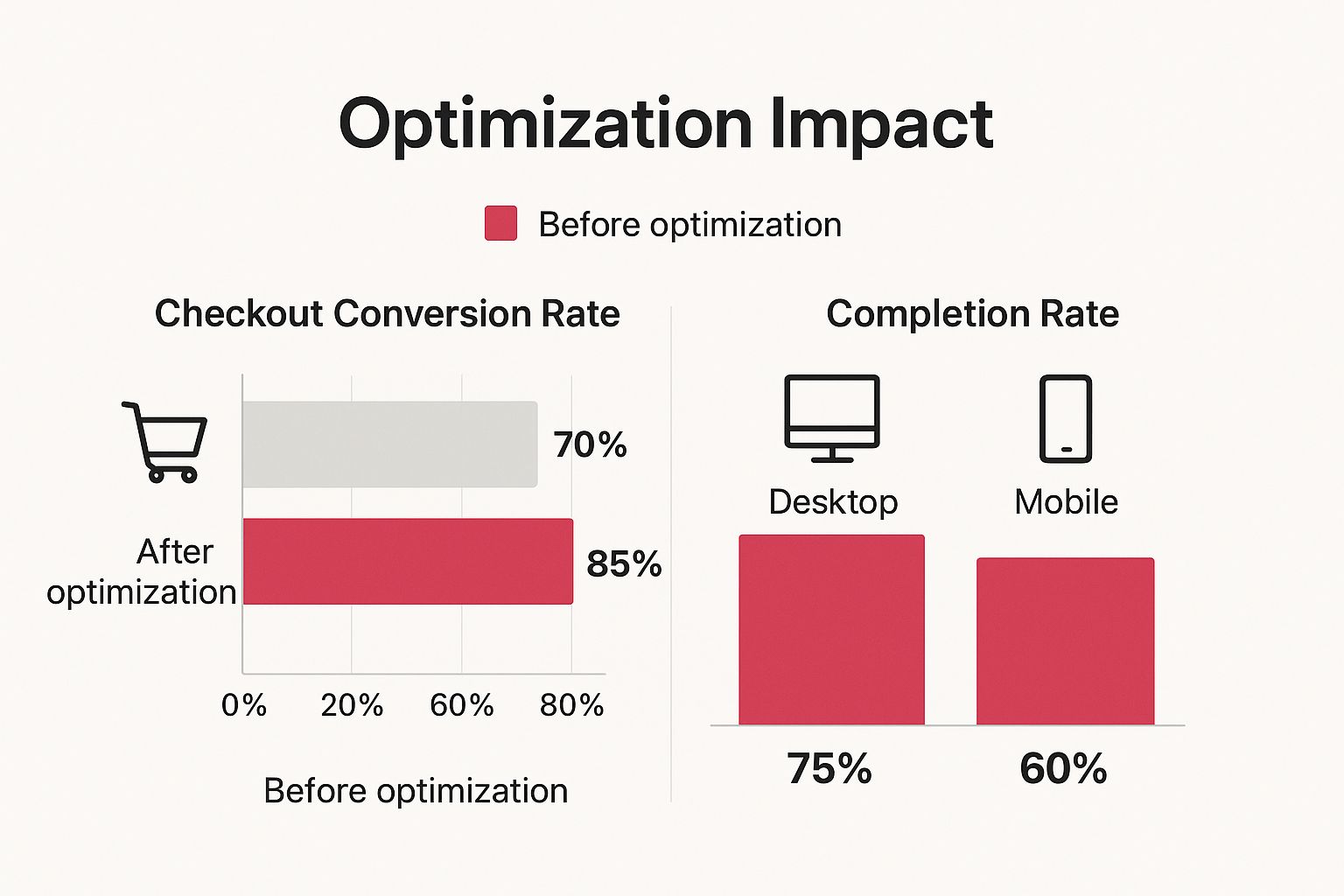
As you can see, even a well-optimized checkout doesn’t solve the mobile conversion puzzle entirely. A mobile-native recovery channel like SMS is the missing piece of the puzzle.
When you look at the raw performance metrics, the difference between SMS and email for cart recovery becomes impossible to ignore.
SMS vs. Email for Cart Recovery
| Metric | SMS (with CartBoss) | Traditional Email |
|---|---|---|
| Open Rate | Up to 98% | 15-25% |
| Response Time | Avg. 90 seconds | Avg. 90 minutes |
| Click-Through Rate (CTR) | 25-45%+ | 2-5% |
| Conversion Rate | Significantly Higher | Much Lower |
| Customer Immediacy | High (read within 3 mins) | Low (often ignored or filtered) |
| Deliverability | Direct to phone; avoids spam | Prone to spam folders |
The table makes it clear: if you want immediate action and a higher return, SMS is the undisputed winner. It cuts through the digital clutter and delivers a message that gets seen and acted upon.
Setting Up Your First SMS Recovery Campaign
Getting your first automated SMS campaign off the ground is much simpler than you might think. The entire goal is to send messages that feel helpful and timely, not spammy, while making it incredibly easy for the shopper to pick up right where they left off.
A killer recovery campaign really just comes down to three things: timing, messaging, and the offer.
- Timing is Everything: Don’t wait around. The sweet spot for that first SMS is between 30 and 60 minutes after they leave. This is the perfect window—soon enough that the items are still fresh in their mind, but not so fast that it feels like you were spying on them.
- Write a Great Message: Keep it short, personal, and get straight to the point. A good text addresses them by name, reminds them what they left behind, and gives them a direct link straight back to their pre-filled cart.
- Sweeten the Deal (Maybe): Sometimes, a simple reminder is all it takes. But for those shoppers who are on the fence, a little incentive can be the push they need. A limited-time offer like, “Finish your order in the next hour for 10% off!” creates urgency and gets them to act now.
Pro Tip: The single most important part of this whole process is the pre-filled checkout link. When a customer taps that link in your text, they should land back on your checkout page with their shipping info, cart items, and any discount code already applied. Remove every single piece of friction.
Real-World Text Examples That Actually Convert
The difference between a text that gets ignored and one that recovers a sale often comes down to the copy. Here are a few battle-tested templates you can steal:
- The Gentle Nudge: “Hi [Name]! Did you forget something? The items in your cart at [Your Store] are waiting for you. Finish your order here before they sell out: [Link]”
- The Helpful Assistant: “Hey [Name], it’s [Your Name] from [Your Store]. Looks like you left a few things behind. Can I help with anything? If you’re ready, you can complete your purchase here: [Link]”
- The Scarcity Angle: “Hi [Name]! We noticed you left the [Popular Item] in your cart. Stock is running low! Grab yours now before it’s gone: [Link]”
- The Discount Offer: “Hi [Name]! Still thinking it over? As a thank you for shopping with us, here’s 15% off your order at [Your Store]. This code expires in 3 hours! Complete your order: [Link]”
Each message hits a slightly different psychological trigger. By using a tool that lets you A/B test, you can quickly learn which approach your customers respond to best. For even more ideas on campaign structure, check out this fantastic guide on transforming communication with automated text messages.
By moving your recovery efforts from the noisy inbox to the personal text message, you meet customers where they are most active. It’s a powerful, modern way to turn would-be lost sales into a predictable, automated revenue stream.
Your Top Checkout Optimization Questions, Answered
Even with the best strategy in hand, you’re bound to run into a few specific questions when you start digging into checkout optimization. It happens to everyone. Let’s tackle some of the most common ones we hear from store owners to clear things up and get you focused on what really moves the needle.
What’s the Single Biggest Mistake in Checkout Design?
Hands down, the most damaging—and shockingly common—mistake is forcing new customers to create an account just to buy something. Think about it. Someone is ready to give you money, their motivation is at its peak, and you throw up a huge roadblock. It adds friction, feels like a data grab, and is a surefire way to kill a sale.
The fix is incredibly simple: make guest checkout the most obvious, default option. You can always ask them to create an account after the sale is complete, right on the order confirmation page. They’re already happy with their purchase at that point, making them much more likely to say yes.
A massive 24% of shoppers have ditched a cart just because a site forced them to create an account. This isn’t a tiny hurdle; it’s a major conversion killer that’s completely avoidable.
How Many Steps Should My Checkout Have?
There’s no magic number here. The real goal is “as few as possible without making things confusing.” A clean, multi-step process with a clear progress bar often works better than trying to cram everything onto one overwhelming page. Your focus should be on reducing cognitive load—the number of fields and decisions a customer has to make—not just the number of pages.
What truly matters is how fast the process feels to the customer. Breaking it down into logical chunks like “Shipping,” “Payment,” and “Review” makes the whole thing feel more manageable and quicker than staring down a single, intimidating form.
How Soon Should I Send an SMS Cart Recovery Message?
Timing is absolutely everything with SMS recovery. The sweet spot we’ve found, and what’s become an industry best practice, is to send that first automated text 30 to 60 minutes after a cart is abandoned.
This window is perfect for a few reasons:
- The purchase is still fresh in their mind.
- It’s not so fast that it feels creepy or intrusive.
- It gives a little buffer for people who just stepped away for a minute and were planning to come back on their own.
Using a tool like CartBoss lets you nail this timing automatically. You can even run A/B tests on different delays—say, 30 minutes versus 55 minutes—to discover what works best for your specific audience.
Can I Actually Optimize My Checkout Without a Developer?
Absolutely. A lot of the highest-impact changes don’t require touching a single line of code. You can probably get these done yourself right now:
- Enabling guest checkout is usually just a simple checkbox in your store’s admin panel.
- Editing form fields to get rid of non-essentials like “Company Name” or “Address Line 2” is often a drag-and-drop or simple settings change.
- Adding payment options like PayPal or Stripe is typically a straightforward integration process.
- Integrating tools like CartBoss for SMS recovery is designed from the ground up to be plug-and-play with platforms like Shopify and WooCommerce.
Of course, for deeper technical work like code minification or custom design changes, you’ll want to bring in a developer to make sure it’s done right. But you can make huge progress on your own first.
Ready to turn those abandoned carts into guaranteed profit? With CartBoss, you can set up automated SMS recovery campaigns in minutes and watch your sales climb. Start recovering lost revenue today!