


To really boost your ecommerce conversion rate, you first need to understand what you’re shooting for. A “good” rate isn’t some magic number—it’s a moving target that changes based on your industry, what you sell, and how your customers shop. It’s all about setting a realistic baseline and then making small, smart improvements based on your own data.
What Is a Good Ecommerce Conversion Rate
Before you can start tweaking your site, you need a benchmark. What does a “good” conversion rate actually look like in the real world? This is a question that trips up a lot of store owners. Many get fixated on a mythical industry average without really understanding the context behind the numbers.
The truth is, there’s no single answer that fits every store.
The global average ecommerce conversion rate usually lands somewhere between 2% and 4%, but you should treat this as a very rough starting point. The number swings wildly from one industry to another, all because of different customer behaviors and product prices. For a deeper dive into optimizing your site’s performance, this guide on how to improve website conversion rates is a fantastic resource.
Why Industry Averages Are Just the Beginning
Trying to compare your boutique fashion store to a massive electronics retailer is like comparing apples and oranges. The customer’s mindset and the time it takes them to decide are completely different. It’s only natural that a high-ticket item like a sofa will have a lower conversion rate than something simple like a face cream.
Your best bet is to benchmark against your own history. The real goal should be to consistently do better than you did last month or last quarter, not just to hit some arbitrary industry number.
While the 2025 global average hovers between 2% and 4%, the differences between sectors are huge. For instance, personal care products are way out in front with a conversion rate of about 6.8%. Food and beverages follow at 4.9%, and electronics come in at 3.6%.
On the flip side, industries like fashion and jewelry often see much lower rates, around 1.9%. This just goes to show how critical it is to tailor your strategies to your specific market. You can check out more detailed industry-specific ecommerce conversion rate benchmarks to see exactly where you fit in.
To give you a quick snapshot, here’s how a few top industries stack up against each other.
Average Ecommerce Conversion Rates by Industry
| Industry | Average Conversion Rate (%) |
|---|---|
| Personal Care | 6.8 |
| Food & Beverages | 4.9 |
| Electronics | 3.6 |
| Home Goods & Furniture | 2.1 |
| Fashion, Apparel, & Jewelry | 1.9 |
As you can see, rates can vary significantly depending on what you sell.
This infographic breaks it down visually for some of the top-performing sectors.
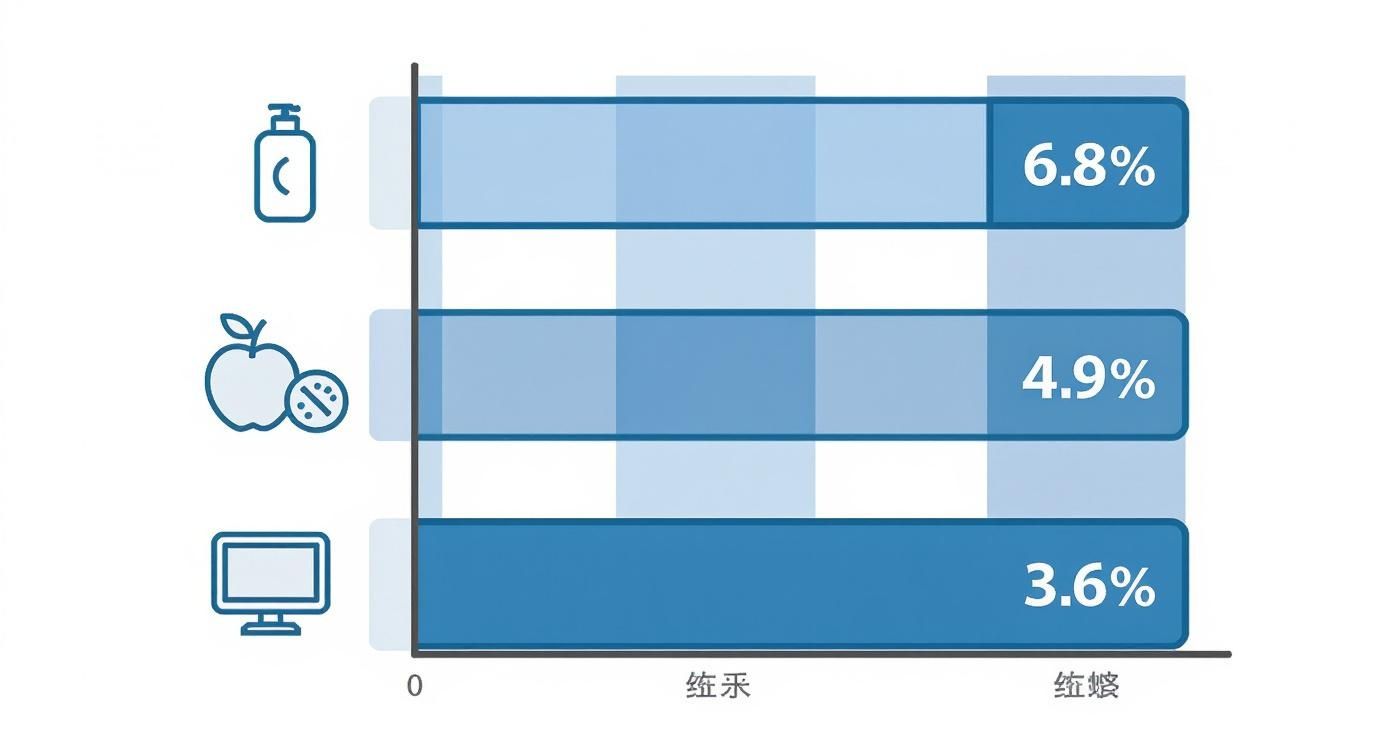
It’s pretty clear that consumables and lower-priced goods—things that people buy without a ton of thought—convert at a much higher clip. Items that require more research and a bigger financial commitment just naturally take longer to sell.
Getting a handle on these nuances is the first real step toward setting goals that make sense for your store. It’s not about chasing a universal number; it’s about building a smart, data-informed plan for steady growth.
Build a User Experience That Drives Sales
Think of a great user experience (UX) as your store’s silent salesperson. It’s that invisible hand guiding a casual browser from a product page all the way to the “thank you” screen, making the entire journey feel natural and trustworthy. When people land on your site, they aren’t just looking for a product; they’re looking for a shopping experience that feels easy and builds their confidence.
If your site is confusing, slow, or just plain hard to navigate, you’re creating friction. Every moment of frustration is a potential exit, and it kills your conversion rates. The goal is to design a digital storefront that feels less like a maze and more like a personal guided tour.
Streamline Site Navigation and Product Discovery
Your customers should be able to find what they’re looking for in three clicks or less. If they have to wrestle with a clunky search bar or confusing menus, they’ll just leave. This isn’t a luxury—it’s a basic requirement for any online store that wants to make money.
A well-organized site simply makes it easier for customers to shop. It reduces the mental effort needed to get around, making the whole process feel automatic.
Here are a few ways to clean up your site’s navigation:
- Limit your main menu categories: Too many choices are overwhelming. Stick to your top-level product categories and use clear, descriptive subcategories to help shoppers drill down.
- Implement smart search: An intelligent search bar with autocomplete and autocorrect is a game-changer for product discovery. If someone types “blakc dress,” your search should know they mean “black dress.”
- Use breadcrumbs: These are the little navigational links that show users where they are (e.g., Home > Women’s > Shoes). They make it super easy for shoppers to backtrack without mashing the “back” button.
A seamless user journey is built on countless small details. For a deeper dive, exploring proven ecommerce UX best practices can provide a comprehensive checklist for auditing and improving your site from top to bottom.
Craft Compelling Product Pages
Your product page is your digital sales pitch. It’s the moment of truth where a customer decides if your product solves their problem. Generic descriptions and blurry photos just won’t fly anymore. You need to anticipate their questions and answer them before they even have a chance to ask.
High-quality visuals are completely non-negotiable. Since shoppers can’t physically touch the product, your images and videos have to do all the heavy lifting. Good visuals build the confidence needed to click that “Add to Cart” button.
To make your product pages convert, here’s what to focus on:
| Element | Why It Matters | Actionable Tip |
|---|---|---|
| High-Resolution Images | Builds trust and helps shoppers imagine the product in their own lives. | Include multiple angles, lifestyle shots, and a zoom feature to show off the details. |
| Benefit-Driven Descriptions | Goes beyond listing features to explain how the product improves the customer’s life. | Start with a punchy summary and use bullet points so people can scan the key info. |
| Clear Call-to-Action (CTA) | The CTA button should be impossible to miss and use action-oriented language. | Use a contrasting color for your “Add to Cart” button to make it pop off the page. |
| Transparent Pricing | Unexpected costs are the #1 reason for cart abandonment. | Clearly display the final price, or be upfront about potential shipping costs right away. |
Leverage the Power of Social Proof
Social proof is just a fancy term for a simple idea: people trust other people. In ecommerce, this means reviews, testimonials, and user-generated content. When a potential customer sees that others have bought and loved your product, it instantly reduces their anxiety about making a purchase.
Just adding testimonials can increase conversion rates by 34%. Integrating authentic social proof is one of the most powerful ways to build trust, especially with first-time buyers. It validates their choice and gives them the final nudge they need. Think of it as a digital version of a friend’s recommendation—it’s genuine, relatable, and incredibly persuasive.
Optimize Your Site for Speed and Mobile Shoppers
In ecommerce, speed isn’t just a nice feature—it’s everything. A slow, clunky website is the fastest way to lose a sale before a customer even lays eyes on your products. Every single second it takes for your page to load is another reason for them to get frustrated and jump over to a competitor.
The numbers are brutal. Even a one-second delay can cause a massive drop in conversions. For mobile users, that patience wears even thinner. They expect a seamless, lightning-fast experience, and if you can’t deliver, they’re gone.
The High Cost of a Slow Website
Your site’s speed is the very first impression you make. If it’s slow, it immediately signals a poor user experience and can even make your brand seem untrustworthy. It’s a technical problem with very real financial consequences.
Slow-loading pages are a primary cause of high bounce rates. If a user has to wait more than a few seconds, the chance they’ll abandon your site skyrockets. For every second of load time, you aren’t just losing a visitor; you’re losing a potential customer and the revenue they bring with them.
To get this sorted, you need to focus on a few critical areas:
- Image Compression: Huge, unoptimized images are the usual suspects for slow load times. Use tools to compress your product photos without turning them into pixelated messes.
- Code Minification: Clean up the clutter in your site’s CSS and JavaScript. Removing unnecessary characters and code makes the files smaller and way faster for browsers to process.
- Browser Caching: This lets a visitor’s browser save parts of your site (like images and logos), so they don’t have to be reloaded every time they come back. For a deep dive, check out our guide on https://www.cartboss.io/blog/how-to-improve-website-speed/ to get your pages loading in a flash.
Adopting a Mobile-First Mindset
The way people shop has completely changed. While desktop still has its place, that initial discovery and casual browsing almost always happen on a smartphone now. If you’re ignoring this, you’re leaving a massive pile of money on the table.
Device type has a huge impact on conversion rates. While mobile devices drive roughly 73% of global ecommerce traffic, desktop users still tend to convert at a higher rate—around 4.8% compared to just 2.9% on mobile. This gap often boils down to a clunky mobile experience. But with mobile commerce sales projected to hit $2.51 trillion in 2025, you simply can’t afford to neglect the small screen.
A responsive design isn’t just about making your site look good on a phone. It’s about rethinking the entire user journey for someone using their thumb to navigate, often while doing ten other things.
Creating a Thumb-Friendly Experience
Optimizing for mobile is so much more than just shrinking your desktop site. It demands a totally different approach to design and usability, one that caters specifically to the on-the-go shopper.
A truly mobile-friendly experience includes:
- Large, Tappable Buttons: Make sure every call-to-action and navigation link is easy to tap without accidentally hitting something else. Tiny, hard-to-press buttons are a one-way ticket to user frustration.
- Simplified Navigation: Your mobile menu needs to be clean and dead simple. Prioritize your most important categories and tuck the rest away in a clear “hamburger” menu to keep the interface uncluttered.
- Streamlined Forms: Nobody wants to fill out long forms on a mobile device. Keep your checkout and contact forms as short as humanly possible, and use features like autofill to make it even easier.
To make sure your site works perfectly across all devices, you need a solid grasp of understanding responsive web design principles. This approach ensures your store automatically adapts to any screen size, giving every single visitor a great experience whether they’re on a laptop, tablet, or phone. By putting speed and mobile usability first, you can finally capture this massive audience and turn their frustration into conversions.
Design a Checkout Process That Converts

The checkout process is the final hurdle. It’s where browsers become buyers, but it’s also where an incredible number of promising sales go to die. If your product pages get users excited but your checkout frustrates them, you’re doing all the hard work for zero reward.
Think of it as the last 10 yards of a football game. A clunky, confusing, or untrustworthy checkout is like fumbling the ball right on the goal line. The goal is simple: remove every single piece of friction to make buying from you feel effortless and secure.
Pinpoint and Eliminate Checkout Friction
First things first, you need to figure out why people are leaving. The top reasons for cart abandonment almost always trace back to friction and unexpected surprises. Tackling these issues head-on is one of the fastest ways to see a real lift in your conversion rate.
A smooth checkout directly impacts your bottom line. I’ve seen that well-optimized stores consistently maintain conversion rates between 3% and 4%, while the top performers can even hit 5% or more. On the flip side, stores struggling with rates below 2% often have a complicated cart flow. You can explore detailed ecommerce industry conversion data to see how you stack up.
The two biggest conversion killers are almost always:
- Surprise Costs: Unexpected shipping fees, taxes, or handling charges that appear at the final step are the number one reason shoppers bail.
- Forced Account Creation: Requiring a user to create a full account before they can buy adds unnecessary steps and just kills momentum.
Your checkout shouldn’t feel like a data-harvesting operation. It should feel like a service designed to help the customer complete their purchase as quickly and easily as possible.
Implement a Guest Checkout Option
Forcing users to create an account is a massive barrier. Let’s be real, most first-time shoppers aren’t ready for that kind of commitment; they just want to buy the product. Offering a guest checkout option respects their time and dramatically reduces friction.
You can always prompt them to create an account on the “thank you” page after the purchase is complete. At that point, their payment and shipping info is already in the system, making the process a simple one-click affair and way more appealing.
Offer Diverse and Convenient Payment Methods
A limited selection of payment options can be a total dealbreaker. Customers expect to pay with their preferred method, whether that’s a credit card, a digital wallet, or a flexible financing option.
To cater to modern shoppers, your checkout should include:
- Major Credit Cards: Visa, MasterCard, and American Express are the absolute bare minimum.
- Digital Wallets: Integrating options like PayPal, Apple Pay, and Google Pay allows for one-click payments, which is a huge win, especially for mobile shoppers.
- Buy Now, Pay Later (BNPL): Services like Klarna or Afterpay can seriously boost conversions on higher-ticket items by breaking the cost into manageable installments.
Providing these options isn’t just a convenience; it’s a powerful way to build trust and show you get what your customers need.
Build Last-Minute Trust and Security
As customers get ready to enter their payment details, their sensitivity to security is at its absolute peak. Any hint of a non-secure or unprofessional checkout page can make them hesitate and abandon the whole thing.
This is where trust signals become critical. These are the visual cues that reassure the customer that their information is safe with you.
| Trust Signal | Why It’s Effective | Placement Tip |
|---|---|---|
| SSL Certificate | The “https://” and padlock icon in the URL bar are universal signs of a secure connection. | This is browser-level, but make sure your entire site is secure, not just the checkout. |
| Security Seals | Logos from trusted security companies (like McAfee or Norton) provide third-party validation. | Place these prominently near the payment information fields where eyes will be focused. |
| Payment Logos | Displaying logos of the payment methods you accept reinforces legitimacy. | Show these icons clearly where users select their payment type. |
By designing a checkout that is transparent, flexible, and secure, you transform it from a leaky bucket into a conversion machine. For more tactical advice, our guide on checkout process optimization offers a complete roadmap to refining this vital part of your store.
Use Testing and Personalization to Refine Your Strategy
Making data-driven decisions is the difference between hoping for growth and actually engineering it. Instead of just guessing what your customers might want, testing and personalization let you know for sure. This is where you really start to dial in your approach, making small, calculated changes that can lead to some seriously impressive gains in your conversion rate.
This whole process is about swapping your assumptions for hard evidence. It’s a constant loop: you form a hypothesis, test it, learn from the results, and implement the winner. Do this enough, and you turn your website from a simple storefront into a finely tuned conversion engine. Every test gives you a new piece of the puzzle about how your customers think and act.
Uncover What Works with A/B Testing
A/B testing, sometimes called split testing, is a pretty straightforward way to compare two versions of a webpage to see which one performs better. You show one version (the control) to one group of visitors and the second version (the variation) to another. Whichever one gets more conversions wins. Simple.
And no, this isn’t just for massive corporations with unlimited traffic. Even smaller stores can get powerful insights by focusing on a few high-impact tests. The key is to start with the elements that have the most direct influence on a customer’s decision to buy.
Here are a few high-impact areas you can test right away:
- Call-to-Action (CTA) Buttons: Play around with the text (“Buy Now” vs. “Add to Cart”), color, and placement. You’d be surprised how much a simple change in wording can lift your click-through rates.
- Product Page Layouts: Test different arrangements of your images, descriptions, and social proof. What happens if you move customer reviews higher up the page? Does that increase add-to-cart rates?
- Checkout Form Fields: Expedia famously discovered that removing a single, non-essential form field led to a multi-million dollar boost in profit. Test simplifying your form down to the absolute essentials.
The core idea behind testing is to make small, steady improvements that compound over time. To really get a solid grasp of the fundamentals, it’s worth understanding what is split testing and how to structure your experiments for clean, actionable results.
Create a More Relevant Shopping Experience
While testing helps you optimize for the majority of your visitors, personalization is how you cater to the individual. Shoppers today expect an experience that feels like it was made just for them. When you show them that you understand their journey, they’re far more likely to convert.
Don’t worry, personalization doesn’t have to be super complex or require a massive budget. Many ecommerce platforms offer built-in tools that allow for simple yet effective segmentation and content delivery.
Here are a few practical personalization tactics you can implement:
| Tactic | How It Works | Why It Boosts Conversions |
|---|---|---|
| Recently Viewed Items | Displaying a carousel of products a user has recently looked at on the homepage or in their cart. | It’s a helpful reminder and makes it easy for shoppers to pick up where they left off, cutting down on friction. |
| Geo-targeted Content | Showing content specific to a visitor’s location, like local shipping offers or region-specific products. | This makes the shopping experience feel more local and relevant, which builds instant rapport and trust. |
| Behavior-based Pop-ups | Triggering an offer based on user behavior, like showing a discount pop-up if they’re about to leave the cart page. | This “win-back” tactic can capture a sale at the last second by addressing potential price sensitivity. |
Ultimately, combining systematic A/B testing with smart personalization creates a powerful feedback loop. Testing tells you what works best for your audience as a whole, while personalization makes each visitor feel like the site was designed just for them. This two-pronged approach is how you consistently increase ecommerce conversion rates and build a more resilient business.
Your Ecommerce Conversion Questions Answered
When you start digging into conversion rate optimization (CRO), a bunch of questions always pop up. It’s only natural to wonder what to expect, where your focus should be, and how long this is all going to take.
Getting straight answers helps you move forward with a clear plan and set realistic goals for your store’s growth. Let’s tackle some of the most common questions ecommerce owners ask about boosting their conversion rates.
What Is a Good Conversion Rate for a New Ecommerce Store?
For a brand-new store just getting its sea legs, a conversion rate between 1% and 2% is a great place to be. Don’t get discouraged by the overall industry average of 2-4%; that number is skewed by established giants with years of brand recognition and customer data.
Your first job isn’t to go toe-to-toe with the big players. It’s to build a solid foundation. That means making sure your site is fast, works flawlessly on mobile, and has a checkout process that feels simple and trustworthy.
Treat your early numbers as a baseline to improve upon, not a final grade. The real win in the long run comes from constantly tweaking, celebrating the small victories, and learning from your data every single week.
How Long Does It Take to See CRO Results?
The timeline for seeing results from your CRO efforts can really vary. Some changes give you an almost instant lift, while others need a bit more patience to prove their worth.
Quick fixes, like adding a guest checkout option or being upfront about shipping costs, can bump up your conversion rate in just a few weeks. These tweaks remove the obvious roadblocks that kill sales on the spot.
On the other hand, bigger strategies like A/B testing a new product page design need time to collect enough data to be meaningful. For a store with decent traffic, this usually takes 2 to 4 weeks. Think of CRO as a marathon of small, steady improvements, not a sprint for an overnight fix. Consistency is what really pays off over time.
What Single Change Has the Biggest Impact on Conversions?
While there’s no magic bullet that works for every store, optimizing your checkout process is about as close as it gets. This is the last hurdle for your customer, and it’s where most sales are either won or lost.
Getting rid of surprise costs is probably the most powerful move you can make. Unexpected shipping fees are the #1 reason people abandon their carts. Other high-impact checkout wins include:
- Cutting Down Form Fields: Only ask for what you absolutely need. Expedia famously boosted profits by $12 million just by removing one field from their form.
- Offering Popular Payment Methods: Adding options like PayPal, Apple Pay, or Buy Now, Pay Later services meets modern shoppers where they are and smooths out the final step.
Another massive lever you can pull is improving your mobile site speed. A slow, clunky experience on a phone is a guaranteed way to lose visitors before they even think about buying.
Should I Focus on More Traffic or a Higher Conversion Rate?
For almost every store out there, improving your conversion rate first will give you a much better return on your investment (ROI). Driving more traffic to a site that leaks customers is like pouring water into a bucket full of holes. You’re just spending money to acquire visitors who are bound to leave because of a frustrating experience.
By plugging the leaks in your conversion funnel first, you make sure every dollar you spend on ads later on works that much harder for you. Optimize the journey you already have, create a smooth path to purchase, and then pour on the traffic for profitable, sustainable growth.
Ready to stop losing sales to abandoned carts? CartBoss turns lost visitors into loyal customers with powerful, automated SMS cart recovery. See how our plug-and-play solution can boost your revenue on autopilot. Start recovering sales today at CartBoss.io.