


Improving your website’s speed isn’t a single task, but a strategic process. It really comes down to tackling four distinct areas: diagnostics, front-end optimization, back-end tuning, and continuous monitoring. Think of it as a full-system check-up—you’ll use tools like Google PageSpeed Insights to see what’s wrong, then work on everything from images and code to your server’s performance, and finally, keep an eye on things to make sure it stays fast.
Why Website Speed Is A Core Business Metric

Let’s cut through the technical noise and talk about what a slow website actually costs you. A delay of just one second isn’t a minor annoyance—it’s a direct hit to your revenue. It sends bounce rates through the roof, kills conversion rates, and erodes the trust you’ve worked so hard to build with your audience.
In e-commerce, speed is literally money. When a potential customer is ready to buy, their patience is incredibly thin. A checkout page that hangs or a product gallery that stutters creates just enough friction to make them second-guess their purchase. This is especially true on mobile, where users expect instant results.
The Real-World Cost of a Slow Website
The damage from poor performance goes far beyond a single lost sale. Search engines, especially Google, have been very clear that they use page speed as a direct ranking factor. So, a faster site doesn’t just feel better to users; it also gets you more visibility in search results, which means more organic traffic.
Put yourself in your customer’s shoes for a moment. A snappy, responsive site feels professional and reliable. A slow, clunky one feels amateur and untrustworthy. That perception shapes brand loyalty and whether a customer ever comes back. In 2025, if your site takes longer than three seconds to load, you’re already behind.
A one-second delay in page response can result in a 7% reduction in conversions. For an e-commerce site making $100,000 per day, that one-second delay could potentially cost $2.5 million in lost sales every year.
The Four Pillars of Speed Optimization
To really make a lasting difference in your site’s speed, you need a structured game plan. I’ve built this guide around four foundational pillars that cover performance from every possible angle, ensuring you get results that stick.
Before diving into the nitty-gritty of each area, it’s helpful to see how they fit together. This table breaks down the core components of our optimization strategy.
Key Pillars of Website Speed Optimization
| Pillar | What It Involves | Primary Goal |
|---|---|---|
| Diagnostics & Tooling | Using performance tools to measure metrics and find bottlenecks. | To get an accurate, data-backed understanding of what’s slowing down your site. |
| Front-End Optimization | Compressing images, minifying CSS/JS, and optimizing browser rendering. | To make the user-facing part of your site load as quickly and smoothly as possible. |
| Back-End & Server Tuning | Improving server response times, database queries, and caching. | To ensure the “engine” of your website runs efficiently and delivers data fast. |
| Continuous Monitoring | Regularly tracking performance metrics over time to catch new issues. | To maintain a high level of performance and prevent future speed regressions. |
This systematic approach ensures you’re not just patching problems but building a faster, more resilient website for the long haul.
Ultimately, this isn’t just a technical tune-up; it’s a fundamental business strategy. To truly understand how this impacts your bottom line, it’s worth exploring how expert website speed optimisation for conversions can become one of your most powerful growth drivers.
Diagnosing Your Website Speed Bottlenecks

Before you even think about compressing an image or tweaking a line of code, you need a solid diagnosis. Trying to improve your site’s speed without data is like driving in the dark—you might get somewhere eventually, but you’re far more likely to take a wrong turn. Simply running a speed test isn’t enough; you have to know how to read the results and pinpoint what’s actually slowing you down.
For this initial diagnostic phase, we’re going to rely on two industry workhorses: Google PageSpeed Insights (PSI) and GTmetrix. They’re both fantastic, but they give you different perspectives. PSI is laser-focused on Google’s Core Web Vitals, blending lab tests with real-world user data. GTmetrix, on the other hand, provides an incredibly detailed waterfall chart that breaks down every single request your site makes. This is pure gold for finding specific bottlenecks.
Using these tools gives you a clear baseline, which is essential for knowing if your hard work is paying off. It also helps you see how you stack up. For perspective, Google’s data shows that in the United States, the average mobile site takes about 1.9 seconds to load its main content, with desktops coming in a bit faster at 1.7 seconds. You can discover more insights about these website speed statistics to get a feel for where you stand.
Understanding Key Performance Metrics
When you get your first report, you’ll see a flood of acronyms and scores. Don’t let it overwhelm you. The trick is to focus on the metrics that directly impact what a real person experiences on your site.
These three are the most critical ones to understand:
- Largest Contentful Paint (LCP): This is how long it takes for the biggest thing on the screen—like a hero image or a big block of text—to show up. A good LCP is anything under 2.5 seconds. A slow LCP is what makes a user feel like, “This site is taking forever to load.”
- Time to First Byte (TTFB): This measures the time from when a visitor requests your page to when their browser gets the very first byte of data back from your server. A high TTFB (anything over 600ms) is a massive red flag pointing to a slow server, sluggish database queries, or an underpowered hosting plan.
- Cumulative Layout Shift (CLS): Ever tried to click a button, only to have an ad load in and push everything down, causing you to tap the wrong thing? That frustrating experience is layout shift. CLS measures how much your page elements move around as they load. A score under 0.1 is what you’re aiming for.
These metrics go beyond a simple “load time.” They tell the story of your site’s performance from a human perspective. A fast LCP makes your site feel fast, a low TTFB ensures it’s responsive, and a minimal CLS keeps it from being annoying.
From Report To Action Plan
Once you have your report, the real work begins: turning all that data into a concrete to-do list. Both PSI and GTmetrix give you an “Opportunities” or “Top Issues” section. This is your treasure map. It lists the exact files and processes that are dragging your site down.
Keep an eye out for these common culprits:
- Serve images in next-gen formats: If you see this, it’s a gentle nudge that you’re using older formats like JPEG or PNG when you could be using WebP to slash file sizes without sacrificing quality.
- Eliminate render-blocking resources: This classic problem means your CSS or JavaScript files are loading before your main content, forcing the browser to sit and wait. It’s a major performance killer.
- Reduce initial server response time: This is a direct reference to a slow TTFB. The report is telling you to investigate your hosting, server setup, or back-end code.
By focusing on the specific recommendations these tools provide, you shift from guesswork to a data-driven strategy. Instead of randomly trying different fixes and hoping for the best, you’ll have a clear checklist of what to tackle first, ordered by impact. This targeted approach is the fastest and most efficient way to a faster website.
Mastering Front-End Speed Optimizations
So much of what a user perceives as “slow” happens right inside their browser. This is the front-end, and honestly, it’s where you can score some of the biggest and fastest wins for your site’s performance. These aren’t abstract server tweaks; they’re tangible fixes that directly impact how quickly a visitor sees and interacts with your content.
Unlike back-end issues that can sometimes feel like chasing ghosts in the machine, front-end optimization is often about smart asset management. By fine-tuning how you deliver images, scripts, and stylesheets, you can slash load times and see your performance scores jump.
Conquer Your Images with Modern Formats and Techniques
Images are almost always the heaviest things on a web page. Getting them right isn’t just a good idea—it’s non-negotiable for a fast website. The game is all about finding that perfect balance between sharp visuals and a lean file size.
First thing’s first: move away from old-school formats like JPEG and PNG. Modern formats like WebP are a game-changer, offering superior compression that can shrink file sizes by 25-35% with virtually no noticeable drop in quality. Nearly every modern browser supports WebP, so it’s a safe and incredibly effective upgrade.
Next, you need to get smart about how you load them. Not every image needs to pop up the second someone lands on your page.
- Implement Lazy Loading: This is a fantastic technique that tells the browser to only load images as the user scrolls down to them. It dramatically speeds up the initial page render by focusing resources on what’s immediately visible.
- Use Responsive Images: You wouldn’t send a desktop-sized, 2000px wide image to a tiny mobile screen, right? It’s just wasteful. By using the
<picture>element or thesrcsetattribute, you let the browser choose the most efficient file size for the device it’s on.
Think of it this way: You wouldn’t serve a whole pizza to someone who only asked for a slice. By serving appropriately sized and timed images, you give the browser exactly what it needs, when it needs it. The result is a much faster, smoother experience for your user.
Minify and Tidy Up Your Code
Every little space, comment, and line break in your CSS and JavaScript files adds to the file size. They’re great for us developers trying to read the code, but they’re completely useless to a browser. This is where minification comes in.
Minification is just the process of automatically stripping out all those unnecessary characters. It’s a simple step, but it can shrink your file sizes by 30-60% or even more. That means faster downloads and quicker processing for the browser.
Most modern build tools like Webpack and CMS plugins like WP Rocket for WordPress can handle this for you automatically. If you’re doing things more manually, there are plenty of online tools that will minify your CSS and JavaScript in seconds. It’s a quick win that should be on every single front-end optimization checklist.
Eliminate Render-Blocking Resources
One of the sneakiest performance killers is what we call “render-blocking” resources. These are usually CSS and JavaScript files that demand to be fully downloaded and processed before the browser will show any of the page’s content. To the user, it just looks like a blank white screen, even if their connection is fast.
To fix this, you need to change how these files are loaded.
- Defer Non-Critical JavaScript: Just add the
deferattribute to your<script>tags. This simple instruction tells the browser to download the script in the background while it keeps parsing and rendering the page. The script only runs after the main HTML is fully loaded. - Inline Critical CSS: Figure out the absolute minimum CSS needed to style the “above-the-fold” content—the part of the page everyone sees without scrolling. Then, take that small snippet of CSS and place it directly in your HTML document inside a
<style>tag. This lets the browser render the visible part of the page almost instantly, while the rest of your stylesheet loads quietly in the background.
This approach is huge for improving the perceived speed. Even if the full page takes a few seconds to become fully interactive, the user sees content right away, which makes the site feel incredibly fast.
This kind of speed is especially critical on mobile. The gap between desktop and mobile performance is staggering. While an average desktop page might load in 2.5 seconds, the typical mobile page takes around 8.6 seconds—a delay that’s over 70% longer. You can read the full research about these website load time statistics to see just how deep this problem runs.
For e-commerce stores, a slow mobile experience is a direct hit to the bottom line. A sluggish checkout process, often bogged down by render-blocking scripts, is a leading cause of cart abandonment. To see how a faster, more streamlined flow can turn this around, check out our guide on how to reduce cart abandonment.
Boosting Performance On The Back-End
While front-end fixes give you those satisfying, visible speed boosts, a slow server can quietly undo all your hard work. Think of your website’s back-end as its engine. No matter how sleek and aerodynamic the car’s body is, it’s not going anywhere fast with a sputtering motor. It’s time to pop the hood and tune that engine.
These server-side optimizations get to the root causes of slowness. We’re talking about how quickly your server can process requests and fire data back to a user’s browser. This is how you crush a high Time to First Byte (TTFB) and build a robust foundation that can handle traffic spikes without even breaking a sweat.
Unleash The Power Of Caching
If you only have time for one back-end change, make it caching. Caching is simply storing pre-built versions of your site so the server doesn’t have to start from scratch for every single visitor. It’s the difference between cooking a full meal from raw ingredients and just grabbing a delicious, pre-made one from the fridge.
There are two key types you’ll want to get familiar with:
- Browser Caching: This tells a visitor’s web browser to save static files—like your logo, CSS, and key scripts—right on their local device. When they click to another page or come back tomorrow, those files load instantly from their own computer, making the experience lightning-fast for repeat visitors.
- Server-Side Caching: This is where the real magic happens for all users, including first-timers. Your server stores fully rendered HTML versions of your pages in its memory (RAM). When someone requests a page, the server can deliver this saved copy almost instantly, completely skipping the time-consuming process of running scripts and querying the database.
By combining both browser and server-side caching, you create a powerful one-two punch. New visitors get a speedy experience thanks to server caching, and returning visitors get a near-instant one because their browser already has what it needs.
Cut Global Latency With A Content Delivery Network
A Content Delivery Network (CDN) is one of the most effective ways to make your site faster for a global audience. A CDN is essentially a network of servers spread across the globe, each holding a copy of your site’s static assets—images, stylesheets, and scripts.
When someone visits your site, the CDN serves these files from a server that is physically closest to them. This drastically reduces latency, which is the actual time it takes for data to travel from point A to point B. For example, a customer in Sydney, Australia, will download your product images from a server in Sydney, not from your main server sitting in Dallas, Texas.
This visual shows just how dramatic the impact of a CDN can be on load times.
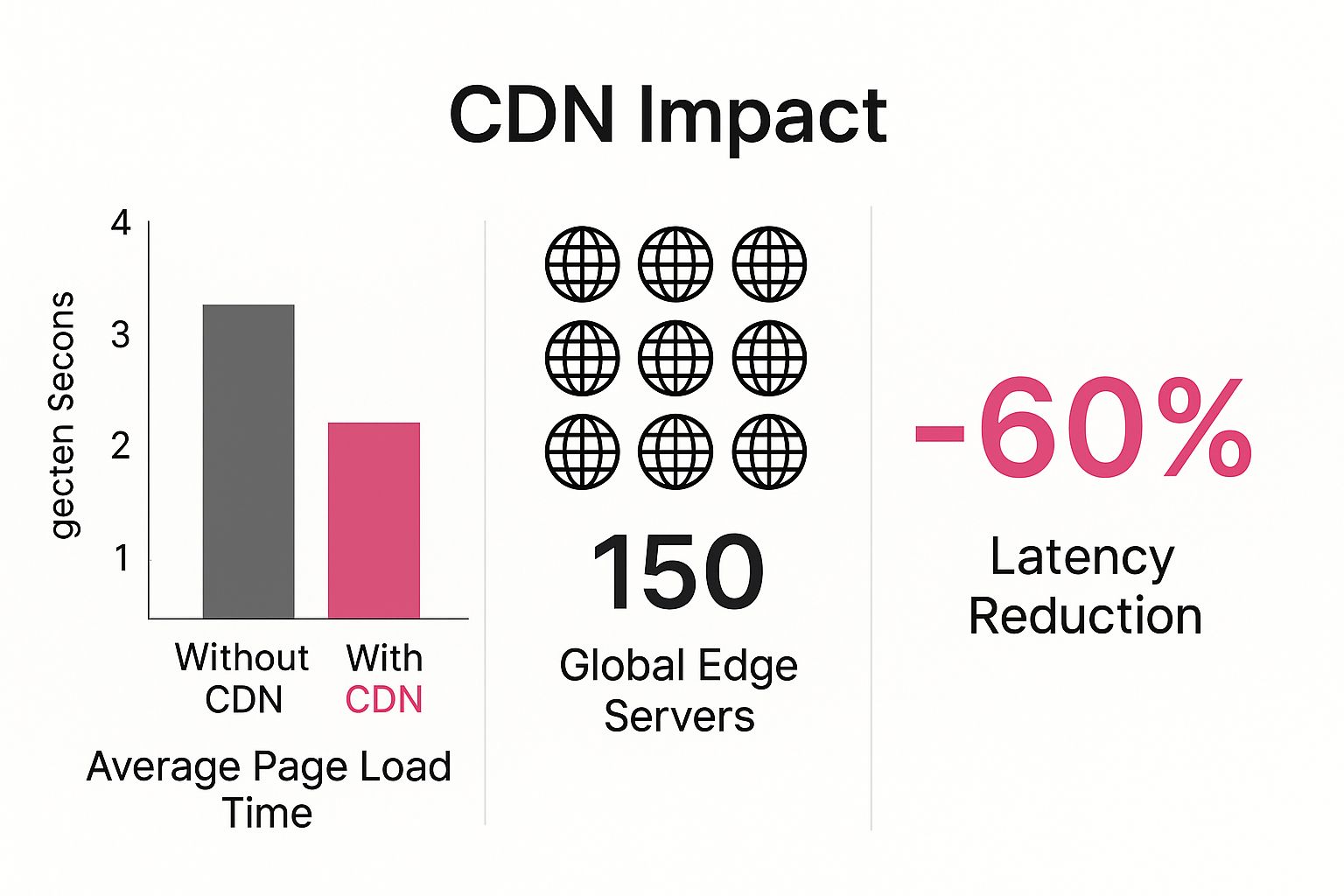
As you can see, distributing your assets globally means a massive drop in page load time for users who are far away from your primary server.
Re-evaluate Your Hosting Plan
Your web hosting is the foundation your entire website is built on. If that foundation is shaky, nothing you build on top of it will ever be truly stable or fast. If your TTFB is stubbornly high even after you’ve set up caching, your hosting plan is almost certainly the bottleneck.
Choosing the right hosting is critical for performance. Here’s a look at how the common options stack up.
Hosting Options Compared For Speed
| Hosting Type | Best For | Performance Impact | Cost |
|---|---|---|---|
| Shared | New blogs, small brochure sites with low traffic. | Lowest performance; you share server resources with hundreds of other sites. Prone to slowdowns during traffic spikes. | $ |
| VPS | Growing businesses, e-commerce stores, high-traffic blogs. | Good performance; you have dedicated resources within a virtual server. Much more stable than shared. | $$ |
| Dedicated | Large enterprises, high-volume e-commerce, applications requiring maximum control. | Highest performance; you have an entire physical server to yourself. Total control and power. | $$$ |
For most growing sites, upgrading from a cheap shared plan to a quality VPS is one of the single most impactful investments you can make for site speed.
This is especially true for e-commerce, where a slow server directly costs you sales. A responsive back-end is fundamental, and to learn more about creating that seamless customer journey, you can explore these e-commerce checkout best practices.
Run The Latest PHP Version
If your site is built on a platform like WordPress, Magento, or Drupal, it’s powered by the PHP programming language. Just like any software, PHP gets regular updates, and each new version brings massive performance gains, better security, and new features.
Running an outdated version of PHP is like trying to run your business on a computer with Windows XP—it’s just slow, inefficient, and a security risk.
How much of a difference does it make? Upgrading from an older version like PHP 7.4 to a modern one like PHP 8.1 can result in your server handling 25-50% more requests per second. That’s a huge performance boost, and it’s completely free. Most good hosting providers make it easy to switch your PHP version right from your control panel. Just be sure to test your site on a staging environment first before flipping the switch on your live site.
Getting your site to load quickly is a huge win, but the real challenge is keeping it that way. Performance isn’t a one-off task you can check off a list; it’s a commitment. Your site’s speed is always in flux, influenced by everything from new features and plugin updates to traffic spikes and changes in third-party scripts.
If you don’t have a plan for long-term maintenance, that fast site you built will eventually suffer from “performance rot.” It’s a slow creep, but one day you’ll realize you’re right back where you started. This section is all about building a simple, sustainable routine to make sure your hard-earned speed is here to stay.
https://www.youtube.com/embed/FoTMJFZ4wwg
Put Your Performance Monitoring on Autopilot
You can’t fix a problem you don’t know you have. Manually running a speed test every now and then just doesn’t cut it. By the time you notice a slowdown, your users have been feeling it for days or even weeks. The only real solution is automated monitoring.
Tools like GTmetrix or the PageSpeed Insights API can be set to test your most important pages on a schedule, whether it’s daily or every few hours. This builds a running history of your performance, making it dead simple to spot trends and identify the exact moment something went wrong.
Imagine your LCP score suddenly jumps after a deployment last Tuesday. An automated monitoring tool will show you that clear cause-and-effect, turning a vague complaint like “the site feels slow” into a specific, fixable problem.
Stick to a Strict Performance Budget
A performance budget is a set of firm limits for your web pages. Think of it as a hard-and-fast rule: “No new feature or change can push our page over these thresholds.” This is how you stop the slow, feature-by-feature bloat that kills so many websites.
Your budget doesn’t need to be complicated. Just focus on the metrics that matter. Here’s a solid starting point:
- Total Page Size: No more than 1.5 MB.
- Largest Contentful Paint (LCP): Keep it under 2.0 seconds.
- Image Count: A maximum of 15 images on key pages.
- Total HTTP Requests: Stay below 50 requests.
Now, when a developer wants to add a new marketing script or a designer suggests a heavy video background, the conversation changes. It’s no longer just “Does it look good?” but “Can we implement this and stay within our budget?” This simple shift forces everyone to think creatively and prioritize performance from the get-go.
A performance budget turns speed from a nice-to-have into a non-negotiable requirement. It’s the single most effective way to prevent your site from gradually getting slower.
Keep Your Tech Stack Updated
I know it’s tempting to ignore those “update available” notifications for your CMS, plugins, and themes. We’ve all done it. But putting off updates is a huge risk to both speed and security. Developers are constantly releasing patches that fix bugs, improve security, and—most importantly for us—optimize code.
Running an old version of a plugin might mean you’re missing out on an update that slashed its database queries or streamlined its JavaScript. The same goes for your CMS core (like WordPress) and theme files. These updates are often the easiest wins you can get. For example, a small update to a checkout plugin could have a massive impact on load times, which is a cornerstone of good checkout optimization.
Of course, always test updates on a staging site first to make sure nothing breaks. But make weekly or bi-weekly updates a non-negotiable part of your maintenance routine. It’s this simple discipline that will keep your site fast, reliable, and secure for years to come.
Your Website Speed Questions, Answered
When you start diving into website performance, a lot of questions pop up. Let’s tackle some of the most common ones I hear from clients and colleagues. My goal here is to give you straightforward advice to help you cut through the noise and focus on what really matters.
How Fast Should My Website Actually Be?
Everyone wants their site to load instantly, but what’s a realistic target? For most websites, a great goal is to get your Largest Contentful Paint (LCP) under 2.5 seconds. That’s the benchmark Google uses to define a “good” user experience.
If you’re running an e-commerce store, the stakes are even higher. Shaving off every possible millisecond can directly impact your bottom line. In that world, aiming for a load time closer to 1-1.5 seconds isn’t just about speed; it’s about building trust and maximizing sales. The real trick is to be noticeably quicker than your main competitors, giving your visitors a smoother, more enjoyable experience.
Will A CDN Really Make A Difference For My Small Business Site?
Yes, without a doubt. It’s a common misconception that a Content Delivery Network (CDN) is only for global enterprises. Even if most of your customers are in the same city, a CDN offers a significant performance boost.
Think of it this way: a CDN takes the load of serving assets like images, CSS, and JavaScript off your main server. This frees up your hosting to do its most important job—building and delivering the actual HTML document much faster for every single visitor.
For any site with users outside its immediate geographic area, a CDN is one of the most cost-effective performance boosts you can get. It dramatically reduces latency, which is the physical delay of data traveling long distances.
Can I Just Use A Plugin To Fix My Website Speed?
Performance plugins like WP Rocket or NitroPack are fantastic tools, but they aren’t a silver bullet. They’re designed to enhance an already well-built site, not to fix fundamental problems.
They excel at handling complex tasks that would otherwise require a developer:
- Implementing sophisticated page caching.
- Minifying and combining CSS and JavaScript files.
- Deferring non-critical scripts so they don’t block the page from rendering.
What they can’t do is compensate for a weak foundation. If you’re on a slow, underpowered hosting plan, using a bloated theme, or uploading massive, unoptimized images, no plugin can magically fix that. Treat these plugins as powerful accelerators, not as a replacement for solid optimization habits.
Turn your abandoned carts into profit with CartBoss. Our automated SMS campaigns recover lost sales and boost your revenue on autopilot. It’s the simplest way to win back customers and see an immediate lift in conversions. Start recovering sales today with CartBoss.