


You’re watching carts pile up in WooCommerce, but completed orders aren’t keeping pace. Your recovery emails are being delivered, some are opened, and many shoppers still never return. Meanwhile, the checkout problems causing abandonment remain hidden inside analytics, where a reminder alone can’t solve them.
A WooCommerce SMS plugin can help, but only when you treat it as a recovery layer, not a magic conversion button. The right setup combines consented messaging, a mobile-first checkout path, clear pricing, and measurement that ties texts to recovered orders and profitable revenue.
Table of Contents
- Why Most Carts Never Checkout and What SMS Changes
- Core Features to Evaluate in a WooCommerce SMS Plugin
- Integration and Setup Steps for WooCommerce Stores
- Cart Recovery Workflows That Drive Measurable Results
- Using SMS Plugins for Customer Retention Beyond Recovery
- Advantages of Purpose-Built SMS Recovery Tools Like CartBoss
- Action Plan and Next Steps for Store Owners
Why Most Carts Never Checkout and What SMS Changes
A shopper adds a product, reaches checkout, and disappears. The cart remains in WooCommerce while the store owner waits for an email sequence to do the recovery work. If the message arrives too late, lands among promotional emails, or sends the shopper back to a generic product page, the follow-up adds little value.
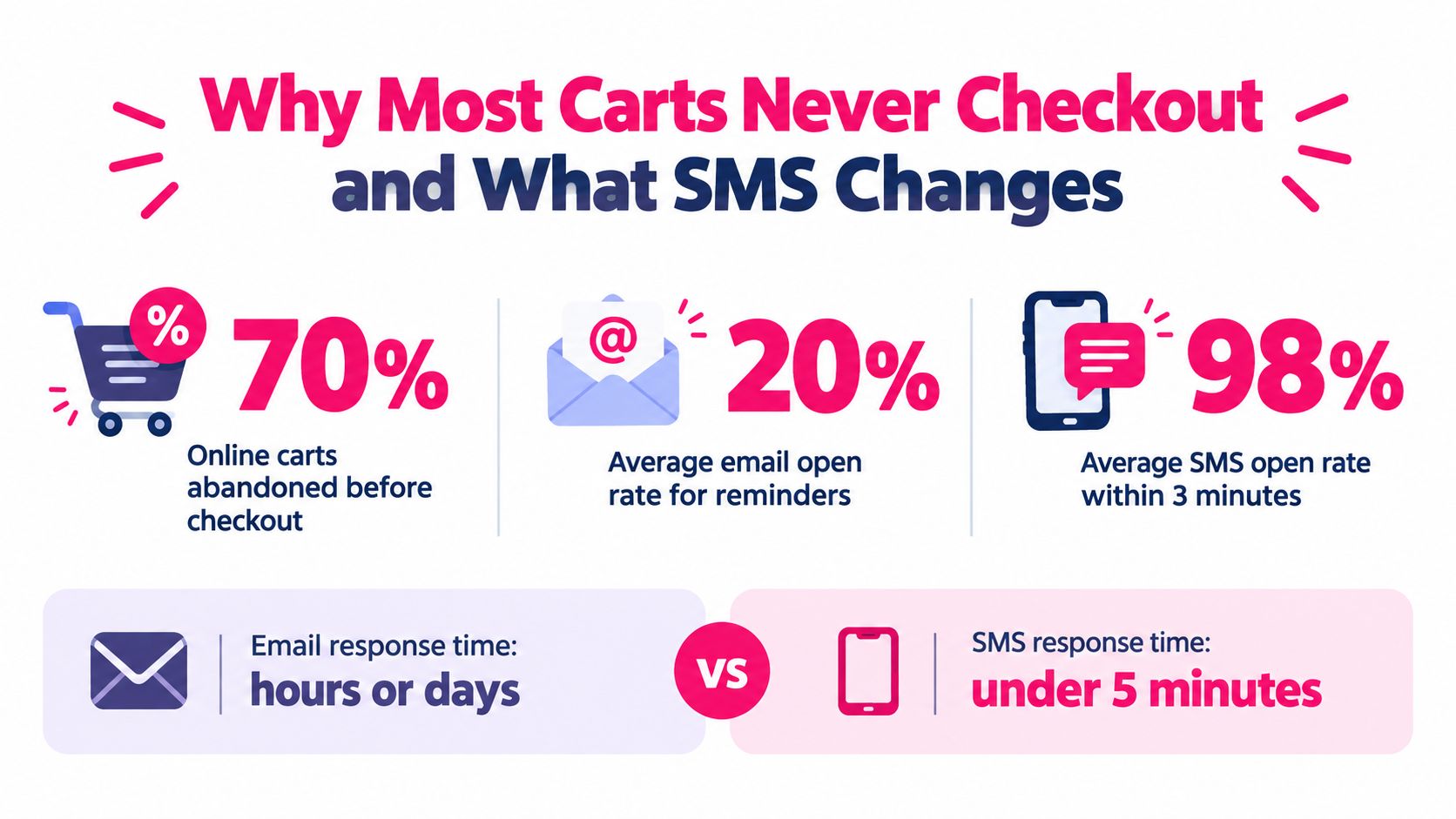
Baymard Institute’s long-running analysis places average cart abandonment at 70.19%, which means roughly seven in ten online carts don’t become completed purchases (Baymard’s checkout usability research). For a store with 10,000 initiated carts, that rate would represent approximately 7,019 potentially unfinished orders, before accounting for customer consent, inventory, product fit, or checkout quality.
The reasons matter. Baymard reports that 42% of surveyed U.S. online shoppers abandoned a cart during the previous three months because they were browsing or weren’t ready to buy. Another 17% cited a checkout process that was too long or complicated (Baymard’s abandonment analysis). The first group may respond to a timely reminder, while the second needs a faster route back into checkout.
SMS changes the timing and the return path. Twilio cites industry studies reporting average SMS open rates of 98%, making text useful for time-sensitive reminders (Twilio’s SMS marketing guidance). That figure doesn’t guarantee a purchase, and open rate isn’t a substitute for revenue. It explains why a consented text can reach a shopper who might never notice another email.
Practical rule: Use SMS to remove the next obstacle between the shopper and checkout. Don’t use it to hide an unclear total, a slow mobile form, or a missing payment option.
A recovery message should save the cart, link directly to checkout, and make the next action obvious. The psychology behind cart abandonment and customer hesitation deserves the same attention as the delivery channel. SMS works best when it meets a known customer problem with a useful, consented prompt.
Core Features to Evaluate in a WooCommerce SMS Plugin
A plugin that can send a text isn’t automatically a recovery system. Evaluate the complete path from consent capture to delivery, click, checkout restoration, and reporting.
Delivery and recovery mechanics
Start with the recovery URL. It should restore the cart across devices, preserve products and variations, and open a short mobile checkout rather than a generic product page. If a discount is authorized, the system should apply it server-side. Coupon codes and personal information shouldn’t sit openly in query strings.
The plugin should also expose delivery status, clicks, recovered orders, recovery revenue, discounts, and message costs. Twilio’s 98% average SMS open-rate figure is useful context, but store dashboards should focus on delivered-message-to-recovered-order rate and net results (Twilio’s SMS marketing guidance).
Consent evidence and opt-out handling
Consent is a system of records, not a checkbox. Capture a separate, unticked SMS marketing opt-in and store:
- Consent timestamp: Record when the customer agreed.
- Consent wording: Preserve the exact disclosure shown at signup.
- Wording version: Keep a version identifier so later edits don’t overwrite history.
- Source: Note whether consent came from checkout, a form, or another device.
- Phone and order relationship: Connect the permission to the relevant customer record without assuming every phone number is marketing-approved.
The plugin should export this evidence, synchronize opt-outs, honor deletion requests, and distinguish transactional messages from abandoned-cart marketing. U.S. programs also need a working opt-out process. Bloomreach summarizes accepted requests such as “STOP,” “QUIT,” “END,” “REVOKE,” “CANCEL,” and “UNSUBSCRIBE,” along with reasonable requests such as “please stop texting me” (Bloomreach’s TCPA and CTIA guidance).
Automation and localization
Look for abandonment triggers, delay controls, buyer suppression, device and cart-value segmentation, frequency limits, and language localization. Automatic language detection can help international stores, but check whether translations are editable and whether the system applies the right language consistently across checkout and follow-up messages.
| Feature | Why It Matters | What to Verify |
|---|---|---|
| Consent records | Creates an auditable permission trail | Timestamp, wording, version, source, export |
| Recovery links | Reduces mobile checkout friction | Cart restoration, variation support, secure handling |
| Buyer suppression | Prevents messages after purchase | Real-time order-status synchronization |
| Delivery reporting | Separates reach from revenue | Delivery, clicks, orders, costs, unsubscribes |
| Localization | Makes reminders relevant to global shoppers | Language detection, editable translations, fallback rules |
| Opt-out controls | Protects compliance and deliverability | Keyword replies, manual requests, synchronized suppression |
A plugin that scores well on delivery but poorly on consent evidence creates operational risk. Choose the tool that gives your team control over the full recovery journey.
Integration and Setup Steps for WooCommerce Stores
A clean setup starts with the customer journey, not the plugin settings. Before connecting anything, test the store on a phone and identify where a shopper can abandon without understanding the final price, delivery terms, or available payment methods.
1. Connect the store and delivery service
Install the WooCommerce SMS plugin, connect the account or API key, and confirm that the integration supports both classic checkout and WooCommerce Blocks if your store uses them. Send a test message to an internal number, then verify the sender identity, delivery status, link behavior, and character handling.
Don’t launch from a copied template. Replace placeholders with the store name, cart context, support route, and the exact checkout URL the customer should use.
2. Capture permission at the right moment
Add a separate SMS marketing checkbox near the phone field. It should be unticked by default and explain who will send the messages, what type of texts the customer will receive, that carrier charges may apply where relevant, and how to unsubscribe.
A shipping phone number isn’t automatically marketing consent. Don’t import legacy contacts into an abandoned-cart campaign unless you can prove that their permission covered promotional or recovery texts.
3. Configure the trigger and return path
Set the abandonment condition only after the shopper has provided a usable phone number and valid consent. Add a delay that gives the customer time to complete checkout naturally, then suppress the reminder immediately after a successful order, cancellation, or opt-out.
The link should restore the cart and open a concise checkout. Keep guest checkout available when appropriate, reduce unnecessary fields, and make shipping and tax information visible before the shopper commits. A useful companion for connecting customer records and automated messaging is this guide to SMS and CRM integration.
4. Add safeguards before enabling automation
Set Do Not Disturb hours, cap message frequency, define the discount rules, and test invalid or expired carts. Confirm that an unsubscribe received through a reply, support ticket, email, or form reaches the same suppression list.
Run test orders from different devices and languages. Check the experience after cache layers, login changes, coupon application, and payment failure. A short test cycle now is easier than explaining an incorrect discount or unwanted text to a customer later.
Cart Recovery Workflows That Drive Measurable Results
The most effective workflow connects the message to the reason a shopper stopped. A reminder can help someone who got distracted. It can’t repair an unexpected delivery charge or a checkout that breaks on mobile.
Start with one helpful message. Return the shopper to the saved cart, state the next action, and clarify the information most likely to cause hesitation. For example:
Still thinking it over? Your cart is saved. Review delivery costs and complete checkout here: [link].
Baymard-linked checkout findings identify unexpected shipping, tax, or fee costs as a leading cause, cited by 48% of non-browsing shoppers. Other reported causes include required account creation at 26%, credit-card security concerns at 25%, slow delivery options at 23%, and a long or complex checkout at 22% (checkout conversion findings). If price surprise is the issue, show the total or delivery terms. A discount shouldn’t compensate for information the store failed to provide.
Build a controlled sequence
A practical workflow can follow this pattern:
- First reminder: Return the shopper to the preserved cart with no discount when a simple prompt may be enough.
- Non-buyer follow-up: Send a second message only when the customer hasn’t purchased or opted out.
- Offer decision: Use a limited discount only when the economics support it. Don’t train customers to abandon carts to receive a coupon.
- Stop condition: End the sequence after purchase, expiration, opt-out, or the configured message limit.
Segmenting by device, first-time status, cart value, and known abandonment reason helps you see which intervention works. Baymard reports mobile abandonment at 85.65%, compared with 69.75% on desktop in the cited benchmark synthesis (mobile checkout analysis). That makes a mobile-first recovery URL and a short form more important than a polished message alone.
Track delivered messages, clicks, recovered orders, recovery revenue, discounts, refunds, unsubscribes, and message costs. For a more structured approach to triggers and follow-ups, review this marketing automation workflow guide. Teams that need a broader conversion review can also see how Alpha Omega Digital helps diagnose page and checkout friction.
Judge the workflow by net revenue after message costs, discounts, refunds, and unsubscribes. An SMS campaign that produces clicks but no profitable orders needs a checkout fix or a different audience, not more messages.
Using SMS Plugins for Customer Retention Beyond Recovery
Cart recovery is the immediate use case, but a consented SMS list can support the customer relationship after an order. The message should reflect a real customer need, such as a delivery update, a replenishment reminder, a service check-in, or a relevant product suggestion.
Purpose-built recovery tools and broader marketing platforms serve different jobs. A recovery tool usually focuses on the abandoned-cart event, saved checkout links, message timing, and recovered-order reporting. A marketing platform may offer wider segmentation, broadcasts, lifecycle journeys, and email coordination, but it can add another system to govern and another data connection to maintain.
Keep retention useful
Post-purchase flows should have clear boundaries:
- Order context: Send operational updates separately from promotional messages.
- Customer relevance: Base reorder or product suggestions on what the customer bought and whether a repeat purchase makes sense.
- Frequency control: Set limits so recovery, delivery, and promotional texts don’t become a constant stream.
- Language consistency: Use the customer’s preferred or detected language across future messages.
- Suppression rules: Exclude customers who opted out, requested deletion, or no longer qualify for the campaign.
A store selling replenishable products may use SMS to remind a customer when another purchase could be useful. A store selling occasional purchases may gain more from service updates and carefully timed product education than from repeated discounts.
For a broader view of ecommerce SMS planning, Yassine Malti’s SMS marketing guide offers useful context on campaign design. The operational standard remains the same: every message needs permission, a relevant reason, and a measurable business outcome.
Retention also benefits from the same discipline as recovery. Record delivered messages, clicks, repeat orders, unsubscribes, and revenue by flow. If a campaign creates attention but increases opt-outs or produces little margin, reduce its frequency or remove it.
Advantages of Purpose-Built SMS Recovery Tools Like CartBoss
A purpose-built recovery tool earns consideration when it reduces the number of systems a store owner must configure and audit. The advantage isn’t that SMS automatically converts every abandoned cart. The advantage is a tighter connection between the abandonment event, the recovery URL, the consent record, and the resulting order.
Look for these practical differences:
- Plug-and-play activation: A guided setup can connect WooCommerce, messaging credentials, templates, triggers, and reporting without custom development.
- Mobile-first links: The recovery path should preserve the cart, support variations, and open a pre-filled checkout that works across devices.
- Localized messaging: Pre-written translations and automatic language detection can reduce manual campaign work for international stores.
- Sender control: A branded sender identity makes the message easier for customers to recognize, subject to local carrier and regulatory requirements.
- Discount governance: Dynamic discounts should have clear eligibility, expiry, and suppression rules rather than exposing reusable codes.
- Unsubscribe handling: Replies and manual requests should update a central suppression record quickly.
- Analytics tied to orders: Reports should connect delivery and clicks to recovered orders, revenue, discounts, and costs.
CartBoss provides a WooCommerce SMS plugin that connects a store to its messaging service through an API key, detects abandoned carts, and sends automated reminders with recovery links and optional discounts. Its product positioning also includes pre-written and translated messages, automatic language detection, pre-filled checkout forms, branded sender ID, Do Not Disturb controls, and analytics.
Selection test: Ask the vendor to show the consent export, opt-out flow, mobile recovery URL, and net revenue report before you judge the message templates.
A tool can be quick to install and still fail if it sends to customers without provable permission, links to a broken checkout, or reports opens without completed orders. Use the CartBoss setup wizard guide to assess the implementation path, then compare the same workflow against a general automation plugin or a larger SMS marketing platform.
The right choice depends on your store’s job. Transactional notifications may favor gateway flexibility and order-status controls. A recovery-focused store needs abandonment triggers, checkout restoration, consent evidence, localization, and financial reporting. Choose based on profit after costs and compliance readiness, not headline reach.
Action Plan and Next Steps for Store Owners
Audit the checkout before installing a recovery tool. Confirm that mobile shoppers can see the total, use guest checkout where appropriate, choose a trusted payment method, and complete the form without unnecessary friction.
Then follow this launch checklist:
- Verify permission: Store consent wording, timestamp, version, and source.
- Test recovery links: Check cart restoration, variations, discounts, caching, and mobile checkout.
- Configure suppression: Stop messages after purchase, opt-out, expiration, or support intervention.
- Start with one reminder: Add a follow-up only for non-buyers and test the economics of any discount.
- Measure outcomes: Track delivered messages, clicks, recovered orders, net revenue, costs, refunds, and unsubscribes.
Don’t judge the system by open rate alone. SMS can’t repair unclear pricing or a difficult checkout, but a compliant, well-timed message can bring a qualified shopper back to a usable path.
CartBoss connects WooCommerce abandoned carts with automated SMS reminders, recovery links, optional discounts, localized messages, and reporting focused on recovered sales. Visit CartBoss to set up a measurable recovery flow and test it against your store’s real checkout data.