


Most WooCommerce owners buy an abandoned cart plugin for WordPress expecting it to fix abandonment. That’s the wrong job description, and it’s why so many installs disappoint. A plugin can bring a persuadable shopper back to a saved basket. It can’t make shipping cheaper, delivery faster, payment feel safer, or a long checkout shorter. Buy it as a recovery layer, fix the checkout problems it reveals, and judge it on profit.
Table of Contents
- What an Abandoned Cart Plugin Actually Does
- Must-Have Features to Compare Side by Side
- Why Shoppers Leave and What a Plugin Can Fix
- Recovery Message Templates by Cause
- GDPR and CCPA Rules for Recovery Messages
- How to Set Up Recovery in Seven Steps
- Message Timing and Metrics Worth Tracking
- Choosing the Right Plugin by Store Situation
- Confirm the Fit Before You Install
What an Abandoned Cart Plugin Actually Does
Baymard Institute’s checkout research places the global average abandonment rate at 70.19%, meaning roughly 7 in 10 shopping carts don’t become completed orders. Say a store starts 10,000 checkouts. That’s about 7,019 abandoned sessions before you account for browsing intent, duplicate carts, or payment failures. Not all of that revenue is recoverable, and treating it as if it were is how forecasts go wrong.
Think of the plugin as a shop assistant who notices a customer leaving with a full basket by the door. The assistant doesn’t rearrange the store, rewrite the price tags, or rebuild the till. They say, politely, “You left this here, do you want to finish?” That’s the whole mechanism, and understanding it keeps your expectations honest.

The Recovery Cycle in Four Steps
- Detection and capture: The plugin detects an active cart and captures the shopper’s email or phone number, with consent, usually at checkout.
- The wait: It waits for a delay you set, because some shoppers return on their own within minutes.
- The reminder: It sends a message with a link that reopens the saved cart, ideally at a pre-filled checkout.
- The stop rule: It cancels the sequence when the order is placed or the shopper opts out.
WooCommerce supplies the cart, checkout, customer, and order events the plugin listens to, so your theme and product catalog stay untouched. The plugin extends the store, it doesn’t replace any part of it. If those events don’t fire cleanly, nothing downstream works, which is why installation testing matters more than template design.
Practical rule: A reminder recovers intent that already exists. It doesn’t create intent, and it doesn’t repair a checkout that actively pushes people away.
For a broader view of how recovery fits alongside checkout fixes, the e-commerce cart recovery playbook from Silver Spoon Agency is a useful companion read. The plugin’s job is narrow. It recovers orders that are still within reach. Pricing, delivery, trust, and checkout design are separate problems, and they’ll cap your recovery rate no matter how good your messages are.
Must-Have Features to Compare Side by Side
Bring this table to every vendor demo and trial. Test each row yourself rather than accepting a sales answer, because several of these failures only appear under real carts.
| Feature | What to verify | Why it matters | Red flag |
|---|---|---|---|
| Trigger and timing controls | Separate delays per reminder; stops when order is placed | Early reminders recover the most intent; late ones feel intrusive | Single fixed delay with no stop rule |
| Cart and checkout restoration | Link reopens the exact cart, items and coupons | Every extra navigation step gives shoppers another reason to leave | Link goes to the homepage or an empty cart |
| Channels | Email, SMS or both, with consent stored per channel | Open and click behaviour differs by channel | Channel claims with no consent records |
| Consent and opt-out | One-tap unsubscribe, quiet hours, suppression after purchase | Required for GDPR and CCPA and protects sender reputation | Opt-out buried or handled manually |
| Discount rules | Capped, time-limited and logged coupons | Prevents blanket discounting of carts that did not need one | Discount applied to every cart by default |
| Analytics and attribution | Recovered orders, revenue, discount cost, opt-out rate | Shows real profit impact rather than activity | Reports only messages sent |
| Scheduling reliability | Visible queue, failed jobs, cron health, duplicate prevention | Late or repeated messages cost sales and trigger complaints | No job logs or retry visibility |
| Localisation | Translated templates and automatic language detection | Multilingual shoppers respond to their own language | English-only templates for every market |
What a Good Answer Sounds Like
Trigger and timing controls come first because they shape everything else. Ask whether you can set a different delay for reminder one and reminder two, and whether a completed order cancels pending messages automatically. A good vendor shows you the setting, not a roadmap promise.
Cart restoration is the feature shoppers experience. Click the recovery link on your own phone during the trial. If you land anywhere other than your exact cart with quantities and any coupon intact, walk away. A generic cart page forces the shopper to start over, and most won’t.
Channels matter because email and SMS behave differently and cost differently. You want consent recorded per channel, so a shopper who agreed to email isn’t texted by default. A vendor who bundles consent into one vague checkbox is creating compliance work for you.
Consent and opt-out handling should be automatic, not a support ticket. Unsubscribes, quiet hours, and suppression after purchase need to happen without your team touching a list. Manual opt-out handling fails the first busy weekend you have.
Discount rules protect your margin. Coupons should be capped, time-limited, and logged against the order they recovered. I would rule out any plugin that discounts every abandoned cart by default. You’re training shoppers to abandon on purpose.
Analytics separate a tool from a toy. You need recovered orders, revenue, discount cost, and opt-out rate in one view. Scheduling reliability sits underneath all of it, because a plugin that can’t show queued, sent, and failed jobs can’t be debugged when messages go missing.
Localisation closes the list. If you sell in more than one language, templates must follow the shopper’s language automatically. An English text sent to a German checkout reads as spam, however good the offer is.
Why Shoppers Leave and What a Plugin Can Fix
A recovery plugin can bring shoppers back, but it cannot repair a checkout that caused them to leave. The useful question is whether a reminder can address the reason for abandonment, or whether the store needs to change pricing information, delivery details, trust signals, or checkout design.
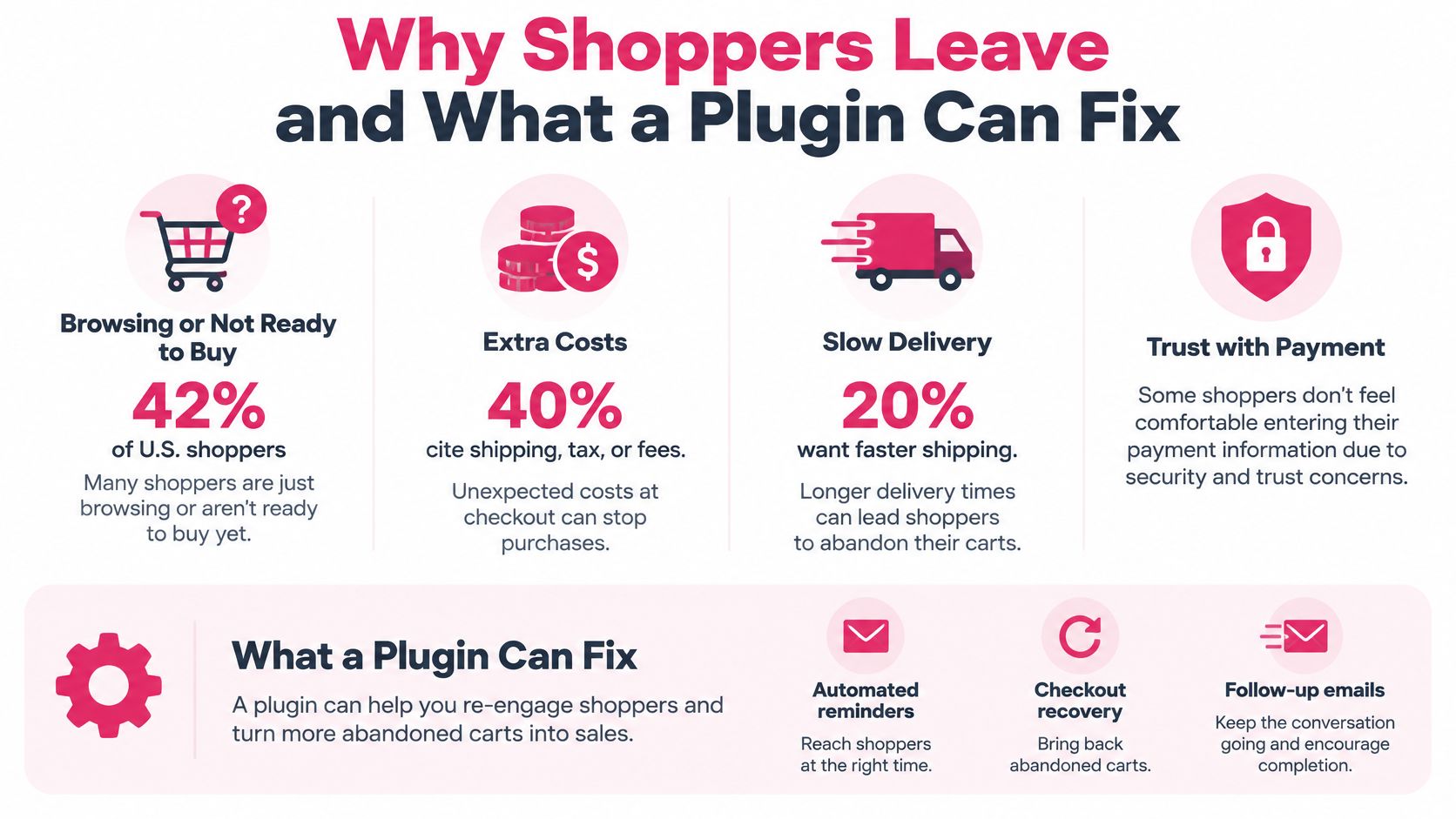
The breakdown of common reasons customers abandon their carts puts browsing or indecision at the top. Other shoppers leave over extra costs, delivery timing, payment trust, account requirements, or a difficult checkout. Here’s how those causes match up with what a reminder can do.
| Cause | Share of shoppers | Can a reminder help? | Checkout fix |
|---|---|---|---|
| Browsing or not ready to buy | 42% | Yes, a timely nudge can bring intent back | Keep the saved cart easy to find |
| Extra costs (shipping, tax, fees) | 40% | Only if the message explains the total | Show full cost earlier in checkout |
| Slow delivery | 20% | Partly, if the message states delivery dates | Show delivery estimates on product and cart pages |
| Lack of trust with payment details | 19% | No, a reminder cannot create trust | Add visible security signals and familiar payment options |
| Forced account creation | 18% | Yes, if the link leads to guest checkout | Make guest checkout the most visible option |
| Checkout too long or complicated | 17% | Partly, the link must reach a pre-filled form | Reduce fields and enable autofill |
Browsing shoppers are a strong recovery target. They may be undecided or interrupted, and a saved cart with a timely reminder makes it easier to continue. Extra-cost surprises need a different fix: explain shipping, tax, and fees earlier, then make sure any reminder reflects the total accurately. A message cannot make an unexpected charge feel expected after the fact.
Slow delivery can sometimes be addressed in the message by stating the expected dates, but the estimate should also be visible before checkout. Payment trust needs work on the page itself. If shoppers hesitate to enter card details, a reminder cannot supply the security signals or familiar payment choices they need.
Account friction falls between those cases. A reminder has a chance only when its checkout link opens a guest option rather than returning shoppers to a forced registration step. Likewise, a pre-filled form can reduce effort, but it cannot compensate for a checkout that asks for unnecessary information.
The walkthrough below shows these causes in a checkout session.
Before increasing message volume, sort abandoned carts by their most likely cause. Fix the leading checkout problems first, then use reminders for the shoppers they can realistically bring back.
Recovery Message Templates by Cause
One generic “you forgot something” message treats every abandonment as forgetfulness. Most aren’t. Write to the likely cause instead, using three templates in sequence.
Template 1 The Reminder
Send this first, for example 30 minutes after abandonment, aimed at the browsing or interrupted shopper.
Hi [First name], you left [Product] in your cart at [Brand]. Your basket is saved: [checkout link]. Reply STOP to opt out.
Keep it plain. No discount, no urgency theatre. You’re testing whether intent alone closes the sale, and many first reminders do exactly that.
Template 2 The Cost Explanation
Send this about 24 hours later when shipping or tax was the likely obstacle.
Hi [First name], your total is $[total] including [shipping or tax]. Returns accepted within [X] days. Finish here: [checkout link]. Reply STOP to opt out.
The work here is removing uncertainty. State the full number, name what’s included, and answer the returns question before they ask it. A shopper who left over a surprise fee needs arithmetic, not enthusiasm.
Template 3 The Time-Limited Incentive
Send this only when price was the obstacle, for example when the shopper viewed a discount code field repeatedly or came from a price comparison visit.
Last reminder from [Brand]: take [X]% off [Product] until [date] with code [CODE]. Terms apply. [checkout link]. Reply STOP to opt out.
Never send this template to a cart abandoned for a non-price reason. Discounting a trust problem or a delivery problem costs margin and solves nothing. For carts abandoned at forced account creation, skip the incentive entirely and replace the link with one that opens guest checkout.
Before Any Template Goes Live
- Brand name present: The shopper should know who sent it without opening the link.
- Opt-out line included: Every message carries it, no exceptions for “transactional” wording.
- Exact cart restored: Test the link logged out, on mobile, before launch.
- Discount capped and expiring: The code has a ceiling, a deadline, and a log entry.
Replace bracketed placeholders with real store values only after testing each one renders correctly. A broken first name field tells the shopper your store is careless with their data. For more wording options, these SMS templates for recovering abandoned carts cover additional angles by cause.
GDPR and CCPA Rules for Recovery Messages
Treat every cart recovery text as marketing. Starting checkout does not give a store blanket permission to send SMS, so consent must be in place before the first reminder. Build that requirement into the plugin workflow rather than adding it after a complaint.
The Operational Checklist
- Capture permission first: Get consent before sending marketing texts, separately from consent for order updates.
- Keep the evidence: Record when and how each shopper gave permission.
- Name the brand: Identify your store in the message itself.
- Make opt-out simple: Provide a clear way to unsubscribe and promptly suppress further marketing texts after an opt-out.
- Stop the flow: End the sequence when the shopper buys, opts out, or reaches your frequency limit.
- Set a retention period: Decide how long to keep phone numbers and consent records, then delete them on schedule.
The rules differ by market, but the US also requires careful consent handling. GDPR generally requires opt-in consent for marketing to people in the EU and UK, so the box should start unticked and the shopper must actively agree. Marketing texts to US numbers are also covered by the Telephone Consumer Protection Act, which generally requires prior express written consent. Apply that opt-in standard to SMS recovery in the US, EU, and UK. CCPA adds notice and opt-out rights for covered personal information, including the right to opt out of its sale or sharing. A store serving these markets needs consent capture for recovery texts, plus the required notices and a working opt-out process.
Automate quiet-hour and do-not-disturb handling where required. Manual time-zone checks are easy to miss during a sale, so configure the plugin to hold messages outside permitted hours and release them at the appropriate local time.
Reporting needs the same care. Klaviyo’s SMS benchmark guidance says campaign and flow benchmarks require at least 25 delivered SMS messages in the previous six months. Keep consented recipients distinct from unconsented traffic in your reports, and track opt-outs alongside clicks and conversions. A rising opt-out rate on a small or poorly consented list can make click figures misleading.
Complete a legal review before selling into a new country. Quiet-hour, sender-identification, and privacy rules vary by market, so a setup that works at home may not meet requirements elsewhere.
This checklist is operational guidance, not legal advice. Confirm the rules for your markets with counsel. For practical guidance on records and consent, see GDPR and CCPA compliance for SMS recovery.
How to Set Up Recovery in Seven Steps
Setup failures are usually scheduling failures, not copy failures. WooCommerce’s abandoned cart documentation states that automated recovery actions commonly depend on WordPress Cron (WP-Cron), and if WP-Cron isn’t running, scheduled plugin events won’t execute correctly. Keep that in mind through every step below.
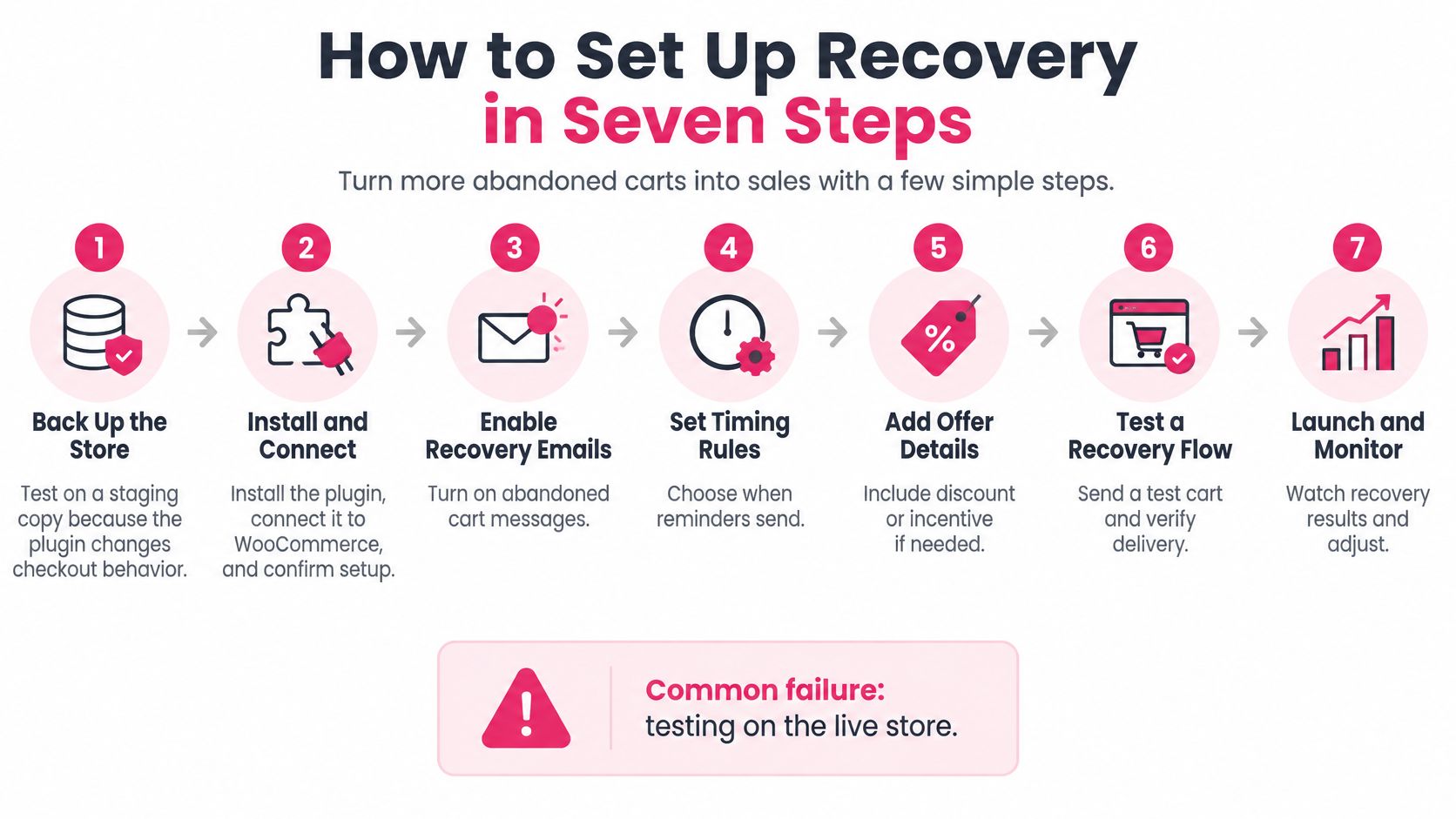
The Seven Steps
- Back up and stage: Back up the store and test on a staging copy, since the plugin changes checkout behaviour. Common failure: testing on the live store and texting real shoppers half-finished templates.
- Install and connect: Install the plugin, connect it to WooCommerce, and confirm cart and order events appear in its logs. Common failure: an incomplete connection that drops events.
- Set a real cron: Configure a server-side cron job calling WordPress at a fixed interval, because WP-Cron only runs when a page request arrives. Common failure: missed runs on low-traffic or heavily cached sites where requests never trigger it.
- Set the thresholds: Choose your abandonment timing, for example 30 minutes for the first reminder and 24 hours for the second, both longer than your cron interval. Common failure: delays shorter than the cron interval, which cause timing drift.
- Load the templates: Add your messages, review translations, and insert the checkout link that restores the cart. Common failure: links opening a generic cart page instead of the shopper’s basket.
- Add the compliance layer: Set consent capture, the opt-out line, the brand name, and your stop rules. Common failure: a missing opt-out line on one template in the sequence.
- Run test carts: Test on desktop, mobile, and two countries. Confirm each reminder arrives once, the link restores the cart, and a purchase stops the sequence. Common failure: duplicate texts from retries after a network hiccup.
Step three deserves emphasis because it’s where low-traffic stores break. WP-Cron is request-driven, so if nobody visits your site overnight, no reminders fire overnight. Aggressive page caching and blocked loopback requests create the same gap. A real server cron removes the guesswork, and it’s a hosting setting, not a plugin feature you can buy your way around.
What to Watch After Launch
Check the plugin’s logs for five things on a fixed schedule.
- Cron health: Is the scheduler running at the interval you set?
- Queued versus sent: Are messages leaving the queue, or piling up?
- Failed jobs: Which sends failed, and do they cluster by country or carrier?
- Duplicate prevention: Does each cart, customer, and campaign combination carry a unique send key so retries don’t double-send?
- Timezone handling: Do quiet hours follow the shopper’s clock or your server’s?
The honest reliability measure isn’t carts recovered. It’s the percentage of eligible carts processed inside your intended time window. A reminder that arrives six hours late often reaches someone who already bought elsewhere, and a duplicate earns you an opt-out you’d never have gotten otherwise.
Message Timing and Metrics Worth Tracking
Set a sequence that gives each message a distinct job: start with a product reminder and checkout link, follow with a benefit that addresses a shipping or returns concern, and use a time-limited incentive only when price appears to be the obstacle. A reminder can bring shoppers back, but it cannot fix high delivery costs, weak trust, or a confusing checkout. Track each message separately so a strong first text does not conceal a weak final offer.
| Metric | Benchmark | How to use it |
|---|---|---|
| SMS click rate | 14.6% or higher is great | Compare messages in the sequence to identify the weakest step |
| SMS conversion rate | 2.1% or higher is great | Judge an incentive by completed orders, not clicks |
| SMS flow order rate | 1.9% for flows versus 0.27% for campaigns | Compare behaviour-triggered recovery with broad promotional sends |
| Benchmark data base | At least 25 delivered SMS in the previous six months | Treat results from smaller samples cautiously |
| Recovered revenue | Abandoned carts × cart value × recovery rate | Example: 1,000 carts × $60 × 5% = $3,000 before costs |
| Opt-out rate | Track alongside click and conversion rate | A rising rate can signal that timing or frequency needs adjustment |
Open rate is weak evidence for SMS performance. Klaviyo’s SMS marketing benchmarks describe open rates as less useful because recipients may open texts without engaging. Klaviyo defines a click rate of 14.6% or higher and a conversion rate of 2.1% or higher as great. Its reported order rate is 1.9% for SMS flows versus 0.27% for campaigns, supporting the use of behaviour-triggered recovery instead of sending broad promotional messages to the whole list.
Finding the Weakest Step
Record delivered texts, clicks, completed orders, revenue, discount cost, and opt-outs for each message. If the first message gets clicks but the next one does not lead to orders, examine the offer and landing experience before changing the timing. Test one variable at a time, such as timing, copy, or incentive, and wait until the sample reaches the minimum data base in the table.
Use the revenue formula to set expectations before spending on messages. For example, 1,000 abandoned carts at $60 each represent $60,000 in cart value. At a 5% recovery rate, that produces $3,000 before messaging costs and discounts. If SMS credits and coupon costs consume most of that revenue, the sequence needs adjustment even if its click rate looks strong.
A rising opt-out rate can point to timing or frequency problems. Slow the sequence before rewriting the copy.
Judge a plugin by incremental profit and completed orders, not message volume. More texts do not guarantee more sales, and reminders cannot repair problems that require changes to pricing, delivery, trust, or checkout design. Use these abandoned cart message timing guidelines to plan when reminders should arrive.
Choosing the Right Plugin by Store Situation
Start with the situation you match, not the store you hope to become next year. Three factors decide the shortlist: your platform, your channel mix, and your hosting reliability.
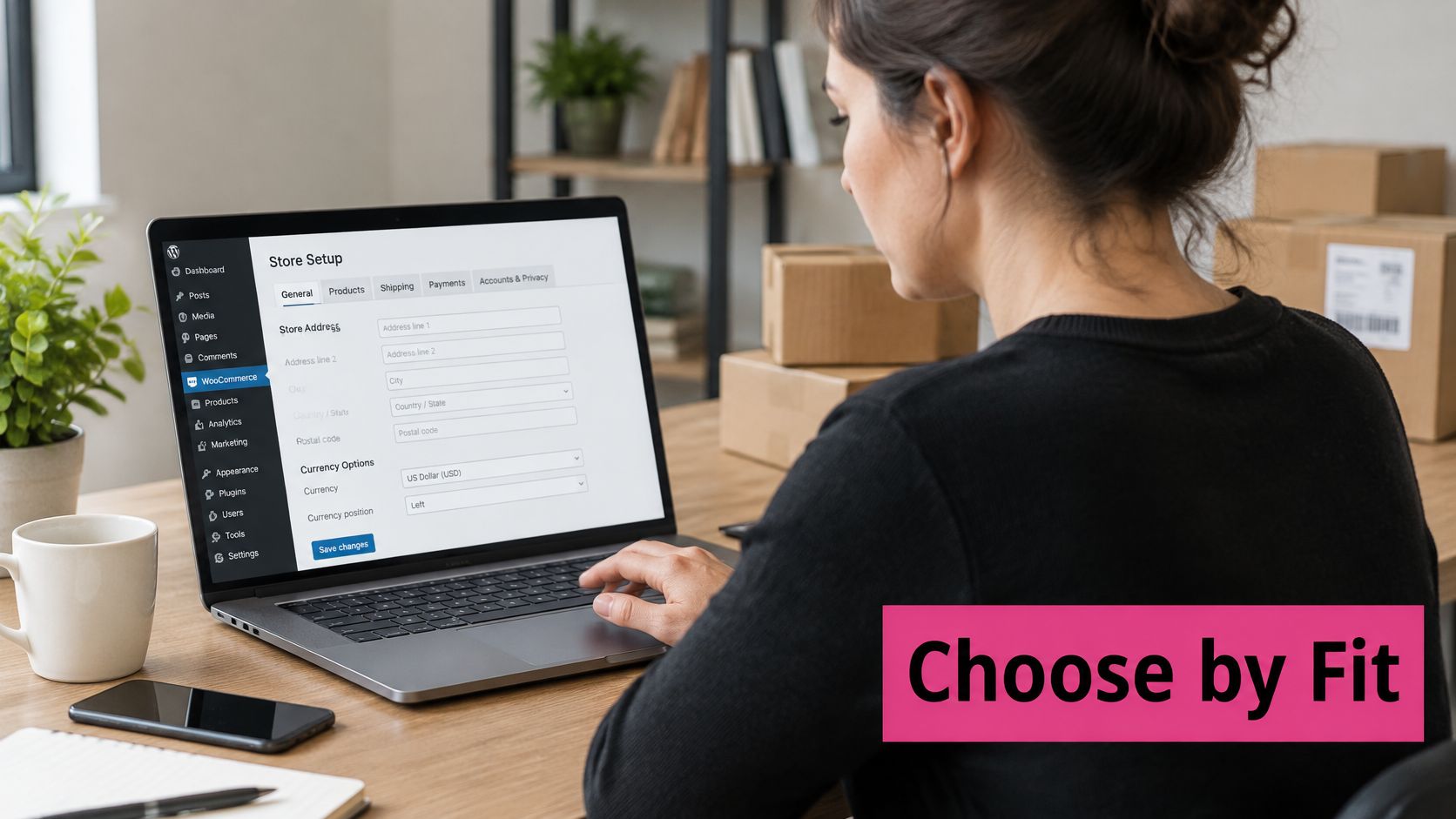
Platform is the easiest factor. W3Techs’ WooCommerce usage survey reports that WordPress powers 39.7% of all websites, while WooCommerce is used by 7.8% of all websites and represents 47.5% of ecommerce systems in its survey. That scale means mature plugin options exist, but compatibility alone guarantees nothing about quality. W3Techs measures technology usage, not store revenue, so treat those shares as context rather than proof of opportunity.
| Store situation | Priority features | Verdict |
|---|---|---|
| Single WooCommerce store, small list, email-led marketing | Timing controls, cron reliability, email templates | An email-first plugin is enough; add SMS only after testing |
| High mobile traffic, fast-moving products | SMS channel, consent per channel, fast first reminder | Choose an SMS-capable plugin with branded sender ID and quiet hours |
| Multilingual store across several countries | Translated templates, automatic language detection, regional consent rules | Pick a plugin with localisation and review rules market by market |
| Store that relies on frequent discounts | Capped, time-limited, logged coupons; discount cost reporting | Use discounts only for price-driven carts and track margin |
| Low-traffic store on shared hosting | Visible cron health, retry handling, duplicate prevention | Fix server cron before buying; a plugin cannot fix missed events |
| Agency managing several client stores | Per-store reporting, separate consent records, exportable logs | Choose a plugin that separates data and reporting by store |
The single-store, email-led case is the most common, and it’s where overspending happens. You need timing controls, reliable scheduling, and decent templates. SMS can wait until email recovery proves the concept on your traffic.
High mobile traffic flips the priority. Shoppers on phones abandon mid-task constantly, and a fast first SMS with a branded sender ID reaches them while the cart still matters. Per-channel consent is required here because your texting volume will draw scrutiny your email never did.
The low-traffic shared hosting row is the one people skip. If your cron doesn’t run reliably, no plugin feature compensates, because every reminder depends on that scheduler. Fix the hosting layer first, then shop for software.
Apply one decision rule across every row. If a plugin can’t show failed jobs, opt-out handling, and recovered revenue after discounts, rule it out regardless of price. Ask every vendor to state running costs, including SMS credits and any hosting requirements, in writing before you commit. This comparison of SMS plugin options for WooCommerce is a reasonable starting shortlist to test against the table.
Confirm the Fit Before You Install
You’ve compared features and matched your situation. Now prove the choice on your own store before money changes hands permanently. Five steps, in order.
The Pre-Purchase Test
- Count your carts: Count monthly abandoned carts and estimate recoverable revenue with your average cart value and a realistic recovery rate, not a guessed one. If the ceiling is small, a modest plugin is the right answer.
- Fix the top cause first: Show total cost earlier, or make guest checkout visible, whichever your cause audit flagged. Installing recovery on top of a broken checkout measures the breakage, not the plugin.
- Shortlist against the checklist: Keep only plugins that show failed jobs, opt-out handling, and recovered revenue after discounts. Everything else is decoration.
- Stage it properly: Complete the setup steps on a staging copy with at least 20 test carts across mobile and desktop. Fewer tests won’t surface duplicate sends or timezone errors.
- Run a controlled trial: Run two to four weeks on a fixed share of traffic, then compare recovered orders, discount cost, and opt-out rate against a control period.
If CartBoss is on your shortlist, verify the specifics you need during that trial rather than from a feature list, including its SMS templates, consent handling, and quiet hours behaviour on your own test carts. Treat it exactly like any other candidate. The trial numbers decide, not the marketing page. Read up on SMS timing before the trial starts so your test windows are set deliberately instead of copied from defaults.
Watch two failure patterns during the trial. First, recovered orders that would have happened anyway, which show up when your control period converts at nearly the same rate. Second, margin leaking through coupons, which shows up when recovered revenue rises but profit doesn’t. Both patterns look like success in a dashboard that only counts orders.
The deciding test: The plugin keeps its place only if it earns incremental profit. Message volume, open rates, and recovered order counts are supporting evidence, never the verdict.
I’d start with the cheapest candidate that passes the checklist and the staging test. You can always move upmarket once your own numbers show which feature you’re missing. Buying the fullest feature list first usually means paying for localisation, channels, or reporting you won’t touch for a year.
Ready to put a recovery layer on your WooCommerce store and measure it properly? CartBoss sends automated SMS reminders with restored checkout links, translated templates, and built-in consent and quiet-hour handling, so you can run the controlled trial described above and judge it on recovered profit. Start with your staging store, test your carts, and let your own numbers make the decision.