


A shopper just added two candles and a tray, typed a phone number at checkout, then got pulled into a meeting. The cart is still there. Shipping showed up late, the form felt long, or they were only comparing prices. If your next move is a blanket “10% off, hurry” text, you train that person to wait for a code, and you pay for orders that were coming back anyway.
An abandoned cart sequence works better as checkout repair. Each text handles one blocker: a saved cart and a real total, then a clear answer on shipping or trust, then a capped incentive only where the numbers say it pays. A holdout group tells you which orders you actually won.
Table of Contents
- Timing and Message Plan for a Three-Text Sequence
- Set Up Consent, Triggers and Suppression Rules
- Segment Carts by Why Shoppers Stalled
- When to Offer a Discount and How to Cap It
- Message Templates That Target the Real Blocker
- Launch a Holdout Test This Week
Timing and Message Plan for a Three-Text Sequence
Use each send to fix one checkout problem. The first restores the cart and clarifies the total. The second addresses a likely question. The third offers an incentive only when the margin supports it.
| Message | Send time after cart is left | Job | Offer |
|---|---|---|---|
| Text 1 | 30-60 minutes | Restore the saved cart and show the final total | None |
| Text 2 | 12-24 hours | Answer the likely blocker: shipping, delivery date or trust | None, or free-shipping threshold |
| Text 3 | 36-47 hours | Final reminder with a time-limited incentive | Fixed amount or percentage, only if margin allows |
| Stop rule | Any time | Purchase, opt-out, refund or 48-hour expiry ends the sequence | Not applicable |
Text 1 goes out 30 to 60 minutes after the last cart activity. Link to the same items and show the total with shipping included. A shopper interrupted during checkout can return without rebuilding the cart or guessing at the cost.
Text 2 follows 12 to 24 hours after the cart is left. Address a likely blocker, such as shipping cost, delivery timing, or trust in the store. A second generic reminder adds little; use the message to answer a question the shopper may have.
Text 3 arrives 36 to 47 hours after the cart is left. Include a time-limited incentive only when the margin makes it worthwhile. Otherwise, send a plain final reminder or skip the text.
Why the first hour and the hard stop both matter
Baymard’s review of 50 studies reports an average global cart abandonment rate of 70.22%. Digital Commerce 360’s 2025 Ecommerce Conversion Report found that 91.6% of surveyed shoppers had left items unpurchased in online carts. Those figures show a large pool of unfinished carts, but they do not mean every shopper needs a discount. A prompt first message can help someone who was interrupted; later messages should respond to a specific objection.
Treat 48 hours as an internal limit for keeping the sequence short, not as a compliance window required by law. Stop the flow immediately after a purchase, opt-out, refund, or cart expiry. Check that suppression works before launch, so a reminder does not arrive after an order.
If your provider or counsel confirms a one-SMS-per-flow limit, send Text 1 and move later reminders to email. Confirm the applicable limit before building the flow. For practical guidance on choosing send times, see when to send abandoned cart text messages.
Set Up Consent, Triggers and Suppression Rules
A shopper can receive a cart text only if the store has valid permission, the cart is still open, and local sending rules allow it. Set those checks before building the sequence. These are operational controls for U.S. programs, not legal advice. Requirements vary by location, so confirm consent language and sending practices with counsel. For cross-border programs, review these GDPR and CCPA notes for cart SMS.
-
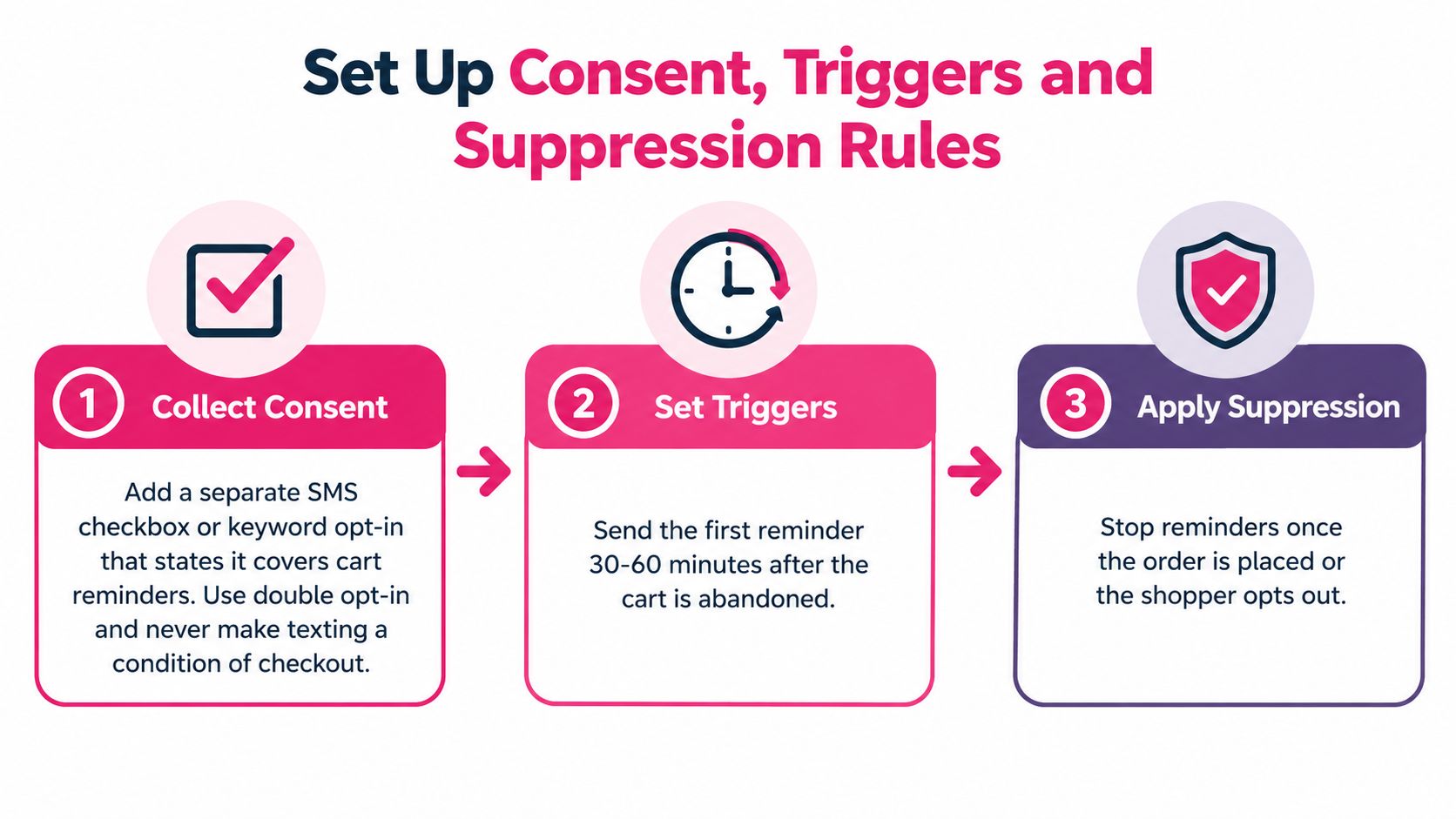
Collect consent on its own. Use a separate SMS checkbox or a keyword opt-in that clearly covers cart reminders. Keep texting optional at checkout. Save the timestamp and the exact wording shown to the customer, and include matching language in your mobile terms and privacy policy. Klaviyo’s compliance guidance can inform your setup, but do not treat a vendor help page as a substitute for legal review. Check whether double opt-in is appropriate for your program and provider.
-
Set the trigger narrowly. Start the flow only when the cart has a confirmed phone number, no completed order, and 30 minutes of inactivity. This avoids messaging shoppers who are still entering payment details.
-
Suppress more than purchases. Stop the flow immediately after a purchase, refund, or opt-out, and exclude anyone without confirmed SMS permission. Checking only for an order can send an irrelevant reminder after a refund or keep a non-consenting contact in the flow.
-
Confirm the sending window and cap. Set the maximum number of messages and the time allowed for delivery with your SMS provider and counsel before enabling the three-text sequence. Provider guidance can change, and rules may differ by jurisdiction. If your confirmed limit does not allow the planned follow-ups, move them to email rather than assuming the texts are permitted.
-
Respect local quiet hours. Schedule sends using the recipient’s time zone and configure quiet hours in your provider. Confirm the applicable window and any message caps with the provider and counsel; do not assume one national schedule covers every recipient. Telebroad’s article on CTIA messaging principles and best practices is a third-party summary, so verify current requirements before relying on it.
-
Put an opt-out on every promotional text. Include “Reply STOP to unsubscribe,” process STOP automatically, and send the appropriate confirmation. Do not send further messages without fresh permission. A clear opt-out gives recipients a direct way to end the sequence.
-
Link to the saved cart. Open the mobile checkout with the same items and total still in place. A homepage link makes the shopper find and rebuild the cart instead of addressing the checkout interruption.
-
Test before you scale. Run a dummy cart on iPhone and Android. Review the first 100 live sends for broken links, errors, and unexpected opt-outs. A bad merge field in the first text can waste permission that is difficult to earn again.
Before each send, check consent, local time, cart status, purchase suppression, and unsubscribe status. Track consent, delivery, clicks, recovered orders, and complaints to keep the flow auditable. CartBoss can open a pre-filled checkout and apply do-not-disturb hours; the store remains responsible for keeping consent records and checking that the configuration fits its rules.
Segment Carts by Why Shoppers Stalled
Cart value is a weak split. Two $200 carts need different texts if one died on the shipping step and the other never left the product page.
| Segment | Signal you can track | Message emphasis | Discount rule |
|---|---|---|---|
| Browsed, never reached checkout | Item in cart, no checkout started | Product value and a reminder | None |
| Stopped at shipping or tax total | Left on the summary or shipping step | Exact total and delivery date | None; test a free-shipping threshold |
| Left at payment | Payment step reached, no order | Saved details, payment options and support | None |
| Stopped at account prompt | Left at login or account form | Guest checkout link | None |
| Price-sensitive repeat visitor | Three or more cart visits on the same product | Time-limited incentive | Text 3 only, fixed or percentage |
| Repeat full-price buyer | Past orders with no discount use | Restore the cart | None |
In Shopify or WooCommerce, read checkout events, not guesses. A cart with line items and no checkout-started event is browsed only. A session that reaches the shipping or order-summary step, then goes quiet, is a cost stall. Reaching the payment step without an order is a payment stall. A drop on the login or create-account form is an account stall. Customer tags and order history separate repeat full-price buyers from people who have opened the same product cart three or more times.
This short walkthrough shows how those checkout events show up in a typical store admin:
Statista reports that in 2025 almost 40% of U.S. consumers abandoned an online purchase during checkout because of extra costs such as shipping, taxes, or fees. That group should see the full total, not a coupon. Baymard’s checkout research finds the average U.S. checkout displays 23 form elements by default, while a working flow may need only about 12 to 14. A shopper who stalled on that long form needs a shorter route back, not a discount.
Practical rule: Cost stalls and form stalls skip the offer. Only price-sensitive repeat browsers reach an incentive, and only on the last text.
Launch two segments this month, browsed-only and shipping-stopped. Add payment, account, and repeat-buyer splits after four weeks of event data, once you can see which step actually leaks.
When to Offer a Discount and How to Cap It
Take an $80 cart at a 45% gross margin. Gross profit is $36. A 10% code drops the price to $72 and profit to $28. You gave away $8 on that one order. If the shopper would have paid full price after Text 1 or Text 2, the code didn’t recover a sale. It taxed one you already had.
The code is worth running only when the extra orders it creates add more profit than the margin it gives away on orders that would have closed anyway. “Abandoned” is not the same as “needs a discount.”
Guardrails that keep the code from leaking
- Single-use codes: Tie each code to one recipient so it can’t be forwarded in a group chat.
- Same-window expiry: Kill the code inside the same 48-hour window as the text.
- Sale items out: Exclude anything already marked down.
- No stacking: Block the code from combining with site-wide promotions.
- Margin floor: Set a per-order cap from the profit you refuse to go below.
- Segment redemption: Track who uses the code, not just who receives it.
Keep discounts out of Texts 1 and 2 for most stores. Shoppers who see an offer in the first hour learn to abandon on purpose. The exception is the price-sensitive repeat visitor whose history shows they rarely buy at full price. Even then, wait for evidence from your own orders, not a vendor screenshot.
Run Text 3 against a no-discount version for part of the eligible audience. If the code group doesn’t beat the control after margin, turn the offer off.
A longer look at offer design is in how discounts change cart recovery.
Message Templates That Target the Real Blocker
Use these three texts as working copy, then swap the name, products, and total for the live cart. Each one matches one row of the timing plan.
Text 1, 30 to 60 minutes: “Hi Maya, your cart is still saved: two candles and the ceramic tray, $84.00 total with shipping. Finish here: [link]. Reply STOP to unsubscribe.”
Text 2, 12 to 24 hours: “Your total is $84.00 with shipping included, and delivery is estimated Thursday for orders placed today. Check options before you pay: [link]. Reply STOP to unsubscribe.”
Text 3, 36 to 47 hours: “Last reminder: your cart is saved. Use SAVE10 for 10% off before midnight tonight: [link]. Reply STOP to unsubscribe.”
Match Text 2 to the stall, not to a template library
Visa’s summary of Baymard research identifies extra, unexpected costs as the most common cause of checkout abandonment. That is why Text 2 leads with $84.00 with shipping included instead of a percentage off. The same summary reports that 18% of U.S. consumers abandoned because checkout took too long or felt too complicated, 19% abandoned when forced to create an account, and checkout-usability improvements could produce a 35% increase in conversion rates.
So the second text changes with the segment. A shipping stall gets the delivery estimate above. An account-prompt exit gets a guest checkout link and no login lecture. A payment stall names the saved details and a support path. One link, one job.
Length and wording that don’t inflate the bill
A standard GSM-7 SMS fits 160 characters per segment. An emoji or a curly quote switches the message to Unicode and cuts each segment to 70 characters, so one “friendly” symbol can double what you pay to send it. Name the product, use the store name, include one link, and ask no more than one question. Skip fake scarcity (“only 2 left” when you have 40). The total in the text must match checkout to the cent. A mismatch damages trust faster than a weak offer.
For more ways to swap product and name without stuffing the text, see personalized SMS for recovery.
Launch a Holdout Test This Week
Don’t judge the sequence by attributed revenue. Some of those shoppers were going to buy when they got home. Withhold about 10% of eligible carts at random from the entire sequence. Compare their completed-order rate with the treated group over two to four weeks. The gap is the orders the texts added.
For each recovered order, calculate contribution margin after message cost and after any discount. Message cost is segments sent times your price per segment. A three-segment Unicode text can erase the profit on a small order even when the click looks good.
What to read at day 14
Track unsubscribe rate, complaint count, median time to purchase, consent rate, and delivery rate next to completed-order lift. Use your own figures. Vendor benchmarks describe someone else’s list, someone else’s offer, and someone else’s checkout.
| Text | Keep when | Pause when |
|---|---|---|
| Text 1 | Incremental margin after message cost is positive | Unsubscribe or complaint rate rises sharply |
| Text 2 | Incremental margin after message cost is positive | Unsubscribe or complaint rate rises sharply |
| Text 3 | Incentive group beats the no-discount group after margin | Incentive group does not beat the no-discount group after margin |
If Text 1 is positive and quiet on complaints, leave it. If Text 2’s margin is flat, rewrite the blocker it answers before you add an offer. If Text 3’s incentive group doesn’t beat the no-discount holdout after margin, pause the code. A higher click rate is not a reason to keep a money-losing send.
Activate Text 1 and Text 2 for one segment this week, set the holdout before the first live send, and review at 14 days. Changing the offer mid-test makes the comparison useless. For how to read that gap without double-counting organic orders, use this note on incrementality testing for recovery flows.
CartBoss sends timed abandoned-cart SMS for Shopify and WooCommerce, with recovery links that reopen the saved cart and optional discount codes you can cap by margin. If you want the sequence, the quiet hours, and the pre-filled checkout in one flow, start with CartBoss and put a holdout on before you scale the third text.