


Auto-reply text messages are automated SMS responses triggered by a specific customer action, like making a purchase or reaching out to your support team. For any e-commerce store, they’re not just a convenience; they’re essential. These messages offer instant acknowledgment, which is huge for building trust and managing customer expectations around the clock, all without any manual work.
The Power of an Instant Connection
We’ve all been there. You click “buy,” and then… silence. Did my order actually go through? Did they get my payment? That tiny window of uncertainty can quickly sour a great shopping experience, sometimes leading to what’s known as “buyer’s remorse.” This is exactly where a smart, automated SMS strategy becomes a total game-changer.
In today’s fast-paced world, immediate communication isn’t just a nice perk—it’s what customers expect. When a buyer gets a text confirming their order just seconds after purchase, it does more than just share information. It’s reassuring. It validates their decision to trust you with their money, closing the loop on the sale and starting the relationship off on the right foot.
Why SMS Is the Winning Channel
The channel you use is just as important as the message itself. By 2025, it’s expected that 5.9 billion people worldwide will be using SMS, making it an almost universal way to connect directly with your audience.
What really sets it apart, though, is the engagement. SMS messages have an incredible 98% open rate, blowing email’s average of around 20% out of the water. This massive reach and near-guaranteed visibility make text messages the most effective way to ensure your customers see your message right away.
This immediate connection turns a simple notification into a proactive sales and customer service tool. Think of these automated touchpoints as your digital frontline, capable of:
- Building immediate trust with instant order confirmations.
- Cutting down on support tickets by proactively answering common questions like “Where’s my order?”
- Fostering long-term loyalty by keeping customers in the loop at every stage.
- Driving repeat business through timely follow-ups and exclusive offers.
The real magic of auto-reply texts is their ability to make a large-scale business feel incredibly personal and attentive. Each automated message is a chance to prove your brand is committed to an amazing customer experience.
Now, let’s look at some of the most effective ways to put these messages to work.
Key Scenarios for E-commerce Auto Replies
Here’s a breakdown of the most impactful use cases for automated texts, the triggers that set them off, and the business goal each one helps you achieve.
| Scenario | Trigger Event | Primary Business Goal |
|---|---|---|
| Order Confirmation | Customer completes a purchase | Build trust and provide immediate reassurance |
| Shipping Notification | Order is fulfilled and shipped | Reduce “Where is my order?” support tickets |
| Delivery Confirmation | Package is marked as delivered | Close the loop and create a positive experience |
| Abandoned Cart Reminder | Customer leaves items in their cart | Recover lost sales and boost revenue |
| Support Ticket Acknowledgment | Customer submits a support inquiry | Manage expectations and show you’ve received the request |
| Welcome Message | New customer subscribes to SMS list | Engage new leads and build brand loyalty |
| Review Request | A set time after delivery | Gather social proof and customer feedback |
These are just the starting points, of course. The key is to map out your customer journey and identify every moment where a quick, automated text can add value.
Platforms like CartBoss are built specifically to help you unlock this potential, turning standard notifications into powerful, revenue-generating conversations. A solid automated SMS strategy isn’t just a nice add-on; it’s a must-have for any modern e-commerce brand. You can learn more about how to transform communication with automated text messages in our complete guide.
Building Your Automated SMS Strategy
A solid system for auto replies text messages isn’t just a random collection of alerts; it’s a deliberate, well-thought-out strategy. The foundation isn’t built on writing messages, but on first mapping out your customer’s journey. You need to pinpoint those key moments where an automated text can make the biggest difference.
Think past the basics. Sure, an order confirmation is a must-have. But what about the experience after delivery? A perfectly timed message asking for a review or maybe offering a little discount on their next purchase can turn a one-time buyer into a loyal customer.
The real goal here is to build a whole ecosystem of communication, not just fire off a bunch of disconnected notifications. Every single message should have a clear purpose—whether that’s cutting down on support tickets, encouraging repeat sales, or simply making the customer feel seen and appreciated.
Defining Your Goals and Triggers
Before you even think about writing a single word, stop and ask yourself: what am I trying to accomplish with this message? Is my shipping notification just about reducing “Where is my order?” emails, or is it a chance to build some real excitement for the delivery?
Your goals will dictate the triggers you set up. Triggers are simply the specific actions or events that kick off an automated message. They usually fall into a few camps:
- Behavioral Triggers: These are based on what a customer does, like abandoning a cart or making their very first purchase.
- Transactional Triggers: Fired off by events in the order process, like when an order ships or gets delivered.
- Time-Based Triggers: Sent after a certain amount of time has passed, like a 7-day follow-up asking how they’re liking the product.
For example, a brand-new customer might get a friendly welcome text with a 10% discount to encourage a second purchase. Meanwhile, a VIP customer who’s spent over $500 could get an exclusive offer for early access to a new product line. This kind of segmentation is what turns a basic notification system into a smart marketing machine. To really get the most out of your SMS efforts, it’s helpful to see how they plug into broader marketing automation strategies.
Key Takeaway: Don’t send messages just for the sake of it. Every automated text should serve a specific, measurable goal that makes the customer experience better and adds to your bottom line.
Mapping the Customer Journey
Try to visualize the entire path a customer takes with your brand, from the moment they first land on your site to their tenth order and beyond. When you can pinpoint these critical touchpoints, you can strategically insert valuable, automated messages exactly when they’re needed most.
This is where platforms like CartBoss really shine. They simplify the whole process by giving you pre-built triggers for the most important e-commerce moments, like cart abandonment and post-purchase follow-ups.
By using these kinds of tools, you can easily roll out a cohesive SMS marketing automation plan that feels personal and genuinely responsive to where each customer is on their journey. If you want to dive deeper into building out a full plan, check out our guide on SMS marketing automation. This strategic approach makes sure all your auto replies text messages work together to build real, lasting relationships and drive steady growth.
Crafting Messages That Convert and Delight
Once you’ve got your triggers and strategy dialed in, it’s time for the real magic: writing the messages themselves. A clunky, robotic text can kill the vibe and hurt your brand. But a great one? It feels personal and builds an instant connection. The goal is to make every automated text feel like a one-on-one conversation.
This is where you need to ditch the stiff, formal language and let your brand’s voice shine through. Are you playful and fun? Straightforward and helpful? Whatever your style, keep it consistent.
A winning text is more than just words; it’s a carefully crafted mix of a few key elements that guide the customer and make them feel good about their decision to shop with you.
The Anatomy of a High-Converting SMS
To create messages that actually get results, you need to nail three things: personalization, a clear call-to-action, and a natural tone.
- Meaningful Personalization: Go way beyond just using a first name. Pull in specific details like their order number (
{order_number}) or the exact item they left in their cart ({product_name}). This simple touch shows you’re paying attention and makes the message immediately relevant. - A Single, Clear CTA: What’s the one thing you want the customer to do? Whether it’s “Track Your Order,” “Complete Your Purchase,” or “Leave a Review,” make it dead simple. Avoid cramming in multiple links or confusing instructions.
- Conversational Tone: Write like you talk. Friendly language, an emoji here and there (if it fits your brand), and short sentences go a long way. A simple “Hey {first_name}!” feels way more engaging than a stuffy “Dear Customer.”
Platforms like CartBoss make this super easy. Using dynamic tokens, you can automatically pull customer and order details right into your messages, creating a tailored experience with zero manual work. For a deeper dive into crafting killer copy, check out our guide with powerful SMS marketing message examples and templates.
The visual below maps out the core steps for building a solid SMS strategy, from figuring out your goals to setting the right triggers.
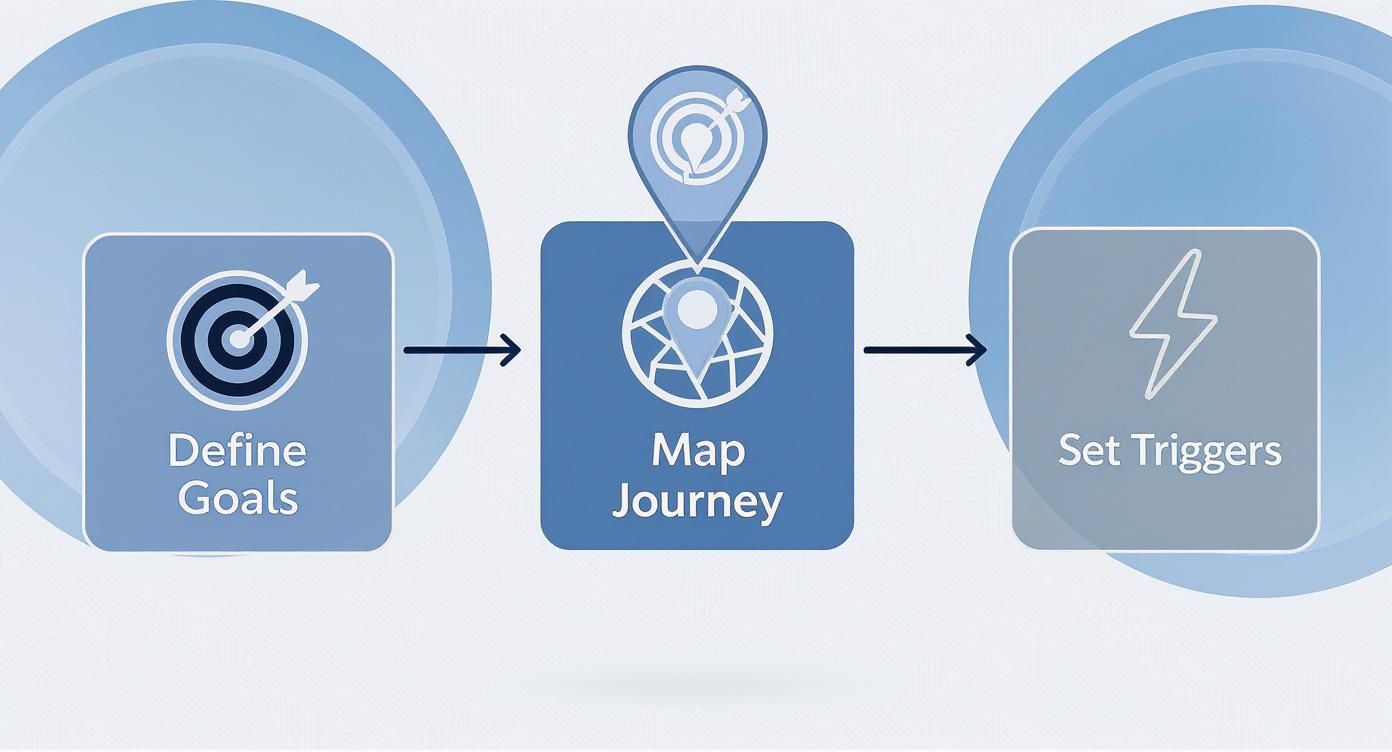
As you can see, a successful SMS plan always starts with clear objectives before you even think about writing a single message.
Ready-to-Adapt Message Templates
Here are a few examples you can grab and tweak for your own brand, showing these principles in action.
Welcome Message (First-Time Subscriber)
“Hey {first_name}, welcome to the club! 👋 So glad to have you. As a thank you, here’s 15% off your first order: {discount_code}. Happy shopping! – The [Your Brand] Team”
Abandoned Cart Reminder (1 Hour Later)
“Still thinking it over, {first_name}? Your {product_name} is waiting! Don’t let it get away. Complete your order here before it sells out: {cart_link}”
Order Confirmation
“Success! 🎉 Your order #{order_number} is confirmed, {first_name}. We’re already getting it ready for you. We’ll text you again once it ships! Track its journey here: {tracking_link}”
The speed of SMS is a massive advantage. Consumers read 82% of text messages within five minutes of receiving them. That gives your auto-replies an incredible window to grab attention instantly. This is only becoming more important—by 2025, forecasts predict that 64% of consumers will be comfortable interacting with businesses via text.
Ultimately, crafting effective auto-replies is about blending smart automation with a genuine, human touch. When you focus on personalization, clarity, and brand voice, you create messages that don’t just convert—they delight your customers every step of the way.
Navigating SMS Compliance and Legal Rules
Jumping into auto replies text messages without getting the legal side sorted is a recipe for disaster. Seriously. Regulations like the Telephone Consumer Protection Act (TCPA) in the US and GDPR in Europe aren’t just suggestions—they’re strict laws, and the fines for messing up can be massive.
The golden rule that ties them all together? Express written consent.
You absolutely have to get a customer’s clear, direct permission before you send them a single marketing text. This means they need to actively opt-in, like checking a box at checkout or texting a keyword to your number. You can’t just assume they’re okay with it, and pre-checked boxes are a big no-no.
Getting and Managing Consent
When it comes to compliance, transparency is your best friend. From the moment someone opts in, you need to be crystal clear about what they’re signing up for. Tell them what kinds of messages they can expect and roughly how often you’ll be sending them.
Just as important is giving them an easy way out. Every single promotional text must include instructions like “Reply STOP to unsubscribe.” This isn’t just a courtesy; it’s a legal requirement. You also need to be diligent about managing your subscriber list and promptly removing anyone who opts out. This keeps your SMS program healthy and, more importantly, legal.
Key Takeaway: Consent isn’t a one-and-done deal. It’s an ongoing agreement. Always prioritize clear communication and simple opt-out options to respect your customers and stay on the right side of the law.
The screenshot below shows how a platform like CartBoss bakes compliance right into its features, so every message automatically follows the rules.
This built-in approach automatically adds the required opt-out language and manages consent for you, taking the legal guesswork off your plate. For a deeper dive, check out our complete guide on SMS marketing compliance.
The good news is you don’t have to become a legal expert overnight. Using a service built specifically for e-commerce SMS, like CartBoss, dramatically lowers your risk. These platforms are designed with compliance at their very core. Features like automatic opt-out handling, mandatory consent language, and quiet hours are all baked in, letting you run powerful campaigns without the legal headaches. That kind of automation is key to minimizing your risk while you focus on what you do best—growing your business.
How to Measure and Optimize Your SMS Performance
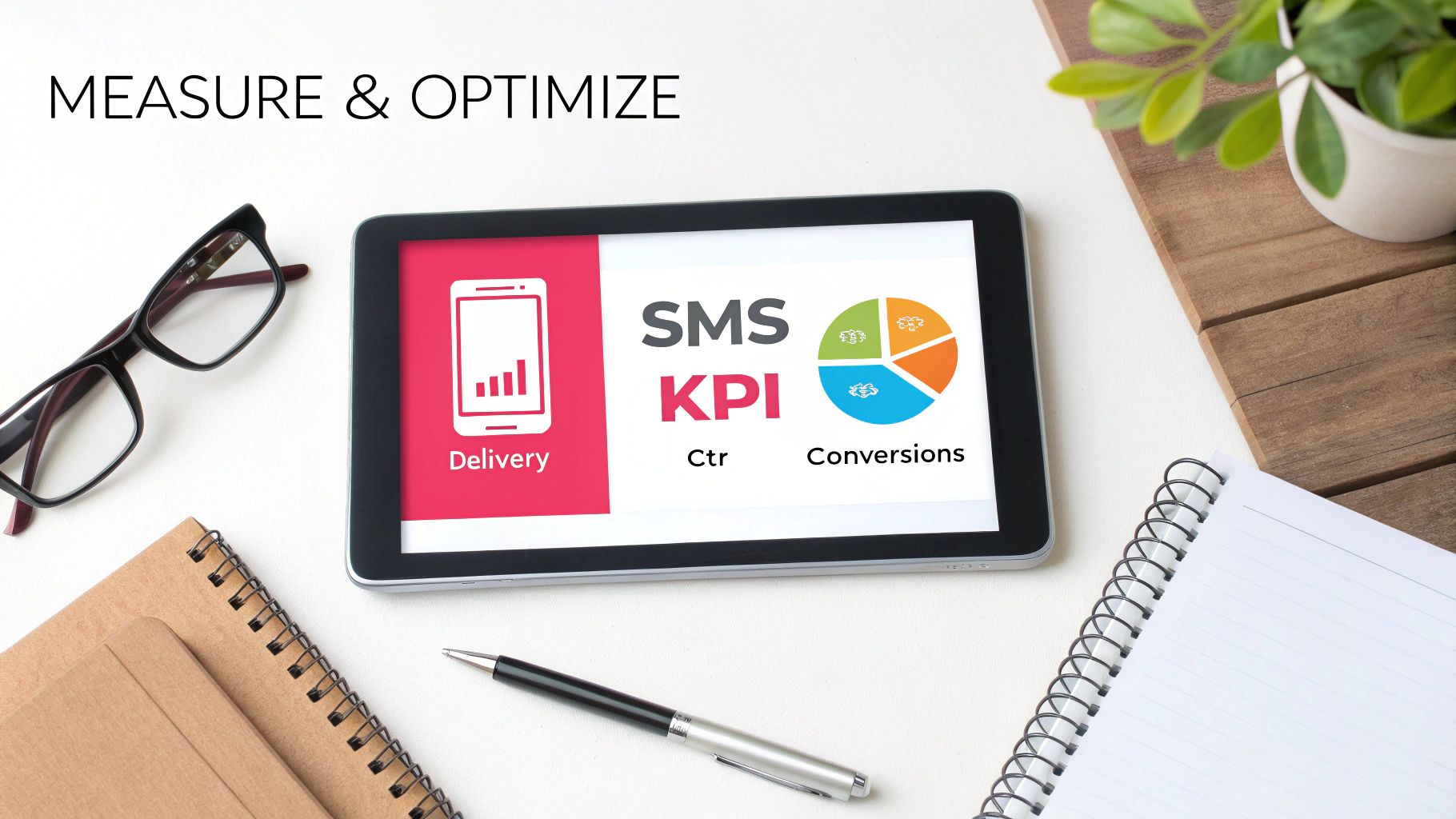
Sending auto replies text messages is only half the battle. The real growth happens when you start digging into the data to see what’s working, what isn’t, and—most importantly—why.
Great SMS marketing isn’t a “set it and forget it” channel. It’s a constant loop of sending, measuring, and tweaking. Turning those raw numbers into actionable insights is how you transform a good strategy into a revenue-generating machine.
Instead of getting bogged down in a sea of metrics, you need to zero in on the Key Performance Indicators (KPIs) that actually move the needle for your business. These are the numbers that tell the real story.
Identifying Your Most Important KPIs
To get started, you need a clear picture of your performance. Platforms like CartBoss have a built-in dashboard that puts all the critical metrics right in front of you, so you don’t need a separate analytics tool to see what’s going on.
Here are the core KPIs you should have your eyes on:
- Delivery Rate: What percentage of your messages actually made it to your subscribers’ phones? A low number here could mean you have a problem with your contact list, like old or invalid numbers.
- Click-Through Rate (CTR): This is the percentage of people who clicked a link in your message. A healthy CTR tells you the copy and the offer were compelling enough to make them act.
- Conversion Rate: This is the big one—the percentage of people who actually completed the goal, like making a purchase. It’s the ultimate measure of success.
- Unsubscribe Rate: How many people are opting out after getting a message? A sudden spike here is a red flag that your messages might be too frequent or just not hitting the mark.
Keeping an eye on these numbers helps you connect the dots. For instance, a high CTR but a low conversion rate isn’t necessarily an SMS problem; it might mean your landing page needs some work. To get the full picture, it’s vital to understand how to measure marketing ROI effectively across all your channels.
Your data tells a story. A sudden drop in delivery rate or a spike in unsubscribes are not just numbers; they are direct feedback from your audience telling you something needs to change.
The data doesn’t lie. Automated SMS messages account for roughly 13% of all sends but drive a massive 26% of all SMS orders. That’s some serious impact. On top of that, 73% of SMS marketers say texting brings in new revenue by increasing both average order value and customer lifetime value.
A/B Testing Your Way to Higher Conversions
Once you have a baseline from your KPIs, the fun begins. It’s time to start optimizing with A/B testing.
This is all about sending two different versions of a message to small, separate groups of your audience to see which one performs better. It’s a simple, methodical way to figure out exactly what your customers respond to.
You can test just about anything, but here are a few ideas to get you started:
- The Copy: Try a fun, casual tone against a more direct, straightforward one.
- The Offer: Pit a percentage discount (20% off) against a flat dollar amount ($15 off). Which one feels more valuable to your customers?
- The Timing: For abandoned carts, does a reminder after 30 minutes work better than one sent an hour later?
- The Call-to-Action (CTA): Does “Shop Now” get more clicks than “Complete Your Order”?
The key is to test just one thing at a time. That way, you know for sure that the change you made was responsible for the lift in performance. Over time, these small, data-backed wins add up, leading to much better engagement and, ultimately, more sales from your auto replies text messages.
Common Questions About Auto Reply Text Messages
Even with a solid plan for your auto-reply text messages, questions always pop up. Getting into automated SMS can feel a bit overwhelming at first, but a few quick answers can clear up the confusion and get you moving in the right direction.
We’ve pulled together the most common questions we hear from e-commerce store owners to give you clear, no-fluff answers. This should help you fine-tune your strategy and make sure your automated messages are firing on all cylinders.
Can I Set Different Auto Replies for Different Situations?
Absolutely, and you definitely should. Sending the same generic auto-reply to everyone is a huge missed opportunity. Modern SMS platforms are designed to handle conditional logic, which is just a fancy way of saying you can create unique messages based on specific triggers.
For instance, your system can easily tell the difference between:
- Business Hours vs. After Hours: During the day, you can send an instant reply promising a human will follow up shortly. After hours, a different message can set the expectation that you’ll get back to them the next business day.
- New vs. Returning Customers: A first-time shopper could get a warm welcome message with a small discount to encourage their first purchase. A loyal VIP, on the other hand, might get early access to a sale or an exclusive offer.
- Missed Calls vs. Voicemails: A missed call can trigger a text that says, “Sorry we missed you! Can we help you over text?” while a voicemail could trigger, “Got your message! We’ll give it a listen and call you back shortly.”
This kind of detail makes your brand feel way more responsive and personal.
Key Insight: The real power of auto-replies isn’t just the automation. It’s the ability to send the right message at the right time. Tailoring your responses makes the whole experience feel human, not robotic.
What Is the Best Time to Send Automated Texts?
Timing is everything in this game. For transactional texts like order confirmations or shipping updates, the answer is easy: immediately. Customers want that instant peace of mind, so those messages should be triggered the second the action happens.
But for marketing-focused messages, like abandoned cart reminders or review requests, there’s more of a balancing act. You want to be helpful, not annoying.
A great starting point for an abandoned cart reminder is 30-60 minutes after they leave your site. That’s usually the sweet spot—soon enough that the item is still fresh in their mind, but not so quick that it feels desperate or pushy.
Of course, the only way to know for sure what works for your audience is to test. Split your audience and send one batch of reminders at the 30-minute mark and another at 60 minutes. Let the data tell you which timing converts better.
How Should I Handle Replies to My Automated Messages?
This is a big one. When a customer replies to one of your automated texts, it’s a golden opportunity to connect. Ignoring them is like hanging up the phone on a customer who called for help.
Your system should be set up to flag any incoming replies for a real person to handle. It doesn’t matter if it’s a simple “Thanks!” or a detailed question about their order; a personal response builds incredible trust and loyalty.
Platforms like CartBoss make this simple by funneling all replies into a unified inbox where your team can manage the conversations. For more ideas on structuring these messages, you can find a great automated reply message sample in our dedicated guide.
Handling replies the right way turns a one-way notification into a two-way conversation. That’s where real customer relationships are built.
Ready to turn abandoned carts into your biggest revenue source? With CartBoss, you can set up a powerful, automated SMS strategy in minutes and watch your sales grow. Start recovering lost sales today!