



Think of an automatic text message reply as a pre-written SMS that fires off the instant a customer does something specific—like bailing on their shopping cart. It’s like having a digital assistant on the frontline, engaging shoppers 24/7 without you lifting a finger. It’s a surprisingly simple way to flip your communication from reactive to proactive, turning it into a powerful sales and support tool.
The Power of an Instant Connection
In a world where speed is everything, every single missed message is a missed opportunity. Today’s customers expect you to be there right away, and a delay of just a few hours can be the difference between making a sale and losing that person for good. When you’re stuck manually following up, you create frustrating gaps in the customer experience that lead straight to abandoned carts.
An automatic text message reply closes that gap—instantly. Don’t just think of it as a tool; see it as a promise to your customer that you’re paying attention and ready to help. That immediate connection is the first, crucial step in building trust and keeping their buying journey moving forward.
From Reactive to Proactive Communication
Traditionally, customer communication has been reactive. A business just sits and waits for a customer to ask a question or, hopefully, complete a purchase. Automation flips that whole model on its head.
By sending a pre-configured SMS in response to a specific trigger—like an abandoned checkout—you proactively re-engage customers at the most critical moment. This shift is fundamental to modern e-commerce success.
This proactive approach does way more than just answer potential questions; it actively shapes the customer experience from the get-go. The benefits are clear and seriously impactful:
- Recover Lost Sales: A perfectly timed text can pull a distracted shopper right back to their cart, recovering revenue that would have otherwise vanished.
- Build Immediate Trust: Instant responses show customers you value their time and are running a professional, on-the-ball operation.
- Create a Seamless Experience: From that very first interaction, automation ensures your communication is consistent, reliable, and genuinely helpful.
Before you can make a change, it’s important to understand the real-world impact of sticking with the old way versus embracing automation.
Manual vs Automatic Reply Impact
Here’s a quick comparison showing the business impact of relying on manual follow-ups versus implementing an automated SMS reply system.
| Metric | Manual Replies | Automatic Replies |
|---|---|---|
| Response Time | Hours to Days | Instant (Within Minutes) |
| Sales Recovery | Low; Opportunity often lost | High; Captures impulse buyers |
| Customer Trust | Inconsistent; Appears slow | High; Shows attentiveness |
| Operational Cost | High labor costs | Low; “Set it and forget it” |
| Scalability | Not scalable | Infinitely scalable |
As you can see, the difference isn’t just about speed—it’s about efficiency, customer perception, and your bottom line. Automation isn’t a luxury; it’s a necessity for growth.
Automated replies get their power from the incredible effectiveness of SMS, which boasts an open rate of over 98%, with most texts read within three minutes. This makes the automatic text message reply one of the most effective tools in your arsenal for grabbing attention when it matters most. You can dive deeper into our guide covering why consumers prefer business texts.
How Automatic Text Message Replies Work
Ever wished you had a smart, tireless receptionist for your business? One who never takes a break, works 24/7, and always knows the perfect thing to say at the perfect moment? That’s pretty much what an automatic text message reply system does. It’s all built on a simple yet powerful “if-then” logic.
At its heart, the system uses triggers and actions. A trigger is just a specific customer behavior you decide is important—like leaving items in a cart. When the system spots that trigger, it fires off the corresponding action: sending a pre-written text message. This way, every key moment gets an immediate, relevant response without you lifting a finger.
The Trigger and Action Mechanism
The real magic here is how the system reacts instantly to all sorts of customer signals. You’re in complete control, deciding which signals matter most for your store.
Common triggers include things like:
- A customer abandons their shopping cart without buying.
- A new user subscribes to your SMS list.
- A customer texts a specific keyword like “DEAL” or “HELP” to your number.
- An order is confirmed, or a package is shipped.
Once a trigger happens, the message you’ve already prepared goes out automatically. It could be a simple “Thanks for subscribing!” or a more complex series of texts designed to bring a customer back to finish their purchase. This infographic breaks down the core benefits that come from this simple setup.
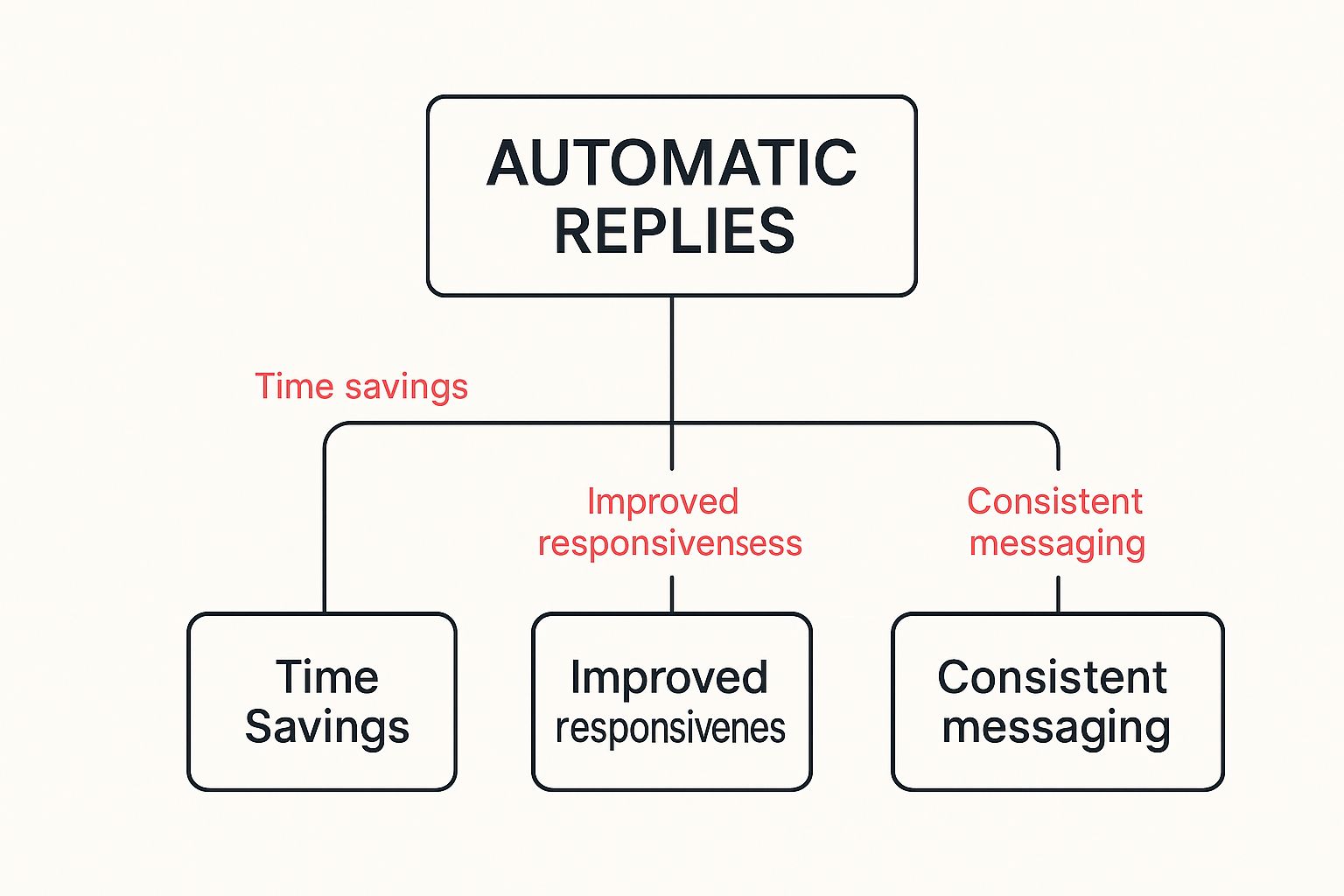
As you can see, the automation isn’t just about saving time. It directly leads to better efficiency and keeps your brand’s communication consistent and professional.
Simple Replies vs. Sophisticated Sequences
Not all automatic replies are the same. They can range from a single, static message to a multi-step conversation that guides a customer toward a specific goal.
A basic auto-reply is a one-off text. Think of it as a digital nod to let a customer know you’ve received their message. Something like, “We got your message and will get back to you within 24 hours,” is perfect for managing expectations.
A sophisticated sequence, however, is a series of messages designed to achieve a bigger goal, like recovering a sale. This could start with a gentle reminder, followed by a text offering a small discount, and end with a final message that creates a bit of urgency.
These advanced sequences are what turn an automatic text from a simple convenience into a powerful engine for sales. If you want to go deeper, you can learn more about using an autoresponder for text messages to see how it fits into a bigger strategy. This is how you meet modern customer expectations for instant replies and build real momentum in their journey with your brand.
Unlocking Growth with SMS Automation
Setting up an automatic text message reply system isn’t just about adding a neat feature—it’s about building a powerful engine for growth. The benefits are real and immediate, making a direct impact on your revenue, team efficiency, and the way customers see your brand. For any e-commerce store, the biggest and most obvious win is tackling the age-old problem of cart abandonment.
Think about it. Every abandoned cart is a potential sale that just… evaporated. A perfectly timed, automated text message can be the gentle nudge that brings a distracted or hesitant shopper back to finish their purchase. It’s a simple move that can turn a near-miss into a closed deal, clawing back a huge chunk of otherwise lost revenue.
Winning Back Lost Sales
Abandoned cart recovery is really where SMS automation proves its worth. When someone adds products to their cart but bails without buying, an automated text can bring them right back. It’s that simple.
Picture this: A customer is ready to buy a new pair of shoes, but their dog starts barking or they get a phone call. An hour later, a friendly text pops up: “Hey Alex, still thinking about those boots? Your cart is waiting for you!” That personal reminder is often all it takes to close the loop on a sale that was moments away from being lost forever.
By reaching customers directly on their phones—a device they check constantly—you cut through the noise of crowded email inboxes and endless social media feeds. This direct line of communication is unmatched for its immediacy and impact.
Boosting Efficiency and Satisfaction
Beyond just recovering sales, automation gives your operations a massive lift. It basically acts as a force multiplier for your customer service team, freeing them up from answering the same questions over and over so they can focus on more complex problems.
Your system can handle common questions instantly, giving customers immediate answers and making for a much better experience. Here’s how it plays out in a few different areas:
- 24/7 Lead Capture: A potential customer texts your business at midnight. Instead of making them wait until morning, an auto-reply engages them right away, captures their info, and lets them know a human will follow up soon.
- Instant Customer Support: A customer texts “STATUS” to check on their order. An automated reply can shoot back the tracking information in seconds. That’s one less support ticket and one happier customer.
- Consistent Communication: Every single customer gets the same prompt, professional communication. It makes your brand look attentive and on top of things, no matter the time of day.
This is the kind of responsiveness customers have come to expect. If you want to see how the pros build these features, checking out different e-commerce platforms can give you some great insights into what works best for growing a business.
A Small Investment for Big Returns
At the end of the day, adding SMS automation is a smart, strategic move with a seriously high return on investment. The costs are tiny compared to the revenue you’ll recover and the time you’ll save.
If you want to dive deeper into the nuts and bolts, our complete guide on text message automation breaks it all down. A small investment here doesn’t just solve problems—it opens up brand new opportunities for growth.
Real-World Examples That Convert
Theory is one thing, but seeing a powerful automatic text message reply in action is where you see the real potential. The examples below aren’t just templates—they’re proven strategies you can borrow and tweak to match your brand’s voice. Whether you’re selling products or services, sending the right message at the right time is your secret weapon.
And it’s a weapon that’s getting more effective every day. By 2025, a whopping 84% of consumers worldwide are expected to opt-in for texts from businesses. This isn’t a small shift; it’s a clear signal of where customer attention is heading. It’s also why 67% of companies plan to pump more money into their SMS marketing budgets.
Ecommerce Examples for Driving Sales
For any online store, an automated text is a golden opportunity to either win back a sale or build a bit of loyalty. The key is to be helpful and timely, not pushy. Here are a couple of battle-tested examples that just plain work.
1. The Gentle Abandoned Cart Reminder
This is the bread and butter of automatic text replies for any ecommerce brand. It needs to be friendly, helpful, and create just a little nudge of urgency.
- Trigger: Customer leaves the checkout for 1 hour.
- Message: “Hey {FirstName}, did you forget something? The items in your cart are waiting for you! Finish your order before they’re gone: {CartLink}”
- Goal: Get the customer right back to their pre-filled cart so they can finish the purchase.
Pro Tip: “Hi {FirstName}, thanks for stopping by! We noticed you left a few things in your cart. As a thank you for your interest, here’s 10% off to complete your order in the next 24 hours: {CartLink}”
This second version sweetens the deal with an incentive. Adding a discount with a deadline is a classic tactic for a reason—it works, creating a sense of urgency that encourages people to act now.
2. The Reassuring Order Confirmation
Ever felt that little pang of “did my order actually go through?” after clicking buy? That’s post-purchase anxiety, and it’s very real. An instant confirmation text crushes that feeling, building trust from the get-go.
- Trigger: Customer successfully completes a purchase.
- Message: “Success, {FirstName}! We’ve received your order #{OrderNumber}. We’ll let you know as soon as it ships. Track your order here: {TrackingLink}”
- Goal: Give customers peace of mind and cut down on those “Where’s my order?” support tickets.
Want to see more messages that get results? Check out our guide on proven marketing text message examples and strategies.
Service Business Examples for Building Relationships
If you run a service-based business, automation can be a lifesaver for your operations and your client relationships. It all boils down to clear communication that makes your clients’ lives a little bit easier.
1. The Simple Appointment Confirmation
No-shows hurt the bottom line. An automated confirmation and reminder system is one of the easiest ways to dramatically reduce them.
- Trigger: Client books a new appointment.
- Message: “Hi {FirstName}, your appointment with {BusinessName} is confirmed for {Date} at {Time}. To reschedule, reply to this text or call us at {PhoneNumber}. See you soon!”
- Goal: Lock in that appointment and give clients an effortless way to make changes if they need to.
2. The Post-Visit Follow-Up
This message shows you care about the client’s experience long after the transaction is over. It’s a simple but powerful way to gather feedback and encourage them to come back.
- Trigger: 24 hours after an appointment is completed.
- Message: “Hi {FirstName}, thanks for visiting us yesterday! We’d love to hear about your experience. Would you mind leaving a quick review? {ReviewLink}”
- Goal: Collect priceless social proof and show off your top-notch customer care.
Setting Up Your First Automated Campaign

Alright, enough with the theory—let’s get our hands dirty. Setting up your first automatic text message reply campaign is way easier than you think, especially with a tool like CartBoss that’s built to be both simple and powerful. We’ll walk through how to launch a campaign that tackles abandoned carts head-on, turning a major e-commerce headache into a reliable revenue stream.
The whole thing boils down to a few quick steps that take just minutes. You don’t need to be a tech wizard or a marketing guru to nail this. The goal is to build an automated system that hums along in the background, re-engaging shoppers at just the right moment.
Integrating CartBoss with Your Store
First things first, you need to connect CartBoss to your e-commerce platform. Whether you’re on Shopify or WooCommerce, the integration is basically plug-and-play.
- Install the App or Plugin: Just head to the Shopify App Store or the WooCommerce plugin directory and search for CartBoss. A few clicks and it’s installed right into your store’s dashboard.
- Connect Your Account: Follow the simple on-screen instructions to link your store. This syncs up your product and customer data automatically, letting the system track abandoned carts in real-time with zero manual effort.
Once you’re connected, CartBoss starts monitoring for abandoned checkouts immediately, ready to deploy your first campaign.
Crafting Your First Message
Now for the fun part: writing the message that brings customers back. Inside the CartBoss dashboard, you’ll find a straightforward editor to build your text. The platform even comes loaded with pre-written, high-converting templates translated into over 30 languages, so you can get going right away.
The real secret to a killer message is making it personal. Use dynamic fields (like {FirstName} and {CartLink}) to make each text feel like it was written just for them. A message that uses a customer’s name is way more likely to get their attention.
Example Message: “Hey {FirstName}, still thinking it over? Your items are waiting! We saved your cart for you. Click here to finish your order and get your goodies: {CartLink}”
This message is friendly, helpful, and gives them a direct link right back to their pre-filled checkout, eliminating any hassle.
Configuring Timing for Maximum Impact
Timing is everything. Send a message too soon, and it feels pushy. Wait too long, and that impulse to buy has vanished. CartBoss recommends sending the first reminder between 30 to 60 minutes after a cart is abandoned. This hits that sweet spot where the purchase is still fresh in their mind.
The power of SMS is undeniable. By 2025, an estimated 6 billion people will use SMS, and 59% of users are already happy to get promotional texts. This huge audience expects things to happen fast, which makes an automatic text message reply a must-have for any modern store.
Once you’ve set the timing and finalized your message, all you have to do is hit “activate.” With just those few steps, you’ve created a powerful revenue-recovery machine that works on autopilot, turning lost visitors into loyal customers. For a deeper dive, check out our modern guide on how to send automated texts.
Diving into any new tech always brings up a few questions. Setting up an automatic text message reply system is pretty straightforward, but getting the details right from the start makes all the difference. Let’s tackle some of the most common things people ask about legality, timing, and making your messages hit the mark.
Are Automatic Text Messages Legal?
Yep, as long as you play by the rules. The big one in the United States is the TCPA (Telephone Consumer Protection Act). The main takeaway is that you need to get explicit permission—an opt-in—from your customers before you start sending them automated marketing texts.
Now, things like order confirmations are transactional and usually fall under different rules. But honestly, it’s always smart to get familiar with the specific laws everywhere you do business.
What Is the Best Time to Send an Abandoned Cart Text?
Timing is everything. We’ve found the sweet spot is between 30 minutes and one hour after someone leaves their cart. It’s quick enough that the purchase is still fresh in their mind, but not so fast that it feels creepy or pushy.
The goal is to be a gentle, helpful reminder. Sending a text within that one-hour window strikes the perfect balance, often catching the customer before they’ve completely moved on.
Of course, the best way to know for sure is to test different delays. See what works best for your audience and your products.
Can I Personalize the Automatic Replies?
Absolutely, and you really should. Personalization is what turns a robotic blast into what feels like a one-on-one chat.
Most platforms, CartBoss included, let you use dynamic tokens to make every message unique. Some of the most common ones are:
- {FirstName} to greet the customer by name.
- {ProductName} to remind them of a specific item they were looking at.
- {CartLink} to give them a direct link back to their pre-filled checkout.
A personalized message makes a huge difference in engagement and is way more effective than a generic one.
How Do I Handle Replies to My Automated Texts?
A good system is a two-way street. While your first message is automated, you need a plan for monitoring and answering any replies that come in. A shopper might have a real question, and being able to connect them with a real person turns a potential problem into a great support experience.
Ready to stop watching sales walk out the door? CartBoss makes it simple to set up powerful, automated SMS campaigns that win back customers and grow your revenue on autopilot. Start recovering lost sales today.