


Sending effective reminder texts isn’t just about what you write; it’s about the timing, the tone, and having a smart way to automate it all—something we’ve perfected with CartBoss. You’re creating a direct line to your customer that completely bypasses the chaos of their email inbox. It’s less of a marketing blast and more of a personal, helpful nudge.
Why Reminder Texts Are Your Secret Weapon
Forget fighting for attention in a packed inbox. The real power play in e-commerce is right where you know your customers are already looking: their phone’s messaging app.
A simple SMS reminder is a direct conversation starter that email just can’t replicate. This isn’t about just sending another notification; it’s about connecting at the most critical moment.
The magic of SMS is how immediate and engaging it is. An email can sit unopened for hours, even days, but a text message creates an instant touchpoint. This is especially vital for abandoned cart recovery, where a gentle, well-timed reminder is often the only thing standing between a lost sale and a happy, loyal customer. It’s a strategy built on being helpful, not intrusive.
The Undeniable Power of SMS Engagement
The numbers behind SMS marketing don’t just talk; they shout. Reminder texts have a nearly universal open rate of 98%. Even more impressive? 90% of those messages are read within just three minutes.
That kind of immediacy is a complete game-changer. Your message lands exactly when it matters most, typically in under 7 seconds. You can dig deeper into the power of SMS in our detailed article about how consumers choose business texts.
What really sets SMS apart, though, is how interactive it is. Response rates for text messages can hit as high as 45%, which absolutely dwarfs the 6% average for email. This level of engagement turns a simple reminder into a real two-way conversation, building a much stronger connection with your customers.
By leaning into the personal and immediate nature of SMS, you’re not just recovering a sale. You’re cementing your brand’s presence in a way that feels direct, modern, and respectful of your customer’s attention.
Cutting Through the Digital Noise
In a world drowning in digital marketing, SMS is a clean, uncluttered channel. Just think about it: how many unread emails are in your inbox versus unread texts? Exactly. This unique position makes SMS the perfect tool for high-priority messages like abandoned cart reminders.
Here’s the simple breakdown of why it works so well:
- Direct and Personal: A text feels like a one-on-one chat, making your message far more impactful and much less likely to be ignored.
- High Visibility: Unlike emails that get lost in spam folders or promo tabs, texts pop up right on the lock screen. They can’t be missed.
- Action-Oriented: The short, punchy nature of SMS encourages people to act now. A simple link that takes them back to their pre-filled cart is often all it takes to seal the deal.
When you bring SMS reminders into your strategy, you’re choosing a smarter, more direct path to communication that delivers real, measurable results.
Writing Reminder Texts That Convert
Alright, let’s move past the theory and get down to crafting the actual messages that bring customers back and close sales. A great reminder text isn’t some complex, secret formula. It’s just a simple, human message that guides someone back to their cart without sounding like a robot or a pushy salesperson.
The goal here is to be a helpful assistant, not an aggressive marketer. Your message should feel like a gentle tap on the shoulder, reminding them of something good they left behind.
The Anatomy of a Perfect Reminder Text
A truly effective reminder text is built on four core components. When you put them all together, they create a super smooth path from the reminder right back to the purchase, making it almost effortless for the customer.
- A Friendly Opening: Always start with the customer’s first name. This is non-negotiable. Personalization instantly makes the message feel like a one-on-one conversation instead of a mass broadcast.
- A Gentle Nudge: Clearly, but casually, mention the items waiting for them. Simple phrases like, “Did you forget something?” or “Your items are waiting!” work perfectly.
- A Compelling Call-to-Action (CTA): Tell them what to do next. Your CTA should be clear and low-pressure. Think “Complete your order” or “View your cart.”
- An Effortless Checkout Link: This is the most crucial part. The link absolutely must take them directly to their pre-filled cart. CartBoss handles this automatically, so there’s zero friction for the customer.
Finding Your Brand Voice in SMS
Your reminder texts need to sound like they’re coming from your brand. The tone you’ve already established on your website and social media should carry right over to your SMS strategy. That consistency is what builds trust and makes your brand memorable.
Think about what fits your style. Are you more playful or more professional?
The Fun & Quirky Brand:
“Hey [Name]! Your cart is having separation anxiety. 😟 Give those awesome items a new home! Tap here to finish checking out: [Link]”
The Sophisticated & Exclusive Brand:
“Hello [Name], your selected items have been reserved for you. To ensure they remain available, please complete your purchase here: [Link]”
See how both examples follow the same core structure but feel completely different? They’re tailored to a specific brand personality. To really nail this, you can dig into your customer data and use actionable insights to understand what kind of messaging truly motivates your audience.
Personalization and Compliance Are Key
Personalization goes way beyond just using a name. If you can, mention a specific product they abandoned. It can boost your conversion rates in a big way. For instance, “Your [Product Name] is still waiting for you!” is far more powerful than a generic message.
The goal is to make every customer feel seen. A personalized text shows you’re paying attention to their journey, not just blasting out messages to a list.
Just as important is staying compliant. Every single message has to include clear instructions on how to opt-out, like “Reply STOP to unsubscribe.” This isn’t just a legal hoop to jump through; it’s fundamental to building trust. When you make it easy for customers to control the conversation, you’re showing respect.
By combining this solid structure with an authentic brand voice and smart personalization, you’ll know exactly how to send reminder text messages that feel helpful, respectful, and are incredibly effective at bringing customers back.
For even more ideas to get you started, check out our guide on SMS marketing message examples that drive conversions.
Perfecting Your SMS Timing Strategy
Even the most persuasive, brilliantly written text will fall flat if it shows up at the wrong time. Timing isn’t just a minor detail; it’s the engine driving your entire abandoned cart recovery strategy. A text sent too soon feels pushy, but one sent too late misses the boat entirely.
The goal is to create a sequence that feels like a helpful nudge, not a desperate sales pitch. This means mapping out a few strategic messages that align with a customer’s mindset as time passes after they’ve left your site.
The Golden Hour: The First 60 Minutes
The most critical window for recovery is within the first 30-60 minutes after a cart is abandoned. At this point, the customer is still in “shopping mode.” They might have been pulled away by a phone call, had a last-minute question about shipping, or just got distracted by something else online.
Sending your first reminder during this period acts as a gentle tap on the shoulder, bringing them right back to what they were doing. The goal here is immediate re-engagement while the purchase is still fresh in their mind. Keep this initial message simple, helpful, and make sure it has a direct link back to their cart.
Here’s a quick visual breakdown of how a simple reminder text can effectively guide a customer back to their cart.
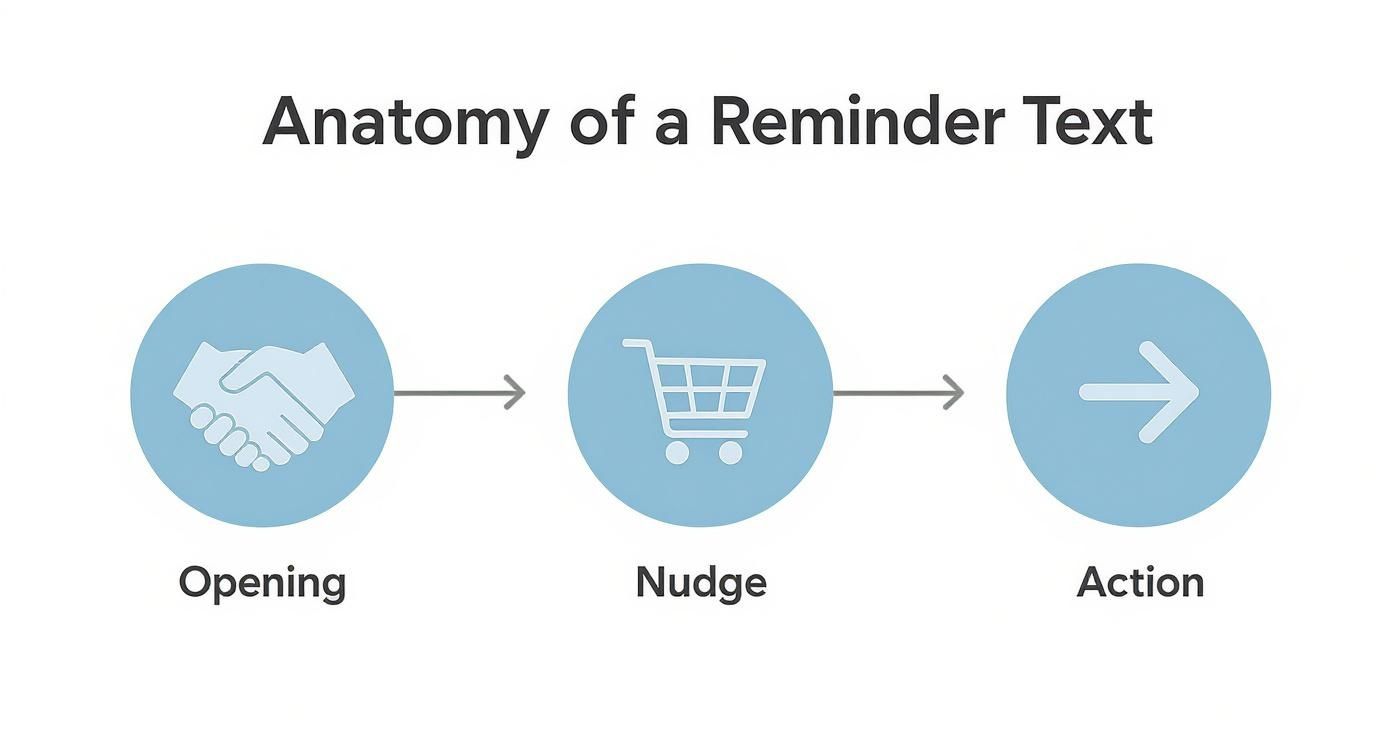
As you can see, the flow is natural: a friendly opening, a clear reminder about their cart, and a simple, actionable link to bring them back.
Expanding Your Recovery Window
Look, not every customer is going to convert from that first text. And that’s okay. This is why having a strategic sequence is so important for knowing how to send reminder text messages that actually work over a longer period.
The real art is creating a sense of helpful urgency without ever crossing the line into being annoying. Each follow-up message needs a slightly different angle to keep the conversation fresh and give them a new reason to come back.
Your follow-up plan should look something like this:
- The 24-Hour Reminder: By now, the initial impulse buy feeling has faded. This is a good time to introduce a bit of scarcity, maybe with a message like, “Your items are selling fast!” or a simple offer to answer any questions they might have.
- The 48-Hour Final Offer: This is your last real shot to win them back. It’s often the perfect moment to roll out a small incentive—think a limited-time discount or free shipping—to give them that final nudge they need to click “buy.”
To give you a clearer picture of how these timing strategies play out, I’ve put together a simple comparison table.
Abandoned Cart SMS Timing Strategy Comparison
This table breaks down the three common timing windows, showing you the primary goal and message focus for each stage.
| Timing Window | Primary Goal | Message Focus | Potential Outcome |
|---|---|---|---|
| 30-60 Minutes | Immediate Re-engagement | Helpful reminder, easy return | High conversion on “hot” leads |
| 24 Hours | Overcome Hesitation | Introduce scarcity, offer help | Recapture thoughtful buyers |
| 48-72 Hours | Final Incentive | Limited-time offer or discount | Convert price-sensitive shoppers |
By carefully planning your sequence, you can adapt your approach to match where the customer is in their decision-making process. For an even deeper dive into scheduling, check out our detailed guide on the best time to send SMS marketing.
Ultimately, this kind of strategic patience is what separates a decent recovery campaign from a truly great one.
Automating Your Abandoned Cart Texts
Writing the perfect message and nailing the timing are huge wins, but let’s be realistic—manually sending every single reminder just isn’t going to happen, especially for a growing business. This is exactly where automation steps in, transforming your cart recovery from a daily chore into a powerful, self-sustaining sales engine.
The whole point of a system like CartBoss is to put your entire recovery strategy on autopilot. You set the rules just once, and the platform takes over from there. It sends perfectly timed, personalized texts to every single shopper who leaves items behind.
This frees you up to focus on other parts of your business while the system works around the clock to bring back lost sales. It’s all about building a reliable process that executes your strategy flawlessly without you ever having to lift a finger.
Connecting and Configuring Your System
Getting started with automation is way simpler than it sounds. Platforms like CartBoss are built from the ground up to integrate seamlessly with major e-commerce platforms like Shopify and WooCommerce. The setup is usually a “plug-and-play” experience, often requiring just a few clicks to connect your store.
Once you’re connected, you can jump right into configuring your messaging flow. This is where you tell the system when to send messages and what those messages should say. You’ll use the timing strategy we talked about earlier to set up your sequence—for example, sending the first text 60 minutes after abandonment, a second at 24 hours, and a final one at 48 hours.
The real power here lies in the pre-built templates. CartBoss comes loaded with messages that are already written and translated into over 30 languages. It even detects the customer’s language automatically, making sure your reminder always feels local and personal, no matter where your customers are.
Automation isn’t just about saving time; it’s about delivering a consistently excellent customer experience at scale. It ensures every abandoned cart gets the same strategic, personalized follow-up, which is key to maximizing your recovery rates.
Fine-Tuning with Dynamic Discounts and Analytics
A basic “set it and forget it” approach will definitely get you results, but the best outcomes come from ongoing optimization. This is where dynamic features and performance data become your best friends. A great system lets you do much more than just send out the same static message over and over.
- Dynamic Discounts: Instead of a generic coupon code, you can automatically generate and apply unique, time-sensitive discounts. For instance, your 48-hour reminder could include a 10% off code that expires in 24 hours, creating a powerful—and genuine—sense of urgency.
- Performance Analytics: The only way to know if your strategy is working is to track it. CartBoss provides detailed analytics showing you exactly which messages are converting, your overall return on ad spend (ROAS), and how much revenue you’ve recovered.
This data is absolutely crucial for refining your approach. If you notice your 24-hour message has a low conversion rate, you can test new copy or a different offer. This continuous feedback loop transforms your knowledge of how to send reminder text messages from a guessing game into a data-driven science. For a deeper look into the possibilities, our guide on SMS marketing automation explores these concepts further.
By combining a solid automated foundation with smart, data-informed adjustments, you create a recovery system that not only saves you time but also continuously improves its own performance, driving more sales back to your business month after month.
Mistakes to Avoid with Reminder Texts
Knowing how to send reminder texts is only half the battle. Just as important is knowing what not to do. SMS is a direct line to your customer, and mistakes on this channel feel far more intrusive than a misplaced email. A single misstep can break trust and send your unsubscribe rates through the roof.
One of the most common blunders we see is ignoring time zones. Sending a text about a forgotten cart at 2 AM is a surefire way to get an angry response, or worse, a lost customer. It’s disruptive, sloppy, and makes your brand look completely unprofessional.
Another fast track to an opt-out is bombarding customers with too many messages. A strategic, multi-day sequence works wonders. Sending three texts in a single afternoon just feels desperate and spammy. Give them some breathing room.
Sending Vague or Unhelpful Messages
Clarity is everything in a 160-character message. A text that just says, “You have items in your cart” without a direct link is a complete dead end. Don’t make your customers hunt for their cart—they won’t. They’ll just move on.
You also have to provide a clear path to opt-out. Making it difficult or impossible to unsubscribe isn’t just bad practice; it’s a violation of regulations that can land you in serious trouble.
Globally, SMS is the most universally available communication channel, with opt-out rates for reminders staying incredibly low at around 0% to 1.5%. This proves customers find these messages valuable, but only when they’re respectful and genuinely helpful. Read more about these powerful SMS marketing statistics.
Ignoring Compliance and Personalization
This is the big one. Failing to stick to legal guidelines is the single biggest mistake you can make. It’s absolutely crucial to understand the rules around consent and opt-outs. If you’re unsure, take the time to review the regulations around TCPA compliance for text messages to protect your business.
Finally, avoid generic, robotic language at all costs. An impersonal message that doesn’t use the customer’s name or reference their cart feels cold and disconnected. A little personalization is what turns a simple automated alert into a helpful, customer-focused interaction that actually gets results.
Got Questions About Reminder Texts? We’ve Got Answers.
When you’re diving into sending reminder texts, a few questions are bound to pop up. It’s totally normal. Let’s walk through some of the most common things e-commerce brands ask so you can get started with complete confidence.
Is Sending Reminder Texts Actually Legal?
This is probably the biggest question we get, and for good reason. The short answer is a resounding yes, sending reminder texts is completely legal—but there’s a huge catch. You absolutely must have explicit consent from the customer.
This isn’t a gray area. A customer has to knowingly agree to get messages from you, which usually means ticking a specific checkbox during checkout. You can’t just start texting every phone number you collect. That’s a fast track to trouble.
Is the ROI Really Worth the Cost?
Another common hesitation is the cost versus the potential return. Is it actually worth spending money on texts? Absolutely. While each message has a small cost, the return on investment can be massive.
Think about it: text messages have open rates that soar as high as 98%. Your message is almost guaranteed to be seen. When you combine that with a direct link that takes them back to a pre-filled cart, you make it incredibly easy for them to finish their purchase. The recovery rates often blow the minimal cost of the texts out of the water.
Are There Rules About When I Can Send Texts?
Yes, and this one is a big deal. You should never, ever send marketing texts during late-night or early-morning hours. This isn’t just a courtesy; it’s a legal requirement in many places.
A good rule of thumb is to stick to normal “business hours” within the recipient’s local time zone. Platforms like CartBoss automatically handle this with a built-in “Do-Not-Disturb” mode, ensuring you never wake a customer up at 2 AM. Trust me, that’s a quick way to damage your brand’s reputation.
How Should I Handle Opt-Outs?
Handling opt-outs is non-negotiable and pretty straightforward. Every single text you send must give customers a clear and simple way to unsubscribe, like replying with “STOP.”
The moment a customer opts out, your system must automatically and immediately remove them from all future messaging. This isn’t just about following the rules; it’s about building trust. Respecting a customer’s decision shows you’re a reputable brand that values their privacy.
Do I Need a Special Phone Number?
Finally, brands often wonder if they need a dedicated phone number. While it’s not always a strict requirement, using a consistent, branded sender ID is a smart move. It helps customers instantly recognize who the message is from. That little bit of professionalism and trust can make your reminders much more effective.
Ready to put this all into action and start recovering lost sales on autopilot? CartBoss makes it simple to set up a compliant, high-converting SMS reminder strategy in just a few minutes. Start recovering your abandoned carts today!