


An SMS sender API is simply a set of instructions that lets your software send and receive text messages automatically. Think of it as a bridge connecting your application directly to a mobile network carrier’s system. It’s what allows you to send notifications, alerts, and marketing campaigns without anyone having to manually type them out.
What Is the Role of an SMS Sender API
The SMS sender API is the engine driving what’s known as Application-to-Person (A2P) messaging. In simple terms, this is when a business application sends a text to a person’s phone. This technology is behind countless interactions you have every day, from getting two-factor authentication codes to receiving shipping confirmations and promotional offers.
The market for this tech is absolutely massive. The global A2P SMS and API market was valued at USD 71.7 billion in 2024 and is on track to hit USD 75.2 billion by 2025. This explosive growth shows just how central automated business messaging has become. Cloud-based solutions are leading the charge, now making up 58.89% of the market as businesses look for more flexible ways to connect with customers. You can discover more insights about the A2P messaging market.

Core Functions and Business Impact
At its heart, the API makes a complex process incredibly simple. Instead of trying to build and manage direct connections with every mobile carrier, a developer just needs to make a few HTTP requests to the API’s endpoints. These requests contain the important stuff: the message content, the recipient’s number, and the sender ID.
By integrating an SMS sender API, businesses can immediately start to:
- Automate Notifications: Send out real-time updates like order confirmations, appointment reminders, and account alerts.
- Improve Security: Easily implement two-factor authentication (2FA) to keep user accounts safe.
- Run Marketing Campaigns: Deliver targeted promotions and company news straight to a customer’s phone.
Having this direct line of communication is a powerful way to keep your customers engaged. If you want to dive deeper into how this works in practice, check out our ultimate guide on using an automated text sender for business messaging. It’s the perfect introduction before getting into the more technical documentation that follows.
Mastering API Authentication and Security
Before your application can fire off a single text message, it needs to properly introduce itself to the server. This secure handshake, known as authentication, is the gatekeeper for any SMS sender API integration. It’s what ensures only your authorized app can access your messaging functions, effectively shutting the door on fraud and keeping your data safe.
The most common way to handle this is with an API Key—a unique string of characters assigned specifically to your application. You’ll need to include this key in the header of every single API request you make, usually under the Authorization header with a “Bearer” prefix. Treat your API keys like you would any sensitive password. They should never be exposed in client-side code, like JavaScript running in a browser. The right way to do it is to store them on your server as environment variables.
Choosing Your Authentication Protocol
While API keys are popular because they’re straightforward, they aren’t the only game in town. Other protocols bring different layers of security and complexity to the table. The right choice often comes down to what the SMS API provider requires and how tight you need your application’s security to be.
This infographic gives a quick breakdown of how common API authentication methods stack up in terms of adoption.
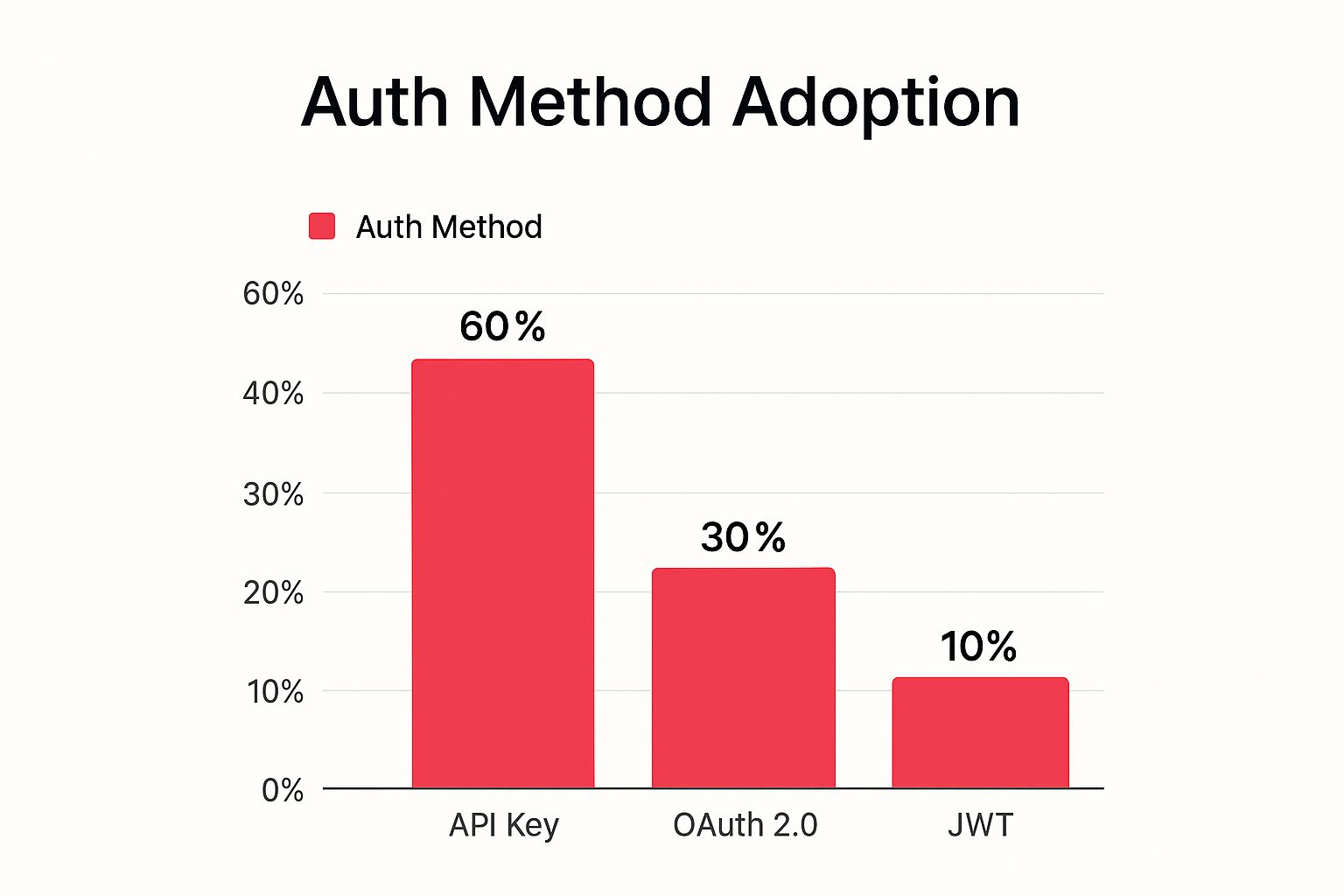
As you can see, the simplicity of API keys makes them the dominant method, but plenty of developers use more advanced protocols like OAuth 2.0, especially when delegated access is a must.
But good security goes way beyond just authentication. You should get into the habit of key rotation, which means periodically generating new API keys and retiring the old ones. This simple practice limits the window of opportunity for anyone who might get their hands on a compromised key. It’s also smart to monitor your API usage for anything out of the ordinary, like a sudden flood of sent messages, which could be a red flag.
To really lock down your integration against common threats, it’s worth digging into these 10 API Security Best Practices for Developers. And of course, always make sure your security measures are in line with all the necessary regulations. Our https://www.cartboss.io/blog/sms-compliance-checklist/ is a great resource for that.
With authentication sorted, you’re ready to dive into the real action: the core API endpoints. Think of these as direct lines to the SMS sender API’s main features. Each endpoint is just a unique URL that performs a specific job, like sending a message or checking up on one you’ve already sent. Getting comfortable with these is the key to building any kind of messaging functionality.
Every endpoint is designed to work with a specific HTTP method, like POST or GET. For example, you’ll use a POST request to send a message (since you’re creating something new), but you’ll use a GET request to retrieve its status or pull your message history. This is a standard, predictable way to tell the API server exactly what you want it to do.
Let’s break down the essential endpoints you’ll be using.
Primary SMS API Endpoints
To give you a quick overview, here are the main endpoints you’ll interact with most often. This table is a handy reference for understanding what each one does at a glance.
| Endpoint | HTTP Method | Description |
|---|---|---|
/v1/messages/send |
POST | Dispatches a single SMS to a recipient. |
/v1/messages/{message_id} |
GET | Retrieves the delivery status of a specific message. |
/v1/messages |
GET | Fetches a history of messages, with filtering options. |
Now that you have the big picture, let’s explore what each of these endpoints actually does and how you can use them.
The Send Message Endpoint
This is the workhorse of our SMS API. Its entire job is to fire off a text message from your application to someone’s phone. To make this happen, you’ll send a POST request to its URL, packed with the necessary details like the recipient’s phone number, your sender ID, and of course, the message content.
- HTTP Method: POST
- Endpoint:
/v1/messages/send - Description: This is how you send a single SMS. When your request is successful, the API will send back a unique
message_id. Hold onto this—it’s your ticket to tracking the message’s journey.
Figuring out how to structure this request is your first real step toward automating your messaging. If you’re looking for a broader view of different platforms, our guide on top SMS messaging platforms is a great resource.
The Message Status Endpoint
Once a message is sent, you can’t just hope for the best. You need to know if it actually arrived. That’s where the Message Status endpoint comes in. It lets you check up on any message you’ve sent by using the message_id you got back from the Send Message endpoint.
This creates a really powerful feedback loop. Instead of just sending messages out into the world, you can build logic that reacts to what happens next. Was it ‘delivered’? ‘failed’? Just ‘sent’? This is absolutely critical for building reliable notification systems and keeping your analytics accurate.
By using the ‘send’ and ‘status’ endpoints together, you can create a complete system that not only sends messages but also confirms they got there, giving you total reliability for your most important communications.
The Message History Endpoint
Whether you’re doing an audit, digging into analytics, or helping a customer, you’ll eventually need a log of past messages. The Message History endpoint gives you access to all that data. You can pull records based on date ranges, specific phone numbers, or other filters you need. It’s incredibly handy for building dashboards to track how many messages you’re sending or see how a campaign is performing.
The explosive growth of SMS is impossible to ignore. In the U.S. alone, the SMS marketing industry is expected to be worth $12.6 billion by 2025. This is fueled by the simple fact that 65% of the world’s population sends and receives texts. APIs are what give businesses a direct line to this massive audience, which is why having solid, well-documented endpoints is so important. Discover more insights about SMS marketing’s global reach.
Formatting API Requests and Parameters
Getting your requests formatted correctly is the absolute foundation of making a successful API call. When you’re using an SMS sender API, sending a message means you need to structure your request with a few key parameters, and each one has its own rules. Nail these details, and your message will fly through the API and get delivered without a hitch.
The three essential parameters for any SMS are to, from, and body. The to parameter is simply the recipient’s phone number, but it must be in the E.164 international format. That means it needs the country code, network code, and subscriber number all mashed together without any dashes, spaces, or other funny business (e.g., +14155552671).
Next up is the from parameter, which tells the recipient who’s sending the message. This can be a virtual number you’ve set up or a pre-approved alphanumeric Sender ID like “CartBoss”. A Sender ID is a great branding tool, but keep in mind that support can vary depending on the country, and some places require you to pre-register them. Also, alphanumeric Sender IDs usually have an 11-character limit.
Essential and Advanced Parameters
Finally, we have the body parameter. This one is pretty straightforward—it’s the actual content of your message. The most critical thing to watch here is the length. A standard SMS is capped at 160 characters. If you go over, your message might get split into multiple parts, which means extra costs for you. To get the full story on this, check out our guide on decoding the SMS character limit.
Once you’ve mastered the basics, you can start playing with optional parameters to unlock some more powerful features:
schedule_for: This is a timestamp that lets you delay the message and send it at a specific time in the future.status_callback: Provide a URL here, and the API will send webhook notifications to it whenever the delivery status changes.validity_period: This sets the number of seconds the API should keep trying to deliver the message before it gives up and lets it expire.
Here’s a clean JSON example showing the request body for a simple text message. This is the exact structure you would send in a POST request to our send message endpoint.
{
“to”: “+14155552671”,
“from”: “CartBoss”,
“body”: “Hi there! Your order #1234 has been shipped and is on its way.”
}
This clear, well-structured format is dead simple for our API to parse, making it a super reliable way to automate your customer communications.
Making Sense of API Responses and Error Codes
Building a solid application means you have to plan for things to go right and for things to go wrong. Every single time you call the SMS sender API, you’ll get a response back. Knowing how to read these responses is the key to debugging your code and building a reliable workflow that doesn’t fall over at the first sign of trouble.
When your API request is successful, you’ll see an HTTP 200 OK or a 202 Accepted status code. The body of that response holds some critical information, but the most important piece is the unique message_id. You’ll need to parse this JSON response and hang on to that ID. It’s your ticket to tracking the message’s delivery status later on.
What a Success Response Looks Like
A successful API call is a confirmation that your request was valid and we’ve accepted it for processing. This is a great start, but it doesn’t mean the message has been instantly delivered to the person’s phone.
Here’s a typical success response you’d get after sending an SMS:
{
“status”: “queued”,
“message_id”: “a1b2c3d4-e5f6-7890-1234-56789abcdef0”,
“to”: “+14155552671”,
“remaining_balance”: “19.75”,
“message_price”: “0.0075”
}
In this example, the status is “queued,” which tells you the message is now in the pipeline to be sent through the carrier networks. The message_id is the unique identifier you’ll use to check on its status down the line.
Common API Error Codes and Solutions
Failures aren’t just frustrating—they’re incredibly useful for diagnosing problems. When something goes sideways, the API will return a non-2xx HTTP status code and a JSON body that includes a specific error code and a helpful message. These errors tell you exactly what you need to fix.
From my experience, the number one cause of API errors is just an improperly formatted request. Seriously, double-checking things like the recipient’s phone number format (make sure it’s E.164) or ensuring your API key is correctly passed in the authorization header will solve over 90% of the issues people run into when first integrating.
To help you get up and running faster, I’ve put together a quick reference table for the most common errors you’re likely to see.
Common API Error Codes and Solutions
This table breaks down the errors developers most frequently encounter, explaining what they mean and how to get past them quickly.
| Error Code | Meaning | Recommended Action |
|---|---|---|
400 Bad Request |
The request was malformed. This could be anything from a missing parameter, an invalid phone number format, or just bad JSON syntax. | Go back and review your request body against our API documentation. Check for typos and make sure all the required fields are there and formatted correctly. |
401 Unauthorized |
Your API key is either missing, invalid, or has expired. The server simply can’t authenticate your request. | Check that your API key is correct and you’ve included it in the Authorization header. If it’s been compromised or expired, just generate a new one from your dashboard. |
403 Forbidden |
You’re authenticated, but you don’t have the right permissions for what you’re trying to do. This often happens if you try to use a feature that isn’t part of your current plan. | Take a look at your account’s subscription level and permissions. If you think you should have access, get in touch with our support team, and we’ll sort it out. |
429 Too Many Requests |
You’ve hit the rate limit for your account. We have these limits in place to prevent abuse and keep the service stable for everyone. | You’ll need to implement an exponential backoff strategy in your code to slow down the rate of your requests. Check the API docs for the specific rate limits on your account. |
By familiarizing yourself with these common responses, you’ll be able to handle both successes and failures gracefully, making your application much more robust.
Integrating with Code Examples and SDKs
Let’s be honest, sometimes the best way to figure out how an sms sender api works is to just dive into the code. We’ve put together a set of practical, ready-to-use code examples for the most common messaging tasks to help you get up and running as quickly as possible. Think of these snippets as your launchpad—they’re designed to get you from theory to a working integration in minutes.
Our examples cover the essentials, like sending your first text, broadcasting a message to a list of recipients, and checking a message’s delivery status programmatically. To make sure they fit right into your existing tech stack, we offer them in several popular programming languages.
Quick Start Code Snippets
Whether you’re building with Python, Node.js, or classic PHP, we’ve got you covered. These examples are written to be clear, straightforward, and easy to adapt for your own projects.
- Python Example: A simple script that shows you how to authenticate and send a single SMS using the popular
requestslibrary. - JavaScript (Node.js) Example: Perfect for modern web apps, this snippet demonstrates how to make an asynchronous API call to send out a message.
- PHP Example: A classic cURL example for sending texts, ideal for integrating into existing PHP-based websites and systems.
- Java Example: Provides a solid method for making HTTP requests to our API, well-suited for larger, enterprise-level applications.
Each example is commented to walk you through the important parts, like setting up authentication headers and structuring the request body. For a bigger picture on how these pieces fit together, our guide on how to send automated texts for modern campaigns offers more context on building out these systems.
Leveraging Software Development Kits
For an even smoother integration, we highly recommend using one of our Software Development Kits (SDKs). An SDK is a library that wraps all the raw API calls into simple, language-specific functions. So, instead of building HTTP requests and parsing JSON responses by hand, you can just use intuitive methods like sms.send() or sms.getStatus().
Using an SDK doesn’t just speed up your development time. It also helps you sidestep common mistakes like malformed requests or incorrect authentication. It handles the low-level details so you can stay focused on what your application does best.
SMS APIs have completely changed how businesses communicate, mainly because of their incredible reach. SMS messages have a stunning 98% open rate, and 82% of them are read within just five minutes. That performance blows email out of the water and is exactly why integrating an SMS sender API can be so powerful. You can discover more about SMS marketing statistics and its impact on engagement. We provide official and community-supported SDKs to help you tap into this power with minimal effort.
Taking Your Integration Further With Webhooks And Advanced Features

If you want to build a truly interactive application, you have to move beyond just pushing out messages. This is where advanced features like webhooks come in, transforming your sms sender api integration from a one-way street into a dynamic, two-way communication channel.
So, what are webhooks? Think of them as automated messages, or callbacks, that our API sends to your server whenever a specific event happens. Instead of you having to constantly ask our API “Is the message delivered yet?”, you can just provide a webhook URL. Our API will then instantly ping your application with real-time status updates for events like delivered, failed, or undelivered.
This event-driven model is worlds more efficient. It frees you up to build powerful automated workflows, keep dashboards updated in real-time, and trigger follow-up actions the very moment a message status changes. You can even set up webhooks to receive inbound SMS, which lets your customers reply and kick off a genuine conversation.
Managing Sender IDs and Rate Limits
Beyond webhooks, getting a handle on a few other advanced settings is what separates a professional setup from an amateur one. A big one is managing your Sender IDs.
Using a consistent alphanumeric Sender ID, like “CartBoss,” is fantastic for brand recognition. However, manually juggling these across different countries is a recipe for mistakes. By automating this configuration, you ensure your brand looks the same everywhere you operate, without the headache.
For any business operating internationally, automating your Sender ID setup isn’t just a nice-to-have. It’s essential for maintaining brand consistency and eliminating the risk of costly manual errors.
Another critical piece of the puzzle is rate limiting. Both carriers and API providers set limits on how many messages you can fire off per second. It’s crucial that your application plays by these rules to avoid getting throttled or even blocked.
A smart way to handle this is by building an exponential backoff mechanism into your code. This strategy intelligently retries failed requests with increasing delays, allowing your application to send messages as fast as possible without stepping on any toes. The result? High deliverability and a reliable system, even when you’re sending massive campaigns.
SMS Sender API: Your Questions Answered
When you’re integrating a new piece of tech, a few questions are bound to pop up. We get it. This section cuts straight to the chase, giving you clear answers to the most common questions developers have about our SMS sender API. Think of it as your go-to guide for smoothing out any bumps in the road.
What’s the Difference Between a Sender ID and a Phone Number?
Great question. A Sender ID is basically your brand’s name, like “CartBoss,” that shows up as the sender. It’s fantastic for brand recognition but is usually capped at 11 characters and is for one-way messages only.
A phone number, on the other hand, is a dedicated virtual number that can both send and receive messages. Since not all countries play nice with alphanumeric Sender IDs (some even require you to pre-register them), a virtual number is often the more flexible option, especially if you need two-way conversations with customers.
Why Aren’t My Messages Getting Delivered?
Message delivery issues usually boil down to a handful of common culprits. Before you do anything else, double-check that the recipient’s phone number is in the proper E.164 format (e.g., +14155552671). An incorrectly formatted number is the number one reason requests fail right out of the gate.
If the number is correct, your next step is to look at the API response for error codes.
- Seeing a
401 Unauthorizederror? That’s a sign something is off with your API key. - A
400 Bad Requestusually means there’s a typo or mistake in your request parameters.
Finally, keep in mind that carriers are always on the lookout for spam. They can filter messages that seem suspicious. To stay in their good graces, make sure your content follows local rules and try to avoid using URL shorteners, as they are a common red flag.
Can I Send Messages to Other Countries?
Absolutely. Most SMS sender APIs are built for global reach, but sending internationally isn’t a free-for-all. Every country has its own set of rules for things like Sender IDs, what you can say in your messages, and how you get customer opt-ins. For example, some countries have a blanket ban on promotional texts or maintain strict “do not call” registries.
A word of advice from experience: before you kick off an international SMS campaign, take the time to research the specific compliance rules for each country you’re targeting. Skipping this step can lead to blocked messages and, in some cases, hefty fines.
Getting this right from the start ensures your messages actually land in your customers’ inboxes and keeps your business on the right side of the law, wherever you’re sending.
Ready to stop losing sales to abandoned carts? CartBoss uses powerful, automated SMS messages to bring customers back and recover revenue you thought was lost. It’s simple to set up and works on autopilot. Start recovering sales with CartBoss today.