


Let’s be honest, most sales reps didn’t get into the business to spend their days drowning in spreadsheets and manual data entry. They want to connect with people, understand their problems, and close deals. This is where sales automation comes in—it’s not about replacing your team, but about giving them a serious upgrade.
Think of it as an intelligent assistant for your entire sales operation. It takes over the repetitive, time-consuming tasks so your team can focus on what they do best: actually selling.
Understanding the Core of Sales Automation

Imagine your sales team as a crew of expert pilots. Instead of forcing them to manually check every single dial and lever before, during, and after a flight, sales automation gives them a sophisticated autopilot. This system handles all the routine—but absolutely critical—checks that eat up valuable time.
This isn’t about taking the controls away from your skilled team. It’s about empowering them. The whole point of what is sales automation is to see it as a powerful tool that shoulders the administrative burden. This frees up your reps to navigate tricky negotiations and ensure every customer has a smooth journey.
From Manual Effort to Automated Efficiency
Without automation, a salesperson’s day is often a chaotic mix of necessary but tedious tasks. These are the little things that pile up and keep them from spending quality time on the phone or in meetings with potential customers.
Sales automation software steps in to streamline these workflows. Here are just a few of the jobs it can take off their plate:
- Logging interactions: Automatically records calls, emails, and meetings in your CRM. No more “I’ll log that later.”
- Sending follow-ups: Triggers personalized emails or SMS messages based on specific customer actions, like downloading a brochure or visiting the pricing page.
- Updating records: Keeps customer profiles and deal stages current without anyone having to lift a finger.
- Lead assignment: Instantly routes new leads to the right person based on rules you set, like territory or expertise.
To see just how much time this saves, let’s look at a quick comparison.
Manual Sales Tasks vs Automated Sales Workflows
This table highlights the stark difference between the old way of doing things and the new, automated approach.
| Manual Sales Task | Automated Workflow Example | Primary Benefit |
|---|---|---|
| Manually emailing a new lead | An instant, personalized welcome email is sent when a lead fills out a form. | Immediate engagement, no leads go cold. |
| Forgetting to follow up after a call | An SMS is automatically scheduled for 24 hours after a logged call. | Consistent follow-up, improved lead nurturing. |
| Updating CRM with deal progress | The deal stage is automatically updated when a customer clicks a proposal link. | Accurate pipeline, less admin work. |
| Assigning leads from a list | Leads are routed to sales reps based on territory rules the moment they come in. | Speed to lead, fair distribution. |
As you can see, the shift from manual to automated isn’t just about saving a few minutes here and there. It creates a more reliable and consistent sales engine that works for you 24/7.
The numbers back this up, too. Organizations that implement sales automation typically see a 14.5% jump in sales productivity. On top of that, a whopping 78% of sales teams report it makes managing their pipeline and tracking deals far more efficient.
By automating the predictable parts of the sales cycle, you give your team the bandwidth to excel at the unpredictable—building rapport, overcoming objections, and creating genuine customer connections.
Ultimately, sales automation is a strategic move that blends technology with human expertise. It ensures no lead ever falls through the cracks and every customer gets the timely attention they deserve.
This concept works hand-in-hand with marketing efforts. For a deeper dive, check out our guide on marketing automation for small business to see how you can create a seamless experience from the first touchpoint to the final sale.
The Real-World Benefits of Automating Your Sales
Sure, saving time is a nice perk, but the real magic of sales automation goes way deeper. It directly beefs up your bottom line and makes your entire operation healthier. Think of it as building a smarter, more effective sales engine—one that gets better results with less grind, not just more work.
The first thing you’ll notice is a massive jump in team productivity. When you take tedious tasks like manual data entry, follow-up reminders, and lead sorting off your reps’ plates, you’re giving them back their most precious resource: time.
They can then pour that time into things that actually require a human touch, like building real relationships, truly understanding customer needs, and closing bigger deals. Instead of drowning in admin, your team can handle more leads without letting good opportunities fall through the cracks. More conversations, more demos, and more sales—all from the same crew.
Enhanced Lead Nurturing and Stronger Relationships
Automation is a beast when it comes to consistency. It makes sure every single lead gets the right message at the right time, which is the secret sauce for effective nurturing. You can build out workflows that send personalized messages triggered by what a customer actually does, keeping your brand front and center while they make their decision.
This steady, reliable engagement is what builds trust and strengthens relationships. For instance, a perfectly timed SMS can pull back an abandoned cart or give a customer a heads-up about a deal that’s about to expire. These automated touchpoints are your secret weapon for guiding prospects smoothly through the sales funnel. To really get a feel for this, you should check out the core benefits of SMS marketing in e-commerce.
Automation gives your team the power to deliver a personal experience at scale. It makes every customer feel seen without anyone having to manually type out every single message. That kind of consistent, tailored communication is what turns a one-time buyer into a loyal fan.
Improved Data Accuracy and Faster Sales Cycles
Let’s be honest, manual data entry is a recipe for mistakes. One wrong number or a forgotten update can throw off your entire sales forecast and lead to some pretty bad strategic calls. Sales automation cuts out that risk by logging every interaction and updating records on its own, keeping your CRM data clean, accurate, and trustworthy.
That accuracy creates a ripple effect. With data you can count on, managers can create precise forecasts, spot trends, and make decisions with confidence. Plus, all the efficiency you gain naturally speeds up the whole sales cycle. From instant lead assignment to automated follow-ups, every step is optimized for speed, helping your team close deals faster. For a wider look at these kinds of gains, it’s worth exploring the general benefits of business process automation, as many of the principles apply here too.
At the end of the day, all these improvements show up in your bank account. Studies have found that companies using automation see a 10-20% boost in return on investment (ROI) and slash human error rates by about 20%. The numbers don’t lie—automation is a serious driver for both revenue and growth.
Must-Have Sales Automation Platform Features
Picking the right sales automation tool can feel like a chore, but here’s the thing: not all platforms are built the same. To really get your money’s worth, you have to look past the flashy promises and zero in on the core features that will actually move the needle for your e-commerce store.
Think of it this way: you’re not just buying software, you’re investing in a new engine for your sales process. The right features don’t just save you time; they actively help you build stronger relationships with your customers and pull back revenue you thought was long gone. Let’s break down what separates a decent tool from an indispensable one.
Essential Sales Automation Features For E-Commerce
To help you cut through the noise, we’ve put together a table of the absolute must-have features. These are the functionalities that have a direct and measurable impact on the performance of an online store.
| Automation Feature | Core Functionality | E-Commerce Impact |
|---|---|---|
| CRM Integration | Syncs all automated interactions (like SMS sends) directly to customer profiles. | Creates a single source of truth for your sales team, enabling personalized and informed conversations. |
| SMS & Email Workflows | Triggers automated message sequences based on specific customer actions (e.g., cart abandonment). | Recovers lost sales, encourages repeat purchases, and welcomes new customers automatically. |
| Intelligent Lead Scoring | Assigns points to leads based on their on-site behavior and engagement. | Helps your sales team prioritize high-intent leads, focusing their energy where it counts the most. |
Ultimately, a powerful sales automation platform should feel like a natural extension of your team, handling the repetitive work so you can focus on strategy and growth.
Seamless CRM Integration And Unified Views
Your Customer Relationship Management (CRM) system is the command center for all your customer data. Any top-tier automation platform has to plug into it flawlessly, creating a single, unified view of every single customer.
This means when an automated SMS zips out to a customer, that interaction is immediately logged in their profile. No more disjointed experiences. Your sales team can see the full story—every purchase, every abandoned cart, every text they’ve received—before they even think about picking up the phone. This context makes every conversation they have far more relevant and effective.
A great sales automation tool doesn’t just perform tasks; it enriches your existing customer data, making every piece of information more valuable and actionable for your team.
Automated Email And SMS Workflows
The ability to build automated communication sequences—often called workflows—is completely non-negotiable. This is where the magic of sales automation really happens. These workflows should kick off based on specific customer actions, which makes them incredibly relevant and timely.
Here are a few of the most critical examples for any e-commerce store:
- Abandoned Cart Recovery: When a customer bails on their cart, the system should automatically send a series of timed SMS or email reminders to nudge them back. This is easily the highest-impact automation for most online stores.
- Post-Purchase Follow-Ups: After a sale, you can trigger a “thank you” message, ask for a product review, or even offer a discount on their next purchase to get them coming back for more.
- Welcome Series: Greet new subscribers with a friendly sequence of messages that introduces your brand story and shows off your best-selling products.
When you’re weighing your options, getting into the weeds of how different platforms handle these workflows is essential. You can check out a detailed marketing automation tools comparison to see how the leading solutions really stack up.
Intelligent Lead Scoring
Let’s be real: not all leads are ready to buy right now. That’s where intelligent lead scoring comes in. It helps your team focus their precious time and energy on the prospects who are actually most likely to convert.
The system automatically assigns points to leads based on their actions, like visiting a product page multiple times, opening every email you send, or adding items to their cart.
Once a lead’s score hits a certain threshold you’ve set, the system can ping a sales rep to reach out personally. This data-driven approach means your team is spending their time on warm, high-value conversations instead of chasing down cold leads. As technology gets better, it’s interesting to see how tools like no-code AI app builders are making these kinds of advanced features more accessible to everyone.
How to Implement Sales Automation in Your Store
Jumping into sales automation can feel like a huge undertaking, but it really doesn’t have to be. The smartest way to start is by picking one specific problem, tackling it, and building from there. Don’t try to automate your entire business overnight. Instead, go for the low-hanging fruit—the quick wins that give you the biggest bang for your buck.
This approach lets you see results fast, helps you learn the ropes, and allows you to scale your efforts based on actual data, not just hunches. The goal is to make a real impact right away, proving the value of automation to yourself and your bottom line.
Identify Your Biggest Sales Pain Points
Before you even think about software, take a hard look at your current sales process. Where are you losing people? What mind-numbing, repetitive tasks are sucking up all your time? Finding these friction points is the most important first step because it gives your automation a clear purpose.
For most e-commerce stores, the usual suspects are:
- High Cart Abandonment: This is the big one. Shoppers add products to their cart but bail before paying. It’s almost always the most profitable place to start automating.
- Slow Lead Follow-Up: A new subscriber signs up, but by the time you reach out, they’ve already gone cold.
- Lack of Personalization: Sending the same generic message to every single customer is a recipe for low engagement and lost sales.
- No Post-Purchase Engagement: The conversation stops the moment the sale is made. You’re missing out on reviews, repeat purchases, and building real customer loyalty.
Once you’ve identified your main challenge—let’s say it’s cart abandonment—you now have a crystal-clear target. Your goal is simple and measurable: recover a percentage of those lost sales.
This visual breaks down the basic flow of sales automation, from hooking up your tools to sending automated messages and scoring leads.
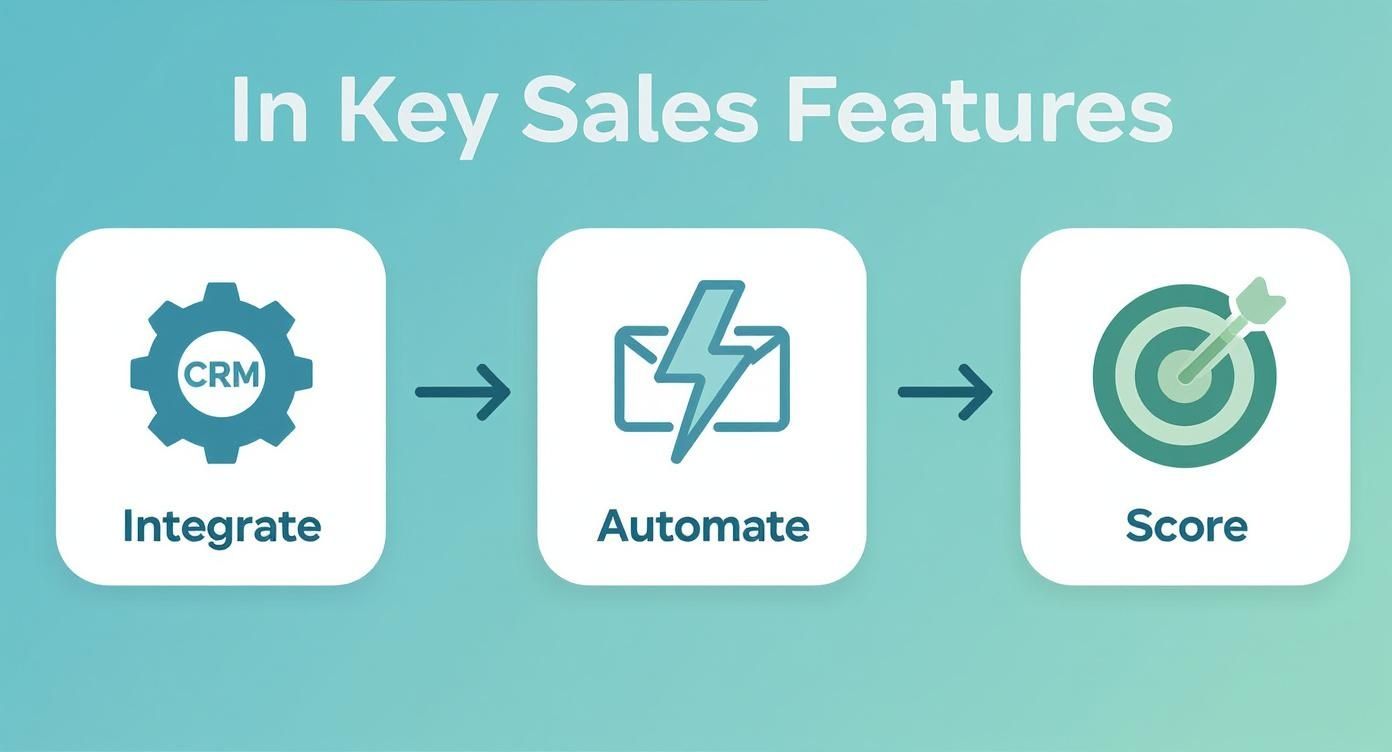
It shows how a connected system can automate crucial touchpoints to guide customers smoothly through the buying journey.
Set Up Your First Automated Workflow
With a goal in hand, it’s time to build your first workflow. An abandoned cart SMS campaign is the perfect place to start. It’s incredibly high-impact and ridiculously easy to set up with a tool like CartBoss. This is a classic example of marketing automation for ecommerce, where a well-timed message can directly rescue a sale.
Here’s what that simple workflow looks like in action:
- The Trigger: A customer adds items to their cart, starts the checkout process by entering their phone number, but then leaves without buying. That action is the trigger that kicks everything off.
- The Delay: You don’t want to seem desperate by messaging them instantly. A short delay of 30 minutes to an hour is perfect. It gives them a chance to come back on their own.
- The Action: The system automatically fires off a personalized SMS. The key is to be helpful, not pushy.
- The Message: Your text should include their name, a friendly reminder about their cart, and a direct link that takes them right back to their pre-filled checkout. Tossing in a small, time-sensitive discount can work wonders for conversion rates.
Here’s a great example: “Hi [Customer Name]! Looks like you left something behind at [Your Store]. We saved your cart for you! Finish your order here: [Link]. Use code SAVE10 for 10% off in the next 3 hours!”
A single workflow like this can start clawing back lost revenue almost immediately after you switch it on. The results are real: companies that adopt these kinds of technologies report a 10-15% bump in operational efficiency and a 5-10% increase in revenue. The connection between automation and growth is undeniable.
By starting with a clear, focused automation, you build a solid foundation. You can watch the results, tweak your messages, and then use what you’ve learned to tackle the next pain point on your list. Step by step, you’ll build a powerful, automated sales engine for your store.
Common Sales Automation Mistakes to Avoid
Sales automation is an incredible tool, but it’s not a magic wand you can just wave over your business. If you get it wrong, you can do more harm than good, making your brand feel cold, robotic, and distant. The whole point is to make your communication more efficient, not to strip out the human element that actually builds trust with customers.
To get the most out of sales automation, you need to know where the common traps are. Being aware of these potential mistakes helps you build workflows that feel helpful and personal, not intrusive or like spam. Let’s break down the most frequent errors we see and, more importantly, how you can sidestep them.
Losing the Human Touch
This is, by far, the biggest mistake people make: over-automating everything. When every single interaction is handled by a machine, your customers start to feel like they’re just another number in your system. This gets really damaging when someone has a complex question or a unique problem that needs a dose of genuine empathy.
Here’s a classic example: A high-value customer just had a terrible support experience. An hour later, they get a generic, automated “just checking in!” email. The message is completely tone-deaf and makes the customer feel totally ignored, which could easily cost you their business for good.
The Fix: Use automation for the repetitive, initial touchpoints, but set up triggers that bring a real person into the conversation at critical moments. A human sales rep could be alerted when a lead visits your pricing page for the third time, or when their engagement score hits a certain level.
Sending Generic, One-Size-Fits-All Messages
The next major blunder is failing to personalize your automated messages. Firing off the same bland text to your entire contact list is a surefire way to get ignored or, worse, marked as spam. And personalization means more than just dropping in a {{first_name}} tag—it’s about making the message relevant to what that specific person has done.
A poorly crafted SMS, for instance, can feel like pure spam. We see this all the time in cart recovery, where generic reminders completely fail to connect with the shopper. To avoid this pitfall, it’s worth learning about the most common mistakes in SMS cart recovery so your messages actually hit the mark.
A simple fix is to use the data you already have to tailor your content. You can personalize based on things like:
- Past purchases: Reference products they’ve bought from you before.
- Browsing history: Mention the specific categories or items they were just looking at.
- Location: Send promotions or offers that are relevant to their city or region.
This level of detail shows you’re actually paying attention and makes your communication feel genuinely valuable.
Answering Your Questions About Sales Automation
Jumping into sales automation naturally brings up a few questions. How much does it cost? Will it make my sales team obsolete? How is it different from the marketing automation tools I already use?
These are all valid concerns, and getting clear answers is the first step. Let’s tackle these common questions head-on.
How Much Does Sales Automation Cost?
The cost of sales automation tools can vary quite a bit, but it’s more helpful to think of it as an investment rather than an expense. Most pricing models fall into a few common buckets.
- Per-User Pricing: Lots of platforms charge a monthly fee for each person on your team using the software. This is perfect for smaller teams or if you’re just dipping your toes in the water.
- Tiered Plans: Many tools offer different plans (like Basic, Pro, and Enterprise) that unlock more features as you go up. This is great because it lets you pay only for what you actually need right now.
- Usage-Based Pricing: Some tools, especially those that send SMS or email, charge based on volume. You might pay per message sent, for example.
While the subscription fee is one part of the equation, the real story is the return on your investment (ROI). Good automation pays for itself over and over by recovering abandoned carts, making your team more productive, and keeping customers coming back. The revenue you gain almost always blows the software cost out of the water.
Will Automation Replace My Sales Team?
This is probably the biggest myth out there, but it comes from a misunderstanding of what sales automation actually does. The short answer is a hard no. Automation isn’t here to replace your talented salespeople; it’s here to make them better.
Think of automation as a ridiculously efficient assistant. It handles all the tedious, repetitive tasks that suck the energy and time out of your team’s day.
Automation does the robotic work so your people can focus on the human work—building relationships, understanding what a customer really needs, and closing complex deals. It frees them up for the high-value stuff that actually drives revenue.
Instead of manually sending follow-up reminders or logging data, your team can spend that time having strategic conversations with potential buyers. Sales automation makes your existing team a supercharged, efficient force—it doesn’t make them obsolete.
What Is the Difference Between Sales and Marketing Automation?
This is a great question. They sound similar and definitely work best when they’re used together, but they serve two very different purposes at different points in a customer’s journey.
Marketing automation is all about the top of the funnel. Its main job is to cast a wide net to attract potential customers and warm them up. Think of it as the machine that generates and nurtures leads at scale. Key tasks include:
- Generating leads with email campaigns and landing pages.
- Sending welcome emails to new subscribers.
- Scoring leads based on how they interact with your content.
Sales automation, on the other hand, kicks in at the bottom of the funnel. It’s designed to help your sales team manage their pipeline and efficiently close the deals that marketing has already teed up. The focus shifts from broad, one-to-many communication to targeted, one-to-one interactions. Its core functions are:
- Managing an active sales pipeline.
- Sending personalized, triggered messages (like an abandoned cart SMS).
- Automating admin tasks for sales reps inside a CRM.
Simply put, marketing automation gets people interested, and sales automation helps your team turn that interest into a sale.
Ready to see how simple, powerful sales automation can transform your store? CartBoss uses automated SMS to recover abandoned carts and turn lost visitors into loyal customers, all on autopilot. Start recovering sales today with CartBoss.