


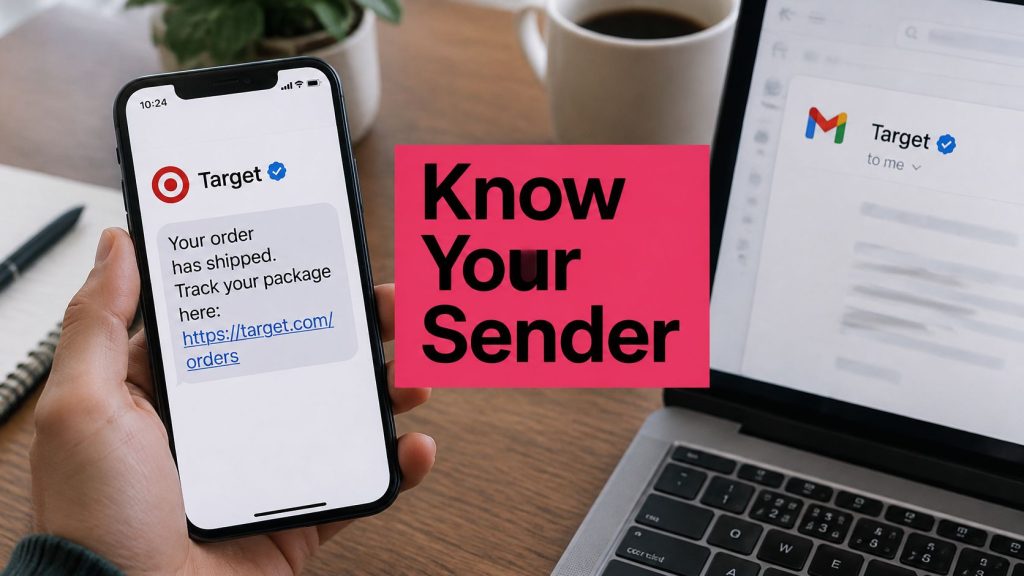
Would a logo beside your From name stop a shopper from treating your cart reminder as spam? Not by itself. A mark only appears after the channel has already checked who you are, and plenty of correct-looking setups still show a blank avatar.
Brand indicators for message identification are the visible signs that a message is yours: a sender name, a logo, or a check mark. They do not replace authentication. They sit on top of it. Email, SMS, and RCS each use a different sign, and each one fails for a different reason. The useful question is which sign your abandoned-cart reminders and order mail can earn.
Table of Contents
- Brand Indicators at a Glance Across Channels
- Why Recognizable Senders Earn Trust and Replies
- How a Logo Gets Attached to Verified Email
- Which Inboxes Display Your Logo and What Happens Elsewhere
- How to Roll Out BIMI Without Breaking Your Mail
- How to Confirm Your Brand Indicator Works
- Register Your SMS Sender ID and RCS Agent
- Set Up Your Sender ID and Opt-Out Rules First
Brand Indicators at a Glance Across Channels
A brand indicator is the visible sign that tells a customer who sent a message, such as a sender name, a logo, or a verification check mark. The aim is the same on every channel. The gate in front of it is not.
| Channel | What the customer sees | Main requirement | Main limit |
|---|---|---|---|
| SMS alphanumeric sender ID | Store name in place of a phone number | Carrier and country registration rules | Up to 11 characters; limited or unavailable for US and Canada traffic |
| RCS verified sender | Logo and check mark inside the messaging app | Verified agent registration | Only RCS-capable phones show it |
| Email BIMI logo | Brand logo beside the sender name | DMARC enforcement plus a VMC or CMC certificate | The mailbox provider decides whether to show it |
SMS alphanumeric sender ID. The handset shows a short store name instead of a phone number. You do not pick that name in the message body alone. A carrier has to accept it under that country’s registration rules. The string stops at 11 characters, and US and Canadian routes often refuse alphanumeric IDs entirely.
RCS verified sender. After the agent is approved, the messaging app can show your logo and a check mark. A phone that cannot run RCS never gets that treatment, so the same campaign looks branded on one device and plain on the next.
Email BIMI logo. BIMI (Brand Indicators for Message Identification) places the logo beside the sender name only after DMARC is enforced and the logo is tied to a Verified Mark Certificate (VMC) or a Common Mark Certificate (CMC). The mailbox still chooses whether to draw it.
Read the row for the channel your cart reminders and order emails already use, and meet that requirement before you redesign anything. Email needs the longest stack, so the next sections stay on BIMI. Text identity is shorter, and the SMS and RCS sender options guide is the companion for that path.
Why Recognizable Senders Earn Trust and Replies
A name badge on a shop door lets a visitor decide in a second whether to step inside, before they read a word on the window. A commercial message works the same way. It answers three questions: who sent this, is it real, and should I act on it.
A 2024 Twilio survey of 3,900 consumers across global markets found that 56% had received branded text messages during the previous year. Among those recipients, 75% said the branding increased their trust. The lift was stronger when the message was verified: 88% of consumers who received a verification badge reported increased trust. The same survey found that 42% had made repeat purchases from brands using trustworthy communication methods.
That is recognition doing commercial work, not decoration. A shopper who left a cart is more likely to recall the visit when the reminder uses the same store name they saw on the product page.
Say the first text arrives from an unknown local number, with a short link and no sign-off. The second uses one store name, the same spelling as the site, and a sign-off the shopper has seen on the receipt. The offer can be identical. Only the second message answers “who sent this” before the thumb moves.
Practical rule: Inconsistent spelling is the fastest way to lose a sender people already trusted.
Pull the last ten cart or browse reminders. Confirm every one uses the same sender name, the same spelling, and the same sign-off. If email is in that mix, the same consistency belongs in the From name, which is part of sound email marketing practice for engagement.
How a Logo Gets Attached to Verified Email
BIMI is an identity-binding layer, not a sticker you upload and forget. The inbox shows a sender-chosen logo only after the message has already passed the checks underneath it.
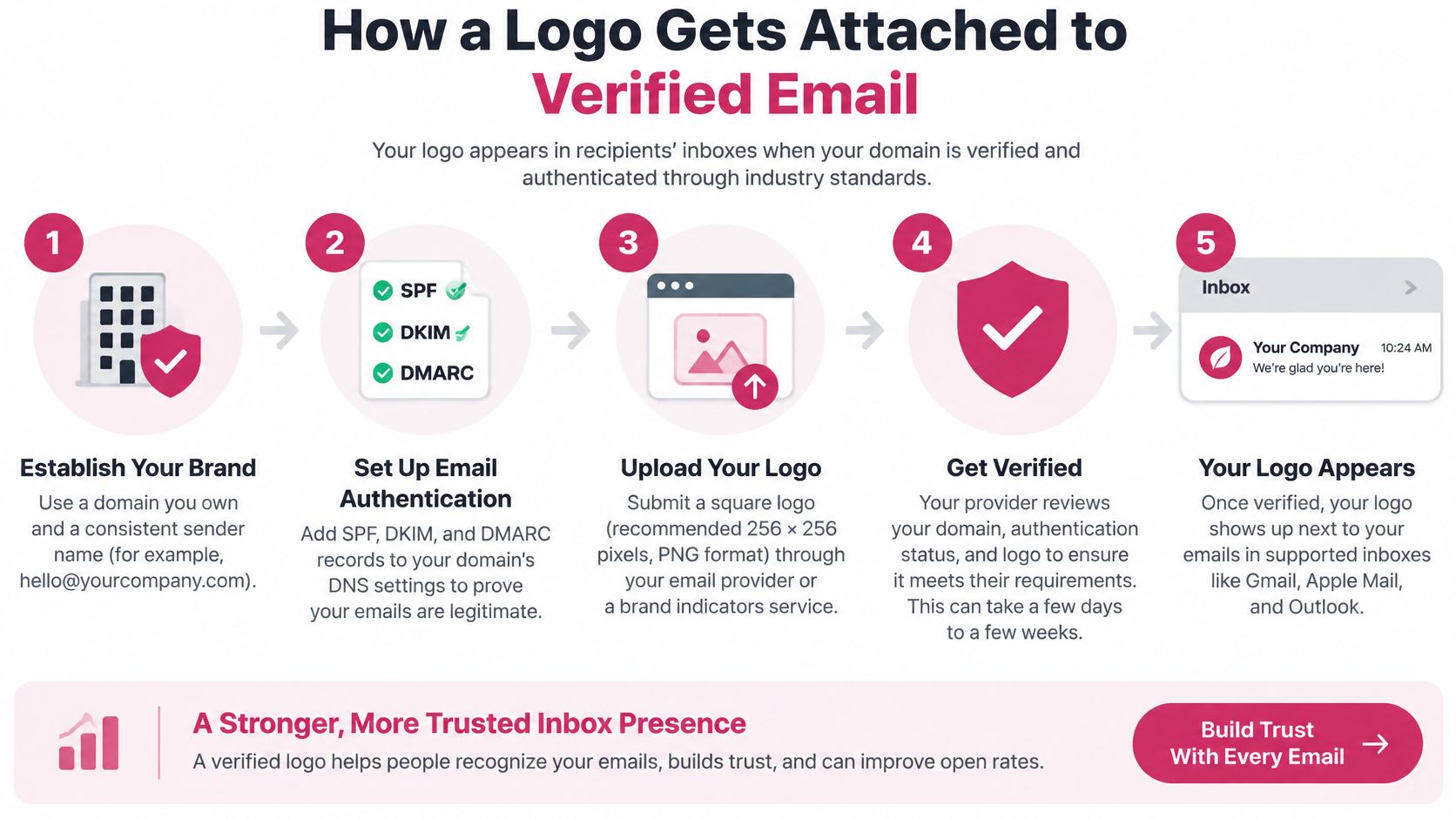
A BIMI logo works like a seal on a notarized letter. The seal carries no weight until the notary’s stamp is on the page. Here the stamp is DMARC. Without it, a clean SVG proves nothing.
The four links
- Domain alignment. SPF or DKIM must validate, and the authenticated domain must align with the visible From domain. That match is what makes it harder for spoofed mail to wear your brand.
- DMARC enforcement. Google’s BIMI requirements for Gmail say the sending domain must use DMARC at
p=quarantineorp=rejectwithpct=100. A policy ofp=noneis not enough. - The BIMI record. A DNS TXT record points at a logo hosted on a stable HTTPS address. It can also point at a mark certificate.
- The mailbox decision. The provider checks authentication and the certificate, then either displays the logo or shows nothing.
Gmail adds a legal ownership check on top of the technical one: the logo must be trademarked, and the claim must be backed by a mark certificate, either a Verified Mark Certificate (VMC) or a Common Mark Certificate (CMC). Which certificate fits depends on the trademark’s standing, but the underlying requirement is the same. You are proving the mark is yours before the inbox will show it.
The failure pattern here is consistent. BIMI does not authenticate the message by itself, and it does not guarantee inbox placement. If any earlier link in the chain is broken, the logo stays hidden no matter how clean the artwork is. Most skipped logos trace back to an aligned domain that was never checked, or a DMARC policy still parked at p=none because nobody wanted to risk the enforcement step.
Use one stable sending domain for receipts, order updates, and cart emails, and confirm SPF or DKIM alignment on that domain before you publish anything visual. The order matters: alignment first, enforcement second, certificate last. Doing it backwards is why so many BIMI records sit in DNS doing nothing.
The walkthrough below shows the same chain in motion, from authentication through to the inbox avatar.
Which Inboxes Display Your Logo and What Happens Elsewhere
Publishing a BIMI record only hands each mailbox provider a file to inspect. Every provider then runs its own checks on authentication, certificate type and sending domain before anything reaches the avatar slot, so display is negotiated inbox by inbox.
Google’s BIMI setup guidance requires DMARC enforced at p=quarantine or p=reject across all traffic, plus a Verified Mark Certificate bound to a trademarked logo, before Gmail will render the mark. A 2025 industry survey cited in that guidance reported that only 5.7% of respondents had implemented BIMI, while nearly 60% had not, and the same material is blunt about the limits: BIMI does not authenticate the message or lift deliverability by itself. Adoption stays low for a reason. The trademark and certificate bar filters out every store that never registered its logo.
| Mailbox provider | Authentication needed | Certificate needed | Logo display |
|---|---|---|---|
| Gmail | DMARC at p=quarantine or p=reject with pct=100 |
VMC tied to a trademarked logo | Shown when every check passes |
| Yahoo | DMARC enforcement at quarantine or reject | Yahoo’s own certificate rules; a VMC Gmail accepts does not carry over automatically | Shown only when Yahoo accepts the certificate |
| Outlook | No published BIMI authentication bar | No published certificate path | Limited or absent in coverage summaries |
| Apple Mail | No published BIMI authentication path | No published certificate path | Treat as unsupported until a live seed message shows the avatar |
What the shopper sees instead
Where the logo fails, the inbox falls back to the From name and the sending address, and that pair becomes the entire visual identity. A recognizable store name beside a clean address still reads as legitimate. A blank avatar beside a generic sending address reads like everyone else’s bulk mail.
Yahoo reviews certificates under its own rules instead of copying Gmail’s, so a mark that renders in Gmail can still come back empty there. Outlook publishes no BIMI route and coverage summaries stay thin, so I would not promise a logo in that inbox. Apple Mail and the long tail of mobile apps sit in the same unverified position until you watch a live seed message arrive.
The logo is also bound to the sending domain. A cart-recovery email that leaves through a partner platform’s authenticated domain cannot borrow the mark you verified on your store domain. If the tool sends as its own domain, the shopper sees that identity.
How to Roll Out BIMI Without Breaking Your Mail
The hard part is risk management, not logo design. Enforcement tells mailbox providers to quarantine or reject mail that fails. If a real sender is missing from SPF or DKIM, receipts, shipping notes, and abandoned-cart emails can vanish with the spoofed ones.
A 2025 DMARC Report industry report estimated that BIMI implementation errors rose 64% year over year. That is what a rushed logo project looks like in the reports. Google and Yahoo both want DMARC at quarantine or reject before they will show the mark, so you inventory senders before you tighten the policy.
- Inventory every sender. List the store platform, order and shipping mail, the support desk, the marketing tool, agencies, and any regional provider. You cannot protect a sender you have not named.
- Check SPF and DKIM for each one. The visible From domain must align with at least one passing method. A tool that “sends as you” but signs a different domain will fail once policy leaves monitoring.
- Stay on
p=noneand read aggregate reports for two to four weeks. Monitoring shows who fails without blocking them. Two quiet weeks is a short window for a small catalog. Four is safer if agencies send on your behalf. - Fix the failures, then move to quarantine and later reject. Raise coverage in steps. Jumping straight to reject is how a multilingual shop loses order mail from a regional ESP nobody documented.
- Publish the BIMI TXT record at
default._bimi.yourdomain, with anl=tag aimed at a stable HTTPS logo and ana=tag aimed at the mark certificate. Do this only after enforcement is real. - Watch logo visibility by provider before you call the project finished. A live record is not proof the avatar renders.
Gmail’s VMC route needs a registered trademark. A CMC can widen eligibility when you do not have that mark, which is why certificate choice belongs in the plan, not as an afterthought from a designer. Sender health still decides whether authenticated mail is wanted. Keep an eye on sender reputation while you tighten policy, because a logo cannot repair a domain mailbox providers already distrust.
A logo can make a broken sending setup look more official and harder to diagnose. Fix the senders first.
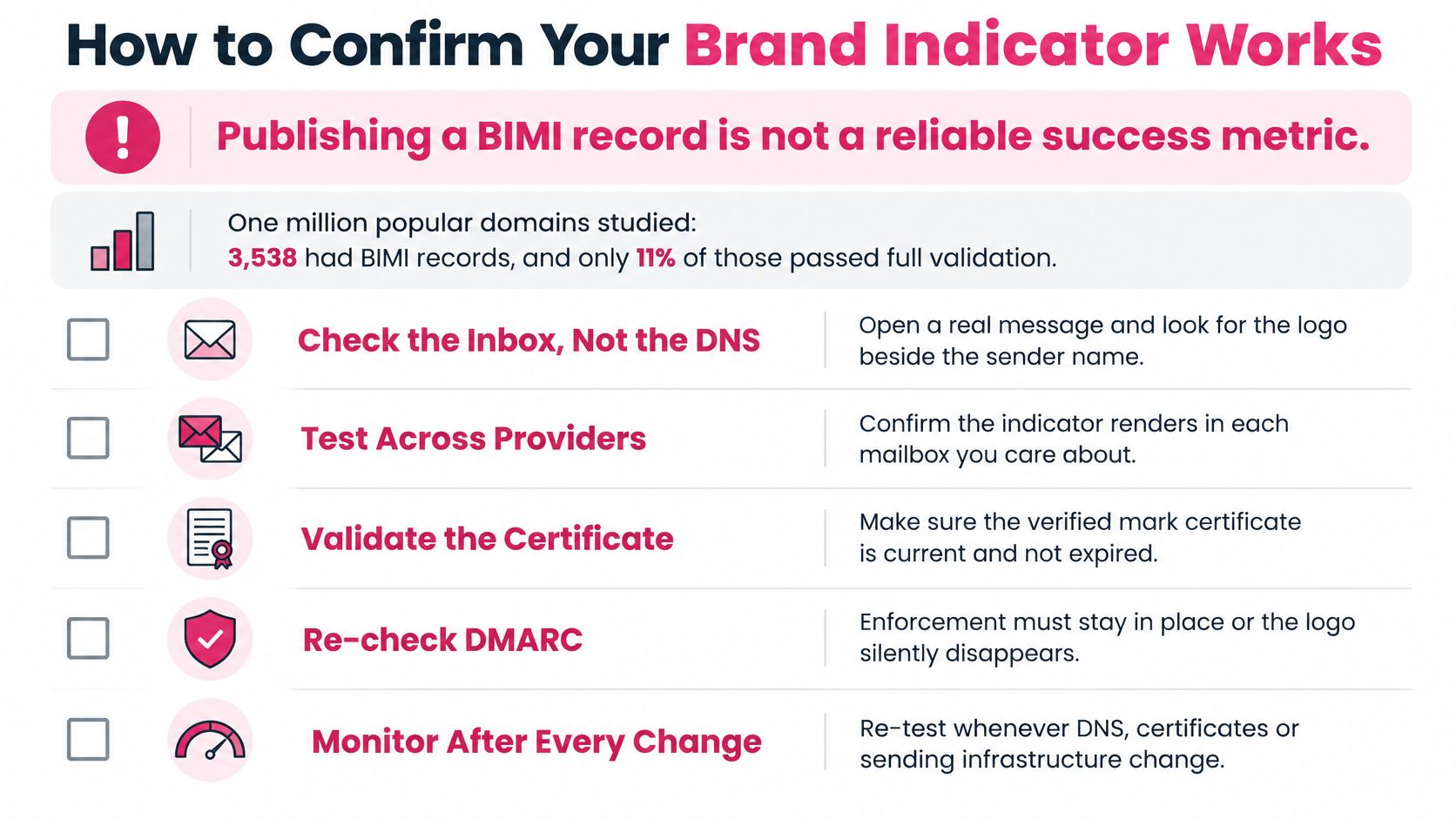
How to Confirm Your Brand Indicator Works
Publishing a BIMI record is not a success metric. A peer-reviewed study of one million popular domains found 3,538 domains with BIMI records, but only 11% of those configurations had both a valid logo image and a Verified Mark Certificate. Among domains that had configured a VMC, DMARC was present on 99.5%. Certificate procurement and enforcement are the completion checkpoints. Measure each layer on its own.
| Check | How to test it | Pass condition |
|---|---|---|
| Logo retrieval | Fetch the l= URL over HTTPS | Valid image loads with no redirect errors |
| Certificate status | Check the a= certificate for validity and expiry | Certificate is valid, unexpired and matches the logo |
| DMARC alignment | Review DMARC aggregate reports | Most sending volume passes with alignment |
| Mailbox display | Send seed messages to test accounts at each provider | Logo appears where the provider supports it |
Run the checks in order
Logo retrieval is a fetch, not a screenshot of your homepage. Open the l= address over HTTPS and confirm the file loads with no redirect loop and no login wall.
Certificate status is next. The a= certificate should be valid, unexpired, and matched to that logo. An expired file fails without warning.
DMARC alignment comes from aggregate reports, not from one test send. Most of your real volume has to pass with alignment. A seed that you mailed from a perfect subdomain can hide a shipping tool that still fails.
Mailbox display is the only check a customer would recognize. Send seeds to test accounts at Gmail and at the other providers on your list, and write down where the logo appears.
Log the result per provider. A logo in Gmail and a plain avatar in another inbox is a finding, not a failed project. Re-test when DNS, the certificate, or the sending platform changes, because the avatar disappears without a bounce.
Register Your SMS Sender ID and RCS Agent
Text indicators are registrations, not DNS records. The opening comparison named the gates. These are the steps a store completes, including the wait.
- Check the country before you design the name. Alphanumeric sender IDs are allowed only where that country’s carriers permit them. For US and Canadian traffic, expect a block or a hard limit. Plan a registered toll-free or 10DLC number, and put the store name in the message body so the shopper still sees who wrote.
- Pick a name of 11 characters or fewer that matches the store exactly. Register it through your messaging provider. The provider submits it for carrier approval. A clever abbreviation that does not match the shop loses the recognition you wanted.
- Write down the approved name and the countries it covers. A later spelling change can force a new review. Treat the approved string as production copy, not a draft.
- Register the RCS agent separately. Give the RCS provider your logo, brand name, and a support contact. Wait for approval before any campaign promises a check mark. An unverified agent shows only the plain sender.
- Test one RCS-capable phone and one phone without RCS. Note both screenshots in the launch file. Approval windows differ by carrier and country, so put that wait on the calendar before you announce the flow.
More detail on naming and registration sits in the SMS sender ID guide. Do not schedule a holiday cart campaign for the day you submit the name. Schedule it for after the carrier says yes.
Set Up Your Sender ID and Opt-Out Rules First
If the store sends abandoned-cart texts, I would fix the SMS sender name first. That is the line shoppers see on the channel where they open reminders. Our SMS reminders have a 99% open rate, which is wasted if the name looks like a stranger. Move to the email logo only after that name is stable.
- Use one store name everywhere, including the SMS sender ID where carriers allow it, the email From name, and the logo.
- Confirm email authentication is enforced before you add a BIMI record. A logo on a domain still at monitoring will not stick.
- Put an opt-out notice in every marketing message. It has to explain how recipients can avoid future messages, and it has to state that any opt-out method not expressly provided is unreasonable. Still honor the method you did publish, including a reply that uses it, not only a keyword buried in a footer.
- Do not send marketing messages at unlawful hours, including between 9 p.m. and 8 a.m. in the recipient’s time zone.
- Never message someone who has opted out. Continued texts read as spam, and they undo the trust the sender name was meant to build.
Keep the store’s own message text in the platform you control so the sender name does not drift when a template is swapped. The SMS compliance checklist is the place to tick notice, timing, and opt-out before the next send.
This week, open the channel your cart reminders use and confirm the sender name matches the store, character for character.
CartBoss sends automated cart-recovery SMS with your own sender name in supported countries, so the reminder looks like the store the shopper just left. Pair that name with a real opt-out and quiet hours, and the message stays recognizable instead of looking like spam. See how branded recovery works at CartBoss.