

Merchants sent 110% more automated web push messages year over year in the first half of 2023, according to Omnisend’s analysis of 129 million ecommerce web push notifications. That’s evidence of adoption, not proof that sending more messages creates more profit. For store owners, the practical limits on push revenue are often simpler: can shoppers finish checkout, and will they still welcome the next notification?
Effective push notifications for ecommerce connect a useful event to a working destination. Start with the right channel, earn permission, and give every campaign a trigger, a send cap, and a result measured against shoppers who didn’t receive it.
Table of Contents
- Push Notifications Compared With Email and SMS
- Choose an Implementation Path for Push
- How to Set Up Web Push Permission Correctly
- Why Shoppers Abandon Carts and What to Fix First
- Which Triggers Recover Carts and When to Send Them
- How Many Messages Are Too Many and How to Word Them
- How to Measure Push Results Beyond Clicks
- Launch Your First Push Campaign This Quarter
Push Notifications Compared With Email and SMS
Push notifications are short alerts sent to shoppers who’ve opted in on a device. They suit quick, behavior-linked updates rather than detailed explanations.
Push, SMS and email compared on the same criteria
| Channel | Consent needed | Benchmark engagement | Best use |
|---|---|---|---|
| App push | OS permission inside the installed app | 3.05% click-through on iOS, 3.78% on Android, ecommerce, Pushwoosh | Browsing, price and stock signals |
| Web push | Browser permission, no email address needed | Measure clicks per delivered notification | Back-in-stock and on-site behavior reminders |
| SMS | Explicit SMS consent | CartBoss SMS reminders have a 99% open rate | High-intent cart recovery |
| Email address and marketing consent | Measure clicks and orders using your email platform | Long content, receipts and detailed offers |
The app-push figures are contextual benchmarks, not promises for your store. Their measurement period and limitations matter when interpreting results.
An app installation and a browser subscription aren’t interchangeable. App push requires your app, while web push can reach an opted-in browser without collecting an email address. SMS requires separate text-message consent; browser permission doesn’t authorize it.
U.S. ecommerce brands sent 2.5 times more push notifications in 2024 than in 2023, according to Omnisend’s analysis of 11 billion marketing messages. That increase doesn’t establish which channel generated the most incremental profit.
Assign a job before choosing a winner
Use push for a requested stock alert or relevant price change. Reserve SMS for an identified, high-intent abandoned cart, and use email when shoppers need delivery details, product comparisons, or a longer offer.
Our SMS versus push notification guide explains the channel differences. For the financial comparison, ECORN’s guide to measure ecommerce SMS marketing ROI provides a useful framework for evaluating SMS alongside other channels.
Comparison rule: An open rate and a click-through rate measure different actions. Don’t rank channels by placing them side by side as though they’re equivalent.
Choose an Implementation Path for Push
Choose the implementation that matches the audience you can reach. Building app infrastructure won’t help much if your customers shop exclusively through a browser.
| Path | What you need | Strongest fit |
|---|---|---|
| Native app push | Mobile app, notification SDK, OS permission, event tracking | Stores with an established app audience |
| Web push | Service worker, push provider or server, browser opt-in button | Stores without an app, especially for requested product alerts |
| SMS or unified messaging platform | Phone-number collection, SMS consent, cart and order integrations | High-intent recovery and coordinated messaging |
Native app push makes sense when shoppers already use your app and logged-in activity supplies reliable product and cart signals. The implementation should open the relevant app screen, not launch the app’s home screen.
Web push lets you start without building an app. A product-page stock-alert button gives visitors a concrete reason to subscribe, while the service worker handles incoming notifications.
SMS isn’t a form of push. It’s an alternative implementation path for the recovery job, often with ready-made ecommerce integrations.
Check the integration before committing
Ask the person implementing your system to demonstrate these capabilities:
- Consent capture: Show exactly what shoppers accept and where that choice is recorded.
- Event access: Confirm the integration receives cart changes, product availability, and completed orders.
- Checkout links: Open a saved cart from a test notification on a mobile device.
- Reporting: Separate permission, delivery, clicks, and purchases instead of combining them into an engagement score.
We cover the SMS cart-recovery path at CartBoss and offer an ROI calculator for evaluating it against your current setup. Compare implementation effort, reachable customers, and expected profit, not just the length of a feature list.
How to Set Up Web Push Permission Correctly
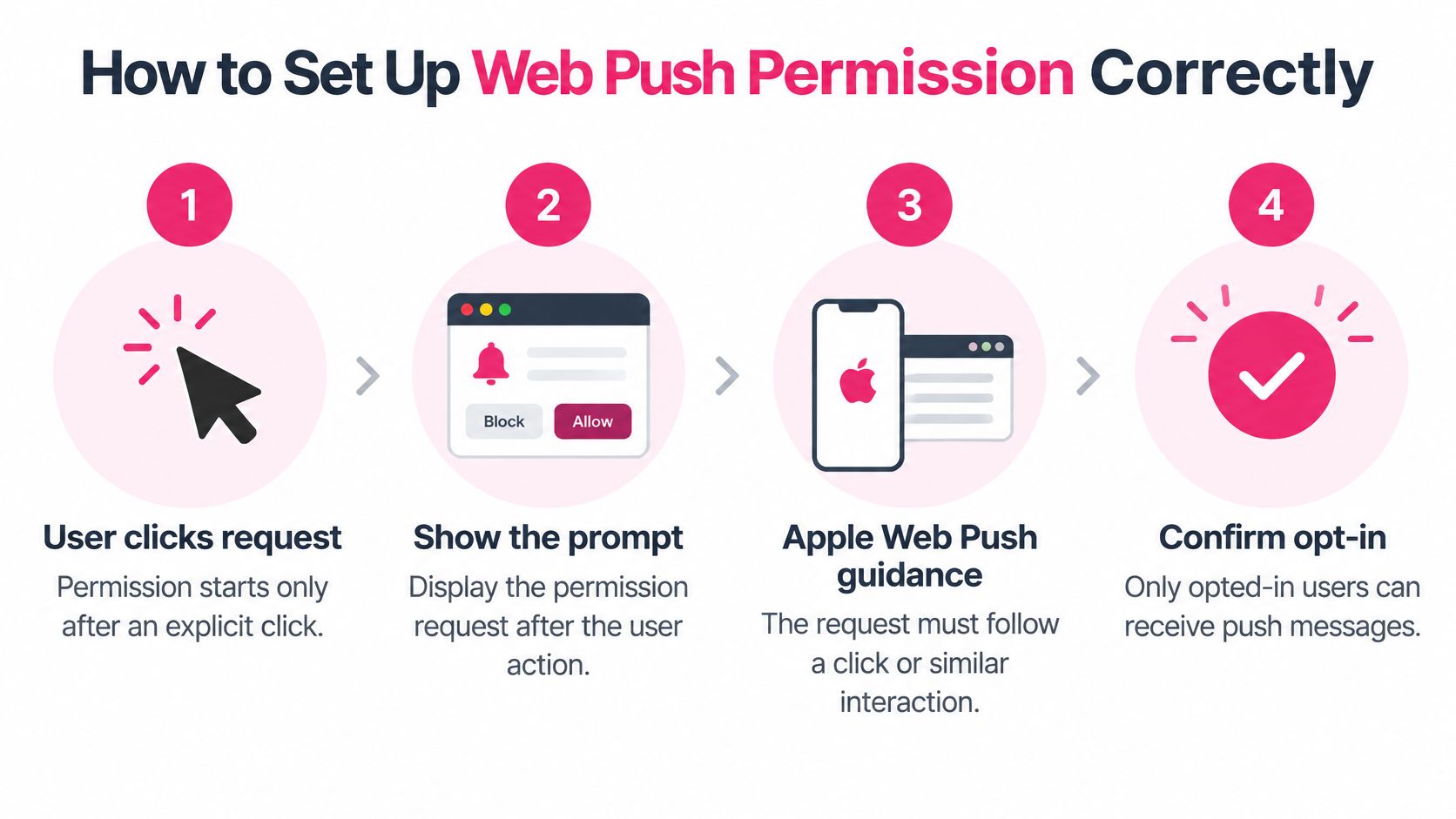
Permission starts with an explicit user action. Apple’s Web Push implementation guidance requires the subscription request to follow a gesture, such as a click or tap, with the subscription method invoked immediately inside that gesture’s event handler.
Give shoppers a reason to take that action before showing the browser prompt.
Build the permission flow
-
Explain the benefit beside the button. For example, use button text such as Notify me when this item is back. Describe the notifications shoppers will receive, rather than asking for unrestricted access to their attention.
-
Place the button on a relevant product or cart page. Don’t interrupt a first-time visitor before they’ve found anything worth following.
-
Request browser permission after the click. Keep the subscription call inside the button’s event handler so the permission request remains connected to the shopper’s action.
-
Register the subscription endpoint and encryption keys on your push server. Protect these records and remove invalid subscriptions when the delivery system identifies them.
-
Install and test the service worker. It should receive the push message and display the notification through the Notifications API, rather than treating receipt as a silent tracking event.
-
Associate the subscription with the appropriate browser or shopper record. Don’t assume someone using another device has granted permission there too.
-
Test the complete journey. Accept permission, receive a notification, follow its destination, and cancel the subscription on every supported browser and device.
Safari doesn’t support invisible push notifications. Display notifications immediately after the service worker receives them, otherwise Safari can revoke the site’s push permission.
Add a consent record and an exit
Record the opt-in time, wording, and notification categories selected. Honor unsubscribes immediately and review applicable requirements, including GDPR in Europe and TCPA for SMS in the United States, with qualified compliance support. Browser permission alone isn’t a complete compliance program.
Give shoppers a plain notification-management or cancellation link in every message where the format supports it. For push interfaces without an inline link, provide a clearly labeled management action and an accessible preferences page.
Before launch, verify:
- Consent text: The benefit and message categories are understandable.
- Button placement: The request follows relevant customer interest.
- Saved subscriptions: The server stores the correct endpoint and keys.
- Device delivery: A test notification appears and opens the intended destination.
Why Shoppers Abandon Carts and What to Fix First
Unexpected costs are a checkout problem before they’re a messaging problem. A reminder can bring someone back, but it can’t make an undisclosed shipping charge feel acceptable.
Baymard’s synthesis of 50 ecommerce studies puts average cart abandonment at 70.22% and identifies unexpected additional costs, forced account creation, and complicated checkout as abandonment reasons.
Abandonment barriers and the fix to make first
| Barrier | Share of shoppers | Fix before sending |
|---|---|---|
| Unexpected shipping or tax costs | 40% | Show full costs before checkout |
| Forced account creation | 18% | Offer guest checkout |
| Checkout too long or complicated | 17% | Open the saved cart in a shortened checkout |
| Preferred payment method unavailable | 9% | Add the payment options shoppers use in the target market |
| Just browsing, not ready to buy | 42% of U.S. shoppers, previous three months | Send an informative reminder with no discount first |
The payment-method finding comes from Baymard’s checkout usability research, which also rates 65% of sites as mediocre or worse. The browsing figure comes from Baymard’s report on shoppers who abandoned within the previous three months.
These reasons aren’t mutually exclusive, and the percentages shouldn’t be added together. They also don’t reveal why a particular visitor left. Use them to prioritize checkout improvements, not to label individual shoppers without evidence.
Test the destination before increasing sends
Run a checkout rehearsal from the actual notification link:
- Device coverage: Test iOS and Android, including the browsers your customers use.
- Session state: Complete checkout as both a logged-in customer and a guest.
- Discount behavior: Confirm eligible codes apply correctly and expired codes fail clearly.
- Inventory changes: Check what happens when an item sells out or a selected variant disappears.
- Cart expiration: Open links after the original cart has expired.
- Failure records: Log problems by device, browser, and payment method.
Our guide to shopping cart abandonment reasons can help you organize that audit.
A notification that opens a broken checkout doesn’t recover the customer. It asks them to encounter the same problem again.
Make the landing experience ready before increasing reach. A strong click rate can coexist with weak revenue when shoppers can’t pay, lose their selected products, or discover extra costs at the final step.
Which Triggers Recover Carts and When to Send Them
Trigger timing for ecommerce push and SMS messages
| Trigger | Delay | Purpose | Incentive |
|---|---|---|---|
| First abandoned cart reminder | 15 minutes after leaving, CartBoss SMS | Return to the exact cart | None |
| Second abandoned cart reminder | 3 hours after leaving, CartBoss SMS | Answer hesitation | Discount if still unpurchased, CartBoss |
| Browse abandonment | After a defined inactivity window | Show the viewed product | None |
| Back-in-stock alert | When requested inventory becomes available | Notify on customer request | None |
| Post-purchase follow-up | At the relevant order-status event; related products later | Order status and related products | None |
Our SMS schedule is a starting model, not a proven optimal schedule for web push. Set browser-message timing according to your buying cycle, quiet periods, and test results.
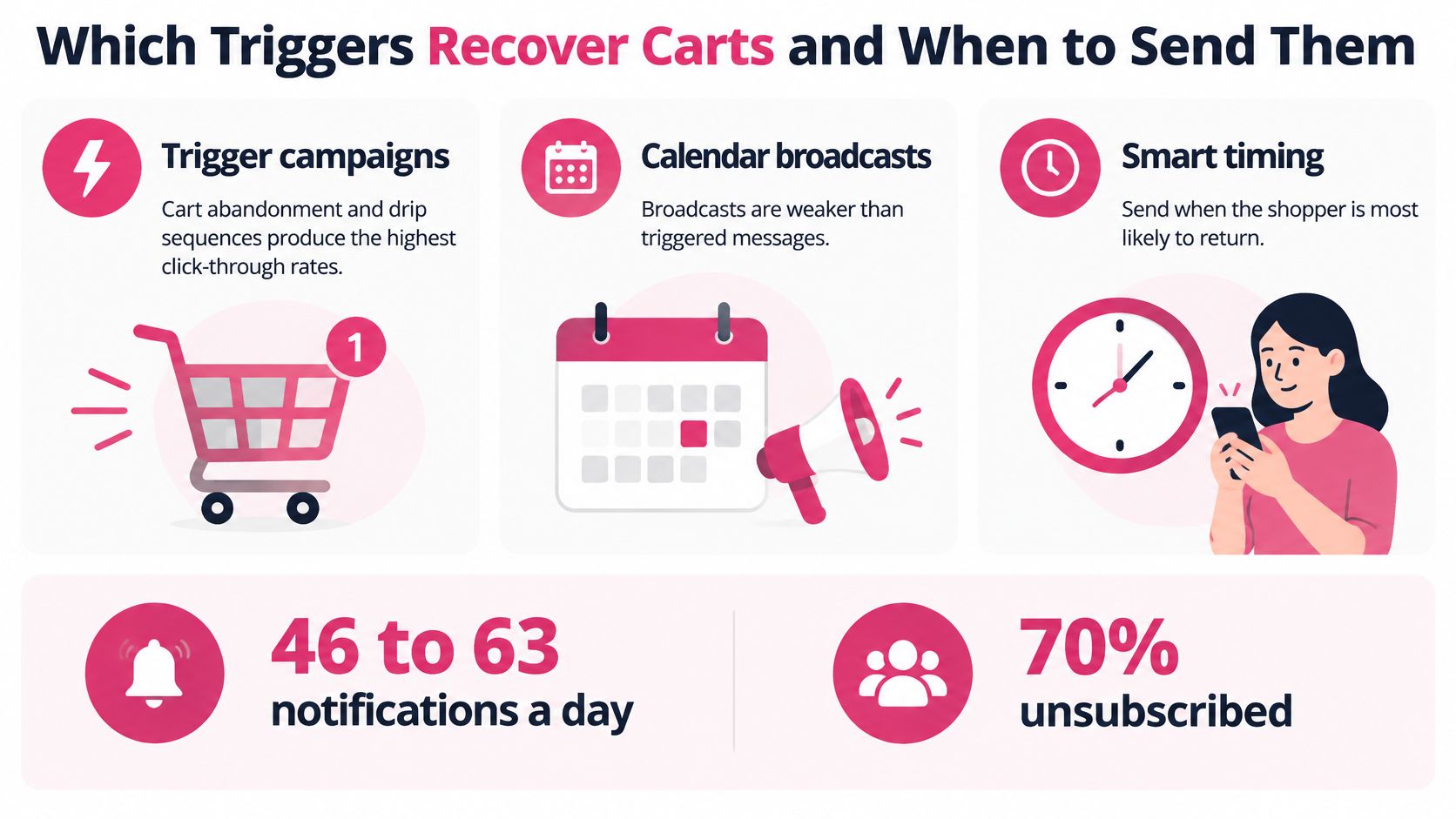
PushEngage’s benchmark discussion identifies trigger campaigns, including cart abandonment and drip sequences, as the highest-clicking campaign types and cites retail-app targeting results reaching 10.36% click-through, compared with under 1% for basic demographic targeting. Those comparisons support testing behavior-based relevance, but they don’t prove the same uplift will occur in your store.
The recovery flow should respond to customer intent rather than a promotional calendar.
Build a staged recovery sequence
-
Reminder: Preserve the cart and give shoppers a direct route back. Example copy: Your saved linen shirt is ready when you are. Return to your cart.
-
Reassurance: Add information that helps an undecided shopper, such as delivery estimates, returns terms, or support access. Don’t claim you know why they left.
-
Selective incentive: Test an offer for engaged non-buyers, then evaluate whether additional profit exceeds the discount cost. A click doesn’t automatically justify a coupon.
For timing decisions, use our abandoned-cart timing guide alongside your own purchase-lag reports. If recovery creates product questions, arrange timely support responses too. Exerta’s guidance on how to protect paid social spend with timely replies is useful for coordinating that handoff.
Define event rules and send caps
Emit abandonment only after a defined inactivity window. Save cart and product identifiers, and populate the exact item, current price, image where supported, and checkout link.
Start with one browse reminder per browsing episode, one alert per requested restock, and a capped cart sequence shared across channels. Send order-status notifications only when the status changes; treat related-product offers as promotional messages.
Stop recovery after purchase, unsubscribe, or repeated non-engagement. Evaluate each trigger against its own randomized holdout so a successful stock alert doesn’t hide an unprofitable browse campaign.
How Many Messages Are Too Many and How to Word Them
Anstrex’s 2025 coverage of notification consent reports that smartphone users may receive roughly 46 to 63 notifications a day, and that 70% reportedly unsubscribed from at least one brand during the previous 90 days because of excessive messaging. It also cites a BFCM analysis averaging 8.6 push notifications during the core week, about twice the normal weekly baseline.
These are warnings about attention, not universal frequency limits. A shopper requesting a stock alert has different expectations from someone receiving another general promotion.
Notification overload can make otherwise relevant messages unwelcome.
Set a shared contact policy
- Reserve push for useful signals: Browsing, price, stock, and order status.
- Cancel redundant recovery messages when a customer converts.
- Set a weekly promotional ceiling: Start conservatively and adjust through testing, not by copying peak-season send volume.
- Let customers choose categories and quiet hours. Apply the budget across push, email, and SMS rather than letting each team spend the same attention separately.
Use our frequency-capping guide to turn those decisions into operational rules. More sends can reduce future revenue if shoppers withdraw permission.
For an additional perspective on notification strategy, consider the accompanying video.
Match framing to the purchase
A 2025 experiment published through Atlantis Press found benefit framing improved purchase intention more than loss framing for functional products, but only when privacy attention was low. That’s a conditional finding about intention, not proof of completed sales.
| Product context | Starting message approach | Avoid |
|---|---|---|
| Routine or functional | Clear utility or a genuine price drop | Manufactured urgency |
| High-ticket | Compatibility, delivery, support, reassurance | Pressure before questions are answered |
| Health-related or personal | Neutral wording and clear data-use explanations | Sensitive details on a lock screen |
Test urgency and reassurance by region and customer relationship. Use scarcity only when inventory or offer conditions clearly support it.
How to Measure Push Results Beyond Clicks
Pushwoosh measured average ecommerce and retail app click-through rates of 3.05% on iOS and 3.78% on Android between Q4 2024 and Q2 2025, across more than 600 apps, according to MobiLoud’s compilation of push benchmarks, compared with all-industry averages of 1.71% and 2.75%, respectively.
Treat those as baselines, not targets. Device mix, permission rates, timing, and relevance change results, and a rate calculated per notification sent isn’t equivalent to one calculated per notification viewed.
Push metrics to track and the decision each one supports
| Metric | Measures | Decision it supports |
|---|---|---|
| Permission request views | Shoppers who see the opt-in prompt | Whether the prompt is seen at all |
| Permission grants | Shoppers who accept | Opt-in wording and placement |
| Active subscriptions | Browsers or devices able to receive messages | Real audience size |
| Delivered notifications | Messages accepted by the browser or device | Delivery problems |
| Clicks | Shoppers who tap through | Message relevance |
| Checkout sessions | Clicks that reach checkout | Landing-page or checkout friction |
| Completed orders | Purchases from recipients | Recovery effect when compared with a holdout |
| Incentive cost | Discount value given away | Profit impact |
| Revenue per recipient | Incremental revenue divided by recipients | Overall program value |
A delivery receipt doesn’t establish that someone read the message. Likewise, a purchase after a notification doesn’t establish that the notification caused it.
Run a randomized holdout test
-
Randomly withhold messages from a share of eligible shoppers. Assign shoppers consistently so they don’t move between treatment and control during the sequence.
-
Send to the remaining eligible shoppers using the same trigger and eligibility rules. Keep other marketing exposure as comparable as practical.
-
Compare completed orders and profit per eligible shopper. Include discounts, message costs, and relevant fulfillment costs, not just attributed sales.
-
Within the messaging audience, test a no-discount reminder against a friction-reducing benefit, such as guest-checkout instructions or restored cart details. Change one major element at a time.
-
Track time to purchase. A message might accelerate an order without creating an additional purchase, which matters when interpreting short reporting windows.
Measurement safeguard: Keep the same conversion window and denominator for treatment and holdout groups.
Use our guide on how to calculate marketing ROI to connect incremental results to spending. Judge the program by completed orders, profit per recipient, and time to purchase, never by clicks alone.
Launch Your First Push Campaign This Quarter
-
Validate permission on supported devices. Assign an owner to test the opt-in, notification display, destination, and unsubscribe journey before any production send.
-
Fix checkout blockers, beginning with unexpected costs and forced account creation. Keep a release checklist so later storefront changes don’t reintroduce those problems.
-
Launch an informative abandoned-cart reminder without a discount. Use the selected product and a working cart destination, with no invented scarcity or unexplained urgency.
-
Add a second reminder with an incentive only for engaged shoppers who haven’t purchased. Configure eligibility deliberately rather than giving every abandoned cart the same offer.
-
Activate frequency caps and suppression. Check that completed orders and unsubscribes cancel queued recovery messages, including messages scheduled through another platform.
-
Run a holdout experiment. A four-week pilot is a practical planning window, not a guarantee of enough evidence; extend it if eligible traffic or completed orders are too limited to support a decision.
Decide what deserves expansion
SMS can complement web push for high-intent recovery because the channels reach separately consented audiences at different moments. Our automated SMS process starts with an early cart reminder, while reminder timing can be scheduled to suit your audience.
Before committing more budget, estimate the economics using realistic inputs from your store. Include reachable abandoned carts, expected incremental recovery, contribution margin, and messaging cost. Don’t substitute an industry click rate for an expected purchase rate.
Scale when completed orders and profit per recipient beat the holdout with credible evidence. If results don’t improve, pause expansion and inspect checkout failures, audience eligibility, and discount costs. Widen the audience only after the first trigger demonstrates value without an unacceptable increase in opt-outs.
CartBoss offers automated SMS cart recovery for Shopify and WooCommerce, plus free tools including a Cart Abandonment Rate Calculator, a Klaviyo SMS Savings Calculator, and an SMS Cart Recovery ROI Calculator. Visit CartBoss to estimate your recovery opportunity, then use that estimate to plan a measured SMS and push program around profitable completed orders.