


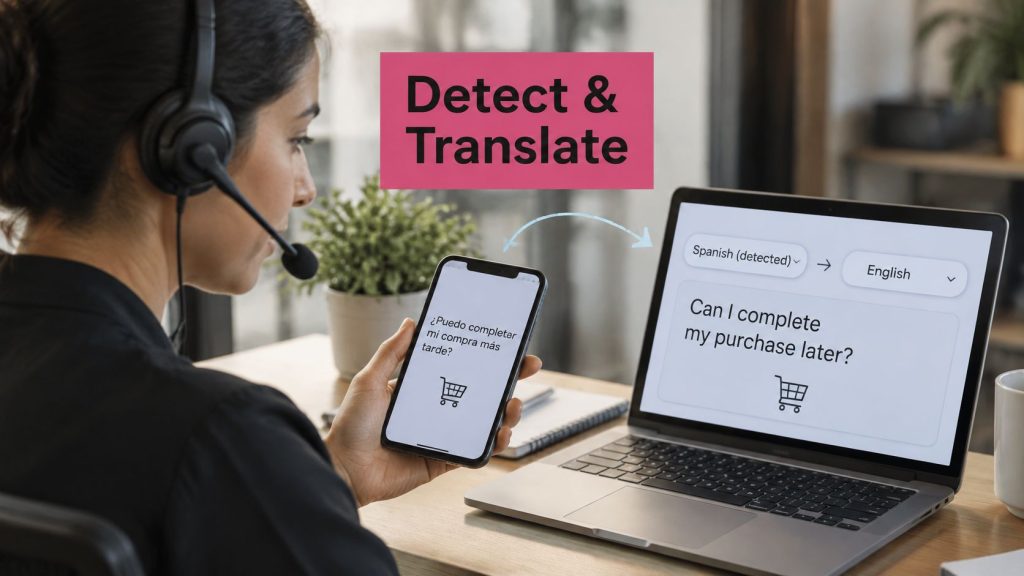
A checkout note arrives in Spanish. The next cart reply mixes French with English product slang, and your support agent needs an English version before answering. Auto-detect looks convenient until a short product name gets mistaken for the shopper’s language.
To auto detect language and translate to English reliably, you need more than a translated text box. You need a decision about when to trust the language label, when to ask for review, and what must never change in translation.
Table of Contents
- Why Cart Texts Need a Language Check First
- How to Auto Detect Language and Translate to English
- Detection Accuracy Across Close Languages
- Handling Mixed, Short, and High-Stakes Messages
- Run the Workflow With Common Tools
- Start Recovery in the Shopper Language
Why Cart Texts Need a Language Check First
Say you sell handmade pottery internationally. A shopper leaves a delivery question in Spanish, while another replies to a recovery message in French with an English collection name. Your team needs to understand both without rewriting the product name or confusing a delivery question with permission to send promotions.
The commercial opportunity is substantial. Translated’s checkout-localization overview reports Baymard Institute’s average cart-abandonment rate at about 70% and illustrates how recovering 3% of otherwise-lost carts from 10,000 checkout attempts would produce 210 additional orders, before accounting for average order value.
That’s a scenario, not a revenue forecast. Language may be one source of friction, but shipping costs, payment problems, and shoppers who aren’t ready to buy still need separate attention.
Separate the internal translation from the shopper message
The operational job is straightforward: identify the source language, retain a confidence score, and translate into English only after accepting that language decision. The English version supports the agent queue, reporting, and campaign analysis.
The shopper-facing message has a different job. It should remain in a language the shopper understands, with localized checkout instructions and clear terms. Language localization covers more than translating the reminder headline.
Keep these elements intact across both versions:
- Offer conditions: Preserve eligibility, exclusions, and expiry wording.
- Money: Keep the amount and currency attached to each other.
- Checkout instructions: Retain the correct destination and action.
- Permission wording: Preserve consent disclosures and unsubscribe instructions.
Measure orders, not translation activity
Test a localized recovery message against your store’s default-language approach. Keep a holdout group so you can distinguish incremental purchases from customers who would have returned anyway.
Track delivered messages, click-through rate, completed purchases, revenue per recipient, and unsubscribe rate by language or country. A campaign can generate more clicks without recovering more profitable orders.
Practical rule: A readable English translation is useful to your team. A correctly localized recovery journey is what you should test for commercial value.
Don’t let a neat language tag become the success metric. Short, informal messages need an uncertainty path before they enter an automated sending workflow.
How to Auto Detect Language and Translate to English
Build the workflow around an accept-or-review decision. Every message either clears the confidence bar or routes to review, and the original shopper text stays attached to every processed version so a human can always inspect what was written.
This process overview is useful for mapping the handoffs between detection, translation, and routing.
Prepare the text and make the language decision
-
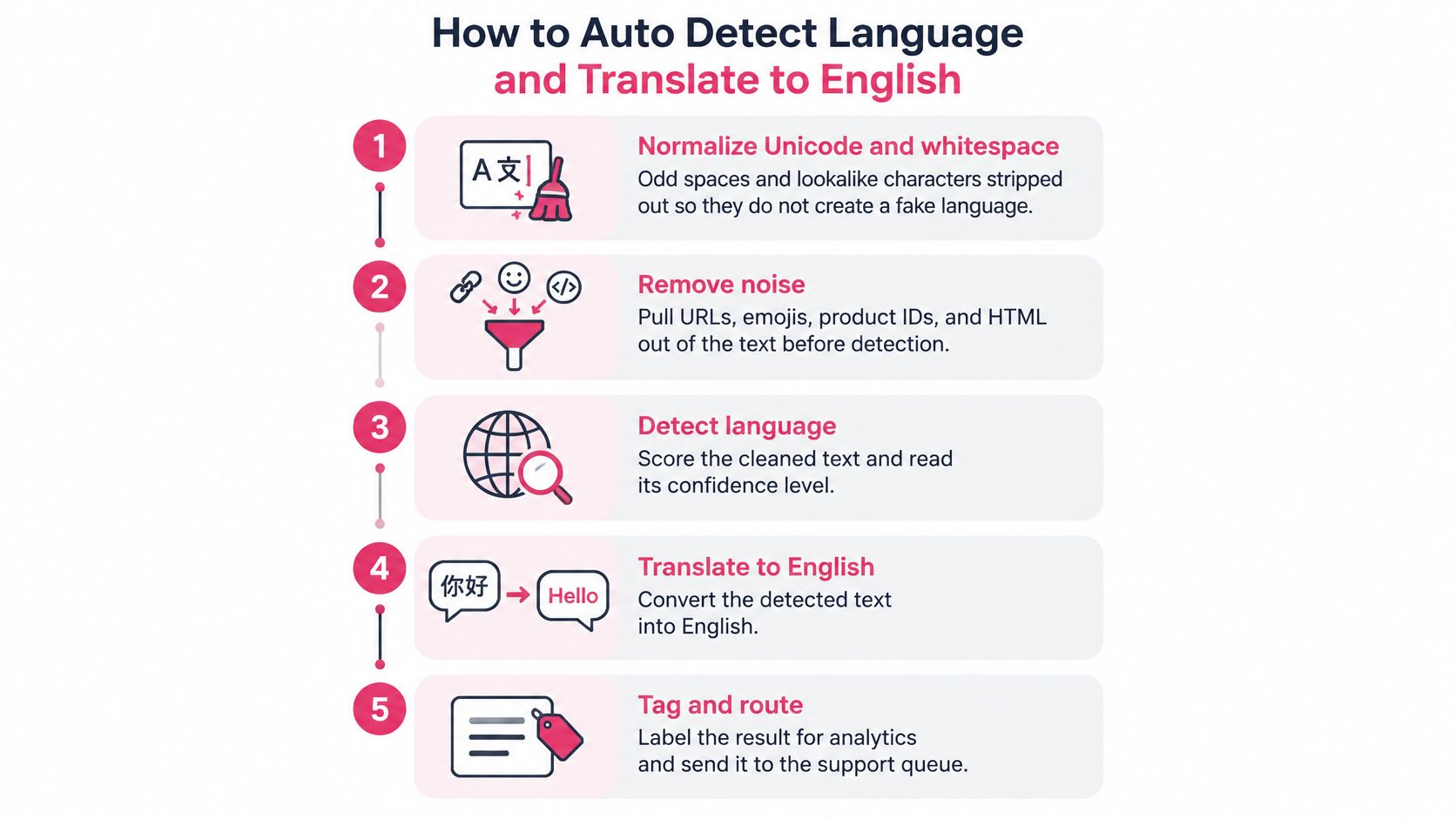
Normalize Unicode and whitespace. Apply consistent Unicode normalization, collapse accidental repeated spaces, and handle invisible formatting characters. Don’t strip accents indiscriminately or convert visually similar letters across scripts, because those differences can carry genuine language information.
-
Pull URLs, emojis, product IDs, and HTML into a separate field. Replace protected content with stable placeholders rather than deleting it permanently, and keep the original order so you can restore every item accurately.
-
Run character n-gram language identification. Feed the cleaned linguistic text into a detector such as fastText. If nothing meaningful remains after removing a URL and a product code, return unknown. A label invented from an empty string is worse than no label.
-
Store the strongest candidate and the runner-up. Record their scores and the gap between them, along with the detector version. A top label alone hides whether the alternative was almost equally plausible, and that gap is what tells a reviewer how much trust the tag deserves.
-
Apply the confidence gate. If the score is weak, the gap is small, or the message lacks context, assign unknown/ambiguous. Route those cases to a fallback detector or bilingual review, with cutoffs calibrated against your own reviewed messages.
Detector choice matters. An ACM-indexed language-identification comparison reports 83.05% accuracy for a fastText-based workflow versus 74.74% for CLD3 on 50,000 examples. Real cart replies introduce names, slang, typos, and code-switching, so test conditions are a poor substitute for running both detectors against a sample of your own messages before you set the gate.
Translate, restore, and inspect
-
Translate to English after selecting the source language. Pass the accepted language explicitly when the translation tool supports it. Letting a second automatic stage make its own source-language decision adds a second failure point.
-
Restore placeholders, numbers, currency, and brand names exactly. Check that every protected token appears in the output as expected. If a token disappears or appears twice, reject the output rather than filling the gap by guesswork.
-
Log the decision and corrections. Retain detector confidence, fallback usage, untranslated spans, and human edits. Break down errors by language, message length, script, and mixed-language status so aggregate accuracy doesn’t conceal a weak market.
For a visual companion to the workflow, use the video below.
Don’t interpret a detector’s confidence score as a guaranteed probability of correctness unless you have calibrated it. Different tools score candidates differently, so copying another team’s cutoff creates false reassurance.
An unknown label is a controlled outcome. A confident wrong label on a promotion or STOP instruction is an avoidable sending risk.
Detection Accuracy Across Close Languages
Language identification accuracy on close pairs
The WiLI-2018 benchmark paper, covering 235 written languages, reports the close-pair results and CLD2 coverage summarized below.
| Case | Reported accuracy | Store takeaway |
|---|---|---|
| Czech versus Slovakian | 100% | Separable in tests; still log confidence |
| Indonesian versus Malaysian | 99.55% | High score is not a skip-review pass |
| Brazilian versus European Portuguese | 95.60% | Check currency, dates, and regional terms |
| American versus British English | 63.94% | Do not force a variety label on short texts |
| CLD2 language coverage | About 100 languages, speed first | Broad coverage is not equal accuracy |
The English-variety row is the useful warning. Extensive shared vocabulary and grammar make a regional label difficult to justify from a brief cart reply. If the text is already English and your support workflow only needs English, choosing a regional variety may add complexity without helping the agent.
Read benchmark results as evidence, not thresholds
The Czech and Indonesian results show that closely related languages can be separable under particular test conditions. They don’t prove that your detector will handle an abbreviated checkout note equally well.
The Portuguese result calls for another distinction: language identification and localization aren’t the same task. Even a correct Portuguese label doesn’t authorize changing the currency or interpreting an ambiguous date. Those details need the order record and a protected translation process.
Use this table as a risk reference for the unknown-path gate, not as a list of confidence cutoffs. Benchmark accuracy describes performance across evaluated examples. A detector score describes its treatment of one input, and the two measures aren’t interchangeable.
To choose your cutoff:
- Group reviewed examples: Separate full sentences, tiny replies, and mixed-language text.
- Inspect close competitors: Look for language pairs that repeatedly trade the top positions.
- Set the routing rule: Send messages below your chosen score or score-gap cutoff to fallback or review.
- Validate the result: Check whether accepted messages are safe enough for their intended use.
Choose coverage and speed deliberately
CLD2’s speed-oriented coverage illustrates a real purchasing decision. A fast detector may suit high-volume routing, but supporting a language doesn’t establish equal accuracy for every market.
For a store receiving French, Spanish, Portuguese, and German replies, the relevant question is whether the detector selects the correct English translation workflow on your customer text. Keyword matching isn’t enough. A collection name, borrowed English word, or international brand can appear in several languages.
Apply the same discipline across your multilingual website practices: keep selected language, country, and detected message language as distinct fields. They can help reviewers interpret a message, but they shouldn’t overwrite each other automatically.
Keep the unknown bucket available for short, informal replies. Forcing the nearest label makes dashboards tidier, not decisions safer.
Handling Mixed, Short, and High-Stakes Messages
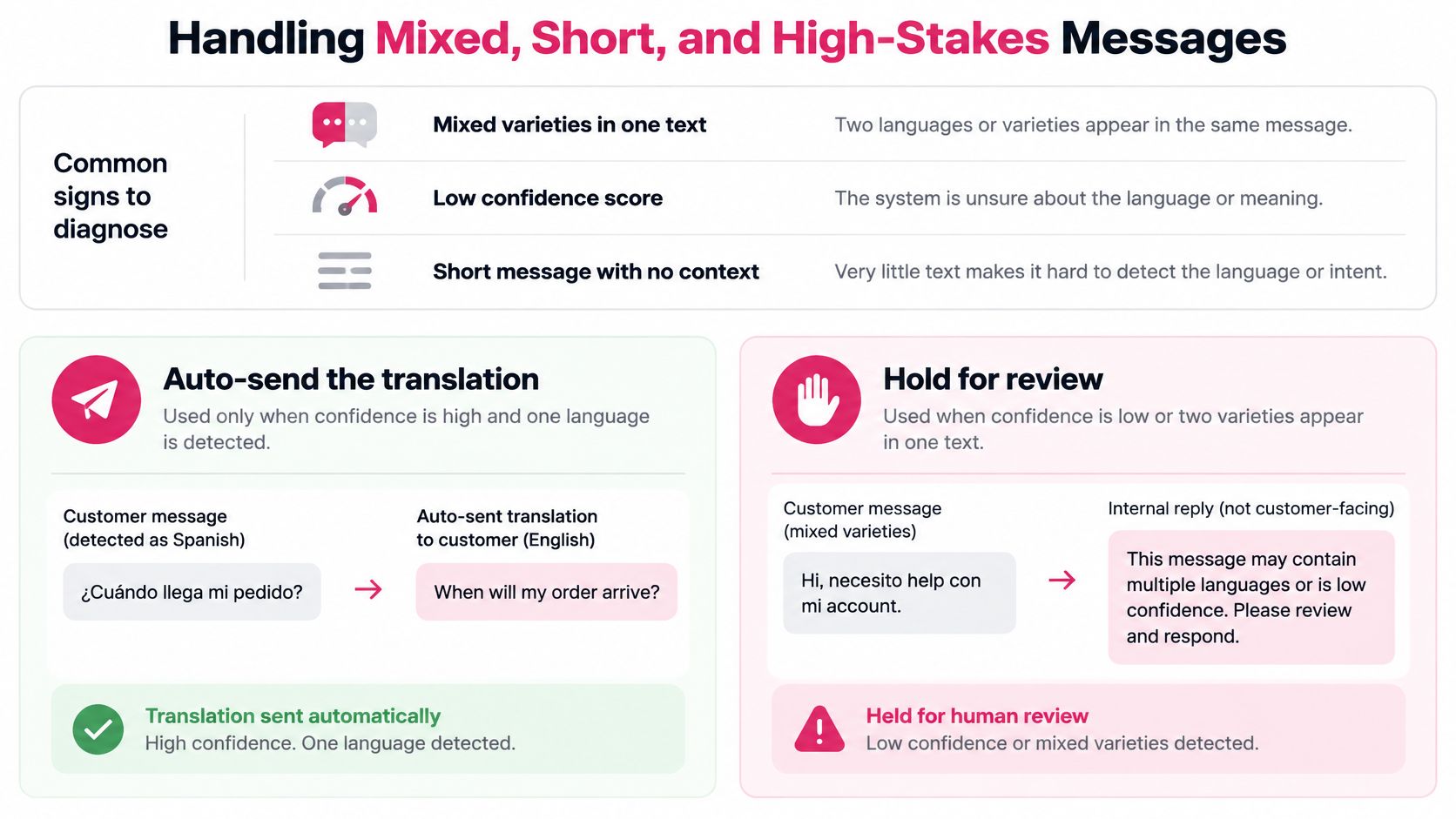
A “STOP” reply in Portuguese, a coupon question written in Hinglish, a three-word answer mixing Spanish and English: the messages most likely to break a language detector are the ones a clean single-language label was never built for. Treat detection here as a gated decision with an explicit unknown path, not a forced pick between two plausible labels.
A 2025 banking-assistant study published in Scientific Reports reports 93% primary-language identification but only 87% correct handling of Hinglish, with dialect results also weaker on Chittagong than on Tangail Bengali.
| Pattern | What the study showed | Safer action |
|---|---|---|
| Primary language only | 93% identified | Sample misses by market anyway |
| Hinglish and other mixes | 87% handled correctly | Route mixed texts to the unknown path |
| Dialect far from training data | Weaker on Chittagong than Tangail Bengali | Test local varieties, not only the standard language |
| Two varieties in one SMS | No single clean label | Hold for review or an internal English note |
| Names and prices inside mixed text | Easily rewritten by mistake | Lock number, currency, and brand tokens |
The banking results aren’t an e-commerce performance forecast. They show how strong primary-language accuracy can sit on top of real failures in the mixed messages an automated workflow has to handle.
When confidence is low or two varieties appear in one message, hold the text for review or create a neutral internal note flagging the unresolved meaning. An auto-sent reply in the wrong language costs a recovered order; a held message costs a few minutes.
Test meaning separately from language labels
Build a representative, consented test set from your major markets. Cover discounts, currencies, dates, product names, URLs, placeholders, and opt-out instructions, each with a human reference translation.
Include local dialects and transliterated text rather than testing only polished standard-language templates. Otherwise you’ll approve a system for messages unlike the ones customers send. An ACL multilingual translation benchmark reported its highest hallucination rate for texts under 50 characters, approximately 0.24%, with lower rates in the 100–499-character range, so very short or high-impact messages deserve stricter review rather than the assumption that less text means less risk.
Score source-language accuracy separately from English translation quality. Then automate checks for:
- Variable integrity: Missing, duplicated, or altered placeholders.
- Financial meaning: Changed amounts, currencies, or discount conditions.
- Negation: A missing negative that reverses the shopper’s intent.
- Output completeness: Untranslated source text or omitted instructions.
- Sending limits: English output that exceeds the intended SMS character or segment budget.
Regression-test model and prompt changes before release, then sample live messages for expert review. Keep glossary constraints for brand and legal terms, and lock price tokens before translation.
Treat consent as a separate sending gate
For U.S. marketing texts, express permission is required: a phone number supplied to complete an order doesn’t automatically authorize promotional SMS. Use a separate, unchecked opt-in that names the brand, describes marketing texts, explains that purchase doesn’t depend on consent, and provides clear STOP instructions.
The UK Information Commissioner’s electronic marketing guidance says consent must cover the particular organization and communication type. For EU campaigns, check the applicable local electronic-marketing rules rather than treating UK guidance as EU-wide legal authority.
Retain when and how consent was captured, including the disclosure language. Changing a message’s language creates no new permission, and translating a text a shopper never agreed to receive doesn’t make it compliant. If you run recovery through CartBoss, review and understand its Data Processing Agreement and Terms of Service before using the service.
Apply personalized SMS practices for cart recovery only after these checks pass. A correctly inserted name doesn’t rescue an incorrect offer or an unauthorized send.
Run the Workflow With Common Tools
A store without engineers can run a manual version this week. Google Translate, DeepL, and Google Sheets can support low-volume review, but consumer translation screens generally don’t provide the score detail needed for a calibrated confidence gate.
Treat this as a review workflow, not an automatic sending system. Minimize personal information before sharing text with any external tool, and use only tools approved for your customer-data handling.
Build a review sheet
-
Export and protect the content. Keep a restricted original column. Replace discounts, prices, dates, product IDs, and identifying details with tokens such as
{DISCOUNT},{PRICE}, and{PRODUCT}before translation. -
Paste the protected text into Google Translate or DeepL with automatic source-language detection enabled. Record the displayed language rather than keeping only the English output.
-
Create an English column in Google Sheets. If the protected message is in A2, use
=GOOGLETRANSLATE(A2,"auto","en"). Keep the recorded detected language in a separate column, because the translation formula doesn’t provide an audit trail of that decision. -
Compare the label with available order context. A mismatch with the market field is a review trigger, not proof that the detector is wrong. Mark tiny replies, unclear product-only messages, and conflicting labels unknown.
-
Send unknown rows to a bilingual reviewer. Include relevant conversational context, but avoid exposing unnecessary customer information.
-
Restore the tokens from the protected source. Check amounts, currency, offer conditions, and the STOP instruction before approving anything customer-facing.
-
Record the decision. Log the accepted language, reviewer, edits, and approval status. Keep unreviewed rows out of the sending export.
Know when to stop using the sheet
The weak point is consistency. Different reviewers may judge ambiguity differently, and a displayed language label doesn’t reveal how narrowly it beat another candidate.
Operating check: If staff routinely skip review to clear the queue, the spreadsheet is no longer a safe control.
Use marketing automation workflow examples to plan ownership and approval handoffs. Move to scored detection when manual review becomes a bottleneck, while keeping the review queue for exceptions.
Start Recovery in the Shopper Language
A custom build should clear a defined bar: normalized input, protected tokens, a top-versus-runner-up check, an unknown route, and validation of discounts and unsubscribe wording before sending. If your team can’t maintain that process, don’t launch unattended customer-facing translation just because the API call works.
Choose the system you can operate safely
We offer CartBoss as an SMS cart recovery tool for online stores, with prepared and translated text messages. It’s pre-configured, needs no coding or setup, and installs in about 2 minutes by adding it to your store in a few clicks.
We work worldwide without extra setup for international use. Keep the shopper-facing recovery message in the appropriate supported language, and treat English support translations as a separate internal workflow rather than assuming every localized messaging tool also provides an English agent transcript.
For businesses handling another kind of customer inquiry, Expressify AI chat for home services is a relevant resource to evaluate separately. Website chat and cart-recovery SMS have different workflows, so assess their language handling and human handoffs independently.
Run a controlled recovery test
Use the abandoned-cart text message overview to choose the message purpose and the sending-time guide to choose the delay. Keep the first test focused:
- Select the treatment: Use a specific recovery message and sending delay.
- Keep a control: Hold out eligible shoppers for comparison.
- Review by market: Compare delivery, clicks, purchases, revenue per recipient, and unsubscribes by language.
- Inspect exceptions: Read corrected and ambiguous messages before expanding.
Choose the workflow that your team can monitor, not the one with the most impressive demo. Recovered orders matter only when the message, permission, and customer experience remain sound.
CartBoss offers automated SMS cart recovery with prepared, translated messages for online stores. Visit CartBoss to start recovery in the shopper’s language, then run a controlled test to measure the orders your localized messages recover.