



A simple reminder text is one of the most powerful, direct ways to reduce costly no-shows and keep your customers in the loop. This tiny action can make a huge difference in appointment attendance and ensures clients always know what’s coming up.
Why SMS Reminders Are a Business Essential
Before we jump into how to send a reminder text, it’s worth taking a moment to understand why it’s a non-negotiable tool for any modern business.
Think about it: a forgotten appointment isn’t just an empty time slot on your calendar. It’s lost revenue, wasted staff time, and a schedule disruption that can throw off your entire day and impact other clients. Manually sending messages just doesn’t scale as you grow, which is why automation is so critical.
The impact on your bottom line is tangible and almost immediate. Emails can sit unopened in a cluttered inbox for days, but text messages are usually read within minutes. That immediacy makes them perfect for time-sensitive alerts.
The Clear Impact on No-Show Rates
The numbers don’t lie. When a business sends a reminder text, it directly influences customer behavior for the better. We’ve seen that text message reminders can drop the no-show rate to just 19%, easily outperforming both email and phone call reminders.
Even better, cancellation rates can fall below 5% when customers get a simple SMS notification ahead of time. This isn’t just a small improvement; it’s a major boost to your operational efficiency and revenue.
For any service-based business, from a local salon to a large medical clinic, cutting down no-shows translates directly into more predictable income and a much smoother workflow.
To see just how effective different reminder methods are, take a look at this comparison.
Reminder Method Effectiveness Comparison
This table breaks down the performance of SMS, email, and phone call reminders across the metrics that matter most to your business.
| Metric | SMS Reminder | Email Reminder | Phone Call Reminder |
|---|---|---|---|
| Open Rate | 98% | ~20% | N/A (Answer Rate Varies) |
| Avg. Response Time | 90 Seconds | 90 Minutes | Immediate (If Answered) |
| Impact on No-Shows | Lowest Rate (~19%) | Moderate Reduction | Effective, but not scalable |
| Customer Preference | High | Medium | Low (Often seen as intrusive) |
| Scalability | High (Easy to Automate) | High | Very Low (Manual Effort) |
As you can see, SMS reminders consistently come out on top for their speed, reach, and efficiency.
Meeting Customer Expectations
Beyond the financial wins, sending a reminder text is just good customer service. People today expect quick, helpful updates that respect their time. A simple text feels way less intrusive than a random phone call and is far more likely to be seen than an email.
This simple act of communication shows you’re organized and that you value your client’s time, which goes a long way in strengthening that customer relationship. For some great ideas on how to word these messages, check out our guide on effective reminder text message examples.
By bringing this strategy into your business, you’re not just sending a message. You’re putting a high-impact communication system in place that delivers a clear and measurable return. It’s a small effort with a massive payoff.
Crafting Reminder Texts People Actually Read
A reminder is useless if it’s confusing, generic, or just gets deleted on sight. The goal isn’t just to blast out alerts; it’s to send a helpful nudge that feels like a personal service, not a robot talking. This means finding that sweet spot between being informative and being stiff and formal.
The trick is to think like your customer. What do they absolutely need to know? A great reminder text answers their questions before they even think to ask, making the whole experience with your business feel smooth and easy.
The Anatomy of a Perfect Reminder Text
Every solid reminder text has a few key ingredients. Nailing these is your first step to cutting down on no-shows and making sure your customers feel like you’ve got their back. Clarity is everything.
Here are the essentials you should include every single time:
- Personalization: Always, always start with their name. A simple “Hi, Sarah,” is way more engaging than a generic opening.
- Key Details: State the date, time (don’t forget the time zone!), and location or link clearly. Don’t make them dig for it.
- Your Business Name: Never assume they’ll recognize your number. State who the message is from right away to avoid any head-scratching.
- A Clear Call to Action (CTA): Tell them what to do next. “Reply YES to confirm” is a classic for a reason—it’s low-effort for them and gives you immediate confirmation.
A well-crafted reminder isn’t just about sharing info. It’s a small interaction that reinforces your brand’s professionalism and shows you respect your customer’s time.
Examples for Different Scenarios
Your tone and what you include will shift depending on the situation. An initial confirmation for a first-time appointment needs more detail than a quick nudge the day before. Let’s break down a couple of examples.
Initial Appointment Confirmation:
Hi, John. This is a friendly reminder of your appointment with us at Downtown Dental on October 26th at 2:00 PM EST. Please reply YES to confirm your spot. Reply STOP to opt out.
This one works because it’s direct, has all the vital info, and gives the customer a clear, simple action to take. No guesswork involved.
The Friendly Nudge (24 Hours Before):
Hey, Maria! Just a quick heads-up about your haircut with Stylist Jane tomorrow at 10 AM. We're excited to see you at The Modern Salon! Any questions? Just reply to this text.
See how this one is a bit more casual? It reinforces the relationship you’re building while still getting the essential details across. If you want to dig deeper into finding the right tone, checking out fundamental SMS marketing best practices will give you a solid foundation.
Maintaining Your Brand Voice
While templates are a great starting point, don’t be afraid to let your brand’s personality shine through. If your brand is fun and casual, your texts can be too. If you’re more formal and professional, stick with that.
Consistency is what matters most. The way you talk in a text reminder should match how you communicate on your website, social media, and in person. This creates a cohesive and trustworthy brand experience, turning a simple reminder into another positive touchpoint that builds customer loyalty.
Mastering Your Reminder Message Timing
You can write the world’s best reminder message, but its success boils down to one thing: when you send it. The timing is just as critical as the words you choose. Send it too early, and it gets lost in the noise. Send it too late, and you leave your client no time to adjust their schedule if something comes up.
Let’s get strategic. From what we’ve seen, the most effective approach uses multiple touchpoints. Each text has a specific job to do, guiding your customer toward their appointment without being a pest. This layered strategy turns your message from a potential annoyance into a genuinely helpful nudge.
The Ideal Reminder Sequence
For most service-based businesses, a three-step sequence is the sweet spot. It provides immediate confirmation and then reinforces the details as the day gets closer, which massively cuts down on no-shows.
Think about trying a schedule like this:
- Instant Confirmation: The second a booking is made, fire off a confirmation text. This puts the appointment on their radar and gives them instant peace of mind that it’s locked in.
- The 24-48 Hour Heads-Up: This is your main reminder. Send a more detailed message one or two days out. This is where you include all the key info and a call to action to confirm or reschedule.
- The Final Nudge: A short, friendly alert sent 2-4 hours before the appointment is the final prompt. It’s perfect for reminding clients about travel time or any last-minute prep they need to do.
This multi-step process respects your customer’s time by giving them information exactly when they need it most. You’re moving them from “this is happening” to “this is happening soon,” keeping your business top-of-mind without being intrusive.
Adapting Timing For Your Industry
Of course, a one-size-fits-all timeline doesn’t exist. You have to tweak your sequence based on what you’re offering.
A dental appointment reminder, for example, is perfect for that 24-48 hour window. It gives the patient plenty of time to move things around if needed. But a webinar reminder is a completely different beast. For an online event, you might send reminders a week out, a day before, one hour before, and even a “we’re starting now!” text with the link.
The trick is to put yourself in your customer’s shoes. What information do they need at each step of their journey?
Respecting Texting Etiquette
When you send a text, you’re entering a personal space. That’s what makes it so powerful. Consumer behavior studies show that the average response time for a text is often within 90 seconds. That incredible speed is driven by a massive shift to mobile—the number of smartphone users is expected to blow past 8 billion globally by 2029.
This personal connection demands respect. You have to stick to communication best practices to build trust, not burn it. The biggest rule? Respect quiet hours. Never send automated texts late at night or first thing in the morning. A good rule of thumb is to stick to normal business hours, roughly 9 AM to 8 PM in the recipient’s local time zone. Platforms like CartBoss can handle this automatically, so you never have to worry about sending a message at 2 AM.
Automating SMS Reminders with CartBoss
Let’s be honest, sending reminder texts manually is a drag. It’s not just tedious; it’s a perfect recipe for mistakes and missed opportunities. This is where a platform like CartBoss becomes your secret weapon, turning a repetitive chore into a “set it and forget it” system that works for you around the clock.
When you stop sending messages by hand, you free yourself up to focus on what really matters: growing your business. You can rest easy knowing that every client will get a timely, personal, and effective reminder without you having to think about it.
Connecting Your Platform and Setting Triggers
The first step is to get your systems talking. CartBoss is built to integrate smoothly with major e-commerce platforms like Shopify and WooCommerce. Connecting your store is a quick, plug-and-play process that instantly gives the system the data it needs to start sending texts.
Once you’re connected, the real magic begins with triggers. A trigger is simply an event that tells CartBoss to kick off an automated workflow. For example, a customer booking an appointment or placing an order can be the trigger that starts your reminder sequence. You could set up a workflow to automatically send a text exactly 24 hours before a scheduled service, all without lifting a finger.
The core idea here is simple: define the action, set the timing, and let the software handle the rest. This completely removes the mental load of remembering to send messages and eliminates the risk of human error.
This process breaks down the fundamental flow of sending a reminder text, from creation to delivery.
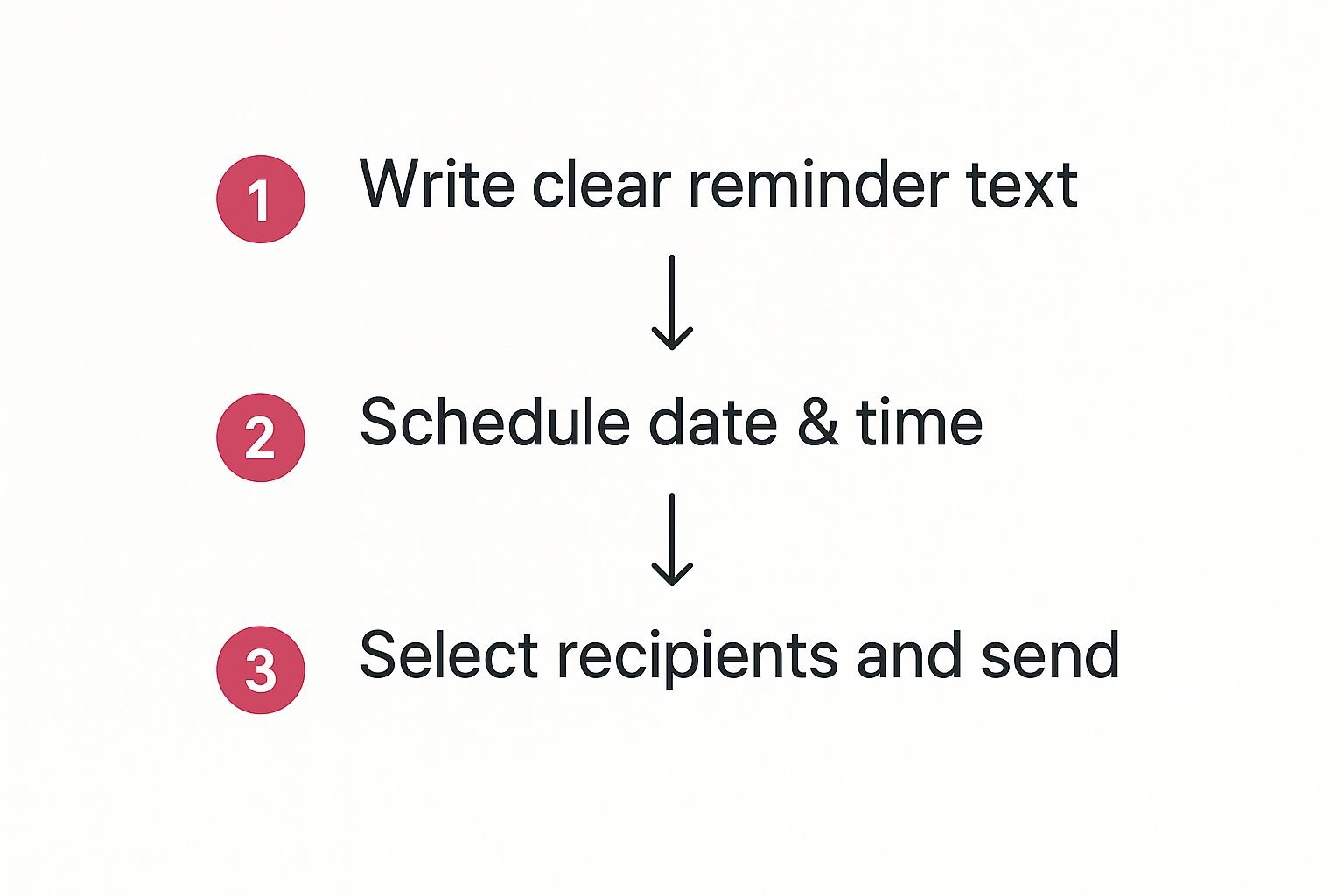
As you can see, even what seems like complex automation boils down to a few clear, manageable steps. You define the content, schedule the delivery, and choose the right audience.
Building Smart Workflows and Segments
Really effective automation goes beyond just firing off single messages. It’s about building intelligent workflows that adapt to what your customers are doing. A workflow is just a series of automated messages sent based on specific triggers or timelines. For instance, you could design a multi-step reminder sequence for a particularly high-value appointment.
This is where segmentation becomes incredibly powerful. You can create different reminder flows for different types of customers.
- New Customers: They might get a more detailed reminder that includes directions or a link to a “what to expect” page. A little extra hand-holding can go a long way.
- Repeat Clients: A loyal customer probably just needs a short, casual reminder. You can even acknowledge their loyalty in the message.
- High-Value Orders: Customers with large orders could be added to a special segment for VIP follow-ups or exclusive offers.
Trying to manage this level of personalization manually would be a nightmare, but it’s straightforward with an automation tool like CartBoss. It makes sure every customer gets the most relevant message, which boosts engagement and makes them feel valued. For those interested in the broader strategies, exploring the principles of marketing automation implementation can offer some great insights.
Why Automation Is the New Standard
This shift toward automation isn’t just a fleeting trend; it’s a fundamental change in how businesses communicate. In fact, a staggering 80% of businesses now use software to automate their SMS strategies, allowing for fast, personalized interactions at a scale that just wasn’t possible before. This tech is used for everything from appointment reminders and flash sales to order updates and customer support.
And it doesn’t stop at sending messages. A well-designed system can also handle replies. Setting up an automated text message response can instantly confirm appointments or answer common questions, creating a much better customer experience while saving your team a ton of time.
By automating your reminders, you’re not just saving time—you’re creating a more reliable, professional, and ultimately more profitable communication channel.
Staying Compliant and Building Trust
When you send a reminder text, you’re not just firing off a notification—you’re showing up in a customer’s personal space. This is a powerful, direct line of communication, but it all hinges on a foundation of trust and rock-solid legal compliance.
Mess this up, and you don’t just risk annoying customers. You risk alienating them completely and, worse, facing some pretty serious legal heat.
The Ground Rules: Consent and Opt-Outs
The absolute first rule of the game is getting explicit opt-in consent before a single message leaves your system. I can’t stress this enough. It’s not a friendly suggestion; it’s a legal mandate under regulations like the TCPA. Simply put, a customer has to knowingly and actively agree to get texts from you.
Just as critical is giving them a clear, easy way out. Every single text needs to have a simple opt-out command, like “Reply STOP to unsubscribe.” If you make this process confusing or difficult, you’re not just breaking rules—you’re torching any trust you might have built.
The Pillars of Trustworthy SMS Communication
Once you have the legal must-dos covered, the real work begins. Building an SMS channel that people actually like is all about consistently respecting their time and attention. This is how you shift from just being compliant to actively building a loyal following.
Think of it this way: a customer who trusts your messages is far more likely to open them, click them, and buy from them.
Here are the core principles I always come back to:
- Be Transparent: Never assume someone will recognize your sending number. Always state who you are, right in the message.
- Provide Value: Every text should be genuinely helpful. A reminder that saves a customer from a missed appointment isn’t spam; it’s a welcome service.
- Respect Boundaries: This one’s common sense. Stick to reasonable hours. An automated text that buzzes someone’s phone at 3 AM is a one-way ticket to an immediate opt-out.
If you want to dig deeper into the psychology of this, check out these proven strategies for building customer trust.
Building trust isn’t a one-and-done task. It’s an ongoing commitment. Every single text you send either strengthens that relationship or chips away at it. Make each one count.
This focus on trust isn’t just feel-good advice; it delivers real results. The numbers don’t lie: texts have a staggering open rate of 98%. On top of that, 79% of consumers say they’re more likely to make a purchase when they’re subscribed to a brand’s SMS list.
That figure represents a 21% jump from the previous year, which tells you just how much customers are embracing this channel when it’s handled with care.
At the end of the day, compliance is just the starting line. The real win is crafting a communication strategy that your customers actually appreciate and find useful. For a more detailed breakdown, our complete guide on SMS marketing compliance is a must-read.
Common Questions About Sending Reminder Texts
Even with a solid game plan, you’re bound to have questions once you start sending reminder texts. It’s totally normal to wonder about the little details of this channel. Let’s walk through some of the most frequent questions I hear, so you can build out your strategy with confidence.
Getting these practical concerns sorted out upfront means you’re not just blindly following a guide—you’re understanding why these practices work. That’s how you build a reminder system that actually gets results.
How Many Reminders Are Too Many?
This is all about finding that perfect balance. A single reminder is good, but a short sequence is almost always better. You just don’t want to cross the line and start annoying people.
For most businesses, especially those with appointments, a sequence of two or three messages is the sweet spot.
Here’s what that usually looks like:
- An instant confirmation text the moment they book. Peace of mind for them, confirmation for you.
- A more detailed reminder about 24-48 hours before their appointment.
- A final, quick “see you soon!” a few hours beforehand.
This approach keeps you top-of-mind without feeling like you’re spamming their phone.
Can I Include Images or Links?
Absolutely, and you really should! Adding a link is pretty much standard practice. It could be a link to confirm their spot, get directions on a map, or jump into a virtual meeting.
One pro tip: use a branded domain for your links if you can. Generic link shorteners can sometimes get flagged as suspicious by phone carriers, which hurts your deliverability.
Including images (MMS) can be a game-changer, especially in e-commerce. A picture of the exact item someone left in their cart is a seriously powerful nudge. We dive deep into that tactic in our guide on recovering abandoned carts with SMS.
What Time of Day Is Best to Send Reminders?
Timing is everything. Your message needs to land when it’s genuinely helpful, not when it’s an interruption.
As a rule of thumb, stick to standard business hours—somewhere between 9 AM and 8 PM in your customer’s local time zone. That’s the safest bet.
The goal is to be a helpful assistant, not an unwelcome alarm clock. A text message late at night or first thing in the morning is a surefire way to get an unsubscribe.
Tools like CartBoss make this easy by automatically respecting “quiet hours.” It ensures your automated texts always arrive at a considerate time, taking the guesswork out of the equation and helping you maintain a great relationship with your customers.
Ready to stop chasing down no-shows and start automating your reminders? CartBoss makes it simple to set up powerful SMS campaigns that recover lost sales and keep your schedule full. Get started with CartBoss today and see the difference for yourself.