



If you’re running an e-commerce store, you know the pain of cart abandonment all too well. You do everything right—drive traffic, showcase your products, get them to add to cart—only for them to vanish at the last second. It’s a massive problem, with nearly 70% of all online shopping carts being left behind.
For years, email was the go-to solution. But let’s be honest, email inboxes are a warzone of promotions, newsletters, and spam. Your recovery email is likely to get buried, if it even gets opened at all.
This is where integrating a send SMS message API completely changes the game.
A text message just feels different. It’s personal, direct, and lands right in the palm of your customer’s hand. When a phone buzzes with an SMS, people almost always look.
The numbers don’t lie. SMS open rates are staggering, hovering around 98%. Your message isn’t just sent; it’s seen. It cuts straight through the noise and gives you a direct line to a customer who was just moments away from buying.
The performance gap between SMS and email for cart recovery is significant. A quick look at the core metrics shows why so many stores are making the switch.
Email vs SMS for Cart Recovery: A Quick Comparison
| Metric | SMS | |
|---|---|---|
| Open Rate | ~98% | ~20% |
| Response Time | 90 seconds | 90 minutes |
| Click-Through Rate (CTR) | 25-45% | 2-3% |
| Conversion Rate | High | Low |
| Perceived Urgency | High | Low |
The data clearly shows that if you want immediate action, SMS is the way to go. It’s simply a more effective channel for time-sensitive reminders like an abandoned cart.
The Magic Behind the Scenes: A2P Messaging
The engine powering this is something called Application-to-Person (A2P) messaging. It’s the technology that lets your e-commerce platform automatically send texts to your customers. It’s not a new concept, but its adoption in retail is exploding. The global A2P SMS market is set to grow by 4.6% annually through 2026, driven almost entirely by businesses needing better ways to connect with customers in real-time.
By plugging in an SMS API, you can set up automated triggers. When a customer leaves their cart, your system can wait a specific amount of time—say, 15 minutes—and then fire off a friendly reminder. Maybe you even include a small discount to sweeten the deal. This isn’t just a gimmick; it’s a proven strategy for turning lost revenue into completed sales.
Want to learn more about why customers are so receptive? We’ve covered the psychology behind it in our guide on why consumers choose business texts.
You Don’t Need to Be a Developer to Do This
Hearing “API” might make you think you need a team of developers on standby. A few years ago, you might have. But today, platforms like CartBoss handle all the heavy lifting for you.
Instead of wrestling with code, you can use a solution that’s ready to go. It takes care of everything from personalizing the messages and managing compliance to tracking your results, so you can focus on your business. For a deeper dive into the overall strategy, checking out a guide on SMS marketing automation is a great next step.
At the end of the day, using an SMS API for cart recovery isn’t just about sending texts. It’s about meeting your customers where they are, grabbing their attention at the perfect moment, and turning a moment of hesitation into another sale.
Selecting and Authenticating Your SMS API Provider
Choosing the right SMS API provider isn’t just about finding the cheapest rate per message. For an e-commerce store, this decision is the bedrock of your entire SMS cart recovery strategy, and it directly impacts revenue through things like deliverability and global reach.
You’ll quickly find yourself at a fork in the road: go with a general-purpose API or a specialized e-commerce tool? General providers give you a blank canvas to build whatever SMS feature you can dream up. The trade-off is a ton of development time—you’re on the hook for building all the cart abandonment logic, personalization, and compliance features from the ground up.
On the other hand, specialized tools are purpose-built for platforms like Shopify and WooCommerce. They handle all the heavy lifting of cart recovery right out of the box, letting you get a campaign live in minutes, not weeks.
Key Factors for E-commerce Stores
When you’re looking at different providers to send sms message api requests, zero in on these factors:
- Platform Integration: Does it have a dedicated Shopify app or a WooCommerce plugin? A native integration saves countless hours of custom development and just plain works.
- Deliverability and Carrier Relationships: A provider with solid, direct relationships with mobile carriers around the world ensures your messages actually land in your customers’ inboxes. Bad deliverability means lost sales, simple as that.
- Pricing Model: Look past the per-message cost. Some providers tack on monthly fees or make you buy credits in huge chunks. For cart recovery, a performance-based model—where you only pay for successful sales—almost always delivers a much higher return on ad spend (ROAS).
- Compliance Features: Does the provider help you navigate the tricky waters of GDPR and TCPA? Things like automatic opt-out management and enforced quiet hours are non-negotiable for protecting your brand and staying out of legal hot water.
Pro Tip: Always check if the provider supports a branded Sender ID. Sending messages from your store’s name instead of some random number builds trust and boosts open rates instantly. It’s a small detail that makes a massive difference.
If you’re just starting out, it’s really helpful to see how different providers are set up. We did a deep dive into the specifics of what to look for in an SMS sender API that’s well worth a read.
Finding and Securing Your API Credentials
Once you’ve picked your provider, it’s time to get authenticated. This is how your app proves it has permission to send texts on your behalf. Head over to your provider’s dashboard and look for a section called “API Settings” or “Developer.”
This is where you’ll find your golden tickets:
- API Key: A unique public string that identifies your application.
- API Secret (or Token): A private string that’s basically your password. Never share this or expose it in your front-end code.
Treat these credentials like your bank account password. If they get compromised, anyone could start sending messages from your account, running up your bill or tanking your brand’s reputation with spam.
The best and most secure way to manage these keys is by storing them as environment variables on your server. This simple practice keeps them completely out of your codebase and away from version control systems like Git, where they could be accidentally exposed to the world. Hardcoding keys directly into your application files is a major security risk that should be avoided at all costs.
Crafting and Sending Your First API Request
Alright, you’ve picked your SMS provider and have your API keys ready to go. Now for the fun part: making the leap from theory to actually sending a message. This is the core of learning how to send sms message api calls, and we’ll walk through it using three of the most common tools in a developer’s arsenal: cURL, Node.js, and Python.
Think of an API request as the digital equivalent of addressing an envelope, writing a letter, and dropping it in the mail. Each example we’ll look at does the same basic thing: it makes an HTTP POST request to your SMS provider’s API endpoint, carrying a “payload” (usually in JSON format) with the recipient’s number, your sender ID, and the message itself.

Quick Testing with a cURL Command
Before you even think about writing application code, it’s a smart move to confirm your API credentials are correct and that you understand the basic request structure. For this, the command-line tool cURL is your best friend. It lets you fire off a test message straight from your terminal with zero setup.
Here’s what a typical cURL request looks like:
curl -X POST https://api.yourprovider.com/v1/messages
-H “Authorization: Bearer YOUR_API_KEY”
-H “Content-Type: application/json”
-d ‘{
“to”: “+15551234567”,
“from”: “YourStore”,
“body”: “Hi there! This is a test message from YourStore.”
}’
Let’s quickly break that down:
-X POST: Tells cURL we’re sending a POST request, which is the standard way to create something new (like an SMS message).-H: This flag sets the request headers. We need two critical ones:Authorizationto prove who you are with your API key, andContent-Typeto tell the server we’re sending data in JSON format.-d: This flag holds our data payload. Theto,from, andbodyfields are pretty standard, but always double-check your provider’s documentation as the names can vary slightly.
If everything works, you’ll get a JSON response back from the API, usually with a message ID and a status like “queued” or “sent.”
Sending SMS with Node.js and Axios
For those building with JavaScript on the server, axios is the go-to library for making HTTP requests. It’s clean, promise-based, and easy to work with. Just install it (npm install axios) and you can wrap your SMS logic into a neat function.
This is the perfect approach for a custom Shopify app or any other Node.js-powered backend.
const axios = require(‘axios’);
async function sendTestSMS() {
const apiKey = process.env.SMS_API_KEY; // Always load secrets from environment variables
const apiUrl = ‘https://api.yourprovider.com/v1/messages‘;
try {
const response = await axios.post(apiUrl, {
to: ‘+15551234567’,
from: ‘YourStore’,
body: ‘Hey! Your cart is waiting. Finish your order now!’
}, {
headers: {
‘Authorization’: Bearer ${apiKey},
‘Content-Type’: ‘application/json’
}
});
console.log('Message sent successfully:', response.data);
} catch (error) {
console.error(‘Failed to send message:’, error.response.data);
}
}
sendTestSMS();
As you can see, the logic is identical to the cURL command, just structured for a reusable JavaScript function. It pulls the API key securely from environment variables, sets up the payload, and uses a try...catch block to handle any potential API errors gracefully. If you want to dive deeper, our guide on the fundamentals of an API to send SMS is a great next read.
Using Python and the Requests Library
Python is a powerhouse for backend development and automation, and its requests library is legendary for making HTTP calls feel effortless. Once it’s installed (pip install requests), sending an SMS is just as straightforward.
import os
import requests
import json
def send_test_sms():
api_key = os.getenv(‘SMS_API_KEY’) # Securely loaded from environment variables
api_url = ‘https://api.yourprovider.com/v1/messages‘
headers = {
    'Authorization': f'Bearer {api_key}',
    'Content-Type': 'application/json'
}

payload = {
    'to': '+15551234567',
    'from': 'YourStore',
    'body': 'Last chance! Your items are selling out fast. Complete your purchase now.'
}

try:
    response = requests.post(api_url, headers=headers, data=json.dumps(payload))
    response.raise_for_status()  # A handy way to raise an error for bad responses (4xx or 5xx)

    print(f"Message sent! Response: {response.json()}")
except requests.exceptions.HTTPError as err:
    print(f"HTTP error occurred: {err}")
    print(f"Response content: {err.response.text}")
send_test_sms()
This Python script is clean, readable, and robust. It assembles the headers and payload, then calls requests.post to do the heavy lifting. I particularly like using response.raise_for_status(), as it’s a built-in feature of the library that automatically checks for HTTP errors, making your error handling much cleaner.
Using Personalization to Drive High Conversions
Let’s be honest, the technical API call is the easy part. A generic “You left something in your cart!” text is lazy and, frankly, easy to ignore. The real conversion magic happens when the message feels like it was written specifically for that one person.
Personalization isn’t just a marketing buzzword; it’s the critical difference between a deleted text and a completed sale. When you send sms message api requests, you’re not just firing off a notification. You have a golden opportunity to inject dynamic data that turns a robotic alert into a helpful, personal reminder.
The Power of Dynamic Variables
At the heart of any good personalization strategy are dynamic variables. Think of them as placeholders in your message template that your system automatically fills with real customer information. This is how a single, well-crafted template can transform into thousands of unique, hyper-relevant messages.
For e-commerce cart recovery, a few variables are non-negotiable:
{{customer_name}}: Addressing a customer by their first name is the simplest, most effective way to cut through the noise. “Hey Jessica” is always going to perform better than “Hey there.”{{item_name}}: Mentioning the specific product they abandoned reignites that initial spark of desire. Instead of a vague reminder, a text about their Vintage Leather Jacket brings that exact item right back to the front of their mind.{{discount_code}}: A unique, one-time-use discount code does more than just offer savings; it creates a powerful sense of urgency and exclusivity. It feels like a personal offer, not a mass promotion blasted out to everyone.
The real magic happens when you combine these elements. A message reading, “Hey David, that Classic Chrono Watch is still in your cart! Use code
SAVE15DAVIDfor 15% off in the next hour to make it yours,” is specific, urgent, and incredibly compelling.
Minimize Friction with a Direct Checkout Link
This might just be the most important part of your entire recovery text. Whatever you do, do not just link back to your homepage or the product page. That’s a rookie mistake.
Forcing a customer to re-add items and navigate the checkout process all over again just reintroduces the exact friction that probably made them leave in the first place. You have to make finishing the purchase ridiculously easy.
Your API call needs to generate and include a pre-filled, direct checkout link. When they tap that link, they should land directly on the payment step with their shipping info loaded and their items already in the cart. You’re removing every single obstacle between them and the “Complete Purchase” button. Getting this one detail right can dramatically lift your conversion rates.
Example Cart Recovery SMS Templates
To give you a better idea of how this looks in practice, here are a few templates that we’ve seen work incredibly well for our clients. They balance being friendly, helpful, and persuasive without feeling pushy.
| Stage | Template Example | Key Element |
|---|---|---|
| Initial Reminder | Hey {{customer_name}}, did you forget something? Your items are waiting for you! Finish your order here: {{checkout_link}} | Simplicity and a direct link to the cart. No pressure, just a gentle nudge. |
| Offer Incentive | Still thinking it over, {{customer_name}}? Complete your order for the {{item_name}} in the next 3 hours and get 15% off with code TAKE15. {{checkout_link}} |
Introduces a time-sensitive offer to create urgency and add value. |
| Final Reminder | Last chance, {{customer_name}}! We can’t hold the items in your cart much longer. Don’t miss out on your {{item_name}}: {{checkout_link}} | Creates scarcity and a final push, focusing on the fear of missing out. |
Notice how each message is short, clear, and has a single, obvious call to action. That’s the key.
Crafting the Perfect Automated Sequence
Timing is everything. Send a text too soon, and it feels pushy. Wait too long, and that initial buying impulse is gone forever. A well-structured, automated sequence hits the sweet spot, respecting the customer’s space while maximizing your chances of recovery.
Based on our data, here’s a high-converting sequence that just works:
- The Gentle Nudge (30-60 minutes post-abandonment): This first message is just a simple, friendly reminder. The customer could have been distracted or hit a technical snag. Something like, “Hi {{customer_name}}, did you forget something? Your items are saved and ready for you here: {{checkout_link}}” is perfect.
- The Value Add (24 hours later): If the first text didn’t seal the deal, it’s time to add an incentive. This is the perfect moment to introduce a discount. “Hey {{customer_name}}, still thinking it over? We saved your cart and wanted to offer you 10% off to help you decide. Use code
COMEBACK10at checkout: {{checkout_link}}” - The Final Offer (48-72 hours later): This is your last shot, so you need to create some real urgency. Emphasize that the cart or the offer is about to expire. “Last chance, {{customer_name}}! Your cart with the {{item_name}} expires soon. Complete your order now: {{checkout_link}}”
The market for this kind of automated messaging is exploding. Messaging Application APIs—the tech powering these SMS gateways—hit a market size of USD 46.75 billion in 2024. Projections show it surging at a CAGR of 18.9% through 2030, driven almost entirely by e-commerce tactics like these. You can discover more insights about this market growth on Grandviewresearch.com.
Of course, it’s also critical to respect “do-not-disturb” windows. Never send texts late at night or super early in the morning. Most modern SMS platforms, including CartBoss, handle this for you automatically, so you stay compliant and avoid annoying your customers.
For a deeper dive, check out our guide on how to personalize SMS campaigns for maximum cart recovery success. When you combine smart automation with genuine personalization, your SMS API stops being just a tool and becomes a powerful engine for growing your revenue.
Making Sense of Delivery Reports and Compliance
Firing off an SMS API request and getting a “success” message feels good, but that’s just the start. To run a smart, sustainable SMS program for your store, you need to know what happens after you hit send. This is where you graduate from just blasting messages to actually managing a powerful communication channel.
Long-term success really boils down to two things: knowing if your texts actually arrived and following the law. Dropping the ball on either one can lead to a leaky sales funnel, a trashed brand reputation, and some seriously painful legal fines.
Get the Real Story on Delivery with Webhooks
That initial “200 OK” response you get from the SMS API? It doesn’t mean your message hit the customer’s phone. All it confirms is that the provider accepted your request and put it in the queue. The message could still fail for a dozen reasons—a bad number, a carrier block, or the phone just being switched off.
To get real-time feedback, you have to use webhooks. Think of a webhook as a reverse API. Instead of you constantly asking the provider for updates, the provider sends you a notification (an HTTP POST request) at a URL you provide whenever something happens. This is your eyes and ears on the ground.
Most providers will ping you with status updates for key events:
sent: The message left the provider and is on its way to the mobile carrier.delivered: The carrier confirmed the message landed on the recipient’s device. This is what you’re aiming for.undeliveredorfailed: The message didn’t make it. The webhook data will usually include an error code that tells you why.
By setting up a simple endpoint in your app to catch these webhooks, you can build some really powerful logic. For instance, you could automatically flag phone numbers that consistently fail as invalid, which keeps your contact list clean and stops you from wasting money on texts that are going nowhere.
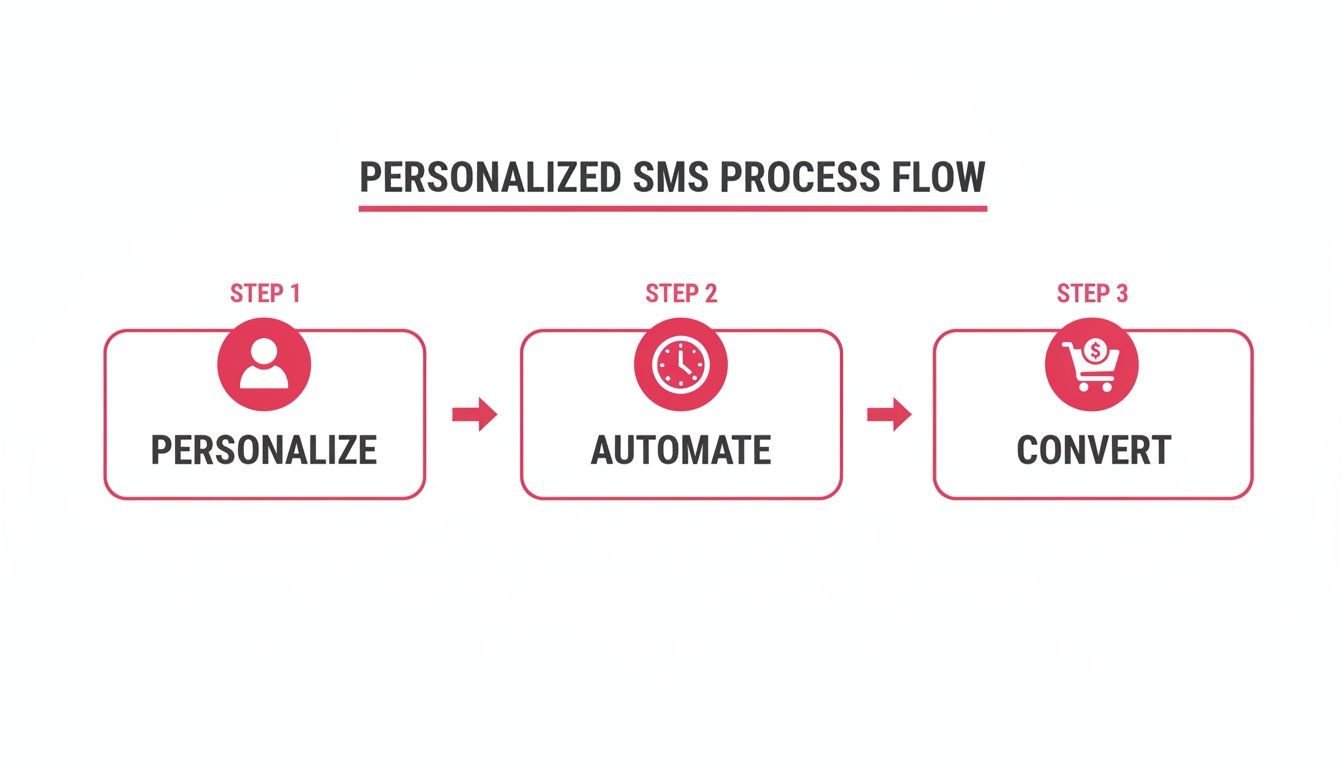
This whole process—personalizing the message, automating its delivery, and converting the customer—only works if you know for sure the message is getting there.
Staying Compliant Is Not Optional
Let’s be blunt: the legal rules around SMS marketing are incredibly strict, and for good reason. Texting is personal, and regulations like the TCPA in the U.S. and GDPR in Europe exist to protect people from spam. Ignoring these rules can lead to fines that can easily sink a small business.
The absolute foundation of SMS compliance is explicit consent. You must have clear, documented permission from a customer before you send them a single marketing text. A simple checkbox at checkout that says “I agree to receive marketing texts” is a great way to handle this.
Key Takeaway: Consent for email is not consent for SMS. You need separate, explicit permission for each channel. Don’t even think about texting someone just because they’re on your email list—that’s a one-way ticket to a compliance nightmare.
Just as important is giving people an easy way out. The standard is to let customers reply with keywords like STOP, END, or UNSUBSCRIBE. Your SMS platform should handle these replies automatically, add the number to a do-not-contact list, and send one last text confirming they’ve been unsubscribed.
For a deeper dive into all the legal details, check out our guide on https://www.cartboss.io/blog/sms-marketing-compliance/.
How to Handle API Rate Limits and Errors
Every API has rate limits—basically, a speed limit on how many requests you can make at once. This is to stop abuse and keep the service stable for everyone. If you try to send a huge blast of texts all at the same time, you might get hit with a 429 Too Many Requests error.
The pro way to handle this is with a strategy called exponential backoff. When you get a 429 error, your code should:
- Pause for a short, random time (like 1-2 seconds).
- Try the request again.
- If it fails again, double the pause time and retry.
- Keep doing this a few times before you give up and log it as a permanent failure.
This polite approach stops you from hammering the API and gives it a chance to catch its breath.
You should also build logic to handle other common errors. A 400 Bad Request error, for example, often points to a badly formatted phone number or a missing piece of information. Logging these errors and alerting your team helps you fix the root problems in your code or customer data much faster.
As you master delivery reports and compliance, it helps to understand the bigger picture. Reading up on SMS marketing best practices will ensure your technical work fits into a proven strategy that respects customers and gets results.
Your Top Questions About SMS Message APIs Answered
Even with a solid plan, jumping into a new marketing channel always brings up questions. Let’s tackle some of the most common ones we hear from e-commerce store owners and developers when they start exploring how to send sms message api requests for cart recovery.
Can I Just Use My Personal Phone Number to Send Texts?
You could, but you absolutely shouldn’t. Seriously. Using your personal number is not just unprofessional; it’s impossible to automate, won’t scale, and almost certainly violates your mobile carrier’s terms of service. On top of that, you’d be wading into a legal minefield with regulations like the TCPA.
Professional SMS providers use registered short codes or dedicated long codes specifically approved for Application-to-Person (A2P) messaging. This is the only way to ensure your messages actually get delivered and keep your business compliant and looking professional.
What’s This Going to Cost Me?
Pricing models for SMS APIs are all over the place, which can make it tough to compare apples to apples. Many providers charge a flat, per-message rate. That sounds simple, but it can get pricey fast, especially if your recovery campaigns aren’t converting. Others will hit you with a monthly platform fee on top of your usage.
For e-commerce, the smartest model is usually performance-based. For example, some solutions only charge a commission on sales they successfully recover with SMS. This flips the script entirely—you only pay for real, tangible results, which completely removes the risk and guarantees a positive return.
Find a provider whose pricing is aligned with your goal—recovering sales—not just their goal of sending more messages.
What’s the Difference Between an SMS API and an SMTP API?
They might both be APIs for sending messages, but they’re built for completely different worlds.
- SMS API: This is purely for sending and receiving text messages over cell networks. It’s designed for short, direct, and urgent communication. Think time-sensitive alerts, like a cart recovery reminder that needs to be seen now.
- SMTP API: This is for sending emails. It’s better suited for longer content, newsletters, and less urgent messages like order confirmations or shipping updates.
Trying to use one for the other’s job is a recipe for poor results. A cart recovery message thrives on the 98% open rate and immediacy of SMS, not the 20% open rate that’s typical for email.
Do I Need to Be a Developer to Use an SMS API?
Not anymore. While you’d definitely need a developer to integrate a raw, general-purpose SMS API from the ground up, today’s best tools are built for everyone else.
Many platforms designed specifically for e-commerce come as simple, one-click apps for Shopify or plugins for WooCommerce. These solutions handle all the complicated backend stuff for you. You can set up your automated campaigns, tweak message templates, and track every dollar recovered from a simple dashboard—no code required. This means any store owner can get a powerful SMS strategy up and running in minutes.
Ready to stop losing sales to abandoned carts? CartBoss makes it incredibly simple to set up automated, high-converting SMS recovery campaigns that win back customers on autopilot. With zero subscription fees and a focus on performance, you only pay for the sales we recover. Get started and boost your revenue today by visiting https://www.cartboss.io.