


Most Shopify advice starts with “send the recovery message immediately.” That sounds sensible, but speed alone doesn’t create revenue. A shopper may still be comparing products, checking delivery details, discussing a purchase with someone else, or moving between tabs. An instant interruption can turn a useful reminder into pressure.
A reliable Shopify abandoned cart notification strategy treats abandonment as a lifecycle event. The right flow identifies the shopper, waits for an appropriate moment, uses email and SMS selectively, removes checkout friction, and respects consent in every market. The strongest recovery programs aren’t the loudest ones. They’re the ones that arrive when the customer is ready to act.
Table of Contents
- Rethinking the Instant Reminder
- Configuring Native Shopify Automations
- Timing Your Notifications for Maximum Impact
- Balancing SMS and Email in Your Recovery Stack
- Crafting Messages That Actually Convert
- Navigating Global Compliance and Consent Rules
Rethinking the Instant Reminder
An “instant” reminder can be too early. Evidence summarized from the Journal of Marketing found that shoppers who received a cart reminder within 30 to 60 minutes were less likely to purchase than shoppers who received no reminder, and a separate SMS experiment with 23,900 customers reproduced the negative effect. The timing analysis points to a practical lesson: a faster message can reduce conversion instead of improving it.
That result makes sense in real storefronts. A customer who leaves checkout may not have abandoned the purchase emotionally. They might be checking a competing price, waiting for a partner’s approval, or trying to understand shipping costs. A text that arrives while they’re still researching feels like an interruption, not assistance.
Separate intent from activity
Shopify gives operators a useful event boundary. It defines an abandoned checkout as a checkout that remains incomplete for more than 10 minutes after the customer has provided email information. Shopify’s abandoned checkout guidance also explains that items aren’t saved at the moment of abandonment, so the recovery link and checkout state matter.
Use that event to create a segment, not an automatic command to send an SMS. A short delay lets you distinguish an inactive checkout from someone who is still browsing. For high-consideration products, the first message should usually provide reassurance or a direct route back to the checkout. For lower-intent carts, suppression or delayed delivery may be more effective than immediate contact.
Practical rule: Treat the abandonment trigger as the start of decision-making, not proof that the customer has finished browsing.
A useful timing test should compare a delayed message with a control group that receives no reminder. Track completed orders and recovered revenue, not only clicks. CartBoss’s guide to abandoned-cart timing is a useful starting point for designing those tests, but your own customer behavior should determine the final schedule.
Configuring Native Shopify Automations
Shopify already includes native recovery tools, so start there before paying for additional software. The platform supports abandoned-checkout recovery for the Online Store and Buy Button sales channels, and it can send an automated email containing a link back to the customer’s abandoned cart. That makes the native workflow a practical baseline for email recovery.
Set up the native workflow
-
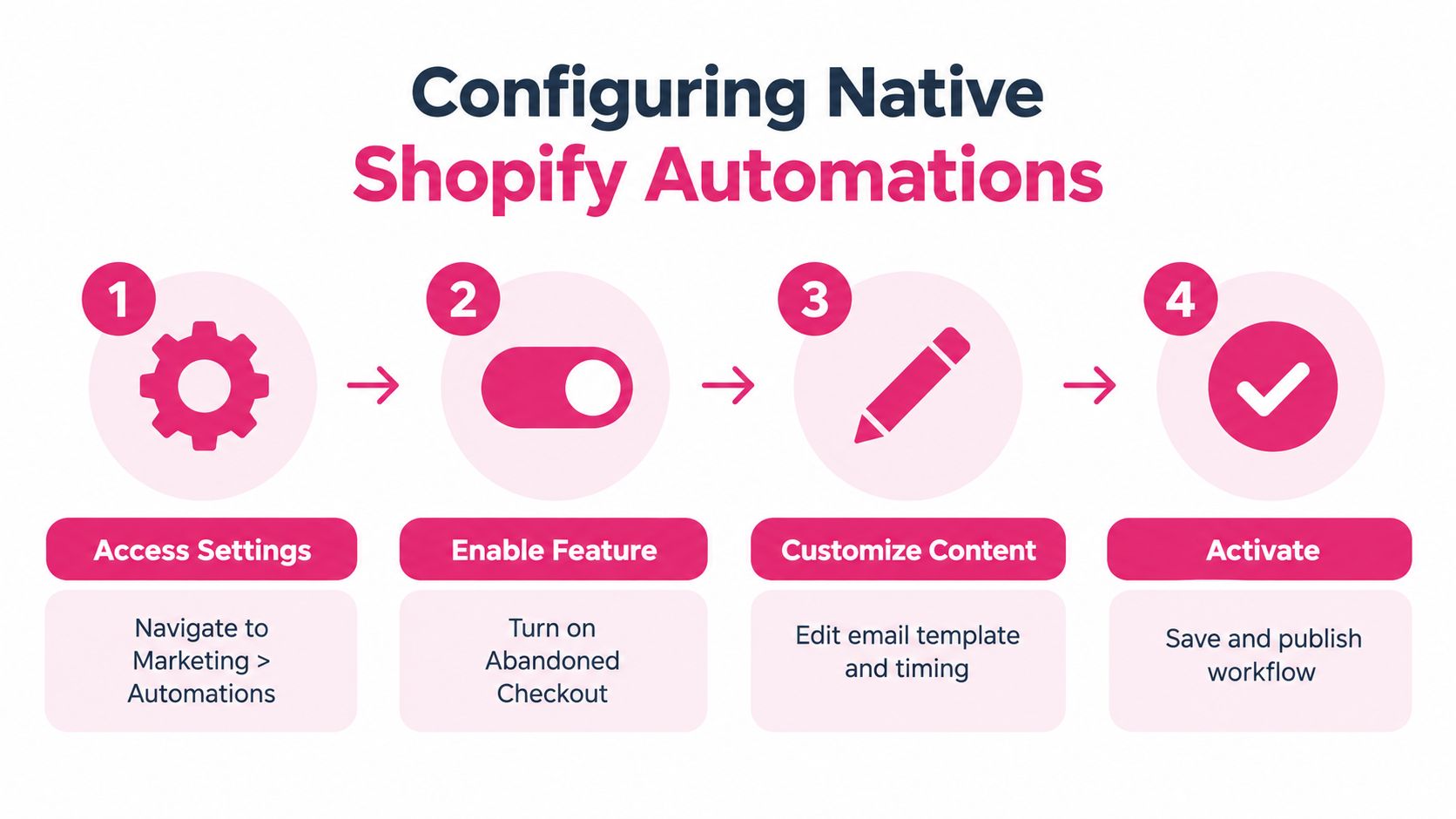
Open Shopify’s marketing tools. In the admin, go to the marketing and automation area and look for the abandoned-checkout recovery template. Review the trigger before editing the message, because a checkout abandonment is different from an anonymous cart that never reached checkout.
-
Choose the channel and audience. Shopify’s marketing automation includes a Recover abandoned cart template that can send a marketing message by Email or SMS to customers who add products to a cart but don’t start checkout. The setup flow lets you choose SMS as the channel and turn the automation on, as described in Shopify’s automation setup documentation.
-
Edit the content. Keep the product, price, and recovery link visible. Remove generic language that doesn’t answer the shopper’s likely concern. A useful email should make the next action obvious without forcing the customer to search for the product again.
-
Save and publish only after testing. Place a test item in a cart, progress far enough to create the relevant event, and confirm the message, link, branding, unsubscribe controls, and mobile layout. Check that a completed order stops later messages.
Shopify’s native system is a good fit when you need a straightforward email or basic marketing automation. It becomes less suitable when you need detailed rules based on cart value, product category, customer history, language, consent status, or previous message exposure.
Know when a separate tool earns its place
A third-party SMS platform can fill those gaps, but it shouldn’t replace the native foundation without a reason. Look for features that control consent, stop messages after purchase, cap frequency, localize content, and send customers to a pre-filled checkout. Those safeguards matter more than a large template library.
Before adding an app, document what Shopify already does and what remains unresolved. Merchants looking to reduce cart abandonment on Shopify should first fix the checkout experience and then add automation where the native workflow can’t provide the required control. Shopify’s own guide to viewing abandoned carts and recoveries can also help you understand which shoppers are visible to the admin and which recovery events your store is recording.
Timing Your Notifications for Maximum Impact
The fastest notification is not always the most profitable one. Sending an abandoned cart message too soon can interrupt a customer who is still comparing options, create pressure before any objection exists, or trigger an SMS complaint when the shopper has only given consent for another purpose. Timing should follow purchase intent, channel permission, and the customer’s local time.
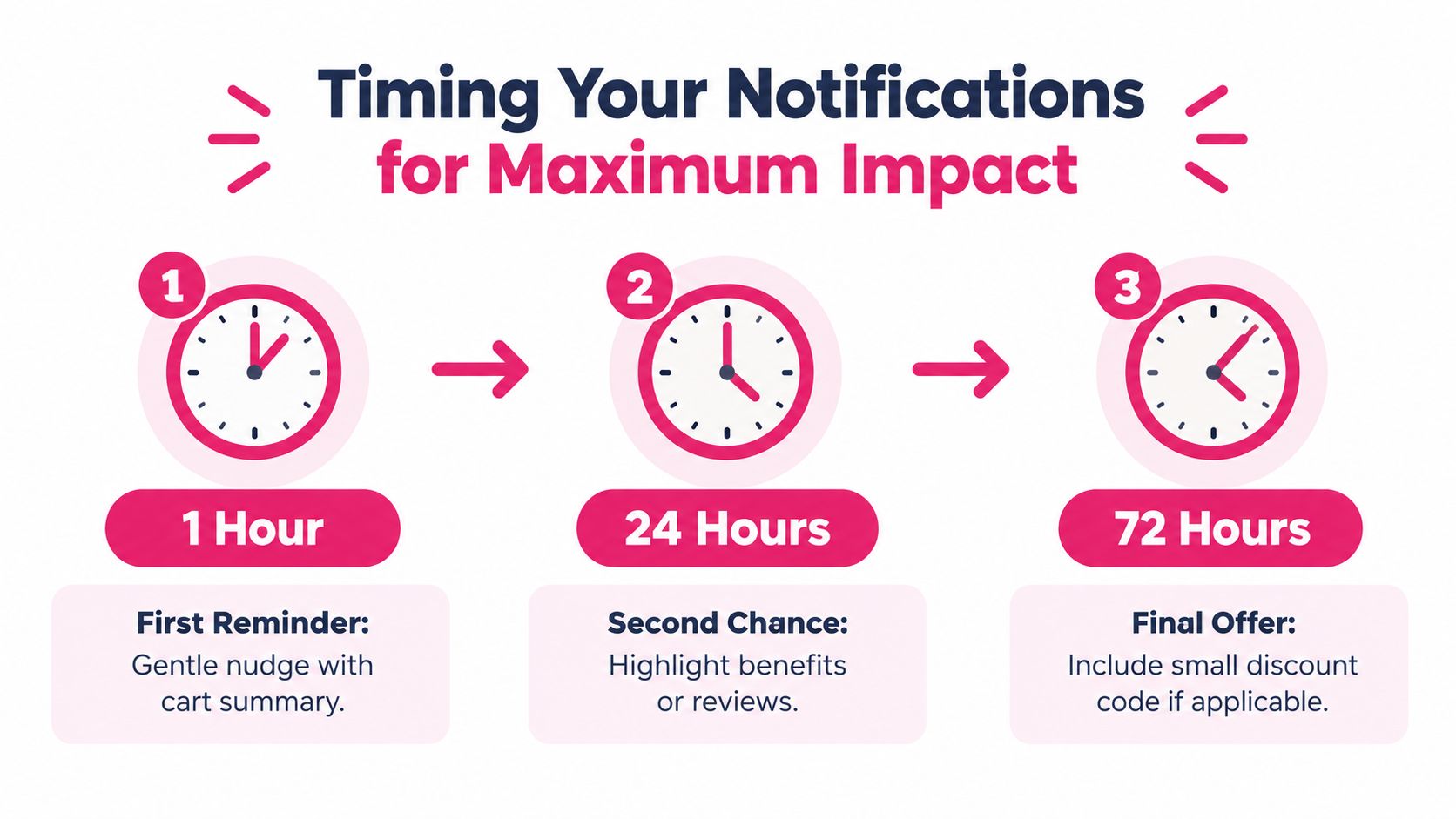
A practical starting point is an initial email within 1 to 2 hours, followed by SMS only for customers who have opted in, then a later reminder or incentive when the cart value justifies further contact. That sequencing guidance supports email first, selective SMS afterward, and delivery only between 8 AM and 9 PM in the customer’s local timezone. Treat those windows as test inputs, not universal rules.
The first touch should preserve active intent without manufacturing urgency. Use a calm subject line, show the item, and link directly to checkout. The second touch can address objections, while the final touch can introduce an incentive if margin and product economics support it. For cross-border SMS, confirm that the customer’s consent covers marketing messages in that destination, store the consent record, and apply the recipient’s local quiet hours rather than the store’s timezone.
A testable schedule
Use this framework as a starting hypothesis, then adjust it by product type, cart value, and customer intent:
-
First touch, after 1 to 2 hours: Send email with the cart summary, product image, and recovery link. This interval gives an active browser time to complete the purchase without an immediate interruption.
-
Second touch, around 24 hours: Send an email or an opted-in SMS focused on product benefits, delivery information, reviews, or returns. Reserve SMS for shoppers showing stronger intent, such as customers who reached checkout or added a high-value item.
-
Final touch, around 48 to 72 hours: Consider a modest incentive only when the cart economics support it. Free shipping, a time-limited code, or a clear explanation of value can outperform a blanket discount. Stop the sequence if the shopper does not engage, opts out, or completes the order.
A separate practitioner recommendation uses a two-message SMS flow, with one reminder immediately and another about 24 hours later, while delaying a discount until a later touchpoint after roughly 48 hours. Keep local delivery restrictions and consent requirements in force even when the timing performs well in one market.
Adjust the flow to the purchase decision
Cart value is only one signal. A replenishment product may need a shorter reminder than furniture, electronics, or an item with complex delivery choices. A high-value cart can justify more reassurance, but it does not automatically justify more messages.
Build separate tests for:
- Low-intent carts: Delay SMS and lead with a helpful email.
- High-intent checkouts: Use the recovery link quickly, after the customer has had time to complete the purchase independently.
- High-value carts: Emphasize service, payment options, delivery, and returns before offering a discount.
- Time-sensitive products: Use urgency only when stock or the promotion is genuinely limited.
Measure recovered-order rate, revenue per recipient, unsubscribe rate, and incremental orders against a holdout group. Open and click data can explain behavior, but they cannot prove that the message created the sale.
For more testing ideas around delivery windows and audience intent, use this guide to when to send abandoned cart text messages.
Balancing SMS and Email in Your Recovery Stack
SMS and email solve different recovery problems. Email gives you space for product details, reviews, shipping information, and reassurance. SMS reaches an opted-in customer quickly, but its brevity and intrusiveness make it a poor replacement for a complete email sequence.
Reported SMS recovery results vary widely by store, audience, consent quality, and sequence design. Treat benchmark ranges as context, not a forecast. The benchmark review also cautions against unsupported promises such as “recover up to 58%.” An opened message still is not a completed order. The checkout link, the customer’s purchase intent, the offer, and the reason for abandoning determine whether attention becomes revenue.
Email may receive attention later, yet it can explain delivery, returns, product fit, or payment options in ways that a text message cannot.
SMS vs Email Recovery Performance
| Metric | SMS Campaigns | Email Campaigns |
|---|---|---|
| Reach | Fast, direct reach among customers with valid SMS consent | Broader space for identified customers who provided an email |
| Message format | Short reminder, direct link, selective urgency | Product details, reassurance, reviews, and longer explanations |
| Best role | High-intent follow-up or time-sensitive reminder | First-touch recovery and objection handling |
| Main risk | Fatigue, opt-outs, and sending before the shopper is ready | Delayed attention and crowded inboxes |
| What to measure | Recovered orders, revenue per recipient, and incrementality | Recovered orders, revenue per recipient, and incrementality |
A practical flow often starts with email, then sends SMS only to eligible customers who have not purchased. The delay matters. A text sent while the shopper is still comparing products can feel intrusive, trigger an opt-out, or create pressure that damages trust. Do not send both channels at the same moment by default. Suppression rules should remove customers after a completed order, unsubscribe, or relevant customer-service interaction.
Cross-border SMS adds another layer of risk. Consent needs to cover marketing messages, not merely order updates or checkout communications. Store the consent event, the wording shown, the source, and the market associated with it. Check local requirements for sender identification, opt-out handling, message timing, and whether promotional content can be sent to that recipient. A phone number collected in one market does not automatically grant permission to market across every other market.
The SMS and email recovery guide offers further channel and sequencing considerations.
Judge revenue, not impressive-looking metrics
Separate direct attribution from incremental impact. A customer who returns through an SMS link may have purchased anyway, especially if the shopper had already reached checkout. A holdout group gives a clearer view of whether the message changed behavior.
Review performance by:
- Recovered-order rate: How many recipients completed an order?
- Revenue per recipient: Did the flow justify message costs and discounts?
- Incrementality: Did the contacted group outperform a comparable holdout?
- Customer quality: Did recovered orders maintain healthy margins and normal repeat behavior?
- Message fatigue: Are opt-outs rising as you add touches?
The right mix is a controlled sequence matched to intent, consent, margin, and customer expectations.
Crafting Messages That Actually Convert
A recovery message has one job: remove the next obstacle between interest and payment. Clever copy can’t rescue a broken recovery link, an unexpected shipping charge, or a checkout that makes the customer re-enter information.
Start with the destination. Send shoppers directly to the relevant checkout whenever the platform can restore the cart and pre-fill available details. A direct path is usually more valuable than a dramatic subject line because it reduces the number of decisions the customer must make after clicking.
Use a clear message structure
A concise SMS can follow this pattern:
- Identify the store: Make the sender recognizable.
- Name the product or cart: Remind the shopper what they considered.
- Add one useful reason to return: Mention delivery, availability, a product benefit, or support.
- Give one action: Link to the pre-filled checkout.
- Explain opt-out access: Make unsubscribing simple and visible.
Example:
Your items are still waiting at [Store Name]. Finish checkout here: [link]. Reply STOP to opt out.
Don’t add a discount just because the customer didn’t finish. A first message can ask whether something went wrong or point to customer support. If the shopper still hasn’t purchased after later touches, test an incentive against a non-discount control so you can see whether the offer creates incremental revenue or merely reduces margin.
Email can carry more context, but it still needs hierarchy:
- Subject line: State the purpose without fake urgency.
- Opening: Acknowledge the saved interest.
- Product block: Show the item, variant, price, and a direct recovery button.
- Reassurance: Address delivery, returns, payment, or support.
- Footer: Include the required business and unsubscribe information.
Run the copy through an email spam checker before launch, then test the actual message on mobile devices. Check image loading, link tracking, discount application, and the behavior of the recovery URL after the cart changes.
Reduce friction inside the offer
The strongest message and the smoothest checkout work together. Use pre-filled forms where available, apply dynamic discounts without making customers copy a code, and preserve the selected product variant. A discount that disappears at checkout creates a second abandonment event.
Make the call to action specific. “Return to checkout” tells the customer what will happen. “Shop now” sends a less certain signal and may lead them back to a category page where they need to reconstruct the purchase.
Also build cancellation logic. When a customer completes the order, every pending email and SMS should stop. When inventory changes, the message should avoid promising an unavailable variant. When a customer unsubscribes, the system must update the permission state across all relevant automations, not only the campaign that received the request.
Navigating Global Compliance and Consent Rules
Consent isn’t a checkbox you add after designing the campaign. It determines whether the campaign can run at all. Shopify’s guidance identifies GDPR, the EU ePrivacy Directive, CAN-SPAM, and Canada’s CASL as relevant frameworks for abandoned-cart email and SMS, with requirements that vary by market. Shopify’s abandoned-cart email guidance explains why merchants need to treat regional permission rules as part of the workflow.
SMS requires particular care. Collect explicit opt-in at checkout where required, explain what the customer is agreeing to receive, store the consent record, and honor unsubscribe requests immediately. Don’t assume that a phone number entered for delivery is permission to send marketing messages.
Build permission into the workflow
- Collect consent clearly: Separate marketing permission from necessary transactional communication where local rules require it.
- Store the evidence: Keep the timestamp, source, market, and wording connected to the consent record.
- Respect the destination: Apply regional rules based on the customer’s location and applicable legal requirements.
- Make opting out easy: Include clear instructions in every SMS and process requests without delay.
- Control quiet hours: Use the customer’s local timezone and avoid messages before 8 AM or after 9 PM, following the operational guidance cited earlier.
- Audit vendors: Confirm that every app and messaging provider passes consent, unsubscribe, and suppression data correctly.
The compliance benefit is commercial as well as legal. Customers who receive unexpected texts may opt out, report messages, or stop trusting the store. A permission-aware flow protects the sender relationship and gives your performance data a cleaner foundation because the audience has chosen to hear from you.
Review GDPR compliance for e-commerce SMS marketing before expanding into new countries, and ask legal counsel to confirm how the rules apply to your customer journeys. Then test the full path, from opt-in through recovery, purchase suppression, and unsubscribe.
CartBoss offers automated SMS cart reminders, personalized recovery messages, dynamic cart links, pre-filled checkout support, consent controls, and reporting for Shopify stores. Visit CartBoss to evaluate whether its SMS workflow fits your timing tests, compliance process, and abandoned-checkout goals.