


Getting a customer to say “yes” is the first, most crucial step in building a profitable relationship. The right opt in messages are your key to unlocking direct communication channels, transforming casual browsers into a loyal, engaged audience. A weak or confusing request gets ignored, but a compelling one can dramatically increase your subscriber list, paving the way for higher conversion rates and improved customer lifetime value. This isn’t just about asking for an email or phone number; it’s about making a value proposition so clear and attractive that customers are eager to connect.
This guide moves beyond generic advice. We will dissect high-performing opt in messages from successful eCommerce brands across various platforms, including website popups, SMS campaigns, and social media integrations. You won’t just see what works; you’ll understand why it works. For each example, we provide a deep strategic analysis, breaking down the specific tactics used to drive action. You’ll gain actionable takeaways and replicable strategies to craft your own powerful opt-in prompts immediately. Forget guesswork, it’s time to build your list with proven methods that convert.
1. Website Modal Popup Newsletter Signup
The website modal popup is a classic and highly effective method for capturing visitor attention and growing your subscriber list. This overlay appears on a user’s screen, temporarily dimming the background content to focus their attention on a single call-to-action: signing up. Unlike subtler opt-in methods, the modal’s directness makes it impossible to ignore, forcing a visitor to engage or close the window.
When implemented correctly, these popups can be a powerful engine for lead generation. They are versatile and can be triggered by specific user behaviors, such as time on page, scroll depth, or exit-intent. For instance, a brand like HelloFresh uses a time-delayed popup to offer a significant discount to new visitors, immediately demonstrating value and encouraging a quick sign-up. This proactive approach turns passive browsing into an active engagement opportunity.
Strategic Analysis
The power of a modal popup lies in its timing and value proposition. A popup that appears too early can feel intrusive and disrupt the user experience. However, an exit-intent trigger, which activates when a user’s cursor moves towards the browser’s close button, is famously effective. It catches visitors at the precise moment they are about to leave, providing one last chance to convert them with a compelling offer.
This infographic summarizes the core components of a high-performing modal popup strategy.
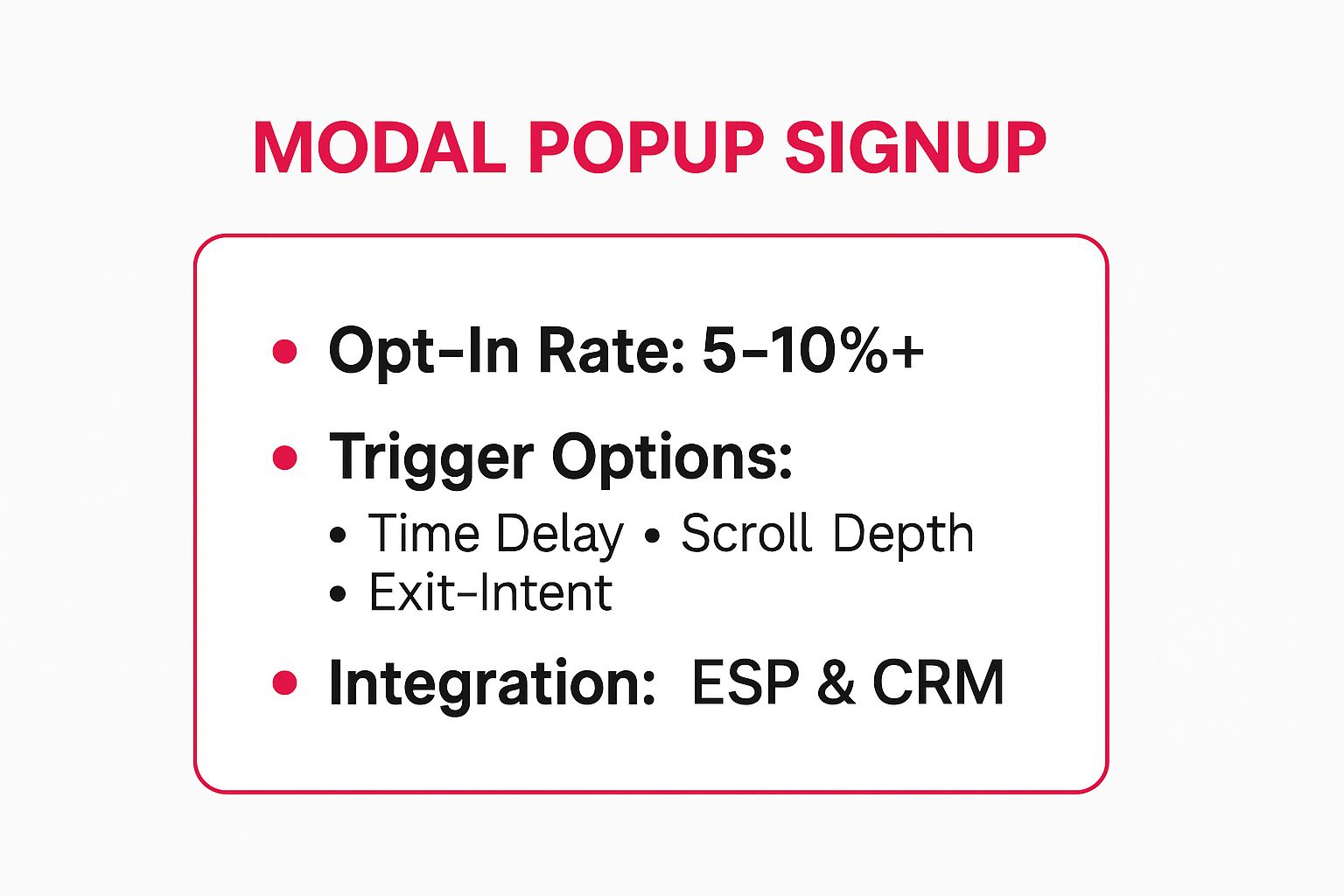
As the data shows, a well-configured modal can achieve impressive opt-in rates by leveraging strategic triggers and seamless integration with your marketing stack.
Actionable Takeaways
To maximize the effectiveness of your modal popups, focus on these key tactics:
- Offer an Irresistible Incentive: Don’t just ask for an email; give something valuable in return. A 15% discount, a free downloadable guide, or exclusive access to a sale are powerful motivators.
- Minimize Friction: Limit form fields to the absolute essentials. An email address is often enough. Adding a first name field can help with personalization, but every additional field increases the chance of abandonment.
- Optimize for Mobile: Ensure your popup is responsive and easy to use on smaller screens. The close button must be clearly visible and tappable to avoid frustrating mobile users.
- A/B Test Everything: Continuously test your headlines, offers, button colors, and trigger settings. Beyond just sign-ups, consider how effective your forms are by exploring tips for Shopify conversion rate optimization to truly convert visitors into engaged subscribers.
2. Email Inline Signup Form with Incentive
An email inline signup form is a highly contextual and less intrusive method for building your mailing list. Unlike a disruptive popup, this form is embedded directly within or at the end of valuable content, such as a blog post or a guide. It captures a reader’s interest at its peak, offering a relevant incentive in exchange for their email address right after they have consumed your high-quality information.
This approach feels like a natural extension of the content rather than an interruption. For instance, a reader finishing a detailed article on SEO strategies on Neil Patel’s blog might find a form offering a “Free SEO Checklist.” This immediate and relevant value exchange makes the opt-in decision seamless. The strength of these opt in messages is their ability to leverage the reader’s existing engagement and trust, turning passive content consumption into an active subscription.
Strategic Analysis
The effectiveness of an inline form hinges on its relevance and placement. By positioning the form after a key insight or at the conclusion of a compelling piece of content, you are asking for the opt-in when the reader’s perceived value is at its highest. They have already benefited from your expertise, making them more receptive to receiving further value.
The key is a tight alignment between the content and the incentive, also known as a lead magnet. If an article discusses “10 Ways to Improve Shopify Sales,” an offer for a “Shopify Sales Template” is far more compelling than a generic newsletter signup. This targeted approach ensures you attract subscribers who are genuinely interested in your specific niche, leading to higher-quality leads.
Actionable Takeaways
To make your inline signup forms a high-converting asset, implement these strategies:
- Create a Hyper-Relevant Lead Magnet: The incentive must be a direct continuation of the article’s topic. Offer a checklist, e-book, template, or case study that provides a practical next step for the reader.
- Emphasize Visual Contrast: Make your form stand out from the surrounding text. Use a contrasting background color or a bright, attention-grabbing call-to-action button to ensure it doesn’t get overlooked.
- Keep It Simple: Minimize friction by asking only for an email address. If personalization is critical, add a first name field, but understand that each additional field can reduce your conversion rate.
- Craft Compelling Copy: Use a clear, benefit-driven headline. Instead of “Subscribe to Our Newsletter,” try “Get Your Free SEO Checklist Now.” To dive deeper, exploring email marketing best practices can help refine your messaging for maximum engagement.
3. SMS Text-to-Join Opt-In Campaign
The SMS text-to-join opt-in campaign is a powerful, mobile-native strategy that leverages the immediacy of text messaging. This method allows potential subscribers to opt into your marketing list by simply texting a specific keyword, such as “DEALS” or “JOIN,” to a designated short code or phone number. It transforms offline or digital advertising into an instant, interactive subscription channel.
This approach is highly effective because it meets customers where they are: on their phones. Brands like Domino’s excel at this, placing “Text PIZZA to 12345 for weekly deals” on pizza boxes and in TV ads. This creates a seamless bridge from a physical or broadcast advertisement directly to their digital marketing list, capturing high-intent customers at the peak of their engagement. The low-friction nature of these opt in messages makes conversion incredibly simple.

The success of a text-to-join campaign hinges on its simplicity and clear call-to-action, making it a favorite for in-person events, retail signage, and traditional media placements.
Strategic Analysis
The strategic advantage of text-to-join is its ability to capture leads from non-digital environments with minimal effort from the user. Unlike methods that require navigating to a URL and filling out a form, this one involves a single, quick action. This is especially useful for brick-and-mortar stores, event marketers, and advertisements on podcasts or radio where a clickable link isn’t possible.
Furthermore, the act of a user initiating the text provides a strong signal of consent. This helps build a high-quality list of engaged subscribers while aligning with compliance standards. To dive deeper into the legal requirements, you can get more information on the rules for express written consent on cartboss.io to ensure your campaigns are fully compliant.
Actionable Takeaways
To launch a successful SMS text-to-join campaign, implement these core strategies:
- Choose a Memorable Keyword: Use a short, simple, and relevant keyword that is easy to remember and spell. Avoid complex words or potential autocorrect nightmares. “SAVE,” “CLUB,” or your brand name are excellent choices.
- Provide an Instant Automated Reply: Configure an immediate auto-response that confirms the subscription, restates the offer, and includes necessary compliance information like message frequency and opt-out instructions (e.g., “Reply STOP to unsubscribe”).
- Promote Your Keyword Everywhere: Display your text-to-join call-to-action prominently in-store, on packaging, on social media bios, in email signatures, and during live events. The more visible it is, the faster your list will grow.
- Segment Subscribers by Keyword: If you run multiple campaigns, use different keywords to automatically segment your audience. For example, “VIP” for an exclusive club and “SALE” for general discounts, allowing for more targeted messaging.
4. Mobile App Push Notification Opt-In Prompt
For brands with a dedicated mobile app, the push notification opt-in prompt is a critical gateway to direct and immediate communication. This permission request, native to iOS and Android operating systems, asks users to grant the app permission to send them notifications. Unlike other opt-in messages that are purely for marketing, these often provide essential functional value, making them a highly contextual and powerful tool.
A strategic approach involves a two-step process. First, a custom “soft-ask” or pre-permission prompt is shown within the app’s interface. This message explains the benefits of enabling notifications, such as receiving order updates, exclusive app-only deals, or new content alerts. For example, Spotify uses this to notify users about new album releases from their favorite artists, while Uber uses it to send crucial ride status updates. This value-first approach primes the user before the official, one-time system dialog appears.
Strategic Analysis
The effectiveness of a push notification opt-in hinges on timing and perceived value. The default iOS prompt can only be shown once; if a user denies permission, you cannot ask again. This makes the pre-permission screen essential. It allows you to explain the “why” behind the request and delay the official system prompt until the user has experienced the app’s core value and is more likely to say yes.
This strategy transforms the opt-in from a simple permission request into a value-driven conversation. By waiting for a high-intent moment, such as after a user completes a key action or saves an item, the prompt feels less like an interruption and more like a helpful feature.
This video demonstrates how timing the prompt can dramatically increase opt-in rates, turning a potential annoyance into a welcome communication channel.
Actionable Takeaways
To maximize the success of your push notification opt-in prompts, implement these key tactics:
- Use a Custom Pre-Prompt: Never lead with the cold, generic system prompt. Create a branded, in-app message that clearly outlines the benefits users will receive, such as “Enable notifications to get real-time shipping updates” or “Get notified about price drops on your favorite items.”
- Delay the Ask: Don’t request permission on the very first app open. Wait until the user has performed a meaningful action, like completing their first puzzle in a game app or adding an item to their cart. This demonstrates your app’s value first.
- Segment Your Prompts: If possible, trigger different pre-prompts based on user behavior. A user who frequently browses a specific product category could receive a prompt about restock alerts for that category.
- Make it Part of Onboarding: Integrate the soft-ask seamlessly into your new user onboarding flow. This is also a key component of a streamlined user journey, and you can discover more about improving this process by reading up on mobile checkout optimization.
5. Facebook Messenger Checkbox Plugin
Leveraging the massive user base of Facebook, the Messenger checkbox plugin is a seamless way to integrate chatbot communication into your existing web forms. Instead of asking for a phone number or email, this tool adds a simple, pre-checked (or unchecked) box to forms like “add to cart,” account creation, or contact forms. With a single click, users can agree to receive ongoing updates directly in their Facebook Messenger app, making it one of the lowest-friction opt in messages available.
This method transforms a standard transactional interaction into a conversational marketing channel. Brands like 1-800-Flowers use it to send real-time order and delivery updates, while media outlets such as TechCrunch deliver daily news briefings. The familiarity and convenience of Messenger create an immediate and personal connection, turning a one-time visitor into an engaged subscriber within a platform they use daily.
Strategic Analysis
The power of the Messenger checkbox plugin lies in its contextual relevance and minimal user effort. Placing the checkbox on a checkout page to offer order updates feels natural and helpful, not intrusive. Since most users are already logged into Facebook on their browser, the opt-in is effortless, removing the need to type anything. This dramatically reduces friction compared to traditional sign-up methods.
However, brands must be mindful of Facebook’s “24-hour rule,” which limits promotional messaging to a 24-hour window after the user’s last interaction. This policy encourages businesses to provide immediate value and re-engage users with non-promotional content or sponsored messages to maintain the conversation. Successful strategies focus on delivering utility first, like Sephora’s restock alerts, to build trust before sending marketing content.
Actionable Takeaways
To effectively implement the Facebook Messenger checkbox plugin, focus on these tactics:
- Be Explicit and Transparent: Clearly state what users are signing up for next to the checkbox. Use unambiguous language like, “Send me order updates and special offers on Messenger.” This manages expectations and builds trust from the start.
- Deliver Immediate Value: Once a user opts in, send a welcome message immediately. Confirm their subscription and deliver on your promise, whether it’s an order confirmation, a shipping notification, or the first news update.
- Segment Your Audience: Use the initial interaction to segment subscribers. If they opted in after purchasing a specific product, tag them with that interest. This allows for highly personalized follow-up messages and more effective marketing campaigns.
- Plan for Re-engagement: Develop a strategy to interact with users to keep the 24-hour window open. Ask questions or offer quick-reply buttons to encourage user responses, which resets the clock and allows you to continue the conversation.
6. WhatsApp Business Opt-In Message
Leveraging WhatsApp for business communication has become a game-changer for customer engagement, moving beyond traditional channels to a platform used by billions daily. A WhatsApp Business opt-in message is the mandatory first step, where a customer explicitly agrees to receive messages. This consent is crucial for compliance and ensures that all subsequent communication, whether for support, notifications, or promotions, is welcome and expected.
This method transforms a personal messaging app into a powerful, direct line to your customers. Brands like KLM use it effectively for sending flight status updates and booking confirmations, while logistics companies like DHL provide real-time shipment tracking. These are not just generic marketing blasts; they are high-value, service-oriented opt in messages that enhance the customer experience by providing timely and relevant information directly within the app they use most.
Strategic Analysis
The effectiveness of a WhatsApp opt-in hinges on its context and value. Unlike SMS or email, WhatsApp is a more personal space, so consent must be earned by offering clear, tangible benefits. The opt-in process must be user-initiated, meaning a customer must send the first message or actively check a box on your website. For example, a customer ticking a box during checkout to receive order updates via WhatsApp is a perfect, non-intrusive way to gain consent.
This proactive consent model ensures higher engagement rates because users have specifically requested the interaction. They are not only aware of the incoming messages but are often anticipating them. This builds trust and positions your brand as a helpful partner rather than an intrusive advertiser, a critical distinction on a personal platform like WhatsApp. To learn more about crafting effective consent requests, you can find detailed guides on how to implement a WhatsApp Business opt-in message that aligns with platform policies.
Actionable Takeaways
To successfully integrate WhatsApp opt-ins into your communication strategy, focus on these critical actions:
- Offer Utility, Not Just Promotions: Frame your opt-in around high-value services like order tracking, appointment reminders, or instant customer support. This makes the decision to opt-in easy and beneficial for the user.
- Make Consent Unambiguous: Use clear language on your website forms, checkout pages, or in-store signage. For example, “Check this box to receive your order confirmation and shipping updates on WhatsApp.”
- Document Everything: Maintain a clear record of when and how each user gave their consent. This is a requirement for using the WhatsApp Business Platform and protects your business while respecting user privacy.
- Use Pre-Approved Message Templates: For all outbound, business-initiated conversations, you must use message templates approved by WhatsApp. This ensures communications are not spammy and adhere to platform guidelines.
7. Double Opt-In Confirmation Email
The double opt-in confirmation email is a two-step verification process that solidifies subscriber consent and significantly enhances list quality. After a user initially signs up through a form, they receive an automated email requiring them to click a confirmation link. This method ensures the email address is valid, belongs to the user, and that they genuinely want to receive your communications, making it a cornerstone for building a high-engagement email list.
Platforms like Mailchimp and AWeber have championed this approach because it creates a more deliberate and verifiable opt-in message flow. By requiring this extra step, brands can filter out misspelled addresses, bots, and low-interest contacts, resulting in a cleaner list with higher open rates and lower bounce rates. This process is not just a best practice; it’s a powerful compliance tool.

Strategic Analysis
The strategic value of a double opt-in lies in its power to build a high-quality, consent-driven subscriber base. While it introduces an extra step that might slightly reduce the total number of sign-ups, the subscribers you do gain are demonstrably more engaged and committed. This is a classic case of quality over quantity. The confirmation acts as a definitive record of consent, which is crucial for adhering to data privacy regulations.
Furthermore, this method sets a professional tone from the very first interaction. It communicates that you respect the user’s inbox and are committed to transparent marketing practices. This foundation of trust can lead to better long-term customer relationships and higher lifetime value. For businesses operating globally, understanding legal frameworks is paramount. Implementing a double opt-in is a robust way to ensure compliance; for a broader perspective, you can explore GDPR considerations in different countries.
Actionable Takeaways
To effectively implement a double opt-in process, focus on clarity and motivation:
- Write a Clear, Action-Oriented Subject Line: Use direct language like “Action Required: Confirm Your Subscription” or “One Last Step to Join Our List.” This immediately tells the user what they need to do.
- Reinforce the Value Proposition: Briefly remind the subscriber in the email body what they signed up for. Mention the exclusive deals, content, or updates they are about to receive.
- Use a Prominent Confirmation Button: The call-to-action button should be impossible to miss. Use a contrasting color and clear text like “Confirm My Subscription” or “Yes, Sign Me Up!”
- Keep it Simple and Focused: The sole purpose of this email is to get a click. Avoid including other links, promotions, or distractions that could divert the user’s attention from the confirmation button.
7 Opt-In Message Methods Comparison
| Opt-In Method | 🔄 Implementation Complexity | ⚡ Resource Requirements | 📊 Expected Outcomes | 💡 Ideal Use Cases | ⭐ Key Advantages |
|---|---|---|---|---|---|
| Website Modal Popup Newsletter Signup | Medium – requires triggers, design, ESP/CRM integration | Moderate – design, dev, analytics | High opt-in rates (5–10%+) | Immediate list growth, broad audience | High visibility, flexible targeting |
| Email Inline Signup Form with Incentive | Low – embed form in content | Low – form design, content alignment | Moderate opt-ins | Engaged readers, content-driven offers | Non-intrusive, contextual relevance |
| SMS Text-to-Join Opt-In Campaign | Medium – shortcode setup, compliance | Moderate – messaging costs, legal | Very high open rates (90%+) | Mobile users, direct promotions | Fast engagement, no app needed |
| Mobile App Push Notification Opt-In | High – app permissions, custom pre-ask | High – app dev, segmentation | High engagement and CTR | Mobile apps needing active users | Rich media, system-level visibility |
| Facebook Messenger Checkbox Plugin | Medium – Facebook API integration | Moderate – FB login, API management | High open rates (up to 80%) | Web forms, chatbot engagement | One-click opt-in, two-way conversations |
| WhatsApp Business Opt-In Message | High – compliance, template approval | High – consent management, FB approval | Very high open rates (90%+) | Personalized customer support, notifications | Highly conversational, global reach |
| Double Opt-In Confirmation Email | Medium – automation and follow-up emails | Moderate – email platform and design | Improved list quality and engagement | Compliance-sensitive lists | Higher deliverability, reduces fakes |
From Opt-In to Conversion: Your Blueprint for SMS Success
We’ve explored a comprehensive arsenal of opt in messages, moving from website popups and email forms to innovative text-to-join campaigns and social media integrations. Each method, whether it’s a straightforward SMS keyword or a sophisticated double opt-in sequence, serves a singular, powerful purpose: to earn the trust and permission of your audience, transforming a casual browser into an engaged subscriber.
The core lesson from these examples is that a successful opt-in isn’t just a technicality; it’s the first handshake in your customer relationship. It’s where you set expectations, showcase your brand’s personality, and deliver immediate, tangible value. The most effective strategies are never passive. They are proactive, context-aware, and built on a foundation of clear communication and compelling incentives.
Key Takeaways for High-Converting Opt-Ins
Mastering your opt-in strategy requires a shift in perspective. Instead of viewing it as a simple data capture form, see it as the first, crucial step in your customer journey and a vital component of your overall marketing funnel.
- Value Proposition is Paramount: Never ask for a phone number without offering something compelling in return. Whether it’s a discount, exclusive access, or valuable content, the “what’s in it for me” must be crystal clear to the user.
- Clarity and Compliance are Non-Negotiable: Transparency is your greatest asset. Clearly state what subscribers will receive and how often. Adhering to TCPA, GDPR, and other regulations isn’t just a legal requirement; it builds the trust necessary for a long-term relationship.
- Context is King: The best opt in messages meet customers where they are. A checkout page opt-in should feel different from a social media text-to-join campaign. Tailor your language, offer, and timing to the user’s current context for maximum impact.
Your Actionable Next Steps
Armed with these insights, it’s time to put them into practice. Start by auditing your existing opt-in points. Are they optimized? Is the value proposition clear? Are you making it as easy as possible for customers to say “yes”?
Next, identify one new channel or method from this article to implement. Perhaps it’s a text-to-join keyword for your next physical event or an improved double opt-in flow to clean your list and boost engagement. Remember, building a high-quality SMS list is a continuous process of testing, learning, and refining. The effort you invest in crafting powerful opt in messages pays dividends through higher engagement, increased loyalty, and ultimately, more sales. For a deeper dive into converting visitors into customers, explore these practical conversion optimization tips. Mastering the opt-in is the first step, but optimizing the entire journey is what builds an eCommerce powerhouse.
Ready to automate your SMS marketing and turn abandoned carts into revenue? CartBoss specializes in sending perfectly-timed, compliant opt in messages and recovery texts that convert. See how CartBoss can help you build your SMS list and boost your sales on autopilot.