


An SMS auto respond system is a simple, pre-programmed tool that fires off a text message automatically when a specific trigger occurs. This could be anything from a customer sending you a message with a specific keyword to filling out a form on your website. Think of it as your digital front desk—an always-on assistant that gives instant replies, 24/7, without you lifting a finger.
Why SMS Auto Respond Is a Modern Business Essential
In a world where everyone expects instant gratification, a slow response is more than just bad service; it’s a missed opportunity. This is exactly where an SMS auto respond strategy shifts from a “nice-to-have” gimmick to a core part of how you communicate. It’s the digital equivalent of greeting a customer the second they walk through your door.
This simple tech completely changes how you engage with leads and customers. It guarantees that no one is left hanging, whether they reach out at 3 PM on a Tuesday or 3 AM on a Sunday. This immediate feedback loop builds trust from the very first interaction and makes your brand look professional and incredibly responsive.
Meeting Customer Expectations Instantly
The biggest win with an SMS auto respond system is the instant reassurance it provides. When someone texts your business, they want a quick answer. An automated reply immediately confirms you got their message and sets the expectation for when they’ll hear from a real person.
This is a perfect fit for the way people use text messaging. With SMS open rates hitting a massive 98% and most messages being read within three minutes, you know your automated replies are being seen almost immediately. That kind of speed blows email and other channels out of the water.
More Than Just a Confirmation Message
A well-crafted auto-response can do much more than just say, “We got your message.” It can be an active part of your sales and support funnel. You can use it to answer common questions, link to an FAQ page, or even capture a lead from a social media ad. To really see how powerful this can be for generating leads, check out this ultimate guide to automated SMS marketing.
By automating that first touchpoint, you free up your team to handle the more complex, high-value conversations. They can stop answering the same basic questions over and over and start solving real problems, which is what truly drives customer satisfaction and loyalty.
To give you a clearer picture, here’s a quick look at the immediate benefits you can expect.
Immediate Business Wins from SMS Auto Responders
This table breaks down the tangible benefits your business can expect when implementing an automated SMS system.
| Benefit | Real-World Impact | Example Scenario |
|---|---|---|
| Instant Lead Engagement | Capture leads the moment they show interest, before they move on to a competitor. | A potential customer texts “QUOTE” to your business number and instantly receives a link to your pricing page and a message saying, “Thanks! A team member will call you in the next 15 minutes.” |
| 24/7 Customer Support | Provide immediate acknowledgment and basic info outside of business hours, reducing customer frustration. | A customer texts your support line at 10 PM with a question. They get an auto-reply: “Our team is offline, but we’ll respond first thing tomorrow morning. In the meantime, here’s a link to our help center.” |
| Improved Team Efficiency | Automate repetitive responses, freeing up your staff to focus on more complex, revenue-generating tasks. | Instead of manually replying to dozens of “What are your hours?” texts, an auto-responder handles it, letting your sales team focus on closing deals. |
| Enhanced Professionalism | A swift, helpful response makes your brand appear organized, modern, and customer-focused. | A new inquiry receives a polished, branded message confirming receipt, immediately setting a professional tone for the relationship. |
Ultimately, setting up an SMS auto respond system isn’t just a tech upgrade; it’s a strategic move that pays off right away. It makes for a better customer experience, boosts your team’s efficiency, and makes sure you never miss a chance to connect with a potential buyer. Mastering these automated replies is a key piece of our recommended SMS marketing best practices for any e-commerce brand looking to grow.
Building Your First Campaign in CartBoss
Alright, let’s move from theory to action. This is where you’ll see just how powerful SMS auto respond can be for your store. Setting up your first campaign in CartBoss is refreshingly simple—no technical wizardry required. The whole point is to get an automated, effective message out to your customers right when it matters most.
First things first, you need to decide what customer action will kick things off. This is your “trigger.” Is it a new lead from a contact form? A completed order? Or, my personal favorite for quick ROI, an abandoned checkout? Think of the trigger as the starting pistol for your automated workflow.
For most e-commerce stores, the abandoned cart trigger is a goldmine. When a shopper loads up their cart and then vanishes, CartBoss can send a perfectly timed text to reel them back in.
Selecting Your Campaign Trigger
Once you’re in the CartBoss dashboard, head over to the campaign creation area. You’ll see a list of pre-defined triggers built specifically for online stores.
Ask yourself: what’s my biggest headache right now? Is it lost sales from shoppers who bail at checkout, or is it failing to connect with new leads quickly enough? Your answer points directly to the trigger you should choose.
Here are a few of the most common triggers to get you started:
- Abandoned Cart: This is the flagship feature for a reason. It targets high-intent shoppers who got distracted or had second thoughts, giving you a second chance to make the sale.
- Order Confirmation: A simple “Thanks for your order!” text builds immediate trust and cuts down on “Where’s my order?” support tickets. It reinforces their buying decision.
- New Customer Welcome: Greet a new subscriber with a friendly SMS auto respond message. You could even toss in a small discount to encourage that crucial second purchase.
Choosing the right trigger is all about aligning the automation with your business goals. For most online stores, tackling cart abandonment offers the highest and fastest return on investment, often recovering otherwise lost revenue within hours.
Crafting Your First Message
With your trigger locked in, it’s time to write the actual text. This isn’t just a system notification; it’s a tiny, powerful piece of marketing. CartBoss gives you a head start with pre-written, translated templates that are already proven to work, but you can (and should) tweak them to match your brand’s voice.
A killer message is personal, straight to the point, and has one clear call-to-action (CTA).
Let’s look at a real-world example for an abandoned cart:
- Example Template: “Hi {firstName}! Looks like you left something behind at {storeName}. Your items are saved and waiting. Complete your order here and get 10% off: {cartLink}”
This message nails it. It’s personal, reminds them where they were shopping, and gives them a compelling reason (and a direct link!) to come back and finish. This simple setup shows how an event, like a text or an abandoned cart, fires off an automated rule and delivers a timely reply.
This diagram breaks down the incredibly simple but effective flow of an SMS auto-responder.
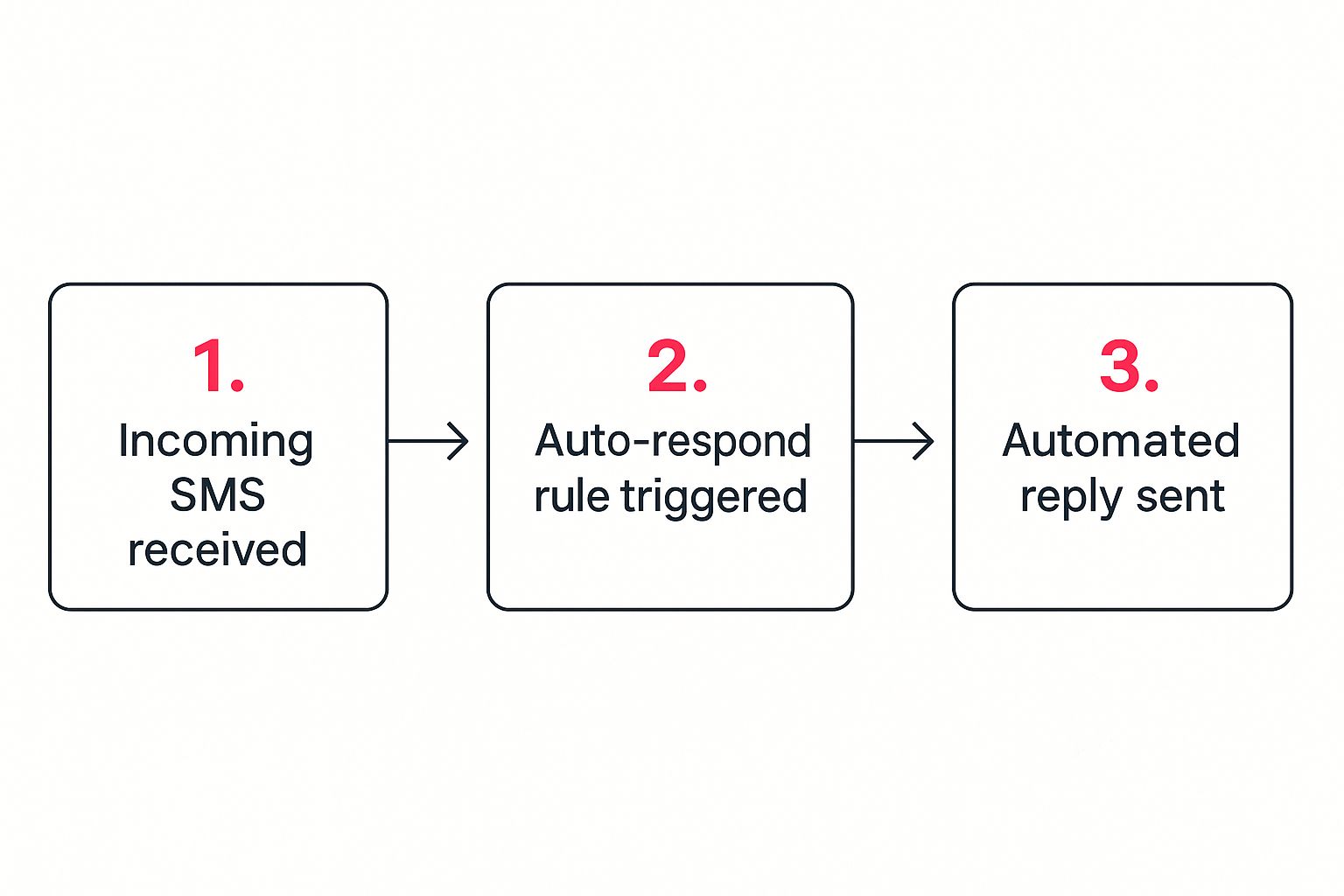
As you can see, the moment a trigger event happens, the system finds the right rule and sends your message. No delay, no missed opportunities. All you have to do is define the trigger and write the message; the platform does all the heavy lifting. By activating this first campaign, you’re essentially hiring an automated assistant that works 24/7 to engage customers and bring back lost sales.
Crafting SMS Messages That Actually Drive Action

A great sms auto respond message does more than just say “we got it.” It needs to pull the customer right back into your world. The line between a text that gets deleted and one that drives a sale is surprisingly thin, and it all comes down to the words you choose.
This is your chance to ditch the robotic confirmations and start writing copy that feels human, helpful, and maybe even a little urgent.
Keep It Personal and On-Brand
The absolute core of a powerful auto-response is personalization. I’m talking about using dynamic tags like {firstName} and {storeName}. Seriously, this isn’t negotiable. These tiny details make the message feel like it was meant for them specifically, not just blasted out to a list. Just using someone’s name can make a huge difference in engagement.
You also need to think about your brand’s voice. Are you playful and fun? Or more direct and professional? Your automated texts have to sound like they came from you. A generic, sterile message feels totally out of place if your brand is usually full of personality.
Consistency builds trust. If a customer is used to your friendly email newsletters, a stiff SMS will feel weird and disconnected. Here’s a quick look at what I mean:
| Scenario | Generic & Robotic (Before) | Personalized & On-Brand (After) |
|---|---|---|
| Lead Confirmation | “Your inquiry has been received. We will respond shortly.” | “Hey {firstName}! We got your message at {storeName} and are on it. One of our experts will be in touch soon!” |
| Support Request | “Your support ticket #12345 has been created. Await a response.” | “Thanks for reaching out, {firstName}. We’ve got your request and our support team is ready to help. We’ll text you back here within the hour.” |
See the difference? The “After” examples feel like a real conversation, which is the whole point of using a personal channel like SMS in the first place.
The Power of a Clear Call-to-Action
Every single sms auto respond message you send needs to have a job. What do you want the recipient to do next? Without a clear call-to-action (CTA), you’re just leaving money on the table. Don’t make them guess—tell them exactly what to do.
A vague message creates confusion, but a specific CTA creates action. The goal is to make it incredibly easy for the customer to do what you want them to do, whether that’s completing a purchase, reading a blog post, or contacting support.
Your CTA should be direct and compelling. Try to create a sense of urgency or highlight a clear benefit. For instance, in an abandoned cart text, a link that automatically applies a discount is way more effective than a plain link to the checkout page. For more ideas on this, you should check out our guide on 5 SMS templates for recovering abandoned carts that we’ve seen work really well.
The economic power behind getting this right is massive. The global SMS marketing industry is on track to hit $92 billion by 2025. And with 74% of consumers admitting to making a purchase after getting a text from a brand, you can’t afford to get your messaging wrong. A well-crafted text is one of the best sales tools you have.
Advanced Automation Workflows You Can Create

A simple “we got your message” auto-reply is fine, but it’s just scratching the surface. The real magic of an sms auto respond system comes alive when you start building smart, multi-step workflows. This is where you graduate from single replies to crafting entire customer journeys that guide users, answer questions, and drive sales on autopilot.
Think of it like setting up a series of digital dominoes. The first message falls, triggering a perfectly timed sequence of personalized texts that feel helpful, not robotic. Let’s dive into a few practical workflows you can build in CartBoss right now to seriously level up your customer experience.
Create a Nurturing Welcome Series
That moment when someone new signs up for your list or makes their first purchase is a golden opportunity. Don’t waste it with a single, generic welcome text. Instead, design a multi-day welcome series that actually starts building a relationship.
This workflow doesn’t just say hello; it nurtures the connection and introduces your brand’s personality. Here’s how you could structure it:
- Day 1 (Immediately): Fire off a warm welcome message with the discount code they were promised for signing up. This delivers instant gratification and value.
- Day 3: Follow up with a text sharing a link to your best-selling product or a popular blog post. Show them what your brand is all about, beyond just the initial offer.
- Day 7: Send a final, friendly check-in. Ask if they have any questions or invite them to follow you on social media to keep the conversation going.
This type of automated message text sequence turns a simple signup into a genuine brand introduction, making long-term loyalty far more likely.
Keyword-Triggered Informational Flows
Your customers probably ask the same few questions over and over: “What’s your shipping policy?” “How do I make a return?” A keyword-triggered workflow transforms your SMS channel into a 24/7 self-service help center, freeing up your support team for the tricky stuff.
It’s simple. You just tell customers to text specific keywords to get instant info.
For instance, set up a workflow that listens for the keyword “SHIPPING.” When a customer texts it, the system automatically replies with a link to your shipping policy and estimated delivery times. Problem solved, no support ticket needed.
This approach works wonders for any common question. You can create triggers for “RETURNS,” “SUPPORT,” or even specific product names to send back detailed info on demand. It’s a ridiculously efficient way to manage customer expectations and provide instant help around the clock.
With around 5 billion SMS users worldwide, automation is no longer a “nice to have”—it’s a necessity. Businesses are leaning into it hard, with AI-powered chatbots now managing about 47% of service requests. The result? A stunning 92% improvement in response times. By building these smart workflows, you’re not just sending messages; you’re building a responsive, intelligent communication engine for your brand that meets modern customers exactly where they are.
How to Measure and Optimize Your SMS Campaigns
Launching your SMS auto respond campaigns is a great start, but the real magic happens when you start digging into the data. Success isn’t just about sending messages; it’s about understanding what works, what doesn’t, and why. Think of the CartBoss analytics dashboard as your mission control for turning raw numbers into actionable insights and a much higher return on investment.
You can’t improve what you don’t measure. The key is to move past vanity metrics. Instead of getting hung up on the number of messages sent, you need to focus on the data points that directly impact your bottom line.
Key Metrics to Track in CartBoss
When you first open your dashboard, you’ll see a ton of information. To avoid getting overwhelmed, start by zeroing in on these critical performance indicators. They tell a clear, concise story about how your audience is actually interacting with your campaigns.
- Delivery Rate: This is the percentage of messages that successfully landed on your customers’ phones. If this number is low, it could be a sign of issues with your contact list quality.
- Click-Through Rate (CTR): This is the gold standard for engagement. CTR measures how many people actually clicked the link in your message, telling you how compelling your offer and copy truly are.
- Conversion Rate: This tracks the ultimate goal—how many of those clicks turned into a completed purchase. It’s the clearest indicator of your campaign’s financial success.
- Response Rate: For campaigns that ask for a reply, this metric shows how many people are actively starting a two-way conversation with your brand.
The real goal here is to connect the dots between these metrics. For instance, a high CTR but a low conversion rate suggests your message grabbed their attention, but something on your landing page or at checkout is creating friction and stopping the sale.
Turning Data into Actionable Insights
Once you have a handle on your baseline performance, you can start optimizing. This is where you put on your detective hat and let the data guide you. Is my copy really effective? Am I sending texts at the right time?
A practical way to find concrete answers is through A/B testing. Don’t just guess what might work better—test it. Create two versions of an SMS auto respond message and send them to different segments of your audience to see which one performs.
For example, you could test things like:
- Different CTAs: Pit “Complete your order” against something more urgent like “Grab your 10% off now!”
- Message Timing: Does a message sent 30 minutes after cart abandonment outperform one sent after two hours?
- Offer Variations: Test a 15% discount versus a free shipping offer. You might be surprised which one actually drives more conversions for your specific audience.
By consistently testing and refining your approach based on real user behavior, you create a powerful feedback loop. Each campaign becomes smarter than the last. This process of continuous improvement is the foundation for building a winning strategy for SMS marketing for eCommerce that delivers sustainable growth.
Got Questions About SMS Auto-Responders?
As you dive into setting up your first SMS auto respond campaigns, you’re bound to run into a few questions. It happens to everyone. Getting these sorted out early is key to running effective, compliant campaigns that your customers will actually appreciate.
Let’s tackle the big one first: legal compliance. Can you just fire off automated texts to anyone who’s ever bought from you? The answer is a hard no. You absolutely must have explicit consent (an opt-in) before sending any marketing messages. This isn’t just a suggestion; it’s a non-negotiable rule under regulations like GDPR and TCPA.
This means you can’t just grab an old customer list and start blasting texts. Each person on that list needs to have actively agreed to get SMS messages from your brand. It’s about protecting them, but it’s also about protecting your business.
For an SMS auto respond system, things like order confirmations are transactional and generally okay. But for anything marketing-related, like abandoned cart reminders, a crystal-clear opt-in during checkout is a must.
Message Length And Timing
Okay, next up: how long should these messages be? The sweet spot is always short and to the point. Remember that a standard SMS message has a 160 character limit. Yes, you can send longer messages, but they get broken up into multiple texts. This can look spammy and, depending on your provider, might even cost you more.
Your goal should always be to get your main point and call-to-action across cleanly in that first message.
And what about timing? For replies to customer questions, it’s a no-brainer: send it immediately. The whole point is to give them instant confirmation that you got their message.
For triggered campaigns like cart abandonment, though, timing is more of a strategic game. Here’s a cadence we’ve seen work wonders:
- First Reminder: Send it 30-60 minutes after they leave.
- Second Nudge: Follow up 24 hours later if the cart is still sitting there.
This approach builds a bit of urgency without being annoying.
Handling Opt-Outs And Staying Compliant
Finally, what happens when someone wants to stop receiving messages? Every single marketing text you send has to include a simple, clear way for them to unsubscribe. Usually, this is done by replying with a keyword like “STOP.”
Your platform—something like CartBoss—should handle these requests automatically. It’s crucial to make sure you don’t accidentally text someone after they’ve opted out.
Staying on top of these rules is everything. For a really deep dive into compliance, especially if you sell in Europe, our guide has some great practical examples for your SMS marketing under GDPR. Getting this right isn’t just about avoiding fines; it’s how you build real, lasting trust with your audience.
Ready to turn abandoned carts into your biggest revenue source? With CartBoss, you can set up powerful SMS campaigns in minutes and watch your sales grow on autopilot. Start recovering lost sales today.