


A 70.22% average online cart abandonment rate means roughly 7 in 10 carts go unpaid, according to a 2026 meta-analysis of 50 studies reported by CartFlows’ checkout abandonment statistics. For a WooCommerce store, that isn’t a minor conversion issue. It’s the largest leak in the sales funnel, and a WordPress SMS marketing plugin can help address it at the moment when purchase intent is still fresh.
The important question isn’t whether a plugin can send a text. Almost any basic notification tool can do that. The central question is whether its gateway architecture, consent workflow, recovery logic, and segmentation controls turn abandoned carts into profitable conversations without creating compliance or deliverability problems.
Table of Contents
- The Revenue Reality of Cart Abandonment
- Core Features of High-Performing SMS Plugins
- Navigating SMS Compliance and Consent Rules
- Evaluating Plugin Architecture and Gateway Reliability
- Implementing Automated Cart Recovery in WooCommerce
- Optimizing ROI Through Segmentation and Frequency Control
- Common Questions About WordPress SMS Plugins
The Revenue Reality of Cart Abandonment
Cart abandonment creates a simple economic problem. Your store has already paid to attract the visitor, the shopper has selected products, and the checkout has started. The sale still fails because the final action never happens. A recovery system doesn’t need to convert every abandoned cart to make a meaningful difference. It only needs to recover a portion of a very large pool of lost intent.
SMS is suited to this job because it reaches customers through a channel they typically check more immediately than email. Shopify’s summary of industry benchmarks reports promotional SMS open rates around 90% to 98%, while transactional SMS can reach about 98%, with rates above 90% considered good in that context. These figures come from Shopify’s SMS open-rate summary, and they explain why recovery texts are often used for time-sensitive checkout reminders.
The contrast with email isn’t just about one channel being universally better. Email remains useful for longer explanations, product education, and broader lifecycle campaigns. Cart recovery is different. The customer already knows what they wanted, so the message needs to restore momentum rather than introduce the brand from scratch.
Practical rule: Treat abandoned-cart SMS as a recovery mechanism, not as a general-purpose broadcast list.
The commercial case becomes clearer when you look at channel-specific performance. Industry benchmark pages published in 2026 reported abandoned-cart SMS open rates of about 98%, with click-to-conversion rates in the low double digits and revenue-per-recipient metrics that consistently outperform broad campaign sends. The Omnisend SMS marketing statistics roundup also reported a 20.34% average click-through rate and a 0.77% conversion rate for automated SMS in one 2026 benchmark set. Those figures aren’t a promise for every store, but they show why automated, behavior-triggered messages deserve separate treatment from promotional blasts.
Start by measuring your own funnel:
- Count abandoned carts. Use WooCommerce analytics or a dedicated recovery tool to identify carts that contain products but don’t reach payment completion.
- Separate consented shoppers. Only customers who have provided the required SMS permission should enter a marketing recovery sequence.
- Measure recovered revenue. Track clicks, completed orders, discounts, message costs, and opt-outs together.
- Calculate the complete return. The practical method is covered in this guide to calculating the ROI of SMS marketing for your ecommerce store.
If your priority is to reduce the number of shoppers who leave before paying, this practical resource on how to lower abandoned cart rate fast is useful alongside SMS planning. The plugin is only one part of the solution. Checkout friction, shipping surprises, payment failures, and unclear delivery terms still need attention.
Core Features of High-Performing SMS Plugins
A WordPress SMS marketing plugin should connect a customer action to a relevant message with as little manual intervention as possible. A tool that only sends a one-off broadcast may be adequate for announcements, but it won’t provide the logic required for cart recovery.
Notification tools are the baseline
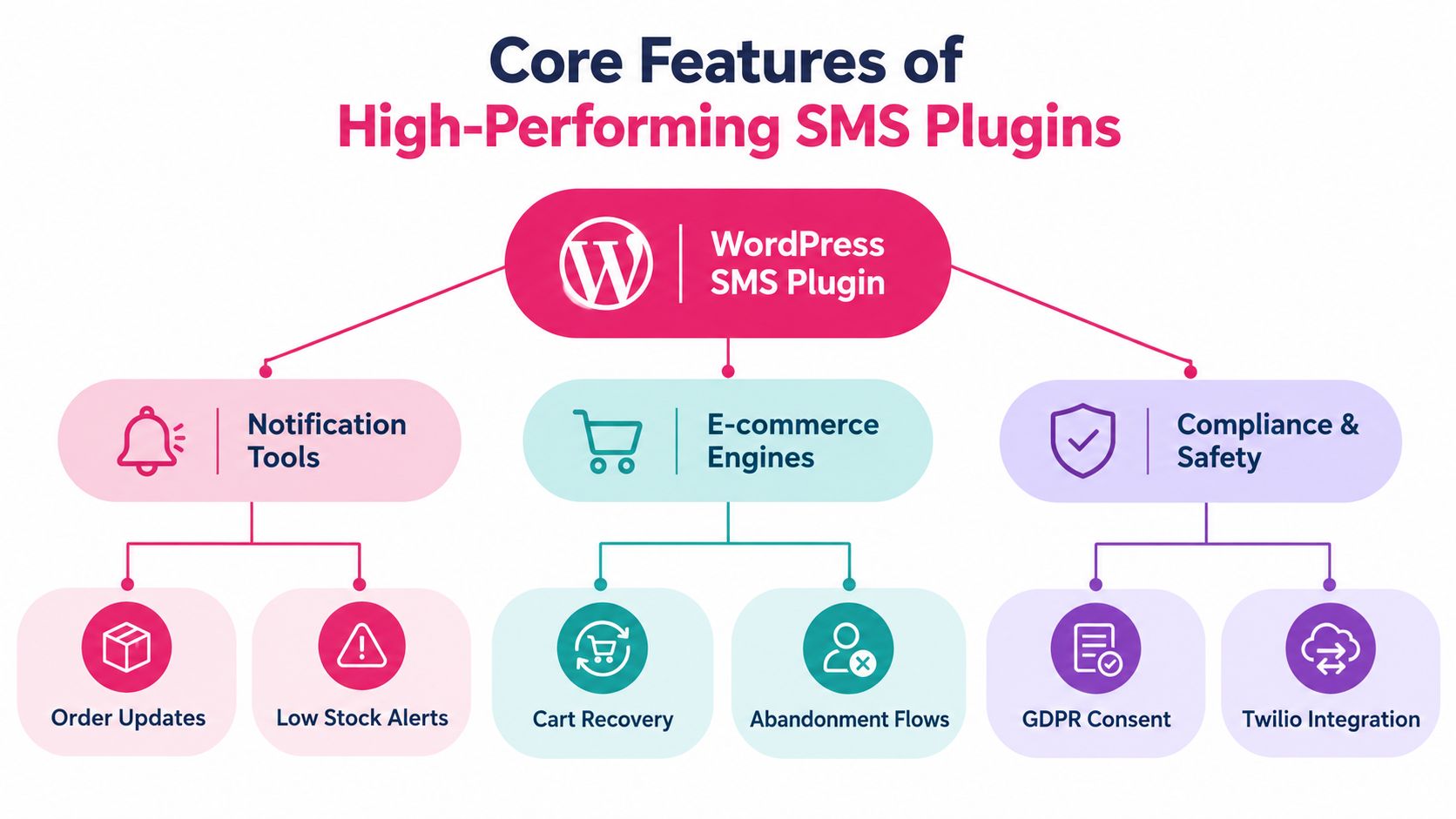
Basic functionality usually includes order confirmations, shipping updates, low-stock alerts, and manual broadcasts. These messages can improve service communication, but they don’t necessarily recover revenue. A store owner should ask whether the plugin can distinguish between a completed purchase, a failed payment, a pending order, and an abandoned cart.
Look for:
- Event triggers: The system should respond to cart inactivity, order status changes, customer registration, and other meaningful events.
- Delivery logs: Administrators need to see whether messages were sent, delivered, failed, or rejected by the gateway.
- Click tracking: A message that was delivered but never clicked requires a different diagnosis from one that failed before delivery.
- Usage records: Message consumption and gateway charges should be visible when you evaluate profitability.
WordPress.org examples show how this category has matured. SendSMS Subscribers & 2FA combines SMS marketing with logging and account-security functions, while Ardary SMS exposes campaign metrics such as sent, delivered, failed, clicks, click-through rate, and SMS used. Those controls turn the plugin from a sending button into an operational record.
Recovery engines drive the commercial outcome
The higher-value features are connected to the checkout itself:
- Pre-filled checkout links reduce the work required to complete an order.
- Dynamic discount application lets the recovery flow apply an offer without forcing the customer to rebuild the cart.
- Branded sender IDs make the message easier to recognize, subject to local carrier and registration rules.
- Automatic language detection supports stores serving customers in different markets.
- Multi-language templates prevent a single English message from being sent to every shopper.
- Frequency and do-not-disturb controls help protect consent quality and customer experience.
A useful evaluation test is to follow the entire journey as a shopper. Add a product, enter a phone number, abandon the checkout, receive the message, click the recovery link, and complete the purchase. If the link opens an empty cart, loses the discount, or asks for information already entered, the dashboard’s feature count won’t matter.
Safety features belong in the product evaluation
A plugin should support explicit consent capture, unsubscribe handling, and a clear audit trail. It should also connect reliably to an external gateway such as Twilio or another provider. The feature list is only valuable when each function works together, from opt-in through delivery and attribution.
Navigating SMS Compliance and Consent Rules
Installing a plugin doesn’t transfer legal responsibility to the plugin developer. The merchant decides what consent language appears at checkout, what messages are sent, which contacts enter a campaign, and how opt-outs are stored. A technically successful text can still create a serious business problem if the customer never agreed to receive marketing messages.
For U.S. campaigns, Twilio’s opt-in and opt-out compliance guidance states that marketing texts require prior express written consent under TCPA guidance. Businesses should retain records of consent and opt-outs. European and Canadian stores also need to account for GDPR or CASL-style consent and unsubscribe obligations, depending on their audience and operating model.
Build consent as a separate action
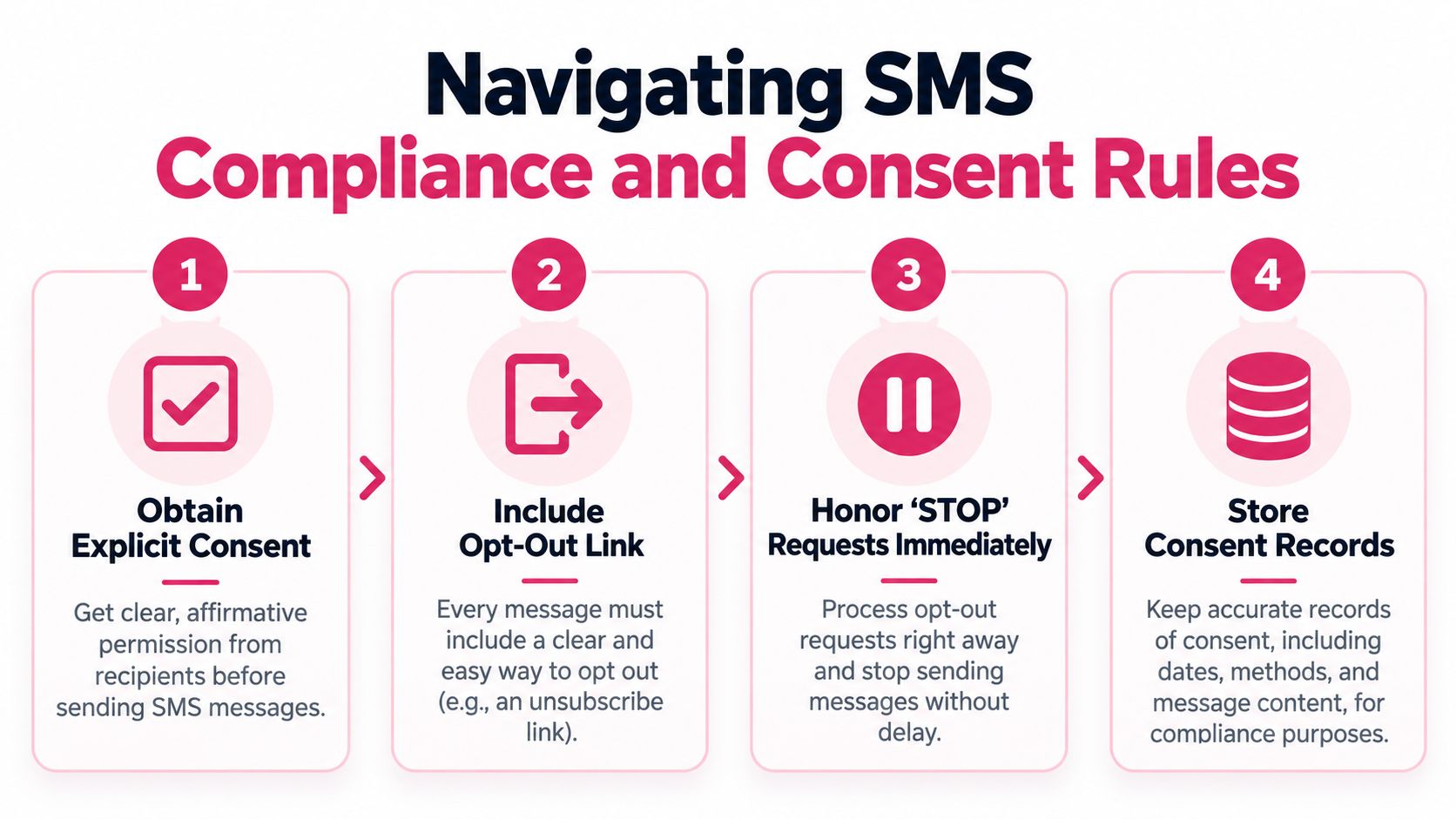
A phone number collected for shipping updates isn’t automatically permission for promotional SMS. Klaviyo’s SMS compliance guide recommends treating SMS consent as optional and collecting it through a separate checkbox or button. The wording should explain what the customer is joining, how messages will be used, and how to stop them.
A practical checkout flow looks like this:
- Display an unchecked SMS consent checkbox. Don’t preselect it.
- Use clear language. State that the customer agrees to receive marketing texts from the store.
- Separate service messages from promotions. The customer should understand the difference.
- Consider double opt-in. It confirms that the number belongs to the person who entered it and that they intend to join the program.
- Store the evidence. Keep the phone number, timestamp, source, consent wording, and relevant order or account context.
- Automate opt-outs. A STOP request should suppress future marketing messages immediately.
Audit the complete customer path
Consent isn’t only a checkbox problem. Review the forms created by pop-ups, account registration, checkout extensions, loyalty programs, and imported customer lists. Confirm that each source records consent in a way your team can retrieve later.
Your messages should identify the business, provide a meaningful reason to act, and make opting out straightforward. Don’t hide the unsubscribe process in a policy page that customers won’t find from the message itself. For a practical review of the operational details, use this SMS compliance checklist.
A plugin can provide fields and automation, but it can’t decide whether your legal basis is sufficient in every market. Ask your legal adviser to review the language and your data-processing arrangements before launch, especially if your store serves customers in the U.S., European Union, and Canada.
Evaluating Plugin Architecture and Gateway Reliability
Most WordPress SMS plugins don’t deliver messages directly from the website. They connect WordPress to an external SMS gateway through API credentials, and the gateway handles the carrier-side delivery. Twilio’s WordPress integration example demonstrates this architecture by loading the Twilio PHP SDK and storing API keys in the plugin settings.
That division of labor is sensible. WordPress handles customer events, cart state, templates, and administrator controls. The gateway handles routing and delivery. It also creates a dependency that many plugin comparisons overlook: throughput, latency, delivery reliability, and message failures depend heavily on the provider’s API and carrier connections.
Generic gateway flexibility versus managed recovery
A multi-gateway plugin gives the merchant choice. WSMS, formerly WP SMS, advertises support for 180+ SMS gateways, SMS and MMS notifications, OTP and 2FA, and GDPR-oriented tooling, as shown in its WordPress.org plugin listing. That flexibility can suit agencies, developers, or stores with an existing gateway contract.
The trade-off is operational responsibility. You may need to configure credentials, sender identity, templates, webhooks, failure handling, country restrictions, and reporting across separate systems. A generic tool can send the message, but it may not understand the commercial meaning of a cart, the value of its products, or the difference between a first reminder and a repeat promotional send.
A specialized recovery solution narrows the architecture around ecommerce events. It can connect cart detection, recovery links, discount logic, localization, and attribution in one workflow. The trade-off is less provider flexibility and a greater need to check data handling, pricing, supported countries, and integration limits before committing.
Test the failure paths, not just the happy path
Before choosing a plugin, test these situations:
- API interruption: What happens when the gateway is temporarily unavailable?
- Rate limiting: Does the queue retry safely, or does WordPress mark the message as complete?
- Duplicate triggers: Can a refresh, checkout update, or webhook resend the same reminder?
- Failed delivery: Is the failure visible, and can you distinguish a bad number from a provider issue?
- Recovery attribution: Does the system connect a click and order to the original message?
- Credential security: Are API keys restricted to administrators and protected from casual exposure?
For WooCommerce-specific considerations, compare the event model and recovery behavior in this guide to choosing an SMS plugin for WooCommerce. The right architecture is the one your team can monitor and troubleshoot, not the one with the longest feature list.
Implementing Automated Cart Recovery in WooCommerce
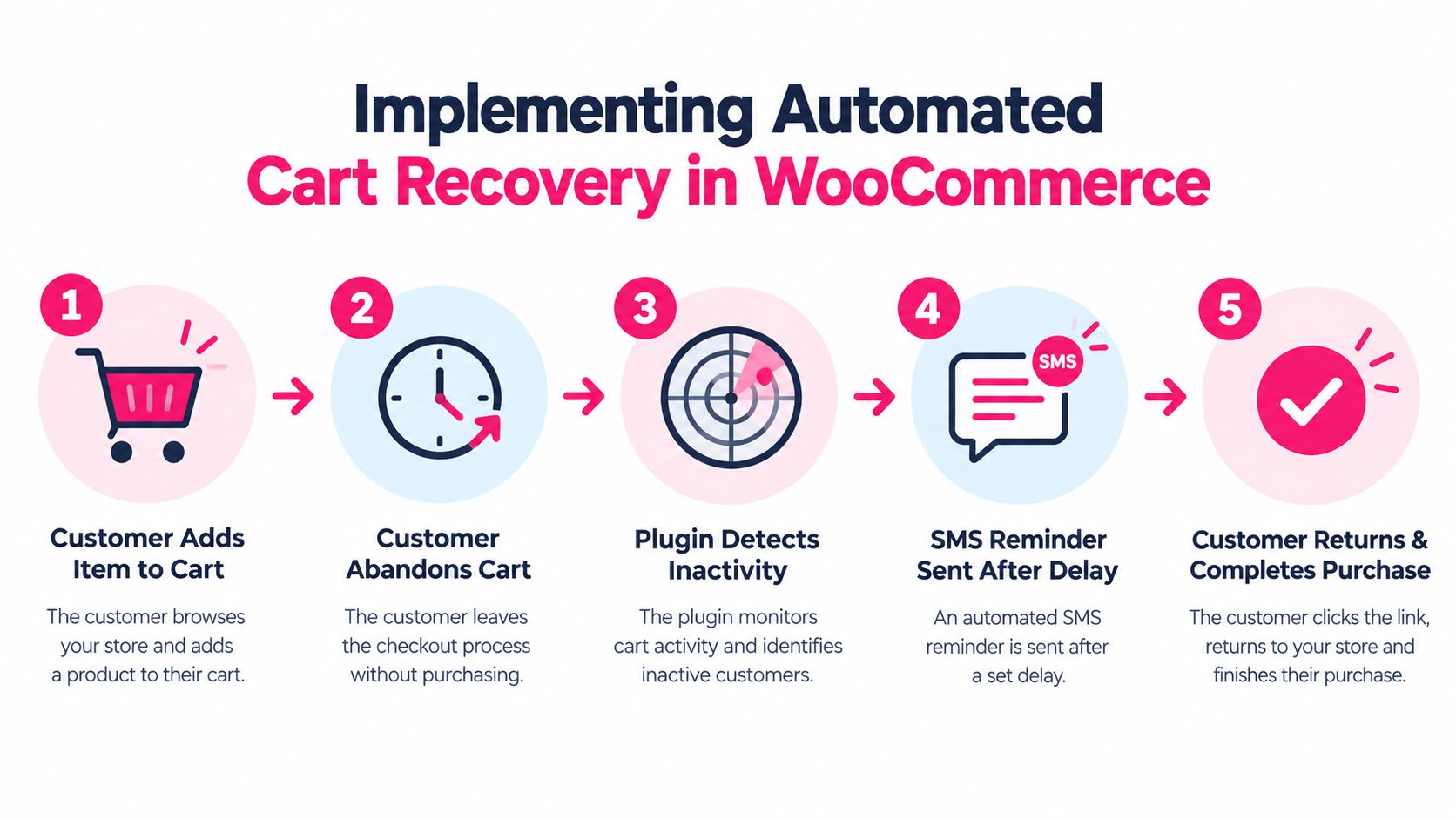
A workable WooCommerce recovery flow starts with one customer action and ends with one low-friction path back to payment. The plugin detects that the shopper left, checks whether the contact is eligible, waits for the selected delay, and sends a message containing a direct recovery link.
Configure the trigger carefully
Start with a test product and a test phone number. Confirm that the plugin captures the cart only after the shopper has supplied the required contact information and consent. A visitor who browses products but never identifies themselves can’t receive a compliant, personalized recovery message.
Then configure the recovery sequence:
- Detect abandonment. Define what inactivity means for your checkout and exclude completed orders.
- Choose the first delay. The message should arrive while the purchase remains relevant, without interrupting the shopper immediately.
- Add the recovery link. The URL should restore the cart and preserve the correct product and quantity.
- Apply the offer conditionally. Use a discount only when it improves the economics of the order.
- Stop the sequence after purchase or opt-out. A customer shouldn’t receive a recovery text for an order they’ve already completed.
A plug-and-play tool such as CartBoss can connect a WordPress site through an API key and send automatic SMS reminders with recovery links and discount messages. Its stated feature set includes pre-written and translated messages, automatic language detection, pre-filled checkout forms, dynamic discount application, branded sender ID, compliance controls, do-not-disturb functionality, and analytics. Treat those features as items to verify in your own store, particularly for the countries and gateways you use.
Localize the message, not only the storefront
A multilingual store shouldn’t rely on one generic recovery template. Automatic language detection can route the message to an appropriate template, while localized wording can make the recovery link feel like part of the shopper’s existing experience. Check translations manually for product names, currencies, shipping terms, and discount conditions.
A simple message structure is often enough:
Your cart is waiting. We saved your selected items. Complete your order here: [recovery link]. Reply STOP to unsubscribe.
Avoid adding urgency that the store can’t support. If stock isn’t limited or an offer doesn’t expire, don’t imply otherwise. The recovery message should restore convenience, not replace trust with pressure.
Use the following video as a practical companion while reviewing the WooCommerce setup:
For a more detailed implementation path, review this guide to abandoned-cart recovery for WooCommerce. Test the entire sequence on mobile, because the customer will usually open the message and checkout link on the same device.
Optimizing ROI Through Segmentation and Frequency Control
SMS profitability depends on more than delivery. Each message has a cost, and every unwanted message creates a chance that a customer will opt out. A recovery flow can generate revenue while still damaging the list if it sends too often, targets the wrong shoppers, or applies discounts to orders that would have converted without one.
Recent benchmark coverage reports median opt-out rates around 0.42% per send and roughly 1.7% per month, while other 2026 coverage places unsubscribe rates below 3.5% per send, with well-run programs closer to 0% to 1.5%. These figures are reported in Digital Applied’s 2026 SMS benchmark coverage. They aren’t universal targets, but they show why list health belongs in the ROI calculation.
Segment by commercial intent
Cart value is a practical starting point because it connects message cost and offer generosity to potential order value. Use separate rules for:
- High-value carts: Send a carefully timed reminder with a direct checkout link. Consider a stronger service-oriented message before offering a discount.
- Low-value carts: Keep the sequence short and avoid giving away margin that exceeds the likely recovered profit.
- Repeat customers: Reference convenience and saved details rather than treating every shopper like a first-time buyer.
- First-time shoppers: Explain the recovery path clearly and avoid assuming they understand your delivery or return process.
- High-intent sessions: Prioritize shoppers who reached payment or entered substantial checkout information.
- Low-intent sessions: Use conservative messaging when the customer added an item but showed little checkout engagement.
A customer segmentation techniques guide can help turn a general SMS list into behavior-based groups. The objective isn’t to create dozens of segments. It’s to make each rule reflect a meaningful difference in expected margin, intent, or customer relationship.
Control frequency as a profit variable
Set a contact limit across all SMS campaigns, not only the cart-recovery automation. A customer who receives a recovery text, a promotional broadcast, and a shipping notification in a short period may experience the program as spam even when every individual message seems reasonable.
Track these measures together:
- Recovered revenue per recipient
- Message cost per recovered order
- Discount cost
- Click-through behavior
- Opt-out rate
- Failed delivery rate
- Repeat purchase behavior
Pause or revise a flow when opt-outs rise, clicks fall, or recovered orders depend entirely on discounts. The strongest automation is usually selective. It sends a relevant message to an eligible shopper and stops as soon as the customer buys or withdraws permission.
Common Questions About WordPress SMS Plugins
Does a WordPress SMS plugin need an external gateway?
Usually, yes. WordPress plugins commonly connect to an external gateway through API credentials, while the provider handles message delivery. The plugin manages triggers, templates, logs, and WordPress workflows, so gateway selection affects reliability, latency, supported destinations, and message costs.
Can one plugin support international customers?
It can, but support varies by gateway, sender identity, carrier rules, language, and destination. Check whether the system can localize templates, detect customer language, handle country-specific consent requirements, and report failed deliveries by market. Don’t assume that a plugin working in one country will behave identically elsewhere.
Is SMS more expensive than email?
SMS usually carries a direct per-message delivery cost, while email platforms often price around contacts, sends, or plan limits. Compare the complete economics, including gateway fees, discounts, recovered margin, and opt-outs. A low-cost message isn’t profitable if it reaches customers who were unlikely to buy or causes valuable subscribers to leave.
What should a store test before launch?
Run a controlled test from opt-in through purchase. Verify consent records, recovery links, discount behavior, language selection, delivery logs, STOP handling, duplicate prevention, and order attribution. Then review the results by cart value instead of judging the program only by total clicks.
CartBoss provides a WordPress and WooCommerce SMS cart-recovery integration that connects through an API key, detects abandoned carts, and sends automated reminders with recovery links and optional discount messaging. Visit CartBoss to review the workflow, then test it against your store’s consent process, gateway coverage, and cart-value economics before activating campaigns.