



Picture this: you’re recovering lost sales while you sleep. That’s the real power behind auto reply text messages. These aren’t just any messages; they’re automated, instant responses that grab a customer’s attention right when it matters most.
Unlike emails that pile up unopened, a text message gets seen almost immediately. For any e-commerce store, this makes them a must-have tool for turning those abandoned carts back into cash.
Why Your E-commerce Store Needs SMS Automation
In the fight for your customer’s attention, the channel you choose can be the difference between a sale and a lost opportunity. Email still has its place, but for time-sensitive messages like cart reminders, it’s losing its punch. People are drowning in promotional emails, and “inbox fatigue” is a real thing.
This is where auto-reply texts completely change the game.
The magic of SMS is its immediacy. How do you react when you get a text? You check it, right? Almost instantly. That same behavior is exactly what makes SMS such a powerful, revenue-driving machine for your store.
The Numbers Don’t Lie
Let’s look at the data. It tells a pretty clear story. While emails often sit unread, SMS messages boast a mind-blowing 98% open rate. Compare that to email’s average of just 20%.
Even better, 90% of those texts are read within three minutes. For time-sensitive nudges like a forgotten cart, you just can’t beat that.
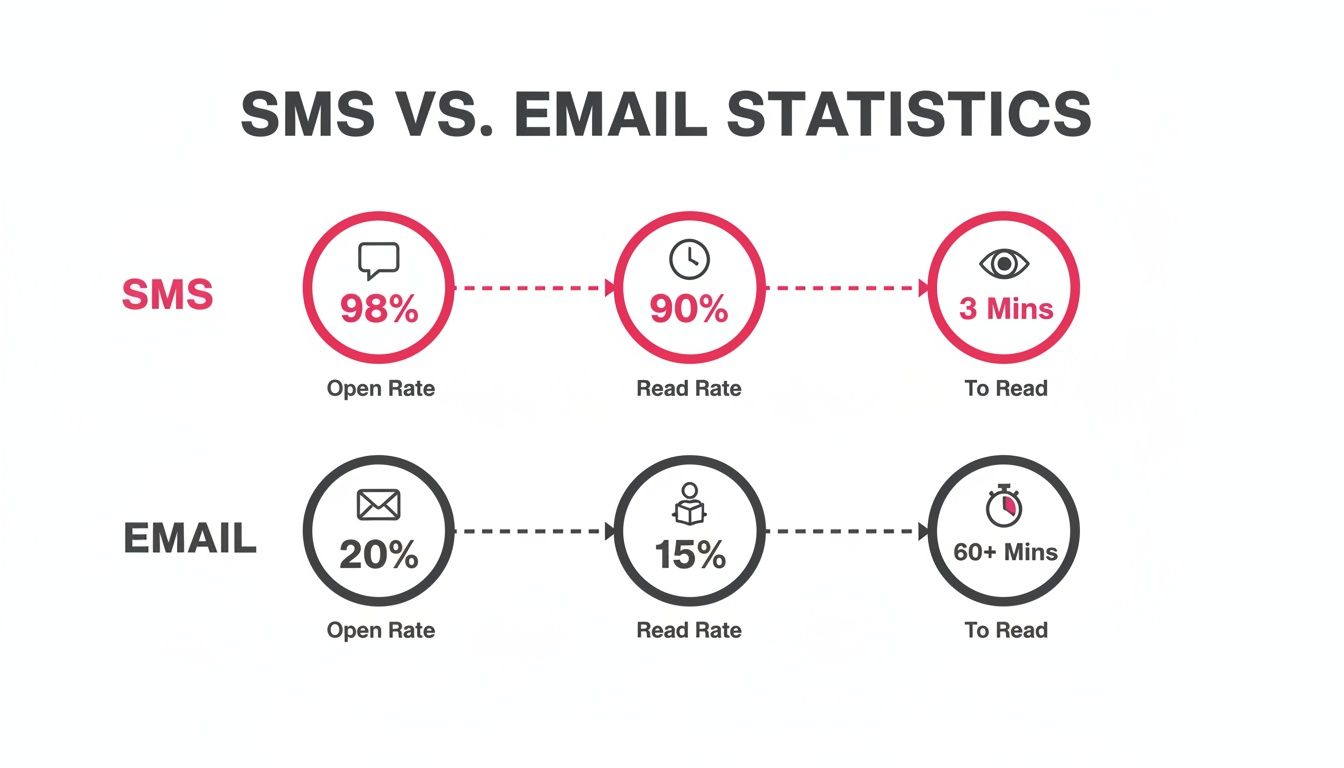
This quick comparison table really drives the point home for e-commerce owners who need to act fast.
SMS vs Email: A Quick Comparison for E-commerce
| Metric | SMS Marketing | Email Marketing |
|---|---|---|
| Open Rate | 98% (Virtually guaranteed to be seen) | ~20% (Often lost in a crowded inbox) |
| Read Rate | 90% read within 3 minutes | Highly variable, often hours or days |
| Click-Through Rate | 25%-45% (Direct and actionable) | 2%-5% (Lower engagement) |
| Best For | Immediate action (cart recovery, flash sales) | Longer-form content (newsletters, updates) |
For cart recovery, where every minute counts, the data overwhelmingly points to SMS as the superior channel.
Turning Abandonment into Opportunity
Every single abandoned cart is a customer who was this close to buying. Something got in their way—maybe the dog started barking, they got confused about shipping, or they just hesitated. An automated text message is that perfect, personal nudge to bring them right back.
For an e-commerce store, a cart abandonment message isn’t just a reminder; it’s a second chance to make a first impression. It’s your opportunity to be helpful, offer value, and guide the customer back to a seamless purchase.
Tools like CartBoss are built to master this interaction. They move beyond generic blasts and automate a smart, effective sequence. This usually includes:
- Perfect Timing: Sending that first text while purchase intent is still sky-high.
- A Personal Touch: Using the customer’s name and maybe even mentioning an item they left behind.
- A Smooth Experience: Providing a direct link that takes them straight to their pre-filled checkout. No friction.
This approach feels less like a marketing message and more like great customer service. Once you get these fundamentals down, you stop seeing abandoned carts as lost sales and start seeing them as your single biggest growth opportunity.
For a deeper look into this strategy, check out our comprehensive guide to transforming communication with automated text messages.
Crafting SMS Templates That Actually Convert
Let’s be honest. Generic messages are the fastest way to get ignored. An auto reply text message that just says, “You left something in your cart!” is destined for the digital trash bin. To actually recover sales, your messages need a bit of personality, precision, and a clear purpose. It’s all about making it feel less like an automated blast and more like a helpful, one-on-one nudge from your brand.
The goal here isn’t just to remind; it’s to re-engage. This means injecting your brand’s unique voice into every character. Are you playful and fun? Or more straightforward and helpful? Whatever your style, your SMS templates need to sound like they’re coming from you, not a robot.
This is so critical because text messages are incredible conversation starters. We’re talking a 45% response rate, which absolutely dwarfs email’s average of 8-9%. In the e-commerce world, this is even more pronounced—a whopping 91% of consumers actually prefer getting reminders via text. They choose SMS for its speed, making it the perfect channel for a timely cart recovery prompt.
The Anatomy of a High-Converting SMS Template
Every effective auto-reply message I’ve seen shares a few core components. Think of these as your building blocks for creating templates that consistently bring people back. Nail these, and you’re already way ahead of the game.
At a minimum, your template has to include:
- A Personal Touch: Use the customer’s first name with a dynamic tag like
[FirstName]. It’s a simple move that instantly makes the message more relevant. - Clear Context: Immediately say who you are. A message from a random number is just confusing. Always lead with your brand name, something like “Hey from [YourBrand]!”
- A Gentle Nudge: Mention their cart without being pushy. I find that phrases like “Looks like you forgot something” or “Still thinking it over?” work really well.
- A Direct Call-to-Action (CTA): This is the most important part. You have to give them a direct link that takes them right back to their pre-filled checkout. The easier you make it, the higher your conversion rate will be.
A great SMS template doesn’t just ask for the sale; it removes friction. The link you provide should take them directly to a checkout page with their items and information already loaded. One click should be all it takes to complete the purchase.
Plug-and-Play Templates for Your Sequence
Sending a single message and hoping for the best isn’t a strategy. A well-timed sequence builds momentum without being annoying. Here are some battle-tested templates you can adapt for a classic three-message cart recovery flow.
Message 1: The Gentle Reminder (Sent 30-60 minutes after abandonment)
This first text is just a simple, friendly check-in. The purchase is still fresh in their mind, and honestly, sometimes all they need is a quick link to get back on track.
- Example Template:
- “[YourBrand]: Hey
[FirstName], did you forget something? Your items are waiting for you! Finish your order before they’re gone:[CartLink]“
- “[YourBrand]: Hey
This template works because it’s direct, personal, and gives them an immediate way to take action.
Message 2: The Value-Add or Incentive (Sent 24 hours later)
If the first message didn’t do the trick, it’s time to sweeten the deal. This is the perfect moment to introduce a small discount or highlight a benefit they might have missed, like free shipping.
- Example Template:
- “[YourBrand]: Hi
[FirstName], still thinking it over? We saved your cart for you. To make it easier, here’s 10% off your order! Use code SAVE10 or just click here:[CartLink]“
- “[YourBrand]: Hi
See how this message gives them a tangible reason to come back? If you’re looking for more ideas, you can explore other proven SMS templates for recovering abandoned carts that really drive results.
Message 3: The Final Urgency Nudge (Sent 48-72 hours later)
This is your last shot at recovering the sale. It’s time to create a little friendly urgency by letting them know their cart—or the special offer—is about to expire. The key is to be firm but still friendly.
- Example Template:
- “[YourBrand]: Last chance,
[FirstName]! Your cart (and your 10% discount) expires tonight. Don’t miss out on your goodies! Grab them now:[CartLink]“
- “[YourBrand]: Last chance,
This final auto reply text message taps into the fear of missing out (FOMO), which is a powerful motivator for any shopper.
Optimization Tips for Maximum Impact
Once you have your templates set up, the work isn’t over. You need to keep tweaking things to squeeze every last drop of revenue out of your campaigns.
- Use Emojis Wisely: A well-placed emoji (like 🛒, ✨, or 👋) can add personality and grab attention. Just don’t overdo it. Make sure they fit your brand’s voice.
- Keep It Concise: You’ve got limited space. Get straight to the point. Every single word should have a purpose.
- A/B Test Everything: Seriously, test it all. Pit your offers against each other (10% off vs. free shipping), try different copy (playful vs. direct), and experiment with your timing. Let the data show you what works best for your audience.
By combining a strong foundation with a multi-step sequence and a commitment to testing, your auto reply text messages will transform from simple reminders into a powerful, automated sales recovery engine.
Right, so you’ve got the theory and a few templates down. Now for the fun part: turning those ideas into a real, money-making campaign. Let’s get your first auto reply text messages live.
The best part? You don’t need to be a developer or have any coding skills. Modern tools have made this whole process incredibly straightforward.
Getting set up on platforms like Shopify or WooCommerce is surprisingly quick. If you’re using a tool like CartBoss, you can connect it to your store in less than a minute. Seriously. This isn’t some complex, week-long integration project; it’s a fast setup designed to get you recovering sales almost instantly.
These tools are built for store owners, not programmers. The focus is on clear, simple settings that you can configure once and let run, driving results from day one.
Nailing Your Core Campaign Settings
Once your store is connected, it’s time to lay down the basic rules for your automation. This is where you tell the system when and how to send your messages, turning it from a simple tool into a smart, revenue-generating machine.
Getting these initial settings right is crucial. It’s the difference between being helpful and being intrusive.
You’ll want to focus on a few key areas first:
- Sending Schedule: Timing is everything. The most effective campaigns don’t just send one message; they send a sequence. I always recommend setting the first text to go out quickly—usually 30 to 60 minutes after a cart is abandoned. This catches people while your brand is still fresh in their minds.
- Message Sequence: Don’t just stop at one text. A single message is easy to ignore. Set up a second message to go out 24 hours later, and maybe even a third one after 48 hours. This multi-touch approach is what really boosts recovery rates.
- Do-Not-Disturb (DND) Hours: This is a non-negotiable. You have to respect your customers’ time. Any decent platform will let you set “quiet hours” to automatically prevent messages from being sent late at night or super early in the morning. It protects your brand’s reputation.
These foundational settings create the backbone of a campaign that works on autopilot, hitting customers at just the right moment without you lifting a finger.
Turning On the High-Impact Features
Beyond the basic schedule, this is where you can really separate your campaign from the pack. Modern SMS tools have features designed to remove every bit of friction from the buying process. Activating these is what takes a campaign from good to great.
You’re not just sending a reminder; you’re delivering a seamless, personalized path back to a completed purchase.
The goal isn’t just to send a text. It’s to deliver a direct, one-click path back to a checkout page with all the annoying obstacles already cleared away.
To make that happen, make sure these features are enabled:
- Automatic Language Detection: If you sell internationally, this is a game-changer. The system figures out the customer’s language and sends a pre-translated message automatically. It makes your brand feel local and personal, no matter where they are.
- Pre-filled Checkouts: When a customer clicks the link in your text, they should land on a checkout page with their info already typed in. It sounds simple, but this one feature massively reduces the effort required to buy.
- Dynamic, Auto-Applying Discounts: If you’re offering a discount, don’t force people to copy and paste a code. The best tools will automatically apply the discount when the customer clicks the link. It’s a smooth, frictionless experience that just works.
When you put all these elements together, you’ve built a seriously sophisticated workflow. To see how a complete system handles all this for you, you can learn more about how a dedicated auto SMS responder can streamline the entire process.
And if you want to zoom out and see how this fits into a bigger strategy, exploring some broader marketing automation best practices can give you great ideas for optimizing all your digital workflows. With these settings dialed in, your auto-reply system becomes a powerful, fully-optimized engine for winning back lost sales.
Using Personalization to Boost Your ROAS
If you’re sending the same generic auto reply text message to every single customer, you’re leaving money on the table. A lot of it. While basic automation is a decent start, the real magic—and the massive return on ad spend (ROAS) that comes with it—happens when you make every message feel like a personal, one-on-one conversation.
Blanket messages get lukewarm results. It’s that simple. A personalized text, on the other hand, shows the customer you’re actually paying attention. Think of it as the difference between shouting into a crowd and pulling someone aside for a quiet chat. That personal touch is what turns a simple reminder into a revenue-generating machine.
The numbers don’t lie. For retailers, a staggering 96% of marketers have seen revenue climb thanks to SMS, and 60% of them reported substantial growth. This is all supercharged by the instant delivery that makes automated replies so powerful in the first place.
Now, AI is pushing this even further. A huge 81% of businesses say it has dramatically improved their SMS game, with more than half using it specifically for personalization and automation. Tools like CartBoss lean on this tech to create dynamic discounts and pre-fill checkouts on the fly, all while keeping things compliant.
Segment Your Audience for Targeted Offers
The first real step toward personalization is segmentation. Let’s be honest, not all abandoned carts are created equal, so why would your offers be? By splitting your audience into logical groups, you can send messages that actually hit the mark and drive much better results.
You can get started with just two key data points:
- Cart Value: A shopper who bailed on a $300 cart is a much bigger potential win than someone who left a $30 item behind. It makes perfect sense to offer that high-value shopper a juicier incentive—maybe 15% off or free shipping—to close that bigger sale. For the smaller carts, a simple nudge or a modest 5% discount is often all it takes.
- Purchase History: Your loyal customers are your VIPs, so treat them that way. If a repeat buyer abandons a cart, your message should feel different. A quick “Welcome back!” or an exclusive offer just for them makes them feel seen and encourages them to stick around.
Segmentation shifts you from a “spray and pray” strategy to a more surgical approach. You’re no longer just sending a text; you’re delivering the right message to the right person at exactly the right time.
Use Dynamic Tags to Make It Personal
Segmentation sets the strategy, but dynamic tags are what make the message feel like it was written just for them. These are just simple placeholders that automatically pull in customer or cart details. They’re incredibly easy to implement and have a massive impact on how your texts are received.
Here are a few must-haves to start with:
[FirstName]: Using a customer’s first name is the oldest trick in the book for a reason—it works. “Hey[FirstName]” is instantly more personal than a cold “Hello.”[ProductName]: Naming the specific item they left behind adds powerful context and jogs their memory. A text like, “Still thinking about the[ProductName]?” immediately reminds them what they were so close to buying.[DiscountCode]: If you’re sending unique, one-time-use discount codes, a dynamic tag can pop the right code into the message for that specific customer.
When you start combining these simple tags, you can create surprisingly sophisticated and relevant auto-replies. For a deeper look at these tactics, check out our guide on how to personalize SMS campaigns for maximum cart recovery success. It’s packed with more actionable strategies.
This level of detail shows you’ve done more than just notice they left. You’ve created a helpful, personalized experience just for them. That’s the kind of thoughtful approach that builds trust, drives conversions, and ultimately delivers a much, much stronger ROAS.
Navigating SMS Compliance and Best Practices
Sending auto reply text messages is a powerful way to connect with customers, but it’s a channel that comes with some serious responsibility. This direct line to your customer’s pocket is governed by strict legal rules, and ignoring them can lead to massive fines and, even worse, a trashed brand reputation. It’s not just about what you send; it’s about how and when you send it.
Think of it like being invited into someone’s home. You wouldn’t just show up and start rearranging their furniture. In the same way, you need explicit permission to enter a customer’s message inbox. This isn’t just a friendly suggestion—it’s a legal must-have under regulations like the GDPR in Europe and the CCPA in California.
The Golden Rules of SMS Compliance
Before you even think about hitting ‘send’ on your first campaign, you have to get the non-negotiables right. These rules exist to protect people from spam and make sure every marketing text they get is one they actually asked for. Nailing this from day one is the foundation of a trustworthy and sustainable SMS program.
Here are the core principles you can’t ignore:
- Explicit Consent (Opt-In): You absolutely must have clear, undeniable permission from a customer before sending them promotional texts. This means they have to actively agree—for example, by checking a box at checkout that is not pre-ticked.
- A Clear Opt-Out: Every single message you send has to include a simple and obvious way for people to unsubscribe. The gold standard is including instructions like, “Reply STOP to unsubscribe.”
- Respect Quiet Hours: Nobody wants their phone buzzing with a special offer at 2 AM. Your system needs a “Do-Not-Disturb” feature that blocks messages from being sent during legally protected quiet hours, which are typically late at night and early in the morning.
Don’t treat compliance as a minor detail. A single violation can result in fines reaching thousands of dollars. Using a platform like CartBoss is one of the smartest moves you can make, as its built-in, automated compliance features handle these rules for you.
For a much deeper dive into the legal side of things, check out our complete guide to understanding SMS marketing compliance.
To keep things straightforward, here’s a quick checklist to help you stay on the right side of the law.
SMS Compliance Checklist
| Compliance Area | Key Action Required | Why It Matters |
|---|---|---|
| Consent | Obtain explicit, affirmative opt-in. No pre-checked boxes. | Protects consumer rights and ensures you’re only messaging people who want to hear from you. |
| Opt-Out | Include a clear “Reply STOP to cancel” in every message. | It’s a legal requirement and gives customers control, building trust instead of frustration. |
| Quiet Hours | Set up a “Do-Not-Disturb” window (e.g., 9 PM – 8 AM). | Avoids intrusive late-night messages, which is both a legal requirement and just plain good manners. |
| Identification | Clearly state your brand name in the message. | Lets recipients know immediately who is contacting them, which reduces spam complaints. |
Following these steps isn’t just about avoiding fines; it’s about building a respectful relationship with your audience from the very first text.
Best Practices That Build Customer Trust
Staying legal is the bare minimum. A truly great SMS strategy is built on trust and provides real value. If you annoy your customers with spammy or irrelevant texts, you’re just begging to get blocked.
To keep your audience engaged and genuinely happy to hear from you, fold these best practices into your strategy:
- Use a Branded Sender ID: Where possible, send messages from your brand name instead of a random number. Seeing “[YourBrand]” pop up instantly builds recognition and trust.
- Provide Real Value: Don’t just send reminders. Offer an exclusive discount, a helpful tip, or early access to a sale. Make every text feel like a small gift.
- Maintain Your Brand Voice: Your auto reply text messages should sound like they’re coming from you. Whether your tone is quirky or professional, keeping it consistent across all your channels is key.
Platforms like CartBoss automate many of these features for you, from managing sender IDs where they’re available to processing opt-out requests instantly across the globe. This kind of automation frees you up to focus on what really matters: crafting valuable, on-brand messages that customers actually want to open. This turns compliance from a headache into an opportunity to build stronger relationships.
How to Measure and Optimize Your Campaigns
Launching your auto-reply text message campaign is a great first step, but the real growth happens when you start digging into the data to see what’s actually working. You can’t just guess your way to better results; you need to measure.
While you might be used to looking at open rates for email, they don’t tell you much with SMS. Let’s be honest, text message open rates are almost perfect anyway. What you really need to track are the metrics tied directly to your bottom line.
To get a clear picture of your campaign’s success, it’s crucial to understand how to measure marketing performance beyond those surface-level numbers.
Key Metrics to Track
Forget vanity metrics. These are the numbers that actually show you if your texts are making you money.
- Click-Through Rate (CTR): This tells you what percentage of people are actually clicking the link in your message. If your CTR is low, it’s a big red flag that your message copy isn’t hitting the mark or the offer isn’t compelling enough.
- Conversion Rate: Here’s the big one. This is the percentage of people who click your link and then go on to complete a purchase. It’s the ultimate measure of whether your campaign is effective.
- Revenue Per Message: Don’t just look at percentages; track the cold, hard cash. See exactly how much money each text generates. Tools like CartBoss make this super simple by showing you the direct financial impact of every message sent.
The most valuable insights I’ve ever gained have come from simple A/B testing. You can’t optimize what you don’t test. Try sending two different versions of a message—maybe one with a 10% discount and another offering free shipping—and just let the data tell you which one your customers prefer.
Frequently Asked Questions
Jumping into auto reply text messages for your store usually brings up a few key questions. Let’s walk through the most common ones we hear from e-commerce owners so you can get your strategy dialed in right from the start.
How Many Messages Should I Send for an Abandoned Cart?
This is all about finding that sweet spot between being helpful and being annoying. In our experience, a sequence of 2-3 messages is the gold standard for recovering sales without burning out your audience.
Here’s a cadence that just plain works:
- The First Reminder: Get this out the door within an hour of the cart being abandoned. It’s a gentle, timely nudge while your product is still top-of-mind.
- The Follow-Up: Wait about 24 hours for the second message. This is the perfect time to sweeten the deal with a small incentive, like a 10% discount, to push them over the edge.
- The Final Nudge: If they still haven’t converted after 48-72 hours, a final message can create a little urgency. A simple “your cart is about to expire” or “your discount is ending soon” often does the trick.
Keep a close eye on your unsubscribe rates. If you see them creeping up, that’s your cue to dial back the frequency a bit.
Are Auto Reply Text Messages Legal and Compliant?
Absolutely, yes. They are completely legal and incredibly effective, but only when you follow the rules. Compliance here isn’t just a suggestion; it’s a must-do.
The single most important rule is that you need explicit consent (an opt-in) from a customer before you send them a single marketing text. No exceptions.
On top of that, every message you send has to give them a simple, clear way to opt-out, like replying with “STOP”.
The smartest move is to use a platform that puts compliance first. Tools like CartBoss are built from the ground up to handle this for you, from capturing consent correctly to instantly processing opt-out requests. It takes the legal headache completely off your plate.
What Kind of Results Can I Realistically Expect?
The results can be pretty staggering. While it always depends on your specific industry and what you’re selling, it’s not uncommon for stores to hit cart recovery rates between 15% and 30% just by using SMS.
Think about it: text messages have a monster open rate of around 98% and crazy high engagement. This means the return on investment (ROAS) is often off the charts. As an example, CartBoss users consistently see an average ROAS of 4,500%. That’s not a typo. You’re turning a tiny cost per message into a huge amount of recovered revenue.
It’s one of the highest-impact channels you can add to your marketing mix, delivering real, measurable financial returns.
Ready to turn those abandoned carts into your biggest revenue driver? With CartBoss, you can get a fully automated, compliant, and high-converting SMS campaign running in minutes. Stop watching sales walk out the door and start maximizing your profit on autopilot. Get started with CartBoss today!