


Reminder text messages are hands down the most effective way to cut down on no-shows and get appointments confirmed. We’re talking about near-perfect open rates that other channels can only dream of. For any business that runs on a schedule, using SMS reminders isn’t just a good idea—it’s a critical step toward running a tighter ship and keeping customers happy.
Why Reminder Texts Are a Modern Business Essential
In a world overflowing with digital noise, just getting your customer’s attention is half the battle. Emails get lost in cluttered inboxes, and let’s be honest, most people don’t answer calls from numbers they don’t recognize. This is where the simple, direct power of a text message completely changes the game. It’s no longer a “nice-to-have” feature; it’s an essential tool for success.
The real magic of reminder texts is their speed and incredible engagement. Unlike an email that might sit unread for days, a text is almost always seen within minutes. This direct line to your customer ensures they get the crucial info about their appointment, a pending payment, or an upcoming event right away.
Just look at the impact these simple messages can have on the numbers that matter most: attendance and getting paid on time.
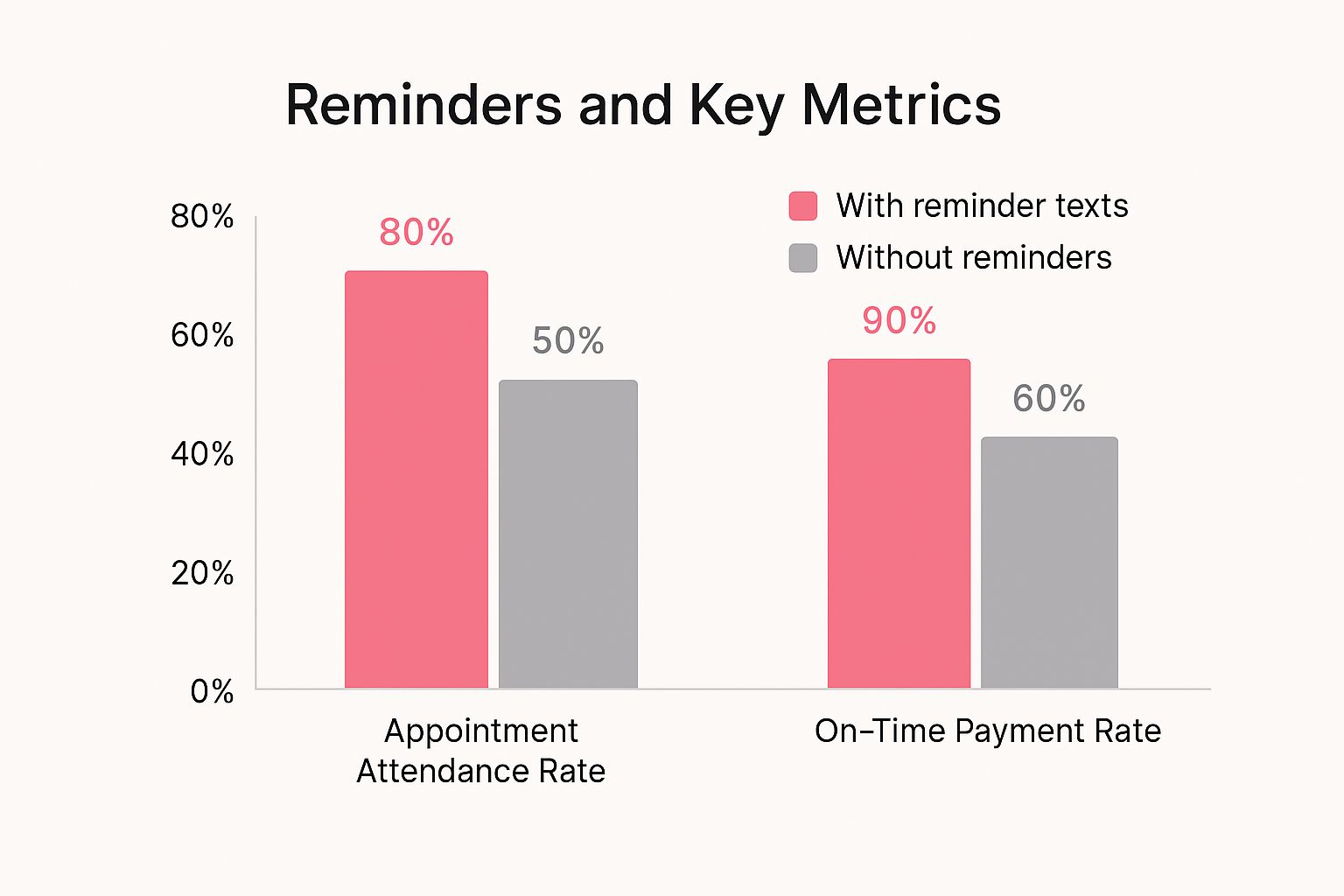
The data doesn’t lie. A basic text notification can boost appointment attendance by 30% and slash late payments by a similar margin.
The Undeniable Data Behind SMS Engagement
The stats backing up SMS are just staggering. SMS reminders rock a 98% open rate with a 45% response rate. That completely blows email’s average 37% open rate out of the water.
With nearly 50 million consumers worldwide opting in to get texts from businesses and opt-out rates sitting below a tiny 1.5%, it’s obvious that customers actually find this channel useful, not annoying.
This brings us to the core difference between SMS and email for time-sensitive alerts. When you absolutely need someone to see a message, SMS is the only reliable way to go.
SMS Reminders vs Email Reminders At a Glance
The numbers really tell the full story when you put them side-by-side. It becomes crystal clear why SMS is the superior choice for reminders.
| Metric | Reminder Text Messages (SMS) | Email Reminders |
|---|---|---|
| Open Rate | 98% | ~37% |
| Response Rate | 45% | ~6% |
| Time to Open | ~90 Seconds | ~90 Minutes |
| Opt-Out Rate | <1.5% | ~0.25% (but easily ignored) |
While email has its place, for immediate, can’t-miss communication, SMS is the undisputed champion. A well-timed text can be the difference between a filled appointment slot and a costly no-show.
By automating a simple, friendly reminder, businesses not only protect their revenue but also enhance the customer experience. It shows you value their time and are organized, building trust and loyalty with every message sent.
More Than Just a Notification
A truly great reminder text is more than just a blast of information; it’s a key interaction in your customer’s journey. It gives them an incredibly easy way to confirm, ask to reschedule, or get a quick question answered without the hassle of making a call or finding a login page.
This back-and-forth turns a simple notification into a powerful customer service tool. You can dive deeper into crafting these messages with our comprehensive guide on reminder text message strategies. By making it effortless to communicate, you create a smoother, more professional experience that keeps people coming back and telling their friends.
How to Write a Reminder Message People Actually Read
Writing a great reminder text is a bit of an art. You have to be clear, but you also have to be brief. That standard 160-character limit for an SMS message doesn’t leave much room for fluff, forcing you to get straight to the point. But the real trick is to sound helpful and human, not like an automated robot.
The goal here isn’t just to send a notification. It’s to create a message that gets opened, read, and acted on—turning a simple reminder into a genuinely positive touchpoint with your customer.
This means you can’t just rely on generic, one-size-fits-all templates. A hair salon can get away with a casual, friendly tone. A medical clinic, on the other hand, needs to sound more professional and discreet. The first step is always knowing your audience so your message connects instead of just annoys.
The biggest advantage of SMS is its speed. Research shows a staggering 90% of text messages are read within just three minutes of delivery. That makes it the absolute best channel for any communication that’s time-sensitive. You have a direct, immediate line to your customer’s attention, which is exactly why getting the message right is so crucial.
Start With the Essentials
Every single reminder text, no matter what it’s for, needs to answer the five Ws: Who, What, When, Where, and Why. And it needs to do it fast.
Always start by saying who you are. A message from a random, unknown number is a one-way ticket to the delete folder.
Here’s a quick breakdown of what to include:
- Who: Your business name.
- What: The reason for the message (e.g., “dental cleaning,” “haircut appointment”).
- When: The full date and time. Don’t forget the time zone if you have remote clients.
- Where: The physical address or a virtual meeting link.
- Why: A simple heads-up (e.g., “Just a reminder about…”).
By building your message around these key pieces of info, you give your customer everything they need in a single glance. It’s quick, efficient, and respects their time.
A great reminder message doesn’t just inform; it facilitates action. The best texts make it incredibly simple for the recipient to confirm, cancel, or ask for help with a one-word reply.
Personalize and Provide Options
This is what separates a basic notification from truly excellent customer service. Just adding the customer’s first name can make a world of difference in how the message is received. It instantly feels less like a mass blast and more like a personal note.
Take this example from a home service company:
“Hi Jessica, this is a friendly reminder of your AC maintenance appointment with Cool HVAC on Tues, June 25th at 2:00 PM. Please reply with C to confirm or call us at 555-123-4567 to reschedule. Thanks!”
This message nails it. It’s personal, has all the key details, and gives clear, simple instructions for what to do next. This simple approach removes any friction and shows that you actually value your customer’s convenience. For more great tips, you should check out these essential SMS marketing best practices.
Finding the Perfect Timing for Your Reminders
Sending a reminder text at the wrong time is almost as bad as not sending one at all. We’ve all been there. A message that’s too early gets lost in the shuffle, and one that’s too late just feels like a nuisance. The goal is to find that perfect window where your message is genuinely helpful, not intrusive—prompting action rather than an eye-roll.
For most service-based appointments, like a haircut or a dental check-up, the scheduling sweet spot is 24 to 48 hours in advance. This gives your customer enough of a heads-up to adjust their schedule if something came up, but it’s close enough that the appointment stays top of mind. Trust me, this timing alone can drastically cut down on no-shows and last-minute cancellations.
Tailoring Your Cadence
Of course, not all reminders are created equal. A “one-size-fits-all” approach to timing is a recipe for mediocrity. The ideal schedule really depends on what you’re reminding them about.
- For high-commitment events: Think webinars, paid workshops, or anything that required a bigger investment of time or money. A multi-step cadence is your best bet. Try sending an initial reminder a week out, another one 24 hours before, and a final nudge an hour before it kicks off.
- For quick service appointments: A single reminder 24 hours prior is often perfect for things like salon bookings or routine maintenance calls. It’s a simple, effective nudge that gets the job done.
You have to put yourself in the customer’s shoes. A reminder for a dental cleaning requires a different touch than a notification for a webinar. The first involves travel and planning, while the second is all about capturing their attention right at that moment.
Data consistently shows that SMS reminders are incredibly effective at reducing no-show rates. After receiving a text, less than 5% of appointments are typically canceled. This is especially true for younger demographics, with 75% of millennials finding these texts useful.
Respecting Time and Boundaries
Beyond just how far in advance you send the text, the actual time of day your message lands is critical. Nobody wants their phone buzzing with a business text late at night or during the chaotic morning rush.
It’s just common sense to respect local time zones and stick to standard business hours, usually between 9 AM and 6 PM. This simple act of consideration shows professionalism and respect for your customer’s personal time. Many SMS platforms have built-in “quiet hours” or time zone detection to prevent these awkward missteps, making sure your messages are always welcome.
The principles of timing go way beyond just appointments, too. For instance, timing is absolutely crucial in e-commerce for abandoned cart recovery. While the context is different, the goal is the same—sending the right message at the moment it’s most likely to drive action. You can learn more by checking out our guide on https://www.cartboss.io/blog/when-to-send-abandoned-cart-text-messages/.
When you get the schedule right, you build a system that customers appreciate, not one they tune out.
Automating Reminders to Save Time and Eliminate Errors
Let’s be honest, manually sending reminder text messages is a drag. More than just being tedious, it’s a process that’s wide open to human error. A forgotten message, a typo in a date, or a text sent to the wrong person can easily lead to a missed appointment and a seriously frustrated customer.
This is where automation comes in. It’s the key to turning that manual chore into a reliable, error-free system that pretty much runs on its own.
The real magic happens when you connect your SMS software with the tools you already use every day—think your scheduling platform, CRM, or even a simple Google Calendar. By integrating these systems, you create a seamless flow where an action in one platform (like a new booking) automatically triggers a perfectly timed reminder text.
You’re essentially creating a “set it and forget it” system. Once a customer books their slot, the automation takes over. It ensures they get the right message at the right time, every single time. This isn’t just about saving yourself a ton of administrative headaches; it’s about boosting your professionalism and consistency.
Setting Up Your Automated Workflow
Getting started with automation is probably more straightforward than you think. The whole process boils down to creating simple rules or “triggers” that tell your SMS platform when to spring into action. You’re basically teaching your software how to handle reminders for you.
An automated SMS workflow really only has a few core parts:
- The Trigger: This is the event that kicks things off. A super common trigger is “New Appointment Created” in your calendar or booking software.
- The Action: This is what happens next. In our case, the action is “Send an SMS Reminder.”
- The Timing: This part defines when the action happens. You could set it to send a reminder 24 hours before the scheduled appointment, for example.
- The Content: This is the actual message. You’ll want to use a template that can automatically pull in personalized details for each person.
Automation ensures every customer receives a consistent, professional reminder without you having to lift a finger. This doesn’t just cut down on no-shows; it eliminates the risk of human error, protecting both your revenue and your reputation.
Key Features in an Automation Platform
When you start looking for a tool to automate your reminder texts, you’ll quickly see that not all platforms are created equal. You want software that offers real flexibility and solid integration options so you can build a system that genuinely works for your business.
A great platform will let you do way more than just send a basic text. For a deeper look at what a powerful system can really do, our guide on how to automate text messages effectively is packed with detailed insights.
Here’s a quick checklist of what to look for:
- Native Integrations: How easily does the software connect with the tools you already use? Whether it’s your CRM, calendar, or e-commerce platform, seamless integration is a must-have.
- Customizable Triggers: Can you set up rules based on very specific events, like an appointment status changing or a particular service being booked? The more granular you can get, the better.
- Dynamic Templates: The platform should let you create templates that automatically populate with customer-specific info, like
[First Name],[Appointment Time], and[Service Type]. This kind of personalization is a game-changer for engagement. - Two-Way Messaging: Can customers actually reply to the automated message to confirm or ask a question? A system that can handle responses is far more valuable than one that just sends one-way blasts.
Customizable Templates for Any Business Scenario
Knowing the theory behind a great reminder is one thing. Having a few battle-tested templates in your back pocket is another. A solid template saves a ton of time and ensures your messages are consistently clear, concise, and professional.
Below, I’ve laid out some ready-to-use examples for the most common business scenarios I see. Feel free to copy, paste, and tweak them to fit your brand’s unique voice. Each one is built for clarity and to get a response.
Medical or Dental Appointment Reminders
When it comes to healthcare, a professional and reassuring tone is a must. Patients aren’t just looking for information; they need to feel confident and cared for. Clarity and easy communication options are non-negotiable.
Example:
“Hi [Patient Name], this is a reminder of your appointment with Dr. Smith on [Date] at [Time]. Our office is at [Address]. Please reply C to confirm or call us at [Phone Number] if you need to reschedule.”
This one just works. It’s direct, has all the vital info, and gives the patient a dead-simple way to respond.
Salon and Spa Booking Reminders
Salon and spa reminders can afford to be a bit more casual and friendly. After all, it’s a personal service! Building a little excitement can go a long way.
Example:
“Hi [Client Name]! Just a friendly reminder about your appointment with [Stylist Name] tomorrow, [Date], at [Time]. We can’t wait to see you! To confirm, reply YES. To reschedule, please call [Phone Number].”
This message feels warm and personal but still does the heavy lifting of confirming the booking efficiently.
The best reminder texts do more than just inform; they open a line of communication. By giving a clear call-to-action—like “Reply C to confirm”—you turn a passive notification into a valuable, interactive touchpoint.
Home Service Visit Confirmations
For any service that requires entering a customer’s home, confirming the details is all about building trust. It assures them you’re reliable and helps make sure someone is actually there to let you in. Pro-tip: including the technician’s name is a fantastic touch for security and peace of mind.
Example:
“Hello [Customer Name], this is [Company Name] confirming your HVAC service for [Date] between [Time Window]. Our technician, Mike, will text you when he’s on his way. Questions? Reply to this message.”
This message nails it by setting clear expectations, providing a specific time window, and adding a layer of safety by naming the tech.
Webinar and Virtual Event Reminders
With virtual events, there’s one piece of information that matters above all else: the access link. Sending a reminder about an hour before the event is a proven strategy to get as many people to show up as possible.
Example:
“Hi [Name], our webinar, [Webinar Title], starts in 1 hour! Get ready to learn. Join here: [Link]. See you soon!”
It’s short, creates a little urgency, and puts the link right at their fingertips exactly when they need it. If you’re looking for more ideas, checking out a dedicated SMS marketing template library can spark some inspiration for all kinds of campaigns, not just reminders.
Before you just copy and paste, take a moment to make sure these templates truly fit your business. This quick checklist can help you nail the details.
Reminder Template Customization Checklist
A quick checklist to help you adapt the provided templates for your specific business needs.
| Checklist Item | Example/Best Practice |
|---|---|
| Brand Voice | Is the tone right? A law firm’s reminder will sound very different from a tattoo artist’s. |
| Key Information | Have you included the absolute essentials? (Who, What, When, Where). |
| Call to Action (CTA) | Is it clear what you want them to do? “Reply C to confirm” is better than a vague request. |
| Personalization | Are you using the customer’s name? Small touches like this make a big difference. |
| Compliance | Does your message include necessary opt-out language if required in your region? |
By starting with these solid templates and fine-tuning them, you can build a reliable system that keeps your schedule full, your no-shows low, and your customers happy.
Common Questions About Reminder Text Messages
Even with the best templates and timing, a few questions always come up when you start sending reminder texts. It’s totally normal. Getting these sorted out from the beginning is key to making sure your strategy is not just effective, but also professional and compliant right out of the gate.
Let’s dig into some of the most common things people ask.
Navigating Compliance and Legal Rules
Okay, let’s talk about the big one first: legal compliance. This is probably the most critical part to get right. In the US, for example, you have the Telephone Consumer Protection Act (TCPA), and it’s not something to take lightly.
The golden rule is simple: you absolutely must have explicit consent from a customer before sending them any automated texts, including reminders. This isn’t optional.
Usually, you get this permission with an opt-in checkbox on your booking form or signup page. Just as important, every message needs to give them an easy way to opt out, like replying “STOP.” Staying compliant isn’t just about avoiding hefty fines—it’s about respecting your customers and building a brand they trust.
Remember, the whole point of a reminder is to be helpful, not annoying. The best way to do that is to respect a customer’s right to control their inbox. Always, always prioritize consent and make opting out a breeze.
What Happens When Customers Reply?
One of the first things businesses wonder is how to handle replies. It’s a great question because people do reply. When someone texts back to an automated reminder with “Can I bring my kids?” or “Is there parking available?”, you need a plan.
The best move is to have those replies forwarded to a real person who can respond quickly—either a specific team member or a monitored inbox.
Think of these incoming texts as a direct line to your customer service. When you answer them promptly, you build trust and show you’re paying attention. If you ignore them? You’ll quickly undo all the goodwill you were trying to create.
Choosing the Right Phone Number
Finally, what kind of phone number should you even use? This often trips people up, but it’s pretty straightforward. You’ve got two main choices: 10-digit long codes (10DLC) and dedicated short codes.
- 10-Digit Long Codes (10DLC): These look just like a regular phone number. They’re perfect for two-way, conversational messaging. For appointment reminders where a customer might have a question, a 10DLC number feels more personal and is almost always the right choice.
- Short Codes: These are the 5 or 6-digit numbers you see in mass marketing campaigns. They’re built for sending huge volumes of one-way messages. While powerful, they can feel pretty impersonal for a simple reminder and are more complicated to get.
For most businesses sending appointment confirmations and fielding customer questions, a 10DLC number hits that perfect sweet spot between professional and personal. It encourages people to reply, turning a simple notification into a positive brand interaction.
Ready to turn missed opportunities into sales? CartBoss makes it simple. Our automated SMS platform helps you recover abandoned carts and keep customers engaged, boosting your revenue on autopilot. Get started today at https://www.cartboss.io.