


Most advice about Shopify automation apps starts with a feature checklist: install more tools, add more triggers, send more reminders, and watch revenue rise. That approach misses the operator’s actual question: would the customer have purchased without the message, and did the automation protect margin, consent, and trust?
Shopify’s ecosystem makes app-based operations practical. The App Store grew from fewer than a dozen apps at launch in 2009 to more than 21,000 apps in Shopify’s latest update, while the average number of apps used by each merchant has increased sixfold since 2012, according to Shopify’s ecosystem overview. That expansion creates opportunity, but it also makes selection harder.
A useful comparison starts with the job each app performs, the risk it introduces, and the evidence it can produce:
| Automation area | Strong use case | Main risk | Metrics to inspect |
|---|---|---|---|
| SMS cart recovery | Time-sensitive reminders and direct checkout links | Consent violations, fatigue, discount leakage | Incremental profit, opt-outs, complaints |
| Email recovery | Longer explanations, product context, and lower-cost follow-up | Deliverability problems and crowded inboxes | Delivered revenue, clicks, unsubscribes |
| Checkout optimization | Removing friction before recovery campaigns begin | Slow scripts or conflicting checkout changes | Checkout completion, load behavior |
| Inventory and fulfillment | Stock synchronization and order routing | Overselling or delayed exception handling | Stock accuracy, fulfillment exceptions |
| Customer engagement | Reviews, loyalty, and win-back sequences | Overlapping messages across channels | Repeat purchases, suppression rate |
The best Shopify automation stack is usually smaller, better governed, and easier to measure. It should know when to send, when to wait, and when to stay silent.
Table of Contents
- The Hidden Costs of App Bloat
- Core Automation Categories for E-commerce
- Fixing Checkout Friction Before Automating Recovery
- Evaluating Cart Recovery and SMS Flow Tools
- Navigating Global SMS Consent and Suppression Rules
- Measuring Incremental Profit and Avoiding Discount Fatigue
The Hidden Costs of App Bloat
Installing another app feels productive because the feature shows up right away. The cost becomes apparent later, when multiple tools respond to the same customer action with different rules, different delays, and different incentives.
Every additional installation adds another conversation with the customer, and another chance for scripts, tags, and triggers to conflict. More functionality means more governance work. If that governance is weak, automation starts to create noise instead of profit.
Where app stacks lose money
The first cost is overlap.
An email platform can send a cart coupon after abandonment while an SMS tool sends a second offer minutes later. Both vendors may claim a win. The merchant gives away margin twice, trains shoppers to wait for discounts, and still cannot tell which message changed the outcome. High headline conversion rates do not help much if the sequence breaks compliance rules, ignores suppression logic, or rewards behavior you do not want.
The second cost is technical. Apps add scripts, tracking calls, webhooks, app blocks, and checkout logic. Some are light. Others leave enough code and dependencies behind that diagnosing a slowdown turns into a scavenger hunt across the theme, pixel manager, checkout extensions, and third-party dashboards. For a practical look at the performance side, see this guide to improving slow Shopify storefronts, then compare those checks against your own theme and script audit.
There is also an operational cost. If three tools can message the same buyer, who owns suppression, consent status, and post-purchase silence windows? If the answer is unclear, the customer notices first.
Practical rule: Don’t approve an app because it has a useful feature. Approve it because you can name the workflow it replaces, the event it owns, the suppression rules it follows, and the metric it should improve.
Run an app-stack audit
Export your installed apps and classify each one by function, trigger, customer-facing output, data access, and commercial owner. Then ask:
- Which workflow does this app own? If two tools handle the same job, assign one owner.
- What happens after an event? Record the delay, channel, offer, destination URL, and stop conditions.
- What prevents duplication or non-compliant sends? Check event IDs, order status checks, suppression lists, consent handling, and retry behavior.
- What does the app add to the storefront? Test scripts, app blocks, checkout extensions, and network requests.
- How will we remove it? Confirm that uninstalling will not leave broken snippets, orphaned tags, or customer data problems behind.
Use a baseline that reflects business quality, not just attributed revenue: checkout completion, average order value, contribution margin, support contacts, unsubscribe activity, opt-outs, and failed automation events. Perfect attribution is not required before making changes. A clean before-and-after comparison is.
Review storefront performance separately with CartBoss’s guide to improving website speed. Keep the audit operational. Remove redundant tools, assign one app to each customer-facing sequence, and document the fallback if that app stops processing events.
Core Automation Categories for E-commerce
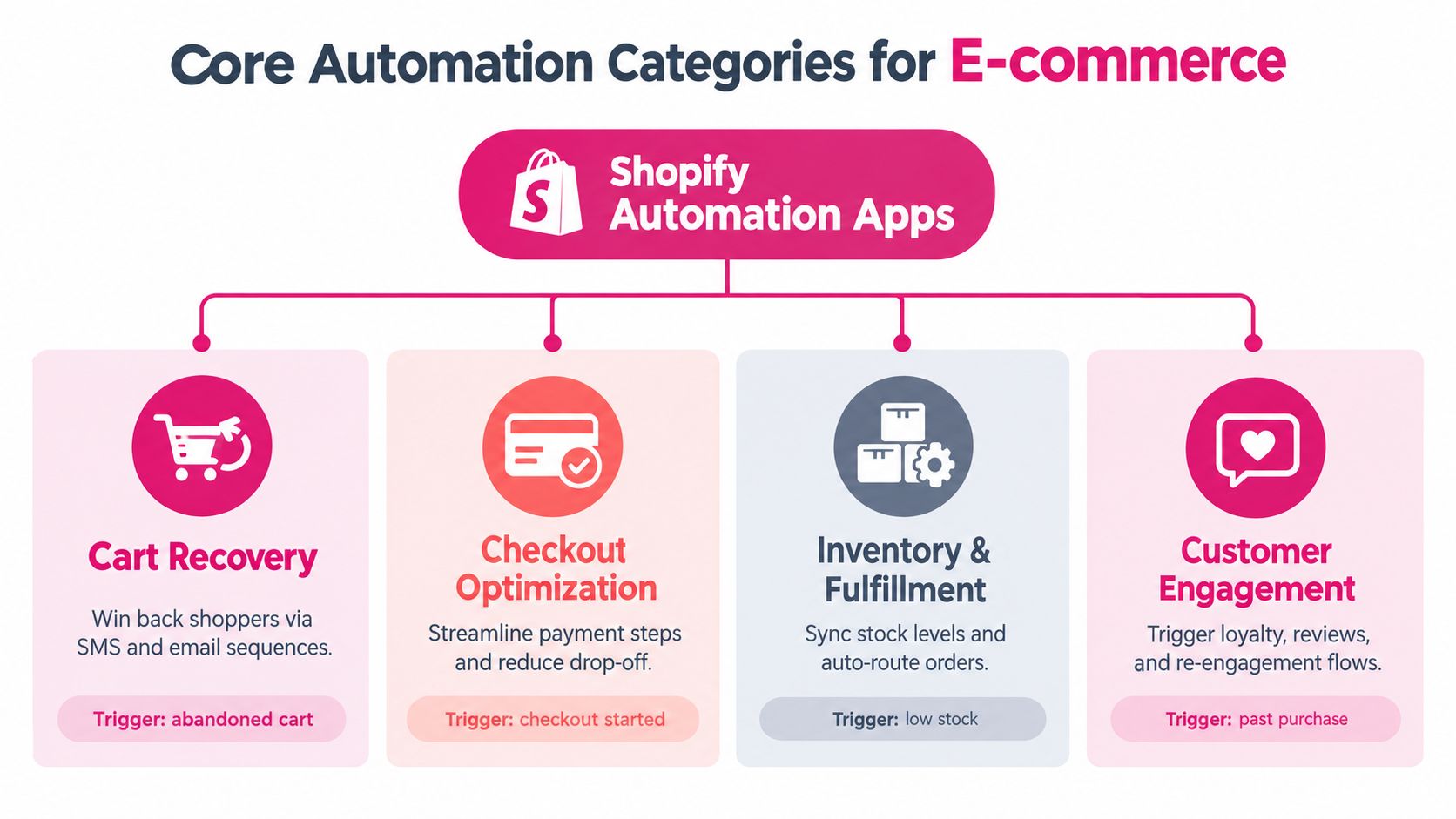
Shopify automation apps usually fall into four connected jobs: recovering demand, improving checkout, moving orders, and extending customer relationships. Merchants should choose by bottleneck, not by category popularity.
Cart recovery
Cart recovery tools watch for checkout or cart activity and send a reminder through email, SMS, or both. The strongest implementations return the shopper to the saved checkout, preserve relevant cart contents, and avoid sending after a completed purchase.
SMS suits urgent, concise reminders. Email gives you more space for shipping information, product details, customer service context, and return policies. Neither channel should receive credit for every order that follows a message. Attribution needs a holdout or another method for estimating what would have happened without the campaign.
Checkout and conversion operations
Checkout tools reduce unnecessary steps, clarify costs, and support payment choices. They sit upstream from recovery, which means a checkout improvement can reduce the number of people who need a reminder at all.
This category also includes functions that personalize discounts or validate promotion eligibility. Because those functions can run inside purchase-critical paths, merchants should favor compact payloads, bounded logic, and graceful failure behavior rather than complicated synchronous enrichment.
Inventory and fulfillment
Inventory apps synchronize stock, route orders, and surface exceptions. Their value is less visible than a customer-facing message, but a recovery campaign can create operational trouble if it sells an item that isn’t available.
The useful connection is event ownership. A paid order can trigger fulfillment, fulfillment can confirm delivery, and delivery can qualify the customer for a review request. That sequence should have clear status checks, so a delayed shipment doesn’t trigger a premature review message.
Customer engagement
Review generation, loyalty, win-back, and support automation belong here. These tools should respond to customer context rather than calendar timing alone. A recent complaint, refund request, or unresolved delivery issue should suppress promotional re-engagement.
Merchants exploring predictive segmentation can use an AI-driven personalization strategy as a planning reference, but personalization only helps when event data is accurate and the business has clear send and no-send rules.
Cart recovery and targeted SMS often deserve early attention when the store already has identifiable checkout activity. Back-office automation becomes more urgent when stock errors, fulfillment delays, or manual order handling constrain growth. For a broader operating framework, see CartBoss’s marketing automation guide for ecommerce.
Choose one measurable job first. If the problem is abandoned checkout, don’t begin with a review app. If the problem is overselling, don’t add another promotional sequence. A focused stack makes results easier to attribute and failures easier to fix.
Fixing Checkout Friction Before Automating Recovery
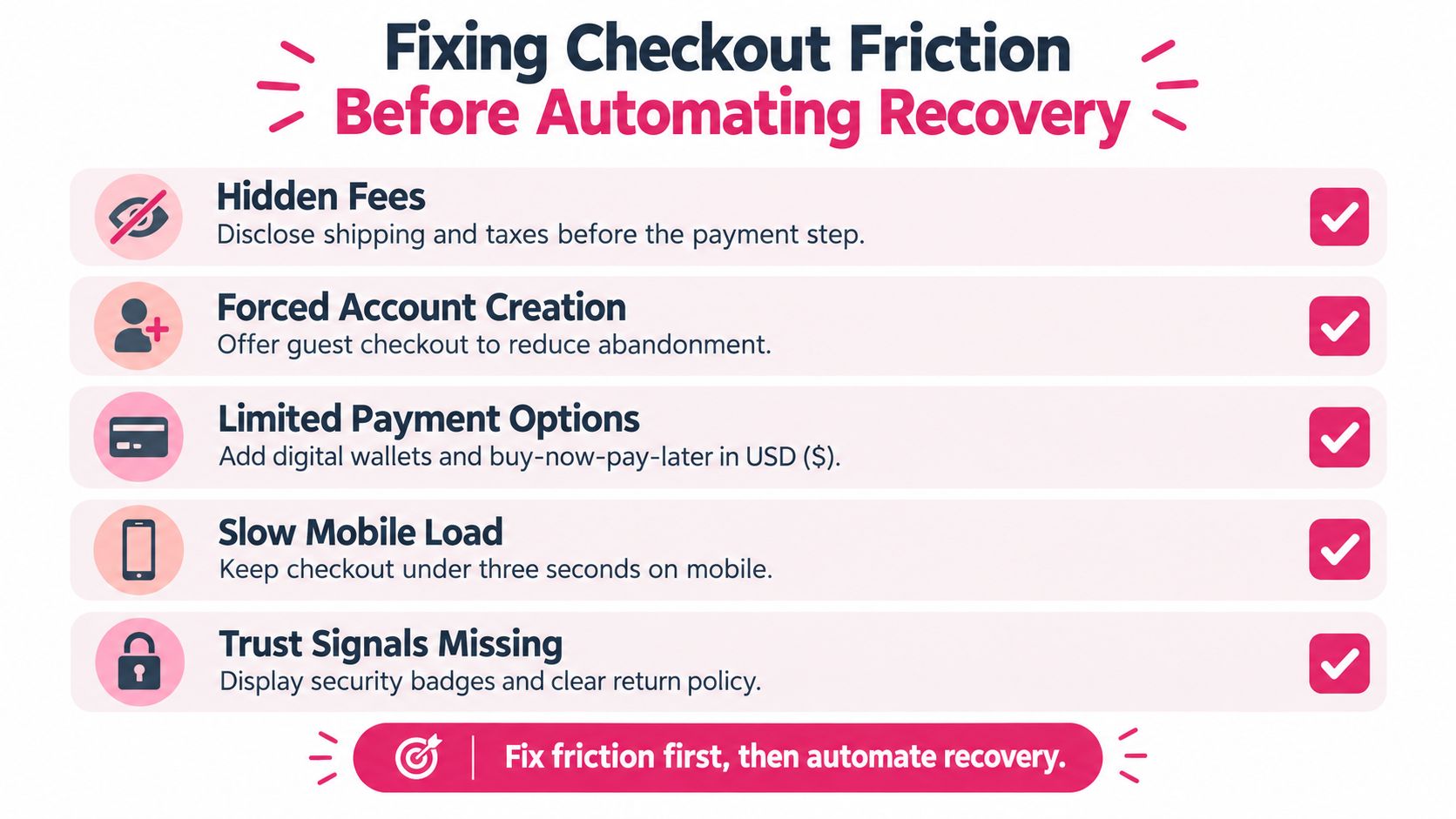
Recovery messages can’t repair a checkout that hides costs, forces account creation, or loses customer information on mobile. They can bring a shopper back, but the shopper will meet the same obstacle unless the store fixes the path first.
Baymard research reports that 40% of shoppers abandon because extra costs are too high, while an optimized checkout can work with as few as 12 form elements, as summarized in Baymard’s checkout usability research. Those findings point to a simple operating order: diagnose friction, remove it, then automate recovery.
Audit the path shoppers use
Start with a clean mobile session and complete a purchase as a new customer. Don’t rely only on an administrator preview. Record every visible field, required selection, error message, loading delay, payment interruption, and point where shipping or tax becomes clear.
Then work through these actions:
- Expose the total early. Show shipping conditions, taxes where applicable, delivery timing, and return information before the final payment decision. Shopify’s summary of Baymard research also reports that 12% of shoppers abandon because they can’t determine the total cost up front, so a recovery discount may be treating uncertainty as if it were price sensitivity. See Shopify’s checkout optimization guidance for the underlying cost-transparency findings.
- Offer guest checkout. Account creation adds a decision and can interrupt purchase intent. Let shoppers complete the order first, then invite them to create an account.
- Remove nonessential fields. Count the inputs on mobile and desktop. If a field doesn’t support payment, fulfillment, compliance, or a necessary customer service function, test removing it.
- Preserve the checkout state. A reminder should open the saved checkout, not a generic homepage. The shopper shouldn’t rebuild the cart or search for the products again.
- Test error recovery. Disable and restore payment methods in a test environment, submit invalid information, and check whether the customer can recover without losing the cart.
Match automation to Shopify’s definition
Shopify defines an abandoned checkout as one where the shopper provided contact information, but the checkout remained incomplete for more than 10 minutes, according to Shopify’s abandoned-checkout documentation. That distinction matters because an anonymous cart addition doesn’t necessarily qualify for Shopify’s native abandoned-checkout workflow.
Shopify’s native recovery automation is available for the Online Store and Buy Button sales channels. Merchants can configure it through Apps, Messaging, and Automations, select an audience, set the delay, and test the recovery link on both mobile and desktop.
Don’t send a message just because an event exists. Check whether the shopper completed the order, opted out, received another channel’s offer, or contacted support. The recovery app should use the most recent customer and order state immediately before sending.
For a more detailed operational checklist, use CartBoss’s checkout process optimization guide. The practical success condition is not a high message volume. It’s a checkout that makes the reminder useful rather than necessary.
Evaluating Cart Recovery and SMS Flow Tools
A cart recovery app should pass two tests. First, it must deliver a relevant message under real event conditions. Second, it must know when not to send. Feature pages rarely answer either question, so ask vendors for workflow behavior, failure handling, and reporting details.
Shopify Flow allows a store to run up to 1,000 workflows, with no more than 40 wait steps per workflow, according to Shopify Flow’s troubleshooting documentation. High-volume recovery sequences should therefore keep durable state outside workflow configuration and use explicit retry handling instead of building long, fragile chains.
| Metric | SMS automation | Email automation |
|---|---|---|
| Best role | Fast reminder for time-sensitive abandonment | Context, education, and follow-up |
| Message design | Short copy, direct link, clear opt-out | Subject line, body content, product and policy detail |
| Main operational risk | Consent, market availability, fatigue | Deliverability, inbox competition, unsubscribes |
| Checkout destination | Saved or pre-filled checkout | Saved checkout, product detail, or support content |
| Suppression need | Immediate and strict | Immediate and strict |
| Vendor question | Can it verify consent before sending? | Can it protect delivery quality and report failures? |
SMS can create a quick path back to checkout, but that speed increases the cost of a bad decision. Email allows more explanation, yet a message that never reaches the inbox has no recovery value. Merchants assessing email infrastructure should consult a practical email deliverability guide and ask how the app handles bounces, suppression, and domain reputation.
Questions for every vendor
Ask for a live walkthrough of these scenarios:
- Duplicate events: What happens when the same abandonment webhook arrives twice?
- Completed orders: Does an order-status check cancel queued messages?
- Webhook outages: How does the app detect missed events and recover them?
- Large segments: Can it batch and paginate when a customer segment exceeds Shopify Flow’s data-return limit?
- State management: Where does it store consent, attempts, timestamps, and suppression reasons?
- Reporting: Can it separate delivered messages, attributed orders, discounts, fees, opt-outs, and complaints?
- Checkout logic: Does it preserve the exact cart or checkout, and what happens if inventory changes?
Don’t accept “real-time” as a sufficient answer. Test p95 latency, duplicate suppression, retry behavior, and the outcome when a customer buys through another channel. For a wider comparison of recovery products, review CartBoss’s Shopify abandoned-cart solutions guide, then validate the current app behavior in your own store.
Navigating Global SMS Consent and Suppression Rules
Consent isn’t a checkbox that an app can forget after collection. It is a status that should travel with the customer, retain its evidence, and be checked again immediately before every automated send.
Shopify requires explicit opt-in for SMS marketing and notes that consent practices may need to comply with regional laws including GDPR, CPRA, and TCPA. Shopify also states that message availability depends on the market, as explained in its SMS marketing requirements. A merchant’s headquarters doesn’t determine every recipient’s legal context. The shopper’s location and applicable telecommunications framework matter.
Build a consent record that can be audited
Store the phone number, consent event, timestamp, source, wording presented, market, and applicable purpose. Keep the record connected to the customer profile and the workflow event, not only inside an app’s dashboard.
Privacy notices should explain phone-number collection, data use and sharing, retention-related rights, message frequency, rates, and opt-out instructions. EU and UK campaigns also require careful consideration of ePrivacy and PECR obligations. If your app can’t expose consent evidence or export it for review, it may not be suitable for global campaigns.
Create a send or no-send gate
A conservative suppression layer should check:
- No recorded opt-in: Do not send promotional SMS.
- Prior opt-out: Block future promotional messages until the customer lawfully opts in again, if applicable.
- Recent purchase: Stop cart recovery once an order is complete.
- Support complaint: Suppress promotion while a complaint or service issue remains unresolved.
- Refund or delivery risk: Avoid a promotional message when the customer is waiting for a refund or shipment resolution.
- Channel conflict: Hold SMS when another channel has already delivered an incentive for the same event.
- Market restriction: Stop sends where the product or message type isn’t available.
- Frequency concern: Apply a contact policy that prevents repeated reminders from different workflows.
A reliable automation system doesn’t maximize sends. It maximizes appropriate sends.
Keep a suppression reason and timestamp for every blocked message. That turns customer fatigue from a vague concern into an operational record. It also helps support teams answer why a customer did or didn’t receive a promotion.
The best app comparison therefore includes compliance controls, auditability, country handling, and failure recovery alongside templates and integrations. A tool that generates attractive messages but can’t prove permission creates operational exposure, not marketing advantage.
Measuring Incremental Profit and Avoiding Discount Fatigue
A recovered order isn’t automatically incremental revenue. The customer may have returned independently, or the message may have converted an order while sacrificing margin through an unnecessary discount.
Shopify warns that indiscriminate incentives can train shoppers to abandon intentionally, which makes holdout tests and incremental profit tracking important, as described in Shopify’s text-message marketing guidance.
Use a controlled measurement loop
- Define the eligible audience. Include only customers who meet the consent, checkout, market, and suppression requirements.
- Create a holdout group. Keep a comparable group from receiving the recovery message.
- Separate offer types. Compare a no-discount reminder with a controlled incentive instead of blending them into one result.
- Track the full cost. Subtract discount value, SMS fees, refunds, support costs, and any app or operational expense.
- Measure customer impact. Record recovered orders, incremental revenue, profit per message, average order value, opt-outs, complaints, and subsequent purchases.
- Set stop rules. Pause a workflow if complaints rise, margin falls, or duplicate sends appear.
A useful profitability calculation is:
Incremental profit = profit from the messaged group minus expected profit without the message, less discount and communication costs.
Use CartBoss’s incrementality testing guide to structure the holdout design and avoid giving the automation platform credit for demand it didn’t create.
Keep the first reminder helpful and the later sequence restrained. Explain shipping, delivery timing, product availability, or the saved checkout before escalating to a discount. If an offer works only because customers learn to wait for it, the campaign is moving revenue forward while weakening future purchase behavior.
CartBoss offers automated SMS abandoned-cart recovery for Shopify, with targeted reminders, pre-filled checkout links, dynamic discount options, post-purchase and win-back messages, and consent-focused controls such as do-not-disturb and unsubscribe handling. If you want to evaluate SMS recovery through the lens of suppression logic, checkout usability, and incremental profit, visit CartBoss and test the workflow against your store’s real customer journey.