


About 70.19% of online shopping carts are abandoned, based on Baymard Institute’s analysis of approximately 50 studies (Baymard Institute). That figure changes how store owners should think about e commerce and CRM. The primary problem isn’t attracting a visitor. It’s recognizing intent, removing friction, and continuing the relationship after the first session.
A CRM becomes valuable when it connects those moments to revenue. It records what a shopper viewed, what they added, whether they consented to email or SMS, what they bought, and whether they returned. The right system turns that history into timely action instead of another disconnected customer database.
Table of Contents
- Why E-Commerce and CRM Belong Together
- How CRM Data Actually Flows in an Online Store
- Core CRM Capabilities Every Store Should Require
- High-Impact Use Cases You Can Launch This Quarter
- Consent-Aware CRM That Protects Deliverability and Margin
- Localizing Recovery Beyond Translation
- Measuring Retention and LTV the Right Way
- Your 30-Day E-Commerce CRM Action Plan
Why E-Commerce and CRM Belong Together
E-commerce has moved well beyond niche retail. UN Trade and Development reports that business e-commerce sales grew 4.4% in 2024 compared with 2023 (UNCTAD). More transactions now happen across marketplaces, mobile storefronts, digital payment systems, and automated communications. Stores need a reliable way to recognize customers across those interactions.
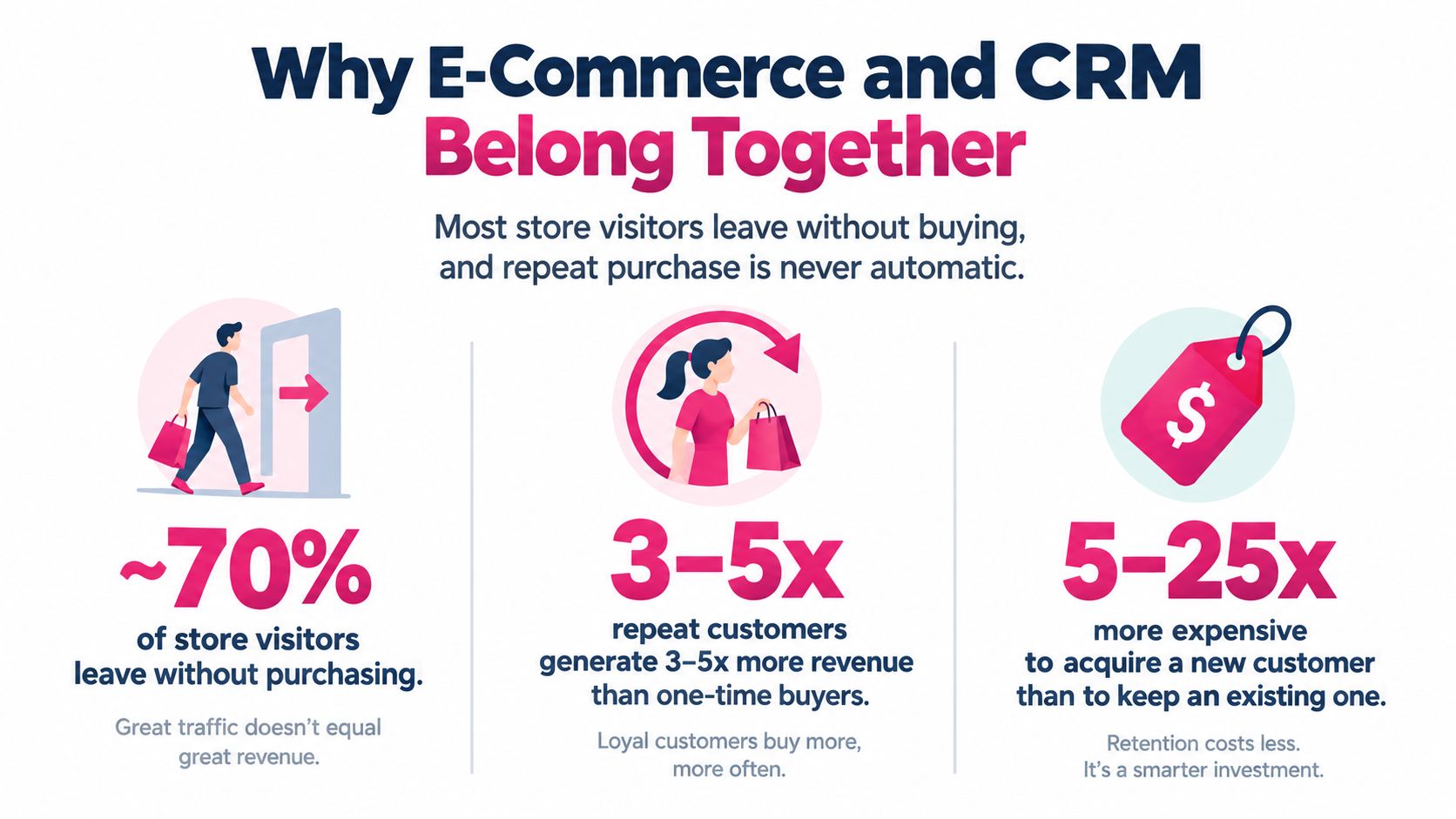
CRM, in practical store-owner terms, is the system that remembers the customer when the browser session ends. It joins customer profiles, order history, consent records, support conversations, product interest, and communication preferences. That joined record lets you decide whether the next message should recover a cart, explain delivery, recommend an accessory, or stay silent because the customer opted out.
Start with revenue moments
A useful e-commerce CRM should intervene at specific moments:
- Before checkout: Identify returning shoppers, viewed products, and active preferences so your store can personalize content without guessing.
- During checkout: Capture cart contents, checkout status, country, currency, delivery context, and marketing eligibility.
- After abandonment: Trigger a relevant reminder only when the shopper has the required consent and hasn’t already purchased.
- After purchase: Coordinate shipping communication, support, review requests, replenishment reminders, and related-product recommendations.
- Before the next order: Segment repeat buyers, high-value customers, and inactive subscribers so each group receives a suitable message.
The distinction matters because repeat purchase isn’t automatic. A customer may like the product and still forget your brand, miss a replenishment window, or receive irrelevant promotions. CRM creates continuity across those gaps.
Practical rule: Don’t buy a CRM because it stores more contacts. Buy it because it can turn a specific customer event into a measurable action.
Shopify and WooCommerce merchants should evaluate the integration, event tracking, consent controls, and reporting before they compare feature counts. This e-commerce CRM software guide is useful for mapping those requirements to actual store workflows. If your sales and customer data already live in several systems, resources such as Bragly and Salesforce integration can help you think through how CRM information should move between platforms.
How CRM Data Actually Flows in an Online Store
A shopper’s journey creates several different types of information. Treating every event as the same is how stores send the wrong message to the wrong person.
A transactional event confirms something happened, such as checkout starting, payment completing, or an order being placed. A behavioral signal indicates interest, such as a product view, cart update, or return visit. A declared preference comes directly from the shopper, such as email opt-in, SMS consent, language preference, or an unsubscribe request.
Follow one shopper through the system
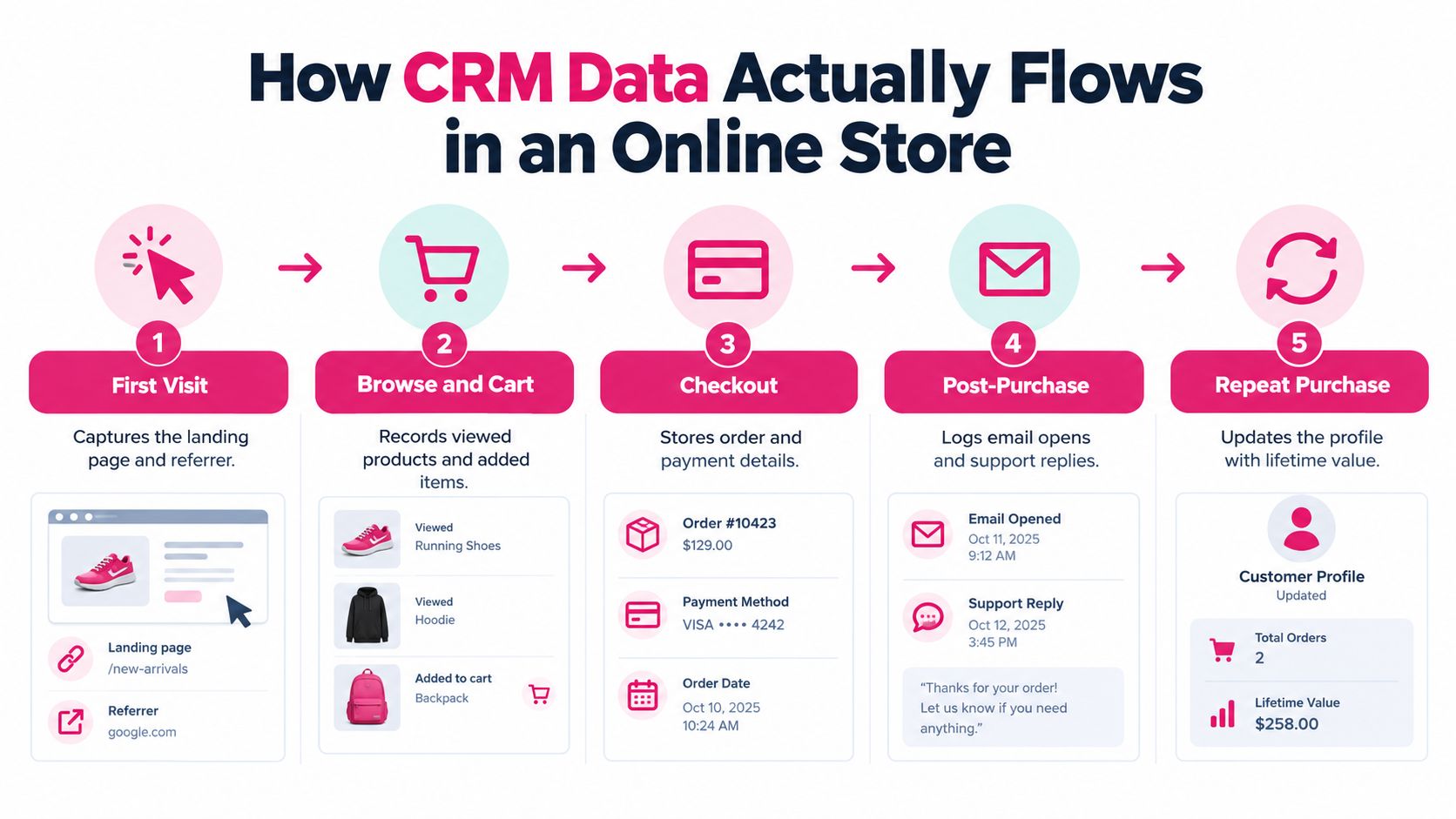
- First visit: The storefront records the landing page, referrer, device context, and any consent choices. Don’t identify an anonymous visitor as a known marketing contact unless the shopper has provided an approved identifier and permission.
- Browse and cart: Product views, variant selections, wishlist actions, and cart additions become behavioral events. The CRM should attach those events to a known profile when identity is available.
- Checkout: The store captures contact details, cart value, products, country, payment context, and checkout status. Marketing consent must remain separate from information needed to process the order.
- Post-purchase: The profile receives order history, delivery events, support replies, campaign interactions, and preferences. A purchase should immediately suppress cart-recovery messages for that cart.
- Repeat purchase: The profile gains another order, new product affinity, and updated customer value. That record should change future segmentation rather than just add another row to a contact list.
Event-driven automation beats scheduled blasts. A scheduled campaign asks, “Who should receive today’s message?” An event trigger asks, “What just happened, and what should happen next?” The second question produces more relevant communication and makes suppression easier.
Identity stitching deserves close attention. A shopper might browse on a phone, complete checkout on a laptop, and contact support through another address. Define which identifiers can safely connect those records, then deduplicate before a trigger fires. Otherwise, one customer can receive duplicate reminders from separate systems.
A practical customer data unification framework can help teams document those identifiers, ownership rules, and synchronization points.
Use the video as a training aid, then test the flow with real scenarios. Create a cart, abandon it, complete a purchase from another device, opt out, and open a support ticket. Your CRM should show one coherent customer history and stop messages when the customer’s state changes.
Core CRM Capabilities Every Store Should Require
A store CRM should pass a revenue test, not a presentation test. If a feature can’t improve a decision at a customer moment, it’s probably decorative.

The evaluation checklist
- Unified customer profiles: Combine identity, orders, browsing, support, and consent in one usable record. Ask: can an agent see the customer’s latest order and active marketing status without opening several tools?
- Real-time event triggers: Launch workflows when a cart changes, payment starts, an order ships, or a customer replies. Ask: can the system react to the event without waiting for a batch import?
- Segmentation: Build audiences using behavior, purchase history, product category, geography, language, consent, and customer value. Ask: can you exclude recent buyers and support cases from a promotional send?
- Consent and preference management: Store the exact permission, channel, source, timestamp, disclosure version, and opt-out state. Ask: can the system prove why a number is eligible for a marketing message?
- Identity resolution: Match records across Shopify, WooCommerce, email, SMS, support, and advertising tools without creating duplicates. Ask: what happens when the same shopper uses multiple devices or addresses?
- Product and inventory context: Use product, variant, price, availability, and cart details inside the journey. Ask: can the workflow avoid recommending an unavailable or already purchased item?
- Attribution and holdouts: Compare treatment groups with eligible customers who don’t receive the message. Ask: can the platform report incremental results instead of assigning every order to the last touch?
- Integration depth: Native connectors, webhooks, APIs, and reliable synchronization matter more than a long app directory. Ask: what happens when the storefront changes an order, refund, consent record, or customer address?
A Shopify app and a WooCommerce plugin can provide fast deployment, but speed shouldn’t excuse weak data ownership. Decide which system owns orders, consent, customer identity, and message suppression before connecting tools.
Teams also need operational visibility. A customer engagement platform comparison should be judged by how well each option handles actual workflows, not by how many channels appear on the pricing page. Require a test workspace, document trigger conditions, and deliberately create duplicate and opt-out scenarios before launch.
High-Impact Use Cases You Can Launch This Quarter
Start with workflows that connect clear intent to a clear next action. Don’t build a complex lifecycle map while basic recovery and retention signals remain unmanaged.
1. Abandoned-cart recovery
Scenario: A shopper adds products, reaches checkout, and leaves.
Trigger: Checkout or cart abandonment, followed by an eligibility check for consent, country, quiet hours, recent purchase, and existing contact activity.
Sequence: Send a helpful reminder that restores the cart and returns the shopper to a pre-filled checkout. Follow with a second message only if the cart remains active and the shopper is still eligible. Stop the sequence immediately after purchase or opt-out.
Offer logic: Don’t discount every cart. First address delivery, payment, product, or trust friction. Use an incentive only when the segment and margin justify it.
Measure: Track recovered orders, recovered revenue, conversion, discount cost, incremental gross profit, opt-outs, and repeat purchase. Baymard’s research shows why this deserves attention: the documented average abandonment rate is about 70.19% (Baymard Institute).
CartBoss can automate SMS cart reminders and return shoppers to checkout, making it one option for stores that want this workflow connected to their CRM.
2. Browse and product reminders
Scenario: A known shopper views a product repeatedly but doesn’t add it to the cart.
Trigger: Product interest combined with identity, consent, product availability, and frequency rules.
Message: Remind the shopper about the product, answer a likely question, or show a relevant alternative. Don’t pretend that a product view equals purchase intent.
Measure: Compare assisted product orders and incremental conversion against a holdout. A browse reminder should earn its place by creating additional value, not by claiming every later purchase.
3. Post-purchase nurture
Scenario: A customer has completed an order and now needs confidence, support, or a reason to return.
Trigger: Purchase, delivery, product type, and support status.
Sequence: Coordinate delivery information, usage guidance, review timing, and relevant complementary products. Suppress promotions when a delivery problem or unresolved ticket makes commercial messaging inappropriate.
Measure: Review repeat purchase, support escalation, review completion, and contribution margin from follow-on orders.
4. Win-back and VIP reactivation
Scenario: A valuable customer has become inactive, or a repeat buyer is approaching a likely reorder point.
Trigger: Purchase history, product category, customer value, consent, and time since the last order.
Message: Give VIP customers recognition and useful access. Give inactive customers a relevant reason to return. Don’t send the same discount to both groups.
Teams building these workflows can also review Arlo Inc. founder automation tips for practical guidance on reducing manual campaign work. Keep the implementation narrow, document the logic, and add the next workflow only after the first one has a clean measurement setup.
Consent-Aware CRM That Protects Deliverability and Margin
More messages don’t automatically produce more revenue. Broad automation can create legal exposure, opt-outs, complaints, and weaker deliverability while inflating superficial engagement metrics.
For U.S. commercial robotext campaigns, the FCC states that text messages generally fall under telephone-call rules and that commercial messages using automated systems require the relevant consent protections under the Telephone Consumer Protection Act (FCC consumer guidance). Your opt-in should identify the brand, explain that marketing texts will be sent, and preserve the phone number, timestamp, disclosure version, and source page.
Separate service permission from marketing permission
An order update and a promotional cart reminder aren’t automatically the same permission. Capture them distinctly, then let the CRM enforce the distinction.
The FCC announced a one-to-one consent rule scheduled to take effect on January 27, 2025, requiring prior express written consent for marketing robocalls or robotexts from each individual seller, with clear seller and topical-relationship requirements (FCC one-to-one consent rule). Regulatory implementation can change, so verify the current position with qualified counsel before launching campaigns. The operational standard remains sound: use brand-specific permission and send messages consistent with the disclosure.
Shopify-related consent research covering more than 15 million sessions identified regional privacy laws, legal interpretation, and consent design as primary drivers of marketing opt-in performance (DataShips consent benchmark). The same research cites that 67% of consumers don’t understand how companies use their data, while 65% would stop using a brand they believe is dishonest about data use (DataShips consent benchmark). Because that source URL should appear only once, treat those figures as part of the same cited evidence and focus on the operational lesson.
Use this checklist:
- Brand-specific disclosure: Name the seller and explain the marketing purpose before collecting the number.
- Immediate suppression: Stop all promotional workflows after an opt-out or do-not-contact request.
- Quiet-hour handling: Delay nonessential messages according to local rules and customer preferences.
- Channel coordination: Prevent email, SMS, push, and support tools from sending contradictory or duplicate messages.
- Consent reporting: Monitor eligible reach, consent rate, opt-out rate, complaint rate, and profit per consented customer.
Sending fewer messages to a properly consented audience is often better business than blasting every available number.
The express written consent guide provides a useful operational checklist for teams reviewing capture forms and automated SMS flows.
Localizing Recovery Beyond Translation
A translated reminder can still fail if the shopper can’t use a preferred payment method, understand delivery timing, estimate duties, or see the right currency. Localization belongs inside CRM decision logic because the customer’s market changes both the reason for abandonment and the appropriate response.
Diagnose the obstacle before choosing the message
Start with the checkout context:
- Language: Detect the shopper’s language, then use a human-reviewed template rather than relying on literal translation.
- Currency: Display the cart value and any incentive in the shopper’s local currency where possible.
- Payment: Explain or surface locally relevant payment methods when the store supports them.
- Delivery: State delivery expectations, shipping costs, and duties clearly instead of hiding them in the recovery message.
- Timing: Apply local time zones and market-specific quiet periods before sending.
A price-sensitive shopper may respond to an incentive. A high-value customer who abandoned because delivery information was unclear needs reassurance, not a discount. Segment abandonment reasons first, then decide whether the next message should educate, reassure, or incentivize.
Recent e-commerce reporting identified traffic growth exceeding 30% in Brazil and South Korea, illustrating why English-first recovery logic can miss important market differences (Salesmartly summary of the Similarweb cross-border playbook). Don’t treat that as a reason to translate one template into more languages. Treat it as a reason to localize the entire checkout path.
Measure recovery by country, language, device, payment method, first-time versus returning customer, and time zone. Then subtract shipping and discount costs from delivered-message revenue. A market with lower gross recovery can still produce stronger incremental margin if its customers need fewer incentives.
Measuring Retention and LTV the Right Way
$6.77 for abandoned-cart email and $4.48 for abandoned-cart text messaging can make a CRM program look strong on paper, but those numbers only matter if the workflow creates incremental profit, not just attributed revenue (Klaviyo abandoned-cart benchmarks).
Open rate belongs in diagnostics. Your weekly CRM view should answer three harder questions. Did the message produce additional orders, did it protect consent quality, and did it increase customer value over time? If your dashboard cannot answer those, it is reporting activity, not performance.
Use randomized holdouts whenever you can. Compare eligible customers who received the workflow against similar eligible customers who did not. Then measure incremental conversion and incremental gross profit after discounts, shipping costs, and message costs. That is how you separate real lift from high-intent shoppers who were going to buy anyway.
The dashboard to review every week
| Metric | What It Measures | Healthy Direction | Common Mistake |
|---|---|---|---|
| Incremental conversion | Orders caused by the message beyond the holdout | Up without rising discount dependence | Counting every attributed order as caused |
| Revenue per delivered message | Revenue generated per successfully delivered message | Up with stable margin | Using sent messages instead of delivered messages |
| Revenue per consented recipient | Commercial value from eligible contacts | Up while consent quality remains strong | Expanding reach by weakening permission |
| Opt-out rate | Customer rejection of the channel | Down or stable | Ignoring spikes by country, template, or send time |
| Repeat purchase rate | Customers who order again after the initial purchase | Up over the selected cohort period | Treating one repeat order as durable loyalty |
| Customer lifetime value | Long-term revenue and margin contribution by customer | Up through profitable retention | Calculating from revenue alone |
Track these metrics by channel, market, and customer segment. A recovery flow can look healthy in aggregate while burning margin in one country, creating opt-outs on SMS, or overusing discounts on first-time buyers. Good CRM measurement stays close to the moment where revenue moved and the conditions that made it profitable.
For a stronger financial model, use this guide to find customer value per subscriber. Then connect campaign reporting to longer-term retention with a practical customer lifetime value formula guide. Keep executive reporting tight: incremental conversion, revenue per delivered or consented recipient, opt-out rate, and LTV by cohort. Everything else supports diagnosis.
Your 30-Day E-Commerce CRM Action Plan
Week one, fix the foundation
Audit Shopify or WooCommerce events, customer identifiers, checkout capture, consent language, suppression lists, and data ownership. Test one customer profile from first visit through purchase and support.
Week two, launch one recovery workflow
Start with abandoned-cart recovery. Use a holdout, suppress after purchase, apply frequency limits, and report recovered orders, incremental conversion, discount cost, and opt-outs from the first day.
Week three, add eligibility and localization
Segment by consent, country, language, time zone, customer status, and likely abandonment reason. Review the top markets for payment, currency, delivery, and template quality.
Week four, cut waste and document the playbook
Retire sends that create opt-outs without incremental profit. Document trigger rules, message versions, suppression logic, and reporting ownership. Queue the next workflow, such as win-back or VIP reactivation, only after the first one is stable.
CartBoss connects e-commerce stores with automated SMS cart recovery, pre-filled checkout links, localized messaging, consent controls, and reporting for Shopify and WooCommerce workflows. Visit CartBoss to evaluate whether its recovery automation fits your store’s CRM and retention plan.