


70.19% of ecommerce carts are abandoned, so WooCommerce marketing plugins should be judged by the profit they recover and prove, not by how many features appear in a comparison table. The most useful tools connect customer consent, checkout behavior, campaign attribution, and net margin into one operational system.
That changes the buying decision. A pop-up that collects leads may help, but it won’t compensate for an unclear checkout, missing payment option, or message sent without valid permission. After migrating countless WooCommerce stores, the pattern is consistent: the strongest plugin stack fixes friction first, recovers high-intent shoppers second, and measures incremental profit throughout.
Table of Contents
- The Reality of WooCommerce Abandonment Rates
- Understanding Core WooCommerce Marketing Plugin Categories
- Evaluating SMS Versus Email for Cart Recovery
- Key Features to Prioritize When Choosing a Plugin
- Real-World Use Cases for Different Store Types
- Avoiding the Checkout Optimization Trap
- Implementing a CartBoss-Compatible Strategy
The Reality of WooCommerce Abandonment Rates
Baymard Institute places the average ecommerce cart-abandonment rate at 70.19%, meaning roughly seven out of ten carts don’t become orders. Baymard’s checkout usability research shows why this deserves operational attention, rather than a passing mention in an analytics dashboard.
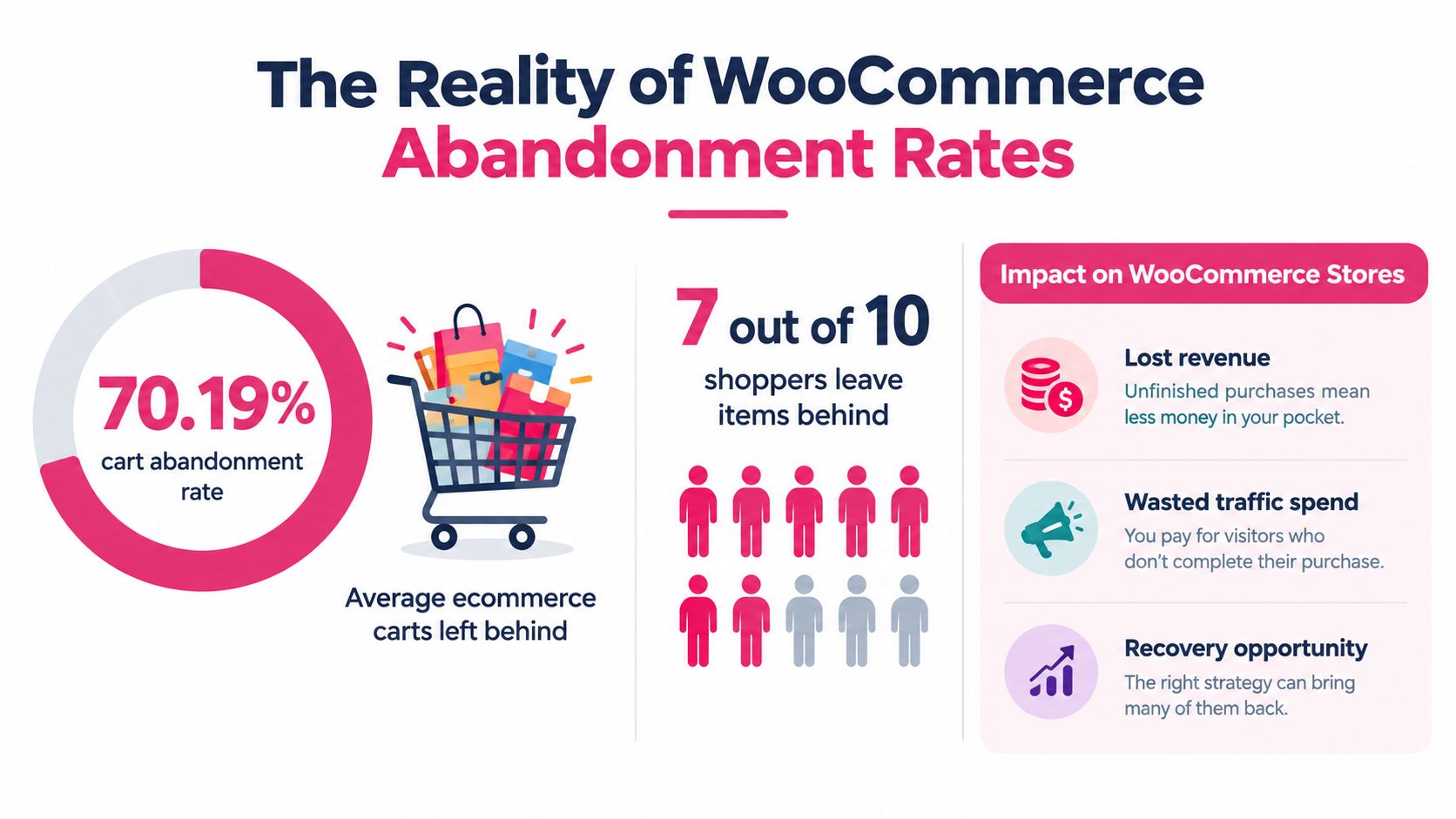
For a small store, each abandoned checkout can represent a meaningful share of the day’s potential revenue. A larger retailer may have more volume and more automation, but also more complex shipping rules, payment methods, inventory conditions, and customer segments. The underlying problem is the same: traffic has already reached a product or checkout page, yet the store hasn’t converted that intent into an order.
WooCommerce marketing plugins are therefore revenue infrastructure, not decorative add-ons. A recovery tool needs to identify a genuine checkout session, preserve the cart, return the shopper to a usable checkout, and report what happened afterward. An analytics plugin needs to connect the campaign to the order, while a checkout tool needs to avoid breaking taxes, shipping refreshes, payment tokenization, or attribution.
Abandonment has several causes
Baymard’s research identifies unexpected extra costs as a leading abandonment reason at 39%, followed by slow delivery at 21%, lack of trust at 19%, forced account creation at 19%, and complicated checkout at 18%. These figures are reported in Million Dollar Sellers’ practical checkout guidance, which is useful when auditing the funnel before buying another recovery extension.
The commercial lesson is simple:
- Lost revenue: The shopper has expressed interest, but the store hasn’t completed the transaction.
- Wasted acquisition spend: SEO, email, advertising, and social traffic all cost time or money before the cart is abandoned.
- Recovery opportunity: A relevant reminder can help, but only when the original friction hasn’t made the purchase unattractive.
Use the WooCommerce cart abandonment statistics guide as a baseline for reporting, then segment your own data by device, country, payment method, first purchase, and returning customer status. A storewide abandonment rate can identify leakage, but it can’t tell you whether the remedy belongs in checkout, delivery messaging, payment selection, or recovery automation.
Understanding Core WooCommerce Marketing Plugin Categories
A WooCommerce marketing stack usually contains several plugin types, but they don’t all operate at the same layer. The difference matters because every extra extension can add scripts, database writes, scheduled jobs, API calls, and compatibility risk.
Cart recovery tools
Cart recovery plugins watch for checkout activity, store cart or customer details according to the site’s permissions, and trigger a message after a defined delay. The better implementations use a pre-filled checkout link, preserve cart contents across redirects, and distinguish an abandoned checkout from a completed or cancelled order.
A weak implementation just sends a generic coupon. That can train customers to wait for discounts, misattribute sales that would have happened anyway, and create conflicts when another campaign has already applied a promotion. Test whether the plugin records cart creation, checkout initiation, payment failure, and order completion as separate events.
Email and SMS automation
Email platforms are useful for newsletters, product education, post-purchase flows, and longer customer journeys. SMS is better suited to a short, high-intent intervention, provided the customer has granted the right permission. The two channels can share segmentation, but they shouldn’t automatically share consent.
Check how the extension synchronizes unsubscribes and suppression records. A customer who opted out of promotional SMS shouldn’t re-enter a flow because a WooCommerce order update recreated their contact profile.
Analytics and attribution
Analytics plugins collect events, but collection alone doesn’t prove incremental revenue. Look for order IDs, campaign identifiers, discount usage, refund status, and channel attribution. If the report only shows messages sent, clicks, and recovered orders, it may overstate the tool’s contribution.
Checkout optimization
Checkout extensions reduce fields, improve validation, add payment methods, or support express checkout. They modify one of the most sensitive parts of the store, so review their handling of WooCommerce sessions, shipping calculations, tax logic, gateway redirects, and order attribution before activating them on production.
The WooCommerce shopping cart plugin guide is a useful reference when comparing cart functionality with marketing automation. Treat each category as a system boundary, then test the handoff between them.
Practical rule: A plugin earns its place when it improves a measured step in the customer journey without creating an unmeasured failure somewhere else.
Evaluating SMS Versus Email for Cart Recovery
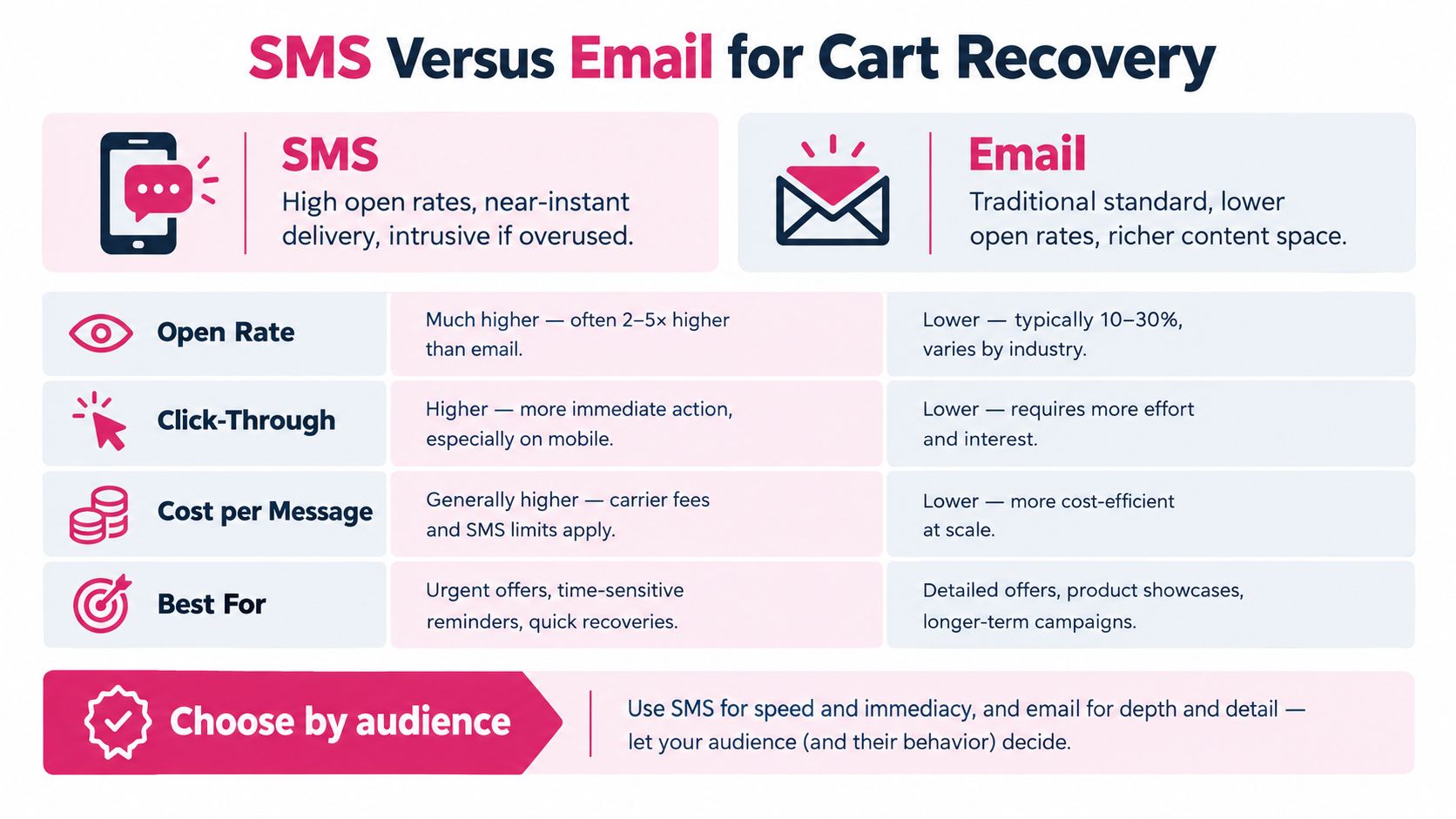
SMS and email solve different recovery problems. Email gives you room for product images, education, recommendations, and longer nurturing sequences. SMS reaches a customer in a more immediate format, but its directness makes irrelevant or unauthorized messages more damaging.
Baymard reports that 8% of users abandoned checkout because their preferred third-party payment option wasn’t available, while 17% abandoned because checkout was too long or complicated. Those findings support a recovery strategy that fixes payment and checkout friction before choosing a message channel. The SMS versus email comparison guide can help teams map each channel to a specific customer action rather than treating one as a universal replacement for the other.
Where email fits
Email works well when the shopper needs more context. Use it for:
- Product reassurance: Explain returns, delivery, materials, warranties, or compatibility.
- Longer consideration cycles: Give the buyer useful information instead of an immediate discount.
- Post-purchase retention: Recommend complementary products or request feedback after fulfilment.
- Deliverability management: Authenticate the sending domain and monitor reputation. Teams can improve sender reputation with BillionVerify by checking deliverability risks before scaling campaigns.
Email’s weakness is operational delay. A message can arrive after the shopper has forgotten the cart, purchased from another store, or encountered the same friction again.
Where SMS fits
SMS suits a recent, identifiable checkout session where the shopper can return through a pre-filled link. The message should state what the customer is returning to, avoid unnecessary urgency, and include a clear opt-out path.
Don’t use SMS as a substitute for consent management. Promotional SMS and transactional cart reminders may require different permissions, and the store must be able to show the event, wording, brand, purpose, and channel associated with the opt-in.
A practical decision matrix looks like this:
| Situation | Better starting point | Reason |
|---|---|---|
| The shopper needs product education | More space for explanation | |
| The checkout session is recent | SMS, where permitted | Faster intervention |
| The buyer has opted out of marketing SMS | Email or no promotional message | Respect channel suppression |
| The store has weak domain deliverability | Fix email infrastructure first | A campaign can’t recover what doesn’t arrive |
| The customer abandoned because of payment friction | Checkout and payment remediation | A reminder won’t add the missing payment method |
Measure completion rate, payment failure rate, recovery revenue, discount usage, and incremental profit by channel. Open and click activity can diagnose engagement, but it isn’t the same as a profitable order.
Key Features to Prioritize When Choosing a Plugin
Start with the event model, not the feature list. A plugin that says it supports abandoned carts may still miss guest checkouts, duplicate messages after payment redirects, or fail to stop a campaign when an order is completed.
Build the evaluation around five checks
-
Verify event accuracy. Confirm that the tool captures cart creation, checkout initiation, payment failure, order completion, refund, and unsubscribe events. Run tests with guest users, returning customers, mobile browsers, and failed payments.
-
Inspect the recovery path. The message should take the shopper to a preserved cart or pre-filled checkout. Test shipping-rate refreshes, coupon application, address validation, payment tokenization, and session persistence on both mobile and desktop.
-
Demand useful segmentation. At minimum, separate first-time customers, returning customers, high-value carts, coupon users, repeat visitors, and shoppers who reached different checkout depths. A browsing visitor shouldn’t receive the same offer as someone who failed at payment.
-
Audit consent controls. Look for timestamped consent logs, country-aware opt-in language, separate transactional and promotional permissions, STOP and HELP handling, suppression synchronization, permitted-hour controls, and exportable audit records. GDPR consent must be specific, informed, freely given, and unambiguous. In the United States, consent must be tied to the particular brand and marketing purpose, and the FCC’s one-to-one consent requirement took effect on January 27, 2025, according to this global SMS compliance guide.
-
Measure profit, not activity. Reports should include order value, discount cost, transaction fees, refunds, and campaign cost. The useful formula is incremental margin from a holdout group, not total orders attributed to a message.
Treat localization as governance
Automatic language detection and translated messages help global stores, but they don’t create legal permission. A customer may understand the message perfectly and still not have consented to promotional SMS in that market.
Before launch, create a country-level matrix covering opt-in wording, message category, sending hours, unsubscribe behavior, and suppression retention. Review it whenever the store adds a market, payment method, or messaging purpose. The marketing automation tools comparison is useful for comparing workflow depth, but compliance controls deserve their own score rather than being hidden under a generic “GDPR ready” label.
Real-World Use Cases for Different Store Types
A plugin stack should reflect the store’s buying cycle, margin, geography, and operational constraints. The same automation that helps a fashion boutique may create unnecessary discount pressure for an electronics retailer.

A small fashion boutique
A boutique may see casual browsers add several items before leaving. The first recovery message shouldn’t immediately reduce the price. Start with a concise reminder, show the selected products, clarify delivery and returns, and reserve a discount for a segment that has demonstrated stronger buying intent.
The owner should watch stock availability closely. An automated message that returns a shopper to an item that has sold out creates frustration and support work. Connect inventory status to the recovery flow, and suppress messages when the cart can no longer be fulfilled.
A high-volume electronics store
Electronics shoppers often compare specifications, shipping terms, and prices. A generic “complete your purchase” message is unlikely to address the reason for abandonment. Segment by product category, cart value, payment failure, and repeat visits, then test content that answers compatibility, warranty, delivery, or financing questions.
Avoid automatic discounts when margin is narrow. A recovery report that counts a sale as successful while ignoring the discount and payment cost can make an unprofitable campaign look effective.
A global brand
A multilingual store needs more than translated copy. It needs market-specific payment methods, delivery expectations, consent language, sending windows, unsubscribe handling, and suppression rules.
Use automatic language detection only as a convenience layer. Store the customer’s country and consent history separately, then verify that the selected message type is permitted in that market. This guide to online shops that benefit from text messages provides a useful way to assess whether SMS fits the store’s customer journey before adding it to every segment.
Avoiding the Checkout Optimization Trap
Sending more reminders isn’t always the best response to abandonment. Baymard’s benchmark of 344 leading US and EU ecommerce sites found that 65% deliver a mediocre-or-worse checkout experience, and its usability research indicates that the average large ecommerce site could achieve approximately a 35% conversion-rate improvement through checkout design changes alone. See Quikly’s checkout optimization tips for practical ideas to apply before scaling recovery traffic.
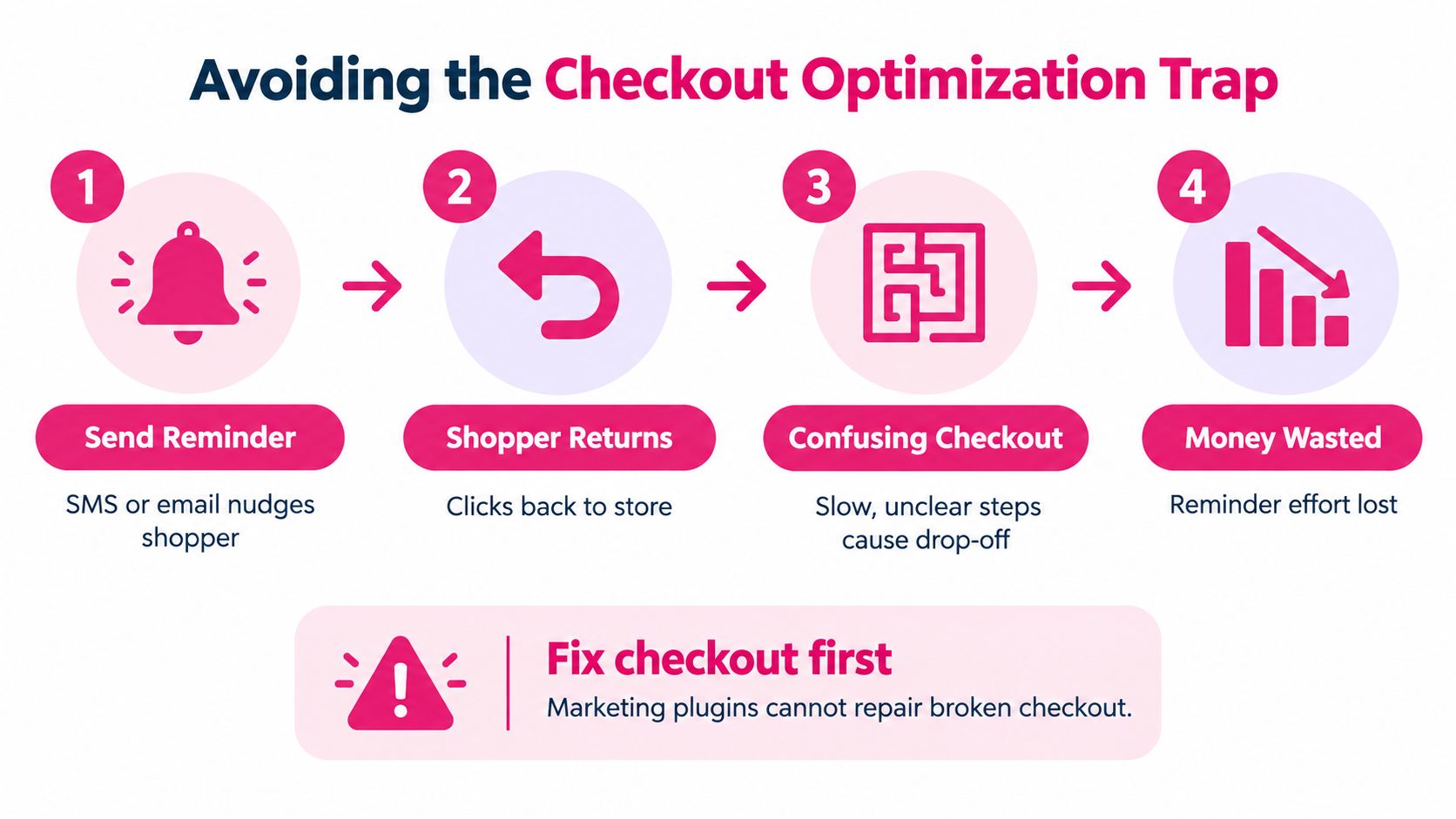
A recovery message can return a shopper to the exact obstacle that caused the exit. If the store hides delivery costs, forces account creation, rejects a valid address, or lacks the customer’s preferred wallet, the second visit may fail just like the first.
Baymard identifies an ideal checkout flow with as few as 12 form elements, and reports that many checkouts could reduce their default form elements by 20% to 60%. Baymard’s checkout usability research also recommends evaluating checkout behavior rather than judging a page by appearance alone.
Run this audit before buying another plugin
- Check field necessity: Remove fields that don’t support fulfilment, tax, payment, or customer service.
- Offer guest checkout: Don’t force account creation before the customer has completed the purchase.
- Expose costs early: Show delivery charges and relevant conditions before the final payment step.
- Test payment recovery: Record gateway errors separately from general abandonment.
- Measure mobile completion: Compare checkout completion, time to purchase, and payment errors by device.
- Review performance: Test JavaScript payload, caching compatibility, and Core Web Vitals after activating every extension.
The WooCommerce ecommerce checkout optimization guide gives merchants a practical framework for this review. Fix the checkout first, then use recovery automation to capture shoppers who still leave for normal reasons, such as comparison shopping or delayed purchase intent.
Implementing a CartBoss-Compatible Strategy
A workable WooCommerce marketing stack doesn’t need every category at once. Start with a clean checkout, one reliable recovery channel, and reporting that separates assisted conversions from genuinely incremental sales.
Use a controlled rollout
-
Baseline the funnel. Record abandonment, checkout completion, mobile and desktop performance, payment failures, recovered revenue, refunds, and discount usage before activation.
-
Connect WooCommerce events. Confirm that the integration detects checkout activity, preserves the cart, and stops reminders after order completion. Test guest and returning customers separately.
-
Configure consent filters. Store the customer’s country, consent timestamp, message purpose, opt-out status, and permitted sending window. Keep transactional and promotional permissions distinct.
-
Write a restrained sequence. Use a reminder that identifies the cart and returns the shopper to a pre-filled checkout. Add a discount only where the margin and test design justify it.
-
Create a holdout group. Compare customers who receive the campaign with similar eligible shoppers who don’t. Report incremental orders and margin, not just attributed orders.
-
Review failures weekly. Investigate duplicate messages, redirect errors, payment failures, unsubscribes, missing consent, and orders that were refunded after attribution. Fix the event or checkout problem before increasing message volume.
CartBoss offers automated SMS campaigns integrated directly with WooCommerce, including abandoned-cart reminders and pre-filled checkout links. Its published product information states an average ROAS of 4,500% with zero subscription fees, so merchants should validate that claim against their own holdout results, message costs, discounts, refunds, and transaction fees rather than treating vendor-reported ROAS as incremental profit. The CartBoss setup wizard can support the initial connection and campaign configuration.
The right standard is not whether a plugin recovered an order. It’s whether the store can explain why the customer returned, what the message cost, whether the order would have happened without it, and how consent was proven. That standard protects margin and makes the stack easier to scale.
CartBoss connects WooCommerce stores with automated SMS cart recovery, pre-filled checkout links, consent controls, and campaign reporting. Visit CartBoss to connect your store, configure a compliant recovery flow, and test incremental profit against a holdout group.