


Before you hit “send” on any SMS campaign, you absolutely have to test it. I’m not just talking about a quick spell-check. Rigorous testing is the single most important thing you can do to protect your revenue and, just as importantly, your customer’s trust.
We need to go deeper than typos. This means verifying every personalization variable, making sure checkout links work on all devices, and confirming discount codes actually apply at checkout. Skipping this step is just asking for costly errors that can completely sabotage your marketing efforts.
Flawless SMS Testing Is Your Best Revenue Insurance
In e-commerce, the line between a wildly successful campaign and a costly flop is razor-thin. A single broken link, a discount code that doesn’t work, or a personalization tag that fails to populate can instantly turn a hot lead into a lost customer for good.
When you meticulously test SMS sending, you’re doing more than a simple technical check. You’re executing a core business strategy that directly safeguards your revenue and your brand’s reputation.
Imagine the chaos during a huge sales event like Black Friday. An SMS promising a “special 20% off just for you, Sarah!” that shows up as “Hello {customer_name}” doesn’t just look sloppy—it shatters that personal connection you were trying to build. You’ve lost that customer.
The Real-World Cost of Minor Errors
Even tiny mistakes can have massive consequences. Think about a scenario where your pre-filled checkout link is perfect on an iPhone but pulls up an empty cart on an Android device. You’ve just alienated a massive chunk of your audience at the most critical step of their buying journey.
These aren’t just hypotheticals; this stuff happens every day to brands that cut corners on testing. My goal here is to help you reframe SMS testing from a tedious chore into what it really is: an essential, profit-protecting activity. A properly tested campaign ensures every single message builds trust, drives sales, and adds to your bottom line. You can dive deeper into how consumers feel about SMS in our SMS marketing statistics article.
The difference between a campaign that converts and one that flops often comes down to one broken element. Thorough testing is the only way to find that broken piece before your customers do, protecting both your immediate sales and long-term brand loyalty.
Maximizing a High-Impact Channel
The stakes are so high because SMS is an incredibly powerful channel. With over 5 billion people sending and receiving texts daily, the channel’s jaw-dropping 98% open rate blows email’s typical 20% out of the water.
For online stores fighting cart abandonment rates that hover around 70%, this is huge. It means your reminder texts have an almost-guaranteed chance of being seen, especially since 82% of consumers read texts within five minutes of getting them. For CartBoss users, this translates directly to recovering up to 50% more lost sales. It’s a game-changer, but only if it works perfectly every time.
Your Pre-Launch SMS Testing Playbook
Before any message ever reaches a customer’s phone, running a full pre-launch check is absolutely essential. This isn’t just about catching typos; it’s about making sure every single technical piece of your SMS campaign works together perfectly to create a smooth, revenue-generating experience. A single broken link or a faulty discount code can completely derail the entire effort.
Your first line of defense is always going to be a sandbox environment or a handful of designated test numbers. This gives you a safe space to test SMS sending without annoying your actual customer list or wasting your budget. Think of it as a controlled lab where you can see exactly how your message looks and feels on a real device before the big show.
Verify Dynamic Content and Personalization
The real power of a high-converting SMS is often in the personal touches. But let’s be honest, dynamic variables are notorious for breaking at the worst possible moment. That’s why you have to manually check that every placeholder is pulling the right information.
- Customer Name: Does
{customer_name}actually pull “Jessica” into the message? When it fails, the message instantly feels generic and spammy, killing any rapport you’ve built. - Product Details: For abandoned cart flows, double-check that variables like
{product_name}and{product_image}are showing the correct items from that specific shopper’s cart. - Dynamic Discounts: Make sure that unique, single-use codes like
{discount_code}are generated and inserted correctly for every single person. Nothing is more frustrating for a customer than a broken discount code.
Taking a few minutes for this step prevents the kind of cheap-feeling errors that erode trust and absolutely destroy conversion rates. It’s what makes the message feel like it was crafted just for them.
The chart below really drives home the financial and reputational damage that can come from even small SMS slip-ups.
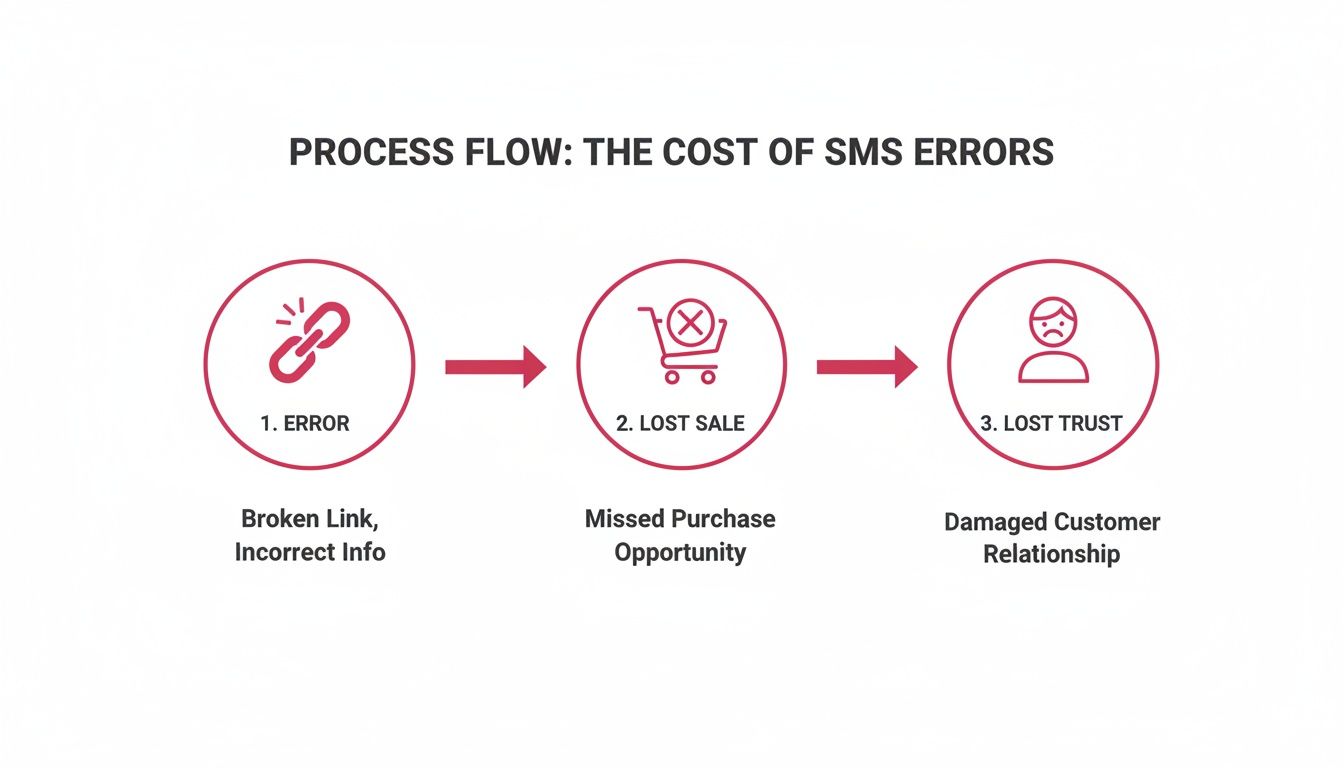
As you can see, a simple technical glitch doesn’t just stay a glitch. It leads directly to a lost sale and, even worse, a loss of customer trust that’s incredibly difficult to earn back.
Test the Full Customer Journey
Getting the message delivered is only half the battle. The real magic—the conversion—happens after the click. That post-click experience needs to be flawless.
The biggest mistake I see brands make is testing the message but not the journey. A beautiful SMS with a link that leads to an empty cart is worse than sending no message at all. It creates a frustrating dead-end that your customer will definitely remember.
Your testing playbook has to include clicking the link on different devices. The experience can be wildly different between an iPhone on Safari and an Android phone using Chrome.
- Click the Link: Does the link actually work? Test it on both iOS and Android to be sure.
- Verify the Cart: Check that the link takes the user to a checkout that’s pre-filled with the right items from their abandoned cart.
- Check the Discount: Is that unique discount code automatically applied? Forcing a customer to jump back and forth to copy-paste a code from their SMS app adds friction and gives them another chance to leave for good.
This end-to-end check connects all your technical setup to a real business result: a smooth, easy path to purchase that will maximize your recovery rate.
To help you stay on track, we’ve put together a quick checklist covering the essentials.
Essential SMS Campaign Testing Checklist
Use this checklist to validate every critical component of your SMS campaign before going live.
| Test Area | What to Verify | Potential Impact If Skipped |
|---|---|---|
| Sandbox Sending | The message is successfully delivered to your internal test numbers. | Campaign failure, wasted budget, and missed revenue opportunities. |
| Personalization Variables | All variables ({customer_name}, {product_name}, etc.) populate with the correct, specific data. |
Impersonal messages that feel like spam, leading to low engagement and trust. |
| Dynamic Discount Codes | Unique, single-use discount codes are generated and correctly inserted into the message. | Customer frustration, support tickets, and abandoned checkouts. |
| Checkout Link | The link works on both iOS and Android, leading to a pre-filled cart. | Broken user experience, high cart abandonment, and lost sales. |
| Auto-Applied Discount | The discount from the SMS is automatically applied at checkout without manual entry. | Added friction in the buying process, which significantly lowers conversion. |
| Compliance & Opt-Out | The opt-out language (e.g., “STOP to cancel”) is clear and the unsubscribe link functions correctly. | Legal penalties (GDPR/TCPA), carrier blocking, and damage to brand reputation. |
Running through this list ensures you’ve covered your bases, turning potential disasters into a polished, high-performing campaign.
For developers building out more complex logic, digging into the specifics of a powerful SMS sender API is the logical next step. You can learn more about the technical side in our guide to using an SMS sender API.
Mastering SMS Compliance and Deliverability
An SMS campaign is only as good as its ability to legally and successfully reach your customer’s phone. Honestly, skipping this part of your testing is like building a brilliant product but forgetting to stock the shelves—it makes all your hard work pointless. A crucial part of your test SMS sending workflow has to be checking for compliance and deliverability.
These checks aren’t just about dodging legal trouble; they directly impact your sender reputation with mobile carriers. Get a bad rep, and your messages can get flagged as spam or blocked entirely. Suddenly, your whole SMS strategy is dead in the water.
Ensuring Bulletproof Compliance
First things first: you absolutely have to verify your opt-out system. Rules like GDPR and CCPA aren’t just suggestions; they’re legally binding with some seriously painful financial penalties if you mess up. Your tests need to confirm that when a user replies “STOP,” the system acts on it instantly.
- Test the ‘STOP’ Keyword: Grab your test phone, send yourself a campaign message, and reply with “STOP.” You should get an automated confirmation right away, and that number needs to be added to your suppression list immediately.
- Verify Unsubscribe Links: If you use links for opting out, click them. Make sure the link works, takes you to a functional opt-out page, and actually removes the number from your active list.
- Check ‘Quiet Hours’ Logic: Try scheduling test messages during your defined quiet hours (for example, between 9 PM and 8 AM in the recipient’s local time). The message should either fail to send or get parked in a queue until the next available window. It has to respect the user’s local time.
A broken opt-out process is one of the fastest ways to destroy customer trust and get hit with complaints. It tells both users and carriers that you don’t respect consent, which can get your numbers blocked for good. Making this a mandatory part of every single test is non-negotiable.
For a deeper dive into the rules, our SMS compliance checklist for e-commerce is an essential resource to keep bookmarked.
Diagnosing Carrier Deliverability Issues
Just because your platform says a message was sent doesn’t mean it actually landed in someone’s inbox. Mobile carriers use sophisticated filters to block texts they find suspicious. The only way to know for sure is to test across different networks.
I recommend keeping a set of test phone numbers from the major carriers in your key regions. Think phones with SIM cards from:
- AT&T
- Verizon
- T-Mobile
Send your campaign to these numbers and physically check each device to confirm you got the message. If a text fails to arrive on one network but shows up on the others, that’s a huge red flag for carrier-specific filtering. This can be triggered by anything from certain keywords and URL shorteners to the type of phone number you’re sending from.
If you start seeing consistent deliverability problems, don’t wait—contact your SMS provider’s support team. They can dig into the delivery receipts (DLRs) to see if a carrier blocked the message and give you advice on how to fix it.
To really get a handle on deliverability, especially if you’re sending campaigns globally, it helps to have a solid grasp of understanding international text message costs and the different regulations that can impact whether your texts make it through. A systematic approach here ensures your messages not only comply with the law but actually reach the people you’re trying to talk to.
How to Validate Your Analytics and Track Performance
An SMS campaign that gets a ton of opens is great, but if you can’t tie it back to actual sales, you’re just guessing. Broken tracking means your ROI is basically fiction. That’s why you have to validate your entire analytics pipeline—it’s just as important as checking for typos in the message itself. You need to know that every click and every conversion is being counted correctly.
There’s really only one way to do this with 100% confidence: a full, end-to-end test purchase. And I don’t just mean clicking a link. You need to walk through the exact journey your customer will, starting from the moment the SMS hits your own phone.
The End-to-End Test Purchase
First things first, send the campaign to your test number. When it buzzes in your pocket, open it, and tap that pre-filled checkout link. Now, go through the whole process—add your info, complete the payment, and land on that sweet, sweet “thank you” page.
Once that’s done, it’s time to put on your detective hat. Jump into your CartBoss dashboard and your store’s own analytics. You’re looking for proof that every step you just took was recorded and, crucially, attributed to the right SMS campaign.
Here’s your checklist:
- Click Tracking: Did the click from your test SMS actually show up in the campaign’s analytics?
- Conversion Event: Was the purchase you just made correctly logged as a conversion from that SMS?
- Revenue Data: Is the exact dollar amount from your test purchase credited to the campaign?
This is how you build a rock-solid foundation for your data. You can’t make smart decisions on shaky numbers. We dive deeper into this in our guide on how to measure marketing campaign success.
Verifying Discount Code Attribution
Using dynamic discounts? Awesome—they’re incredibly effective. But they also add another layer you need to verify. When you’re doing that test purchase, watch the discount code like a hawk.
Make sure it not only works at checkout but that its usage is tracked and linked back to your campaign. This step is non-negotiable if you want to understand the real profitability of your offers. If the discount isn’t tied to the campaign, your data gets skewed, and you’ll have no idea which promotions are actually making you money.
An untracked conversion is basically the same as a lost sale. You can’t optimize what you can’t measure, making this validation step a core part of any serious SMS strategy.
Getting this right is essential because the stakes are high with SMS. We’re talking about a channel with a 45% response rate compared to email’s meager 6%. And with 90% of messages opened within 3 minutes, the opportunity for immediate impact is massive.
This makes accurate testing vital, especially when you consider that 79% of subscribers are more likely to buy after getting a text. That’s a clear line from SMS to revenue.
Ultimately, this entire process turns your analytics from a simple report into a powerful tool you can actually trust. When you know your data is accurate, you can confidently double down on what works and tweak your strategy for maximum impact.
Troubleshooting Advanced SMS Campaign Scenarios
Once you’ve nailed down the basics, you’ll eventually run into some of the trickier issues that can pop up with SMS campaigns. Don’t worry, this isn’t a cause for panic. Advanced troubleshooting is all about having a game plan to figure out what’s wrong and fix it fast, so your campaigns keep delivering without giving you a constant headache.
A big part of this is getting your A/B testing right. Instead of just guessing what works, you need a structured way to test SMS sending variations. Create specific tests for things like your message copy, the exact time you send it, and the discount percentages to see what actually gets your audience to click.
Diagnosing Personalization and Link Failures
There’s nothing more frustrating than seeing a personalization variable fail. A message that says “Hello {customer_name}” doesn’t just look sloppy; it can break the trust you’re trying to build. When this happens, the first place to look is the variable syntax in your message template. Is it exactly right? Even one misplaced bracket can make the whole tag fall flat.
Another all-too-common problem is a pre-filled checkout link that dumps your customer into an empty cart. This almost always points to an issue with how sessions are being tracked between CartBoss and your e-commerce store.
- Check the Link Structure: Look at the link CartBoss generates. Does it have all the right parameters to identify the user and their specific cart?
- Test on Multiple Devices: This problem can sometimes be specific to a browser or operating system (like iOS vs. Android), which can help you pinpoint a compatibility snag.
- Review Recent Store Updates: Did you just install a new app or update your store’s theme? These kinds of changes can sometimes mess with how checkout links are handled.
A broken personalization tag or a dead link is a direct roadblock to a sale. Fixing it isn’t just a technical task—it’s about smoothing out the customer’s journey and protecting the revenue you’ve worked so hard to generate.
Solving International and Character Limit Issues
If you sell internationally, language detection can be a major headache. When a customer from Spain gets an SMS in English, you can bet your engagement is going to drop. This usually happens when the location data used to figure out the language is either wrong or missing entirely. You need to double-check that your system is correctly identifying the customer’s location at checkout to trigger the right translated message.
Then there’s the sneaky issue of character limits. A message might look perfect in the editor, but then get split into two or three separate texts when it’s delivered. This is confusing for the customer and can unexpectedly drive up your costs. It’s often caused by special characters or emojis, which take up more data than you’d think.
To get a better handle on this, you can dive into the details behind the SMS character limit of 160 characters, which breaks down how different characters affect your message length.
When you start systematically tackling these advanced scenarios, you’re no longer just sending messages. You’re strategically managing a powerful sales channel. This proactive approach to troubleshooting means you can fix issues on your own, saving a ton of time and protecting your campaign’s ROI from these common pitfalls.
Common SMS Testing Issues and Quick Fixes
Even with the best plan, you’ll run into small hiccups. We’ve seen it all, and most of the time, it’s a quick fix. This table covers some of the most frequent issues we see and how to solve them directly in CartBoss.
| Problem | Likely Cause | How to Fix in CartBoss |
|---|---|---|
| Messages not sending at all. | API connection issue or sender number misconfiguration. | Go to your Connections settings and run a test connection to your store. Also, verify your sender number is active under Senders. |
Personalization tags show as {variable}. |
Incorrect syntax or the data wasn’t available when the message was triggered. | Check the message template for typos in the variable name. Ensure the customer data (e.g., name) is being captured at checkout. |
| Discount code isn’t working. | The code generation rules in your e-commerce platform are conflicting with CartBoss settings. | In CartBoss, review the Offer settings for that specific message. Then, check your WooCommerce or Shopify coupon settings to ensure they align. |
| Checkout link leads to an empty cart. | Session tracking error or caching issue on your website. | Purge your website’s cache. If that fails, re-establish the connection between your store and CartBoss from the Connections page. |
| Analytics show zero clicks, but sales are up. | Link shortening or tracking parameters are being stripped by another app or the carrier. | Disable any third-party link shorteners. Use the default CartBoss shortener and check your Analytics tab for data. |
| Messages are split into multiple parts. | The message exceeds the 160-character limit due to special characters or emojis. | Use an online SMS character counter to check your message. Replace special characters (like ´ or ¨) with standard ones to stay within one segment. |
This quick reference should help you debug the majority of problems you might face. By knowing what to look for, you can spend less time troubleshooting and more time optimizing for conversions.
A Few Common Questions About SMS Testing
Even with a detailed checklist, you’re bound to run into a few tricky spots when you start testing your SMS campaigns. It happens to everyone. Getting these common hurdles sorted out is what builds confidence and makes sure nothing slips through the cracks before a big launch.
Here are some direct answers to the questions we see pop up most often. Think of it as your quick reference guide for clearing those final roadblocks.
How Can I Test SMS Sending Without Using My Own Phone Number?
Using your personal number for every single test isn’t just a hassle; it can actually get your number flagged by carriers over time. The best way to handle this is by using a dedicated set of test numbers. Most modern SMS platforms have a sandbox mode or let you designate specific numbers for testing that don’t eat into your sending credits.
Another great option is to use online services that provide temporary phone numbers. This is perfect for simulating what a customer sees on different networks or in different countries, all without blowing up your personal phone.
What Is the Biggest Mistake People Make During Testing?
By far, the most common and costly mistake is getting hyper-focused on the message itself while completely forgetting about the user’s journey after the click. Teams will check that the message looks great and gets delivered, but they often stop there.
A perfect message with a broken user journey is still a lost sale. You have to test the entire path to purchase—from the SMS click to the final “thank you” page—to guarantee a smooth and profitable customer experience.
This means actually clicking every link on different devices. Does the discount code automatically apply? Is the purchase tracked correctly in your analytics? A broken journey just leads to frustration and kills your conversion rate right at the finish line.
How Often Should I Re-Test My Automated SMS Campaigns?
You absolutely need to run a full, end-to-end test whenever you launch a new automation or make any big changes to an existing one. That includes things like tweaking the discount logic or updating the message copy. If you’re using tools that connect different systems, it becomes even more important. For anyone curious about how these integrations work, you can explore the Phoneflow integration benefits to see how different platforms can talk to each other.
Beyond the major updates, it’s a good habit to do a quick spot-check on your main campaigns at least once a quarter. This simple step helps you catch any issues caused by recent website updates, platform changes, or tweaks to your checkout process before they cost you sales.
Ready to turn abandoned carts into your biggest revenue source? With CartBoss, you can set up powerful, automated SMS campaigns in minutes and recover up to 50% more lost sales. It’s time to stop guessing and start converting. Start your free trial today and see the results for yourself!