


Think of your e-commerce store like a new smartphone. It’s pretty capable right out of the box, but the apps you install are what really make it powerful. Third-party integrations are those apps for your business—specialized tools that plug into your main platform to add powerful new features, all without needing a team of developers to build them from scratch.
How Third-Party Integrations Power Modern E-Commerce

Let’s be clear: using integrations isn’t just a “nice-to-have” anymore. It’s essential. These connections are what allow different software programs to talk to each other, share critical data, and handle tasks automatically that would otherwise eat up your entire day. This web of connections becomes the central nervous system for your store, making it smarter, faster, and way more efficient.
For instance, when a customer bails on their cart in your Shopify store, a connected SMS recovery tool can instantly fire off a text to bring them back. That single, automated action links your storefront directly to a marketing tool to solve one of e-commerce’s biggest headaches—lost sales.
Building a Competitive Advantage
The right set of integrations gives you a serious edge. Instead of having a bunch of separate tools that don’t talk to each other, a connected tech stack gets them all working in sync. This isn’t some fringe strategy; it’s now the gold standard for any serious e-commerce operation.
The sheer scale of this trend is mind-boggling. By 2025, analysts are tracking 928 different third-party technologies with over 66 million installations across 13.6 million online stores. This explosion shows a huge shift in thinking: store owners are now piecing together their perfect setup with best-in-class tools, almost like building with Lego blocks, instead of trying to create everything themselves. You can dig into more of this data over at StoreLeads.
From Simple Connections to Powerful Ecosystems
A well-integrated store creates a powerful feedback loop. Data from one tool automatically informs what another tool does, leading to sharper business decisions and customer experiences that feel incredibly personal.
By connecting specialized tools, you move from just selling products to creating intelligent, automated customer journeys that drive repeat business and long-term loyalty.
This is what allows your store to:
- Recover lost revenue on autopilot with tools that target abandoned carts.
- Truly understand customer behavior by piping sales data directly into your analytics platform.
- Build lasting relationships through CRMs and email marketing systems that know a customer’s entire history.
Ultimately, these connections are the bedrock of modern customer engagement platforms, turning what would be isolated data points into a cohesive, powerful strategy for growth.
The Essential Integration Categories for Every Online Store

Jumping into the world of third-party integrations can feel like a lot to take in, but don’t worry. Most successful e-commerce stores are built on just a handful of core categories. The best way to think about them isn’t as a random list of apps, but as specialized departments for your business, each one built to solve a specific, crucial problem.
The absolute must-have is Payment Gateways. Tools like Stripe and PayPal are your store’s digital cash registers. Their job is simple but critical: process customer payments securely. A smooth, trustworthy checkout is non-negotiable—it builds confidence and is your first line of defense against abandoned carts.
Understanding Customers and Building Relationships
Once you’re making sales, the next big question is, “Who are my customers, and what do they really want?” This is where Analytics and Customer Relationship Management (CRM) integrations step in.
- Analytics Tools: Think of platforms like Google Analytics or Hotjar as your store’s security cameras. They give you a bird’s-eye view of your traffic, tracking where people click, which pages they love, and where they get stuck and leave. These clues are pure gold for optimizing your site.
- CRM Systems: A CRM like HubSpot is your digital Rolodex, but on steroids. It keeps a record of every customer interaction, from their first visit to their last support ticket, letting you build detailed profiles for truly personalized marketing.
When you use analytics and a CRM together, you stop guessing. You start turning raw data into real insights, helping you understand your audience on a much deeper, more profitable level.
Driving Revenue with Marketing and Automation
With a solid foundation in place, you can shift your focus to growth. Marketing and Automation tools are the engine that drives new sales and, just as importantly, recovers lost ones. For many stores, this is where you’ll see the biggest return on your investment.
Email and SMS platforms like Klaviyo or our own CartBoss are perfect examples. They plug right into your store’s data to send out automated messages, like a welcome series for new subscribers or powerful abandoned cart reminders. And when you’re looking for options, just know there are tons of fantastic Shopify apps to increase sales in this category alone.
The real magic happens when these tools talk to each other. An insight from your CRM could trigger a super-targeted SMS campaign, which drives traffic that your analytics tool then measures. It’s a complete feedback loop.
To help you visualize how these pieces fit together, here’s a quick breakdown of the most common integration types.
Key E-commerce Integration Types and Their Functions
| Integration Category | Core Function | Popular Examples |
|---|---|---|
| Payment Gateways | Securely process online payments and transactions. | Stripe, PayPal, Square, Authorize.net |
| Analytics & BI | Track website traffic, user behavior, and sales data. | Google Analytics, Hotjar, Mixpanel |
| CRM Systems | Manage customer data and interaction history. | HubSpot, Salesforce, Zoho CRM |
| Email & SMS Marketing | Automate communication for marketing and cart recovery. | CartBoss, Klaviyo, Mailchimp, Postscript |
| Customer Data Platforms (CDPs) | Unify customer data from multiple sources into one profile. | Segment, Twilio Engage, Bloomreach |
| Workflow Automation | Connect different apps to automate repetitive tasks. | Zapier, Make (formerly Integromat) |
Each of these categories plays a vital role in creating a smooth, automated, and profitable online business.
As you explore these tools, don’t forget about your advertising. A solid ecommerce PPC marketing guide can show you how to connect your ad platforms to your analytics for a crystal-clear view of your spending and results.
Finally, tools like Zapier act as the universal glue. They connect apps that don’t have a direct “official” integration, letting you build custom workflows and create a truly seamless tech stack.
How Integrations Directly Impact Your Revenue and Loyalty
Connecting your business software is more than just a tech task—it’s a core strategy for growing your bottom line. Smart third-party integrations aren’t just about saving a few hours of manual work; they actively generate revenue and build the kind of customer loyalty that keeps a business thriving.
Think about it. Every time you manually copy customer data from your storefront to your email list, you’re not just wasting time. You’re opening the door to costly human errors. When integrations automate these tedious jobs, those mistakes disappear, freeing up your team to focus on what really matters: marketing and customer service.
From Disconnected Data to Unified Customer Views
The real magic of integrations happens when you create a single, unified view of each customer. When your storefront, CRM, and marketing tools are all talking to each other in real time, you can finally move beyond generic marketing blasts and start delivering hyper-personalized experiences.
This is the bedrock of a modern omnichannel customer experience, where every interaction feels seamless and relevant, no matter where it happens. This shift is fueling a massive market boom. The E-Commerce Integration market is projected to be worth between USD 5.0 billion and USD 15.0 billion by 2025, driven by the relentless demand for personalized, real-time shopping. You can dig into the numbers in this comprehensive market analysis.
This connected approach lets you:
- Spot High-Value Customers: Automatically tag repeat buyers in your CRM so you know who your VIPs are.
- Personalize Recommendations: Use past purchase data from your store to power smart product suggestions in your email campaigns.
- Offer Proactive Support: Get an alert when a customer has a failed payment, letting your team reach out and help before they even think to complain.
Turning Abandoned Carts into Direct Revenue
Let’s look at a concrete example that puts money directly back in your pocket: cart recovery. An abandoned cart is a loud and clear signal of purchase intent. But without an integration, that potential sale is often lost for good.
By connecting an SMS recovery tool like CartBoss to your Shopify or WooCommerce store, you transform a lost opportunity into an automated revenue stream. The moment a cart is abandoned, the integration triggers a targeted text message to the shopper.
This single connection creates a ripple effect across your most important metrics. It doesn’t just give your daily sales an instant lift; it also boosts your Customer Lifetime Value (CLV). By bringing a customer back to finish their purchase, you’ve successfully re-engaged them and made it more likely they’ll become a repeat buyer and a loyal fan. It’s a perfect illustration of how one simple integration can deliver tangible, measurable results.
Navigating Security and Data Privacy with Confidence
Connecting a third party integration to your store is a lot like giving a new business partner a key to your office. You’re granting them access to one of your most valuable assets: your customer data. This makes security and data privacy a top priority, not something you figure out later.
Every app you install creates a new potential entry point into your business, and it’s your job to make sure each one is locked down tight.
Thoroughly vetting every integration partner isn’t just a good idea—it’s non-negotiable. Before you even think about clicking “install,” you need to put on your detective hat and dig into their data handling policies and security protocols. A breach caused by a third-party app can do serious, lasting damage to your reputation and your bottom line.
It’s a sobering thought, but one study found that 63% of all data breaches start with a third-party vendor. That number alone shows just how critical this step is.
Staying Compliant with Privacy Laws
Modern e-commerce doesn’t operate in a vacuum; it’s governed by strict data privacy regulations. Laws like the General Data Protection Regulation (GDPR) in Europe and the California Consumer Privacy Act (CCPA) in the United States have set very clear rules for how you collect, handle, and use customer information.
These regulations aren’t just for massive corporations, either. They apply to any business that serves customers in those regions. This means your entire tech stack, including every single third party integration, has to be compliant. Ignoring these rules can lead to hefty fines and, worse, a complete loss of customer trust.
For a deeper look into these rules, you can learn more about CCPA compliance requirements for online stores and how they directly impact your day-to-day operations.
Your Security Evaluation Checklist
So, how can you be sure an integration is safe to use? You need to look for clear, undeniable evidence of strong security practices. Don’t just take a company’s marketing claims at face value—you have to verify them.
Building a secure and trustworthy e-commerce machine means treating every integration like a new hire. You must check their references, understand their background, and ensure they follow the rules before giving them access to your business.
Before adding any new tool, run it through this quick checklist:
- Data Encryption: Does the provider encrypt data both in transit (as it moves between systems) and at rest (when it’s stored on their servers)? This is the absolute bare minimum you should accept.
- Access Controls: Does the app ask for only the permissions it genuinely needs to function? Be extremely wary of integrations that request sweeping, “god mode” access to all your store’s data.
- Compliance Certifications: Does the provider publicly state their compliance with major regulations like GDPR and CCPA? Look for a dedicated privacy policy page on their website.
- Regular Security Audits: Do they talk about undergoing independent security audits or penetration testing? Reputable companies are usually transparent about how they invest in keeping their platform secure.
Choosing and Managing Your Integration Tech Stack
Building a powerful tech stack isn’t a shopping spree—it’s a strategic mission. Choosing the right third party integrations takes a clear, methodical approach if you want to avoid bloating your system with unnecessary or incompatible apps. This is less about adding flashy features and more about solving specific business problems.
First things first: what problem are you actually trying to solve? Are you bleeding sales from abandoned carts? Is your customer data scattered across a dozen different platforms? You need to pinpoint the exact pain point before you even think about looking at new tools. It keeps you from getting distracted by shiny objects that don’t fix your core needs.
Once you know the “what,” you can start digging into solutions. Look past the marketing hype and get into the trenches with user reviews, case studies, and real-world comparisons. A big part of this research should be finding the best payment gateway for e-commerce to make sure your transactions are smooth and secure right from the start.
A Framework for Selecting the Right Integrations
After you’ve got a shortlist of potential candidates, it’s time to vet them. This is where you separate the real deal from the pretenders. Compatibility is non-negotiable. The tool must plug in perfectly with your core e-commerce platform, whether that’s Shopify, WooCommerce, or something else.
Next, focus on providers known for excellent customer support. Sooner or later, an integration will have a hiccup, and when it does, you’ll want a responsive team ready to help you figure it out. A free trial is also a must-have. It’s your chance to test-drive the software in a real-world setting before you put any money down.
To make your selection process a little easier, follow these steps:
- Define the Core Problem: Get crystal clear on the specific business challenge you need to solve.
- Research and Shortlist Solutions: Find 2-3 top-rated integrations that directly tackle your problem.
- Verify Platform Compatibility: Confirm there’s a seamless, native integration with your existing e-commerce platform.
- Assess Support and Reviews: Look for consistently positive feedback on customer service and reliability.
- Run a Trial Period: Use a free trial to test functionality, ease of use, and the actual impact it has on your business.
Long-Term Management and Troubleshooting
Your job isn’t over once an integration is installed. A healthy tech stack needs regular maintenance to stay in top shape. A great habit to get into is conducting a quarterly audit of all your installed apps. If you’re no longer using a tool, get rid of it. Unused integrations can create security holes and slow your site down.
Think of your tech stack like a garden. It needs consistent weeding to thrive. Regularly removing unused or underperforming apps prevents bloat and ensures your core tools have the resources they need to flourish.
Keep a close eye on your site’s performance, especially after adding a new app that touches your storefront. If you notice things getting sluggish, it’s much easier to isolate the cause. And of course, always stay on top of software updates. These patches often contain critical security fixes and performance tweaks that keep your entire ecosystem running smoothly. For more ideas on building an efficient stack, check out our guide on e-commerce automation tools.
Real-World Examples of a Connected E-Commerce System
Theory is one thing, but seeing third-party integrations in action is where you really grasp their power. Let’s start with a simple, direct connection that delivers immediate value.
Imagine an SMS recovery tool like CartBoss is integrated directly with your Shopify store. When a customer abandons their cart, this integration automatically triggers a targeted text message, bringing them back to complete their purchase. This one-to-one connection solves a single, high-value problem with zero manual effort.
But the real magic happens when you start connecting multiple systems, creating a cascade of intelligent, automated actions. This is where a simple integration evolves into a true e-commerce ecosystem.
Building a Multi-System Workflow
Let’s build on that first example. A customer clicks the link in the CartBoss recovery SMS and completes their purchase. That single event can set off a chain reaction across your entire marketing machine.
- Step 1: The Sale. The sale is recorded in Shopify, and the CartBoss integration tags the order as “recovered via SMS.”
- Step 2: Update the CRM. This action instantly sends data to your HubSpot CRM, updating the customer’s profile and tagging them as a “rescued customer.”
- Step 3: Trigger a Nurture Sequence. HubSpot then tells your email platform, Klaviyo, to add this customer to a special “Welcome Back” email sequence, maybe offering a small thank-you discount on their next purchase.
This multi-step workflow turns one successful recovery into a long-term loyalty-building opportunity. The infographic below shows the high-level thought process for choosing the right tools to build these kinds of workflows.
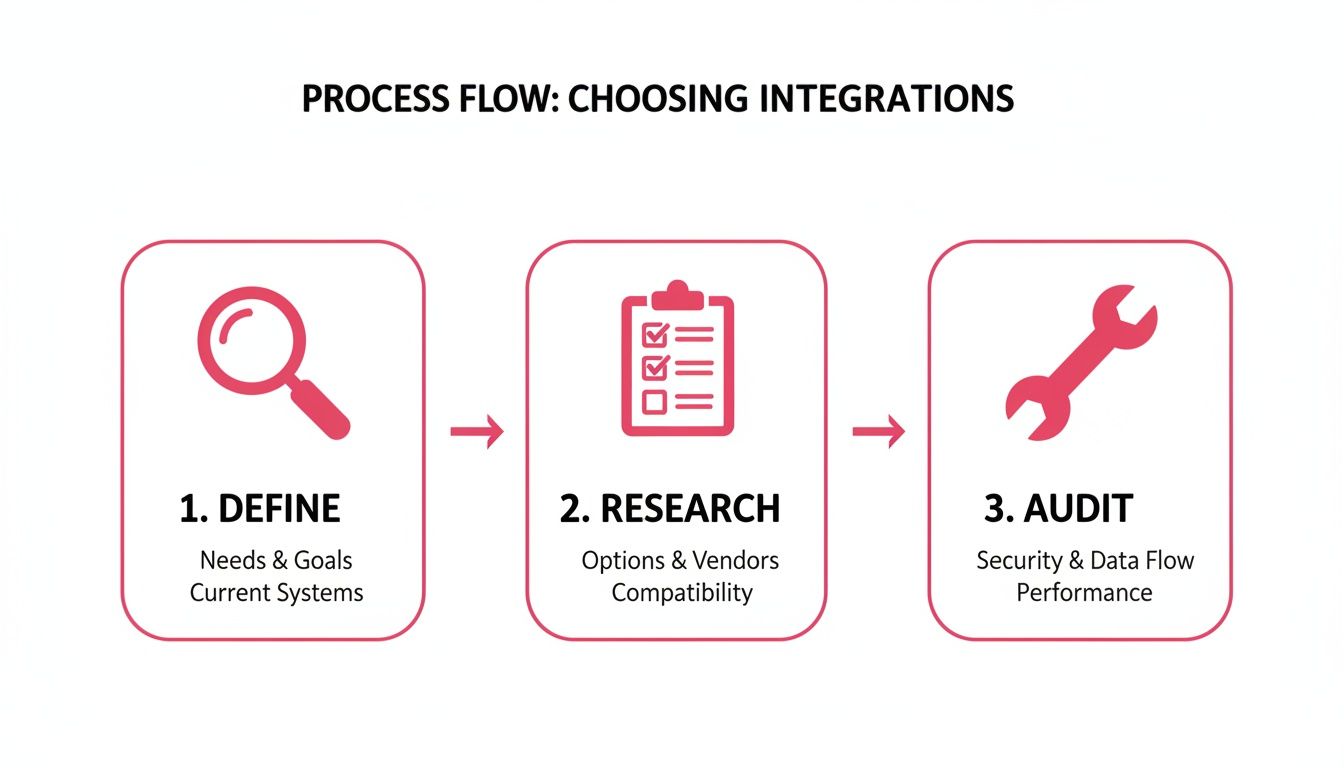
This process shows how defining a problem, researching solutions, and auditing performance are key to building an effective system. This strategic approach is becoming essential as new technologies reshape how customers behave.
A truly connected ecosystem means one tool’s success doesn’t just end there—it becomes the starting signal for a dozen other intelligent actions across your business.
For example, AI-powered referrals from chatbots are now driving an impressive 11.4% conversion rate, more than double the 5.3% from organic search. As mobile app usage surges and web visits dip, merchants have to rely on a connected ecosystem of third-party integrations to capture these high-intent buyers wherever they are.
You can dive deeper into these trends and discover how AI is impacting e-commerce conversions in recent industry reports.
Still Have Questions About E-commerce Integrations?
Jumping into the world of third-party integrations can bring up a few questions. That’s totally normal. Getting some clear answers upfront will help you build your store’s tech stack with confidence and sidestep some common headaches.
Let’s go through a few of the things we hear most often from merchants.
How Do I Know if an Integration Is Right for My Business?
Great question. The best way to start is by pinpointing a specific, measurable problem you’re facing. Maybe it’s a painfully high cart abandonment rate, or perhaps your marketing workflow is just clunky and inefficient.
Once you know the problem, you can look for tools built to solve that exact issue. A solid integration should do one of three things: save you time, make you more money, or give your customers a better experience. The best ones do all three.
Always check for strong reviews from other merchants, see what people say about their customer support, and make sure it plays nicely with your core platform, like Shopify or WooCommerce. If there’s a free trial, use it. There’s no better way to see if it’s a good fit before you commit.
Can Too Many Integrations Slow Down My Website?
Yes, they absolutely can. Every app you add, especially those that inject code into your storefront (what we call client-side), can add a little bit of drag and slow down your page load times. This is exactly why you want to stick with well-coded integrations from developers who know what they’re doing.
It’s a good habit to regularly audit your app list. If you’re not using a tool anymore, get rid of it. Old, unused apps can create unnecessary bloat and even open up security risks.
A pro tip is to use site speed tools to measure your store’s performance before and after you install something new. This helps you quickly spot any apps that are causing a slowdown. It’s also worth noting that server-side integrations are generally much less likely to impact your store’s front-end speed.
What’s the Difference Between a Native vs. a Zapier Integration?
Think of a native integration as a custom-built, direct connection between two apps. A perfect example is an app you download directly from the Shopify App Store. These are usually incredibly stable, fast, and offer much deeper functionality because they were designed for that one specific job.
On the other hand, a tool like Zapier is more like a universal adapter. It acts as a middleman, creating a bridge between thousands of different apps that don’t have a direct connection. It offers amazing flexibility for connecting all sorts of things, but you might run into slight data delays or find that the functionality is a bit limited.
For your most critical business tasks—like payment processing or cart recovery—you should always go for a native integration if one is available. Then, use Zapier to connect everything else and fill in the gaps in your workflow.
Ready to turn abandoned carts into your biggest revenue stream? CartBoss uses the power of automated SMS to bring customers back and recover sales on autopilot. Start recovering lost sales today.