


A shopper adds two products, reaches checkout, types an email address, and then disappears. You don’t have a traffic problem in that moment. You have a cart system problem.
That’s why a WooCommerce shopping cart plugin matters so much. It isn’t just the box that holds products before payment. It controls how buyers move from interest to intent, how smoothly checkout works, whether abandoned carts are measurable, and whether recovery tools help or hurt the buying experience.
WooCommerce itself has been moving at scale for a long time. It launched on 27 September 2011 as a free WordPress e-commerce plugin, passed 100,000 downloads in less than two years, then reached 4 million downloads by August 2014 and 7 million by April 2015, which shows how quickly merchants adopted it early on according to this WooCommerce growth summary. That history matters because most store owners aren’t building around a niche tool. They’re working inside a huge ecosystem with lots of extensions, lots of flexibility, and lots of ways to create friction by accident.
If you’re choosing, fixing, or extending your cart setup right now, you’re in the right place. This guide is for store owners, marketers, and operators who want to make better decisions without turning their checkout into a plugin pile.
A good cart setup doesn’t just collect orders. It protects conversion at the most fragile point in the customer journey.
You’ll leave with a practical way to judge any WooCommerce shopping cart plugin by business impact, not feature count. You’ll also know where stores usually get tripped up, especially around abandoned cart tracking, mobile friction, performance, SMS recovery, and compliance.
If you want context for why this matters so much, CartBoss has a useful breakdown of cart abandonment statistics for e-commerce teams. The short version is simple. Buyers leave all the time, and the stores that recover more of them usually treat the cart like a system, not a page.
Table of Contents
- Introduction Why Your Cart Decides Your Revenue
- What a WooCommerce Shopping Cart Plugin Actually Does
- Key Features That Turn Browsers Into Buyers
- Setup Considerations That Protect Performance and Compatibility
- Integrating SMS Recovery Without Slowing Your Store
- Compliance and Accessibility Most Guides Overlook
- Putting Your Shopping Cart System Into Action
Introduction Why Your Cart Decides Your Revenue
The cart is where buying intent gets tested
A product page can be beautiful and still fail to sell. The reason often shows up later, when the buyer opens the cart, hits checkout, gets confused by extra steps, can’t find the final cost, or gets interrupted on mobile.
That’s the job of a WooCommerce shopping cart plugin. It has to support a clean path from product selection to payment confirmation. If it adds confusion, slows checkout, clashes with your theme, or breaks on a phone, you feel it in lost revenue.
WooCommerce is now used at very large scale. One 2025 industry source estimated 4.53 million active WooCommerce stores worldwide and 33.4% of tracked e-commerce sites, while a 2026 analysis reported 4.17 million live stores and a 20 to 39% global share range depending on measurement provider, according to this market share review. A platform that common deserves a more careful conversation than “which plugin has the longest feature list?”
What store owners usually miss
Many merchants think they’re shopping for one thing, a cart plugin. In practice, they’re making decisions across four linked layers:
| Layer | What it affects | Common mistake |
|---|---|---|
| Core cart | Add to cart, cart page, checkout flow | Assuming default behavior is already optimized |
| Extensions | Recovery, upsells, dynamic offers | Installing too many overlapping plugins |
| Performance | Load time, order processing, checkout stability | Adding tracking and scripts without testing |
| Measurement | Open carts, abandoned carts, recovery results | Running campaigns without reliable attribution |
That’s why “does it have abandoned cart recovery?” is too small a question. A better question is, “Will this setup recover more carts without making checkout heavier?”
A practical way to think about the problem
Treat your cart like a revenue engine with three jobs:
- Let buyers move quickly from cart to payment.
- Capture signals so you can measure drop-off.
- Recover lost intent with a fast follow-up channel when someone leaves.
If one of those jobs fails, the whole system gets weaker.
What a WooCommerce Shopping Cart Plugin Actually Does
The easiest way to understand a WooCommerce shopping cart plugin is to picture a physical store.
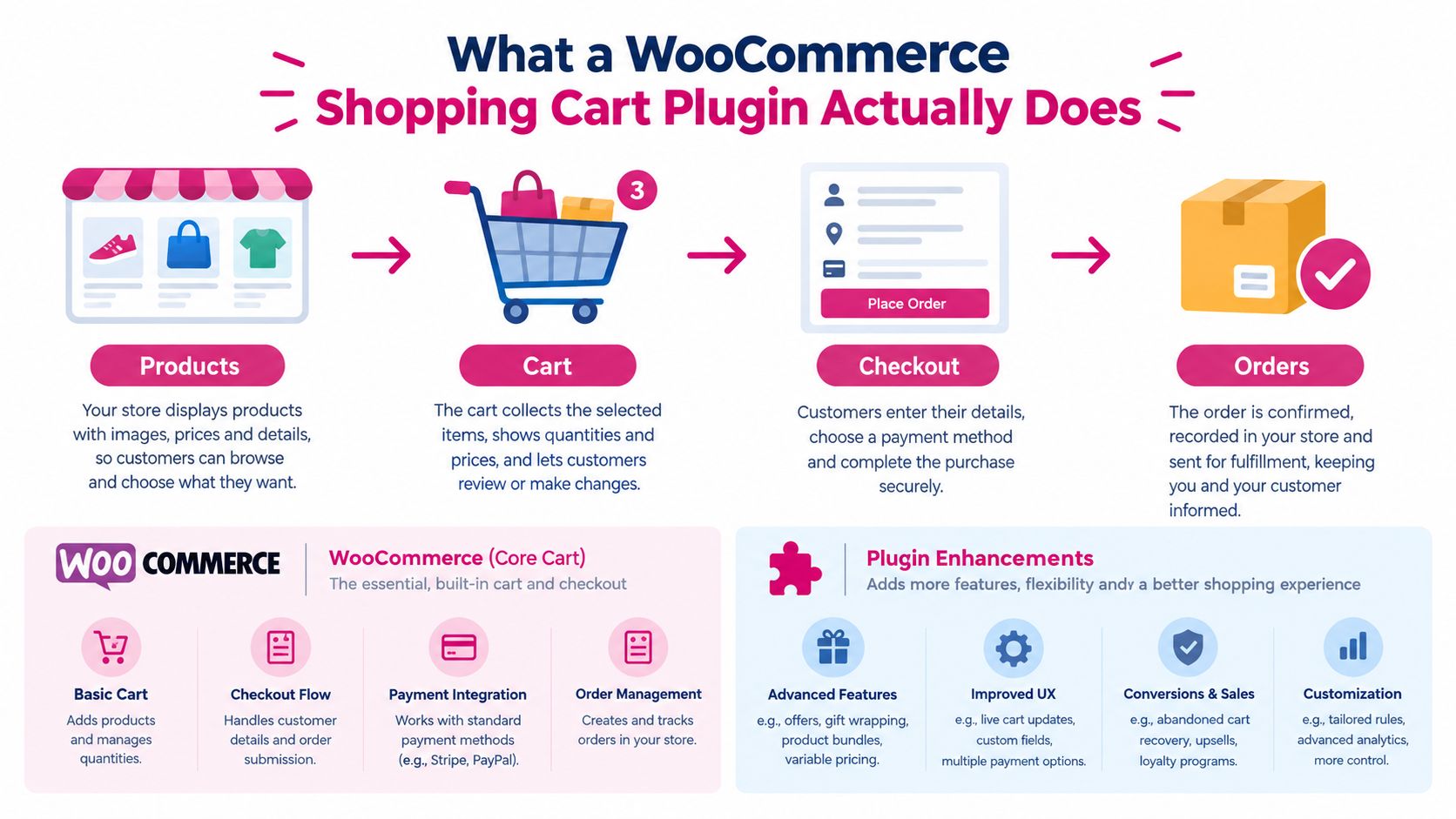
Products sit on shelves. The cart is the basket. Checkout is the cash register. Orders are the receipts and fulfillment records after payment. WooCommerce gives you the basic store structure. Plugins change how that basket behaves, how the register works, and what happens when a shopper walks away before paying.
Core WooCommerce versus plugin extensions
At its base, WooCommerce handles the essentials:
- Products and pricing so buyers can browse and add items.
- Cart contents so selected items stay together before purchase.
- Checkout fields for shipping, billing, and payment.
- Order creation after the customer completes payment.
A plugin extends one or more of those jobs. For example, one plugin may replace the cart page with a slide-out cart drawer. Another may simplify checkout fields. Another may detect when a shopper entered contact details but didn’t finish.
That difference matters because not every plugin is “the shopping cart.” Many are really cart enhancers.
Why abandoned carts confuse so many store owners
Readers often get stuck. They assume WooCommerce automatically tracks abandoned carts in a useful way. It doesn’t by default.
WooCommerce’s own Cart Reports extension emphasizes real-time visibility into open, converted, and abandoned carts, and broader abandoned-cart guidance notes that stores need extra tooling if they want proper recovery measurement, as explained on the WooCommerce Cart Reports page.
Practical rule: If you can’t see which carts were opened, abandoned, and recovered, you’re not running recovery. You’re sending reminders in the dark.
The slightly more technical version in plain English
Under the hood, WooCommerce has to remember what the shopper added, preserve key session data, and then turn that temporary shopping activity into a real order once payment goes through.
That creates three practical questions:
- Will the cart hold state reliably? If not, buyers lose items or coupon data.
- Will checkout complete cleanly? If not, buyers hit errors and leave.
- Will your store record useful recovery data? If not, marketing can’t learn what’s working.
A WooCommerce shopping cart plugin is useful when it improves one of those jobs without damaging the others.
Key Features That Turn Browsers Into Buyers
The right way to evaluate features is to ask what buyer problem each one solves. Fancy labels don’t matter much if the result is still a clunky checkout.
Recovery features that help you win back intent
Cart abandonment is a normal part of e-commerce, but it’s still painful. Metorik reports that across 6,000+ WooCommerce stores and 65M+ orders, 21% of placed carts were abandoned in 2025 according to Metorik’s cart abandonment benchmarks. Broader industry summaries commonly place abandonment around 70%, with one Baymard-derived figure of 70.19%, a WooCommerce-specific estimate of 70% to 75%, and mobile abandonment reaching about 85% in one summary, as outlined in this WooCommerce abandoned cart statistics roundup.
Those numbers tell you why recovery features matter. Even modest gains can translate into meaningful recovered revenue because the pool of lost intent is so large.
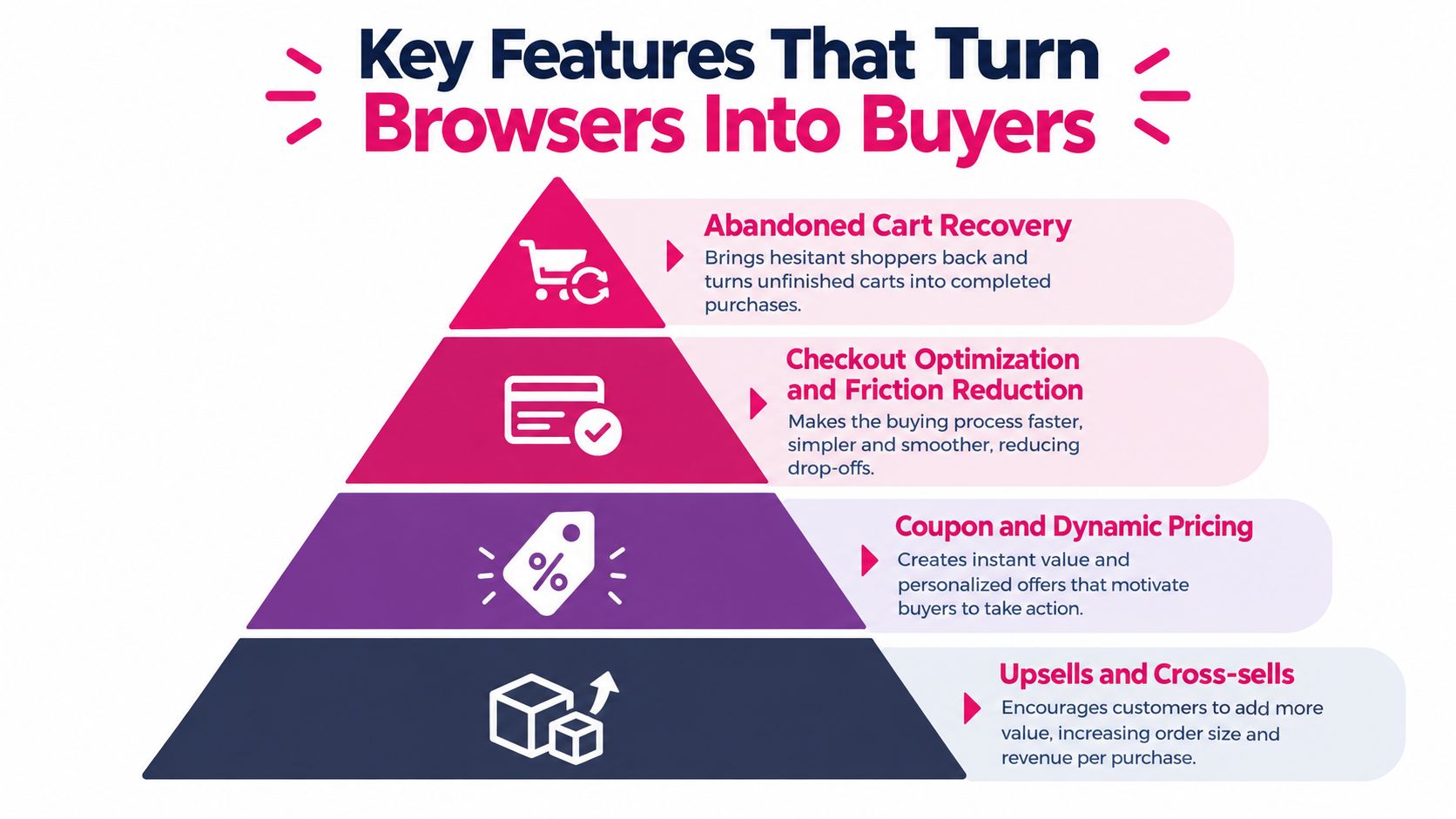
A useful recovery feature set usually includes:
- Captured contact details so the store can follow up after drop-off.
- Recovery links that bring the shopper back to the right cart or checkout state.
- Simple offer support for discounts or incentives when appropriate.
- Reporting so you can compare recovered carts against total abandoned carts.
Friction reduction matters more than flashy extras
Before you chase coupons or upsells, fix what slows the buyer down. Cart friction usually shows up as too many fields, delayed costs, forced account creation, broken payment overlays, or a cart drawer that behaves badly on mobile.
CartBoss has a practical guide to e-commerce checkout optimization for digital retailers that lines up with what operators see every day. Shorter paths usually outperform more complicated ones.
Here’s a simple decision filter:
| Feature | Good question to ask | Revenue effect |
|---|---|---|
| Cart drawer or mini cart | Does it help buyers review items faster? | Can reduce drop-off before checkout |
| Checkout field controls | Does it remove unnecessary inputs? | Can lower friction |
| Guest checkout support | Does it let people buy without extra setup? | Can preserve impulse purchases |
| Coupon logic | Does it apply offers cleanly without confusion? | Can improve completion for hesitant buyers |
| Recovery tracking | Can you measure actual recovered carts? | Can improve decision-making |
This short demo helps if you want to see the general idea of cart recovery in action before comparing tools:
Don’t buy features that work against each other
A common mistake is stacking a cart drawer plugin, a checkout field editor, a popup discount tool, a bundle plugin, and multiple tracking scripts without checking whether they compete for the same moment in the journey.
If a plugin adds one more script, one more popup, and one more conditional rule at checkout, ask whether it’s increasing confidence or increasing hesitation.
The best feature mix is usually the smallest one that improves speed, clarity, and recoverability.
Setup Considerations That Protect Performance and Compatibility
A cart plugin can look fine in the dashboard and still cause trouble where it matters most, at checkout. Setup quality is what separates “installed” from “safe to rely on.”
Start with order storage and checkout speed
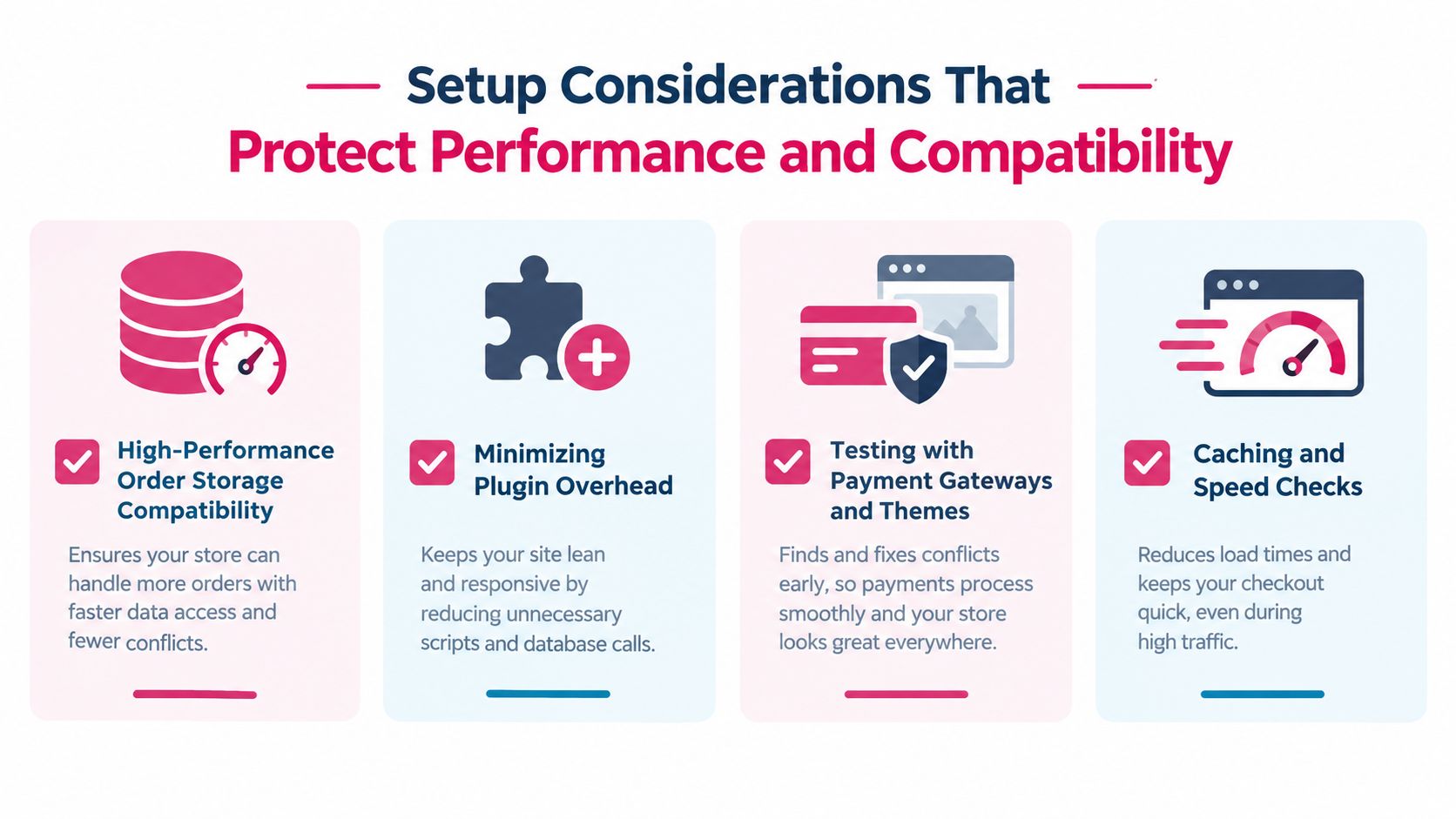
WooCommerce checkout performance improves materially with High-Performance Order Storage. WooCommerce benchmarking showed about a 1.5× checkout improvement for a simple one-product checkout, with 10 checkouts taking 0.9917s on HPOS versus 1.5087s on the legacy posts table, as summarized in this HPOS performance overview.
The reason is practical, not mysterious. HPOS reduces dependence on the older post and postmeta order model, which lowers write pressure during checkout and speeds order processing, especially on stores with many concurrent checkouts or extensions that touch orders often.
If your plugin stack isn’t ready for HPOS, that’s a warning sign.
Test the places where plugins usually break
The cart rarely breaks in the obvious places. It usually breaks in edge interactions.
Check these combinations before launch:
- Theme plus cart behavior: Open the cart drawer, update quantities, remove items, and continue shopping on desktop and mobile.
- Payment gateway overlays: Confirm that card forms, wallet buttons, redirects, and validation messages still behave correctly.
- Coupon handling: Apply, remove, and re-apply a discount from both cart and checkout.
- Logged-in and guest states: Some issues only appear when the shopper isn’t logged in.
For store speed work, CartBoss also has a practical post on how to improve website speed. The useful mindset is to test the transaction path, not just the homepage.
A pre-launch checklist you can actually use
Run through this before adding traffic or launching campaigns:
- Enable compatibility checks for your theme, payment gateways, and major extensions.
- Confirm HPOS support in every cart or order-related plugin you rely on.
- Test on a real phone using mobile data, not just desktop preview mode.
- Complete trial purchases with and without coupons.
- Check order creation speed during repeated checkout attempts.
- Review scripts and plugin overlap to remove duplicate features.
- Verify cart persistence after page refreshes and return visits.
A fast catalog page won’t save a weak checkout. Test the moment money changes hands.
What experienced operators do differently
They don’t ask only whether the plugin works. They ask whether it keeps working when promotions go live, when several shoppers check out close together, and when extensions all fire at once.
That’s the setup mindset worth copying. Stable beats clever.
Integrating SMS Recovery Without Slowing Your Store
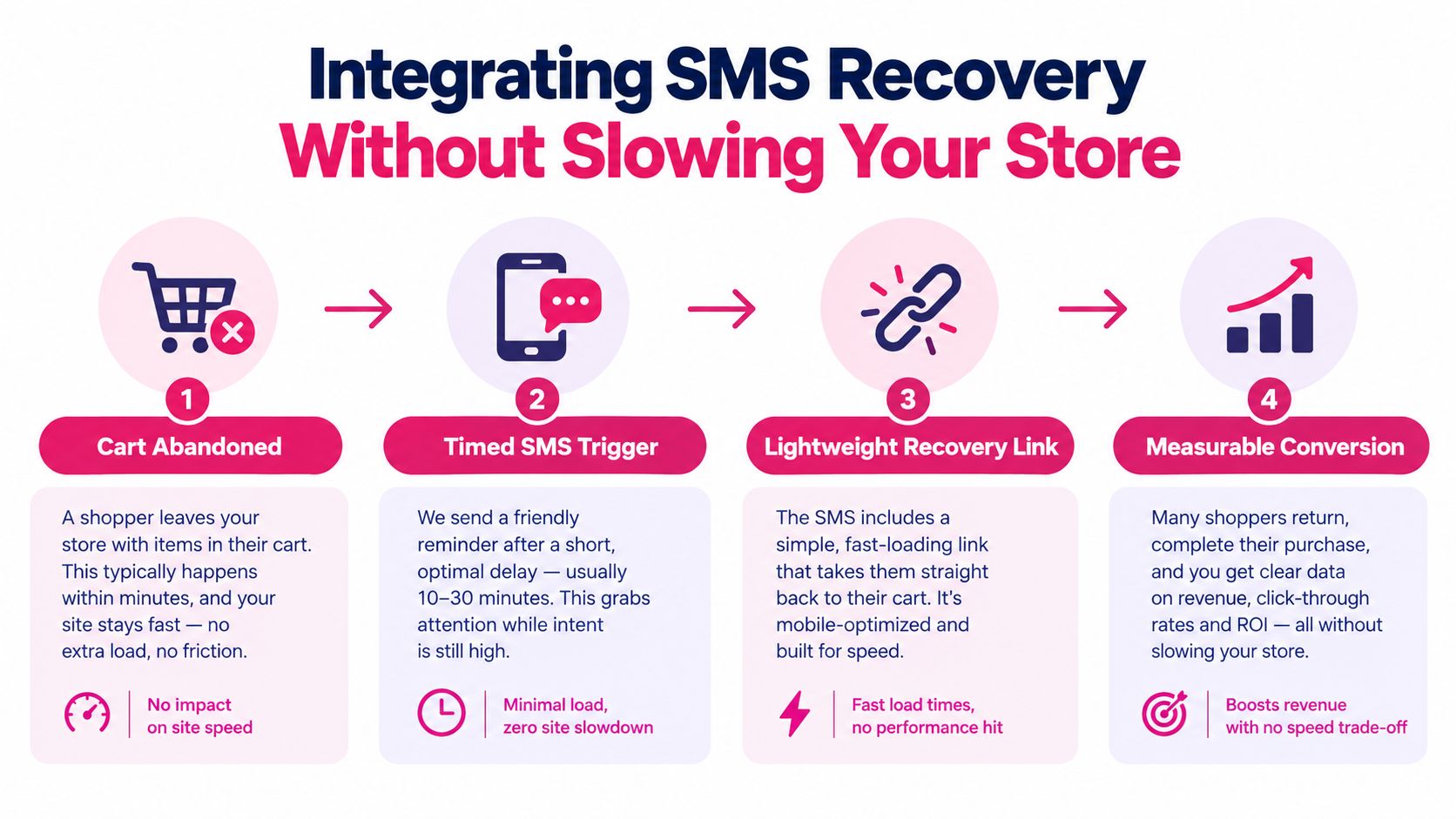
Email still has a place, but abandoned cart recovery is often a speed problem. If the message shows up too late, the buyer has already moved on, switched devices, or forgotten the purchase.
Why SMS fits the abandoned cart moment
SMS is strong for time-sensitive reminders because visibility is so fast. One 2026 industry benchmark says SMS open rates average 98%, with 95% of messages opened within three minutes, and another 2026 benchmark reports a 97.2% median open rate across vendors and says delivered messages are exposed to recipients within three minutes, according to this SMS benchmark report.
That doesn’t mean every text converts. It means the message is far more likely to be seen quickly, which is exactly what abandoned cart recovery needs.
A lightweight recovery workflow
You don’t need a bloated setup. You need a clear sequence.
-
Detect meaningful abandonment
Capture the moment a buyer has shown real purchase intent, such as entering checkout details but not completing the order. -
Send the first reminder quickly
Fast matters because the product, price, and intent are still fresh in the shopper’s mind. -
Use a recovery link that reduces effort
The return path should take the buyer back to a useful state, ideally with the cart restored and as little re-entry as possible. -
Measure by delay, click, and conversion
Compare whether earlier or later sends create better recovery in your store.
What to include in the message flow
A useful SMS recovery system usually works better when it includes:
- The shopper’s context so the message feels connected to the cart they left.
- A direct path back to checkout rather than a generic homepage link.
- Offer logic when needed such as dynamic discounts for selected situations.
- Clean reporting so you can tell whether the text sequence is worth keeping.
One option in this category is CartBoss, which provides a WooCommerce SMS recovery plugin that detects checkout inputs and sends automated abandoned cart text messages. If you want to see how that type of setup works in practice, CartBoss explains its approach in this guide to an SMS plugin for WooCommerce.
Keep the recovery layer separate from the checkout burden
This is the key idea many stores miss. Recovery should sit beside the cart system, not weigh it down.
If the recovery tool needs heavy front-end scripts, complicated rule stacks, or multiple overlapping popups, it can erase part of the value it creates. The cleaner approach is to collect the necessary recovery signals, trigger messages at the right time, and measure outcomes without cluttering the buyer journey.
Recovering a cart after abandonment is useful. Preventing a slow checkout is even more useful.
Compliance and Accessibility Most Guides Overlook
A cart can function technically and still expose you to legal risk or block real customers from completing checkout. That gap gets ignored in many WooCommerce shopping cart plugin articles.
SMS consent rules are stricter than many stores assume
For GDPR-compliant SMS marketing in the EU, prior consent is required for unsolicited marketing by email and SMS under Article 13 of the ePrivacy Directive, as summarized by Bird’s GDPR explainer for email and SMS marketing. Related guidance also stresses express consent, clear channel-specific disclosure, no pre-ticked boxes, and immediate STOP handling.
That means your recovery flow should include:
- Clear opt-in language that says the buyer is subscribing to SMS, not just “updates.”
- Channel-specific disclosure so email consent and SMS consent aren’t blended together.
- Easy opt-out handling so STOP requests are processed right away.
- No pre-ticked boxes because passive consent isn’t enough.
For stores selling into the US as well, CartBoss has a plain-English primer on what TCPA compliance means and why texting rules deserve their own review.
Accessibility problems often come from custom layers
WooCommerce says its core cart and checkout blocks are built with accessibility in mind, and it also states its front end is substantially conformant with WCAG 2.2 AA/AAA. At the same time, WooCommerce’s own accessibility update notes that themes and third-party plugins can still break labels, focus handling, and error announcements in the actual checkout flow, which is why WooCommerce’s accessibility improvements update is worth reading carefully.
That distinction matters. Core compliance claims don’t automatically cover your full live store once page builders, payment overlays, custom fields, and cart drawers are added.
A fast audit checklist for the real store
Use this short test on your live checkout:
| Area to test | What to check |
|---|---|
| Cart drawer | Can a keyboard-only user open, navigate, and close it reliably? |
| Form labels | Are all input fields clearly labeled and announced correctly? |
| Error handling | Do validation errors appear in text and move focus properly? |
| Payment step | Can buyers understand failures and retry without confusion? |
| Mobile checkout | Are fields, buttons, and notices usable on smaller screens? |
The pressure to do this well is increasing in 2025 and 2026, especially with European Accessibility Act readiness and WCAG-driven audits pushing merchants to test more rigorously in major markets.
A cart that excludes buyers isn’t optimized, even if it converts well for everyone else.
Putting Your Shopping Cart System Into Action
Most stores don’t need a bigger cart stack. They need a sharper one.
If you want better results from your WooCommerce shopping cart plugin, start with the buying path that already exists. Look for friction on mobile, confirm that your cart and checkout behave cleanly with your theme and payment tools, and make sure you can measure open, abandoned, and recovered carts.
A simple action plan works well:
- Audit mobile checkout first because that’s where friction often gets exposed fastest.
- Turn on measurement so you can see cart activity instead of guessing.
- Review plugin overlap and remove anything that adds clutter without a clear revenue purpose.
- Add one recovery flow and track what happens by send timing, clicks, and conversions.
- Check consent and accessibility before you scale the program.
Success isn’t “we installed a plugin.” Success is clearer. Buyers complete checkout with less effort, your team can see where carts are being lost, and recovery messages bring shoppers back without making the storefront heavier.
That’s the system view that tends to win over time. Protect checkout speed. Reduce friction. Measure abandonment. Recover lost intent with a fast channel. Then keep iterating based on what the store shows you.
CartBoss helps WooCommerce stores add SMS cart recovery as a measurable layer on top of checkout, with automated reminders, recovery links, and reporting that fit the revenue system approach covered here. If you want to turn more abandoned carts into completed orders without overcomplicating your setup, visit CartBoss.