


You open Shopify on a Tuesday afternoon and see two shoppers leave without buying. One added a product to the cart, then kept browsing. The other entered checkout details and stopped just before placing the order. A blanket discount sent to both might bring someone back, but it could also spend margin on a shopper who wasn’t ready to buy and miss a fixable checkout problem.
Those exits aren’t the same signal. Cart abandonment points to a broad group of shoppers with mixed intent; checkout abandonment identifies people who started the purchase flow. Separating them helps you choose whether to send a gentle reminder, make checkout easier, or hold back and protect the customer experience.
Table of Contents
- Why These Two Events Are Not the Same
- Defining Abandoned Cart and Abandoned Checkout
- Side-by-Side Comparison of the Two Events
- What Causes Each Type of Abandonment
- SMS Recovery Timing and Messaging by Stage
- When the Real Fix Is the Checkout Itself
- Privacy and Compliance for Recovery Messages
- Choosing the Right Recovery Approach for Your Store
Why These Two Events Are Not the Same
A dashboard that reports one abandonment rate can make two very different shopper behaviors look like one problem. Someone who adds an item to a cart may still be browsing, comparing prices, or waiting to decide. A shopper who starts checkout has taken another step toward buying, so a useful recovery message may be more specific and direct.
The scale of the issue can be striking: Baymard Institute’s 14-year tracking puts the global average cart-abandonment rate at 70.19%, meaning roughly 70 of every 100 shopping sessions involving a cart don’t end in a purchase (Baymard’s cart-abandonment benchmark). That figure describes cart abandonment, not checkout abandonment. Treating it as a measure of checkout failure blurs where shoppers are leaving and what kind of intervention could help.
Read the funnel signal before spending
Picture two rows in your analytics. The first shows a shopper who added a product but never opened checkout. The second shows a shopper who entered contact and shipping details, then left. An automatic discount may be unnecessary for the first shopper; the second may benefit more from a saved checkout link or a quick reminder, unless the checkout itself is the reason they left.
That distinction affects audience, timing, tone, and discount cost. Lower-intent cart audiences generally call for a softer touch, while checkout audiences can support a more direct return-to-purchase message. Neither group should receive a discount by default.
Practical rule: Separate cart starts from checkout starts before you judge a recovery campaign. One blended rate can’t tell you whether your message, offer, or checkout needs work.
Measure the stages independently: cart starts, checkout starts, completed purchases, and recovery conversions. That gives your team a clearer basis for deciding where to focus, instead of treating every exit as a missed sale waiting for a coupon.
Defining Abandoned Cart and Abandoned Checkout
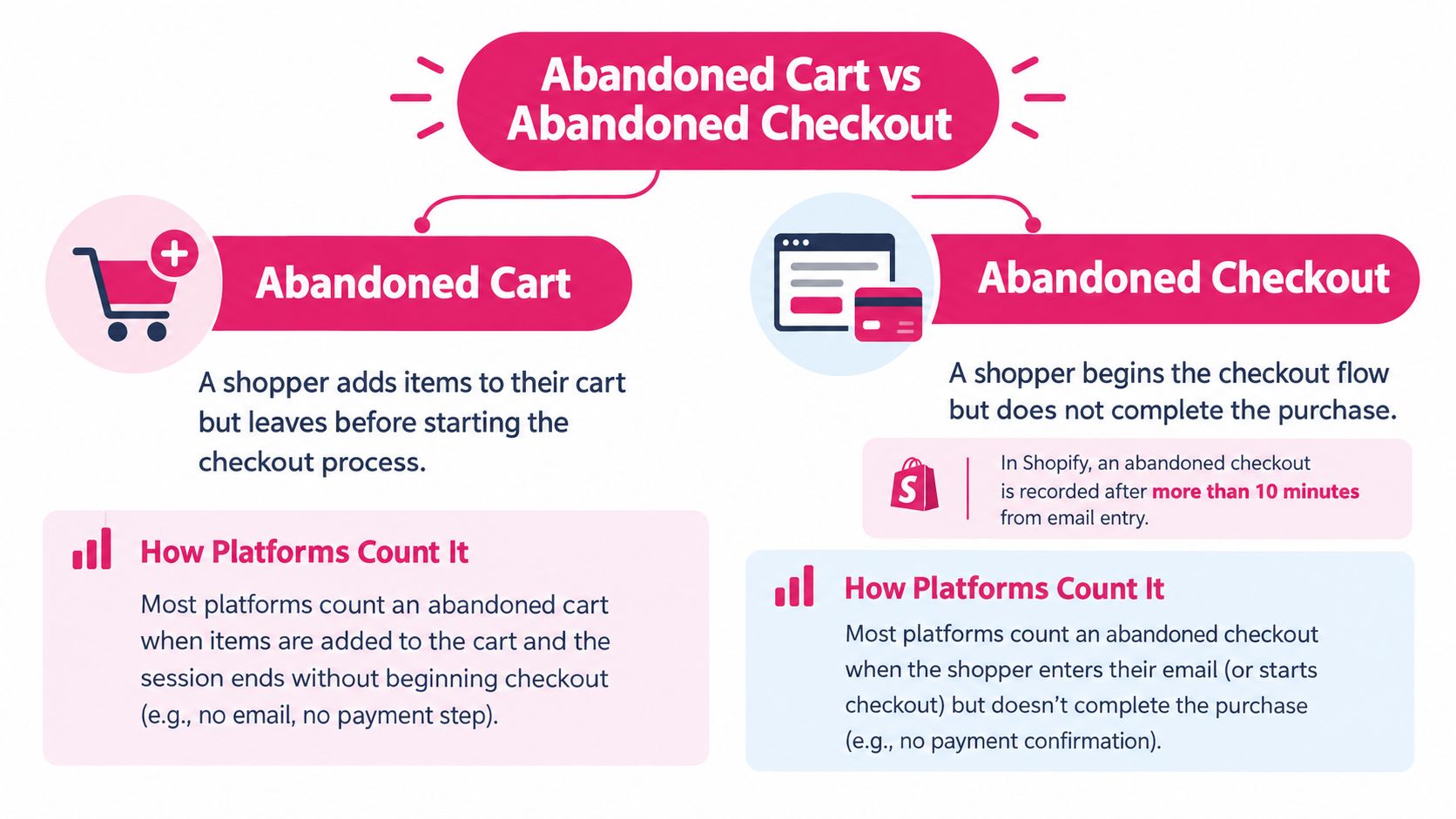
Use the shopper’s progress through the funnel to classify the event. Cart abandonment happens when someone adds at least one product to an online cart but leaves without purchasing. Checkout abandonment happens after the shopper starts checkout and exits before payment or order completion.
The difference isn’t only vocabulary. A cart event can carry product information, while a checkout event may include contact or shipping details and a recovery URL. That added context can help you send a message tied to the actual purchase the shopper left behind, rather than a generic “come back” prompt.
Apply Shopify’s event threshold
Shopify gives checkout abandonment a specific operational threshold: an abandoned checkout is recorded after the shopper submits an email at checkout and more than 10 minutes pass without the order being completed. The platform preserves line items, quantities, prices, addresses, timestamps, and recovery URLs for abandoned checkouts (Shopify’s abandoned-checkout documentation).
To label your store’s funnel accurately:
- Count cart starts when a shopper adds an item.
- Count checkout starts when they enter the checkout flow.
- Separate completions from shoppers who leave at each stage.
- Record recovery conversions against the stage where the shopper dropped off.
That separation also keeps your reporting honest. A cart abandoner and a checkout abandoner may both be reachable, but the second group has demonstrated stronger purchase intent and may have given the store more information to support relevant recovery. Don’t combine the two events into one denominator and assume the result tells you which message is working.
Side-by-Side Comparison of the Two Events
Use this table as a quick planning reference. Platform implementation can affect exactly what you can see, so confirm which events and fields your Shopify setup or analytics tools capture before building an automation.
| Dimension | Abandoned cart | Abandoned checkout |
|---|---|---|
| Trigger | Shopper adds a product but leaves without buying | Shopper begins checkout but leaves before completing the order |
| Data captured | Cart contents, when available | Checkout details may include items, quantities, prices, contact and shipping information, timestamps, and a recovery URL |
| Intent level | Mixed; the shopper may still be browsing or comparing | Higher; the shopper has moved into the purchase flow |
| Recovery approach | Low-pressure reminder, product context, or helpful information | Timely message with a saved checkout link and, when justified, a targeted offer |
| Reporting lens | Cart starts and purchases, measured separately | Checkout starts and completed orders, measured separately |
For an accurate baseline, use CartBoss’s guide to calculating cart abandonment rate. Keep the cart and checkout rates apart in your report, then compare the performance of each recovery flow with the audience it reached.
A cart-stage message should feel like a helpful nudge, not a countdown. A shopper who was browsing may need a reminder of the product or clear information about delivery, while a checkout abandoner is more likely to benefit from a link that returns them to the saved purchase flow. A discount can be tested for either group, but it shouldn’t be the default response to every exit.
Use the event to set the message, not the other way around. If your flow doesn’t distinguish the trigger, it can’t reliably match tone or timing to shopper intent.
What Causes Each Type of Abandonment
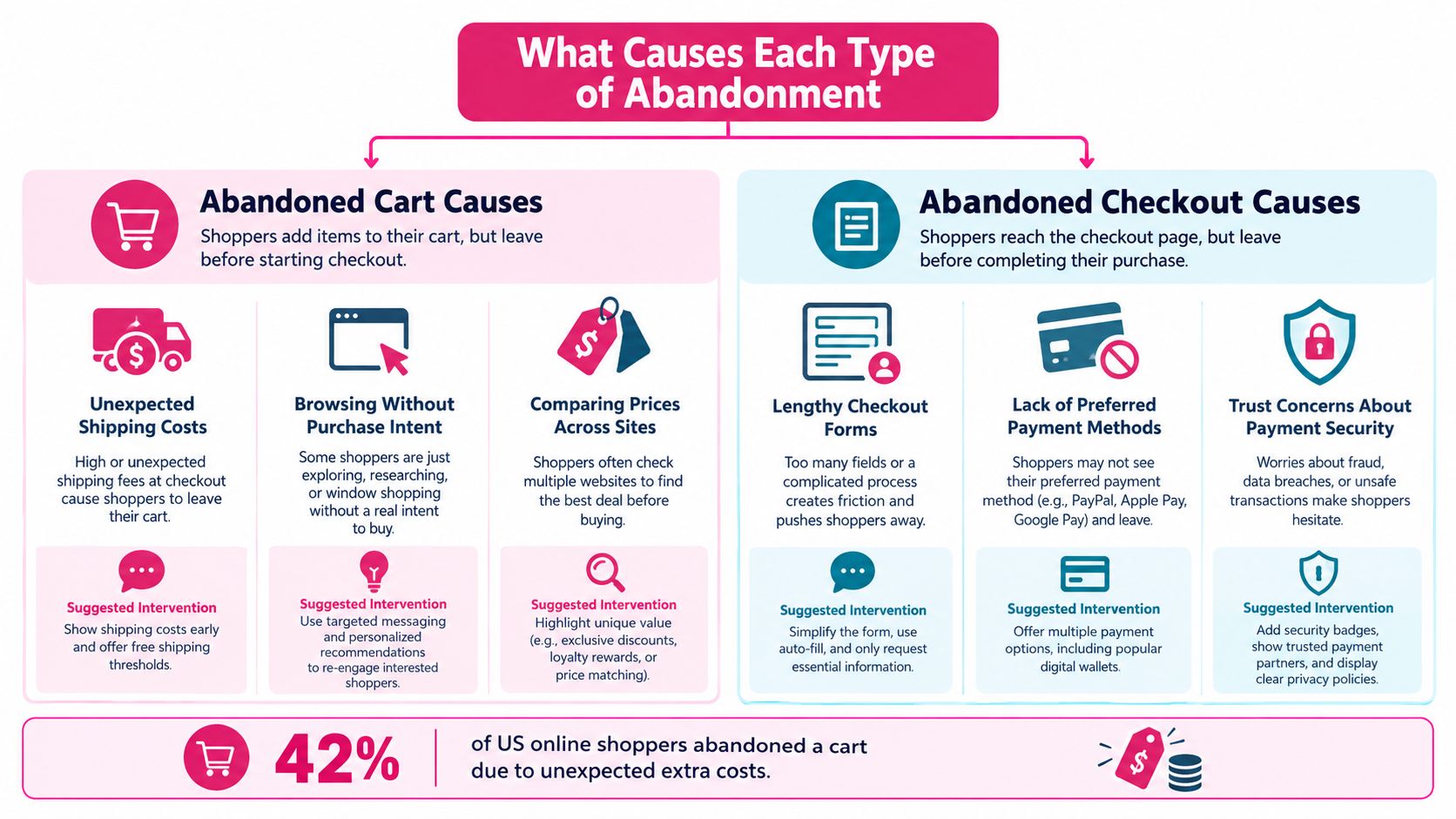
Abandonment has more than one cause, so a single recovery tactic won’t address every exit. Baymard’s large-scale checkout research found that 42% of U.S. online shoppers abandoned because they were merely browsing or not ready to buy, while 17% cited a checkout process that was too long or complicated (Littledata’s benchmark discussion). The first reason may call for a patient reminder, if any; the second points toward a checkout improvement.
Match the cause to the response
Use this practical decision tree when reviewing drop-offs:
- Shopper appears undecided: Start with a soft reminder and useful product context. Avoid leading with a discount, which may reward hesitation without resolving it.
- Costs become clear late: Surface shipping and other costs earlier in the cart or checkout. A reminder can bring the shopper back, but it can’t make a surprise feel less surprising.
- Checkout feels difficult: Review the form and payment flow before increasing message volume. If shoppers repeatedly leave at the same step, address that friction first.
- The reason isn’t clear: Test a restrained message and track what shoppers do afterward. Don’t assume every non-completion signals a recoverable purchase.
Cart abandonment can come from low purchase intent or product comparison, while checkout abandonment can signal a problem with form length, payment options, price clarity, or trust. Those possibilities overlap, so read the pattern in your own store rather than assigning one cause to every shopper in a segment.
For a practical starting point, use CartBoss’s overview of common reasons customers abandon their carts. If you’re also reviewing the wider site experience, Wonderment Apps’ guide on finding ways to increase conversions offers additional areas to examine alongside recovery messaging.
SMS Recovery Timing and Messaging by Stage
SMS can suit shoppers who want a quick reminder, but it isn’t a reason to message every person who leaves. Klaviyo reports that 18% of customers prefer abandoned-cart notifications by SMS and cautions that SMS open-rate analysis isn’t a reliable primary measure, since people may open messages without engaging (Klaviyo’s ecommerce SMS overview). Track actions after delivery, not opens alone.
Build two distinct message paths
A workable starting point is a checkout reminder within 60 minutes for a shopper who has supplied the required consent and can return through a saved checkout link. For a cart-stage shopper, allow 2 to 6 hours before sending a softer reminder. These are operational starting points to test, not guarantees that a particular delay will perform best for your audience.
Checkout template
Still want to finish your order? Your checkout is saved here: [recovery link]. Reply STOP to opt out.
Cart template
You left [product] in your cart. Take another look when it suits you: [cart link]. Reply STOP to opt out.
Keep the message identifiable, concise, and accurate. Use the correct recovery destination, and don’t promise an offer, delivery detail, or stock status that you can’t verify.
For timing and sequence decisions, consult CartBoss’s guide to abandoned-cart timing. Then judge the flow on delivered messages, recovery-link clicks, completed orders, revenue per recipient, discount cost, and unsubscribes. Suppress repeated reminders when the shopper has already purchased, opted out, or shown a recurring failure pattern that points to checkout friction rather than forgetfulness.
When the Real Fix Is the Checkout Itself
A recovery message can bring a shopper back to the same broken step. If a required field feels intrusive, totals arrive too late, or payment doesn’t work, a reminder or discount may produce a sale without correcting the experience that caused the exit.
Baymard’s testing reports that 14% of users abandon when a phone number is required, while 39% of sites fail to explain why the information is needed (Baymard’s checkout usability research). That’s a clear reason to inspect the form before adding more messages: shoppers may be reacting to a specific friction point, not forgetting to complete their order.
Diagnose the failure before changing the offer
Look for repeated drop-offs at the same field or step, form errors, unclear totals, and payment friction. Use customer feedback or reason codes where available. A cluster around one field points toward a checkout fix; scattered exits without a shared problem may be more suitable for a restrained recovery test.
You can also review account-creation friction. Baymard found that 18% of surveyed U.S. online shoppers abandoned an order because they didn’t want to create an account, and 62% of sites failed to make guest checkout the most prominent option (Shopify’s checkout optimization guidance). Make guest checkout easy to find and consider asking shoppers to create an account after purchase instead.
Don’t confuse recovered orders with a repaired checkout. A campaign can recover sales while the same usability problem continues to send shoppers away.
For a broader review of form and flow improvements, see the Sprints & Sneakers checkout playbook and CartBoss’s ecommerce checkout optimization guide. When testing messages, compare an eligible audience that receives them with a holdout group that doesn’t, then account for discounts, messaging costs, refunds, and support burden. Incremental profit is a stronger decision measure than a headline recovery count.
Privacy and Compliance for Recovery Messages
A phone number entered during checkout isn’t, by itself, permission to send promotional SMS. Before activating cart or checkout recovery, confirm the applicable requirements with your legal or privacy team. GDPR and CCPA obligations depend on your business and how you use customer data, so don’t treat one consent setup as a universal compliance solution.
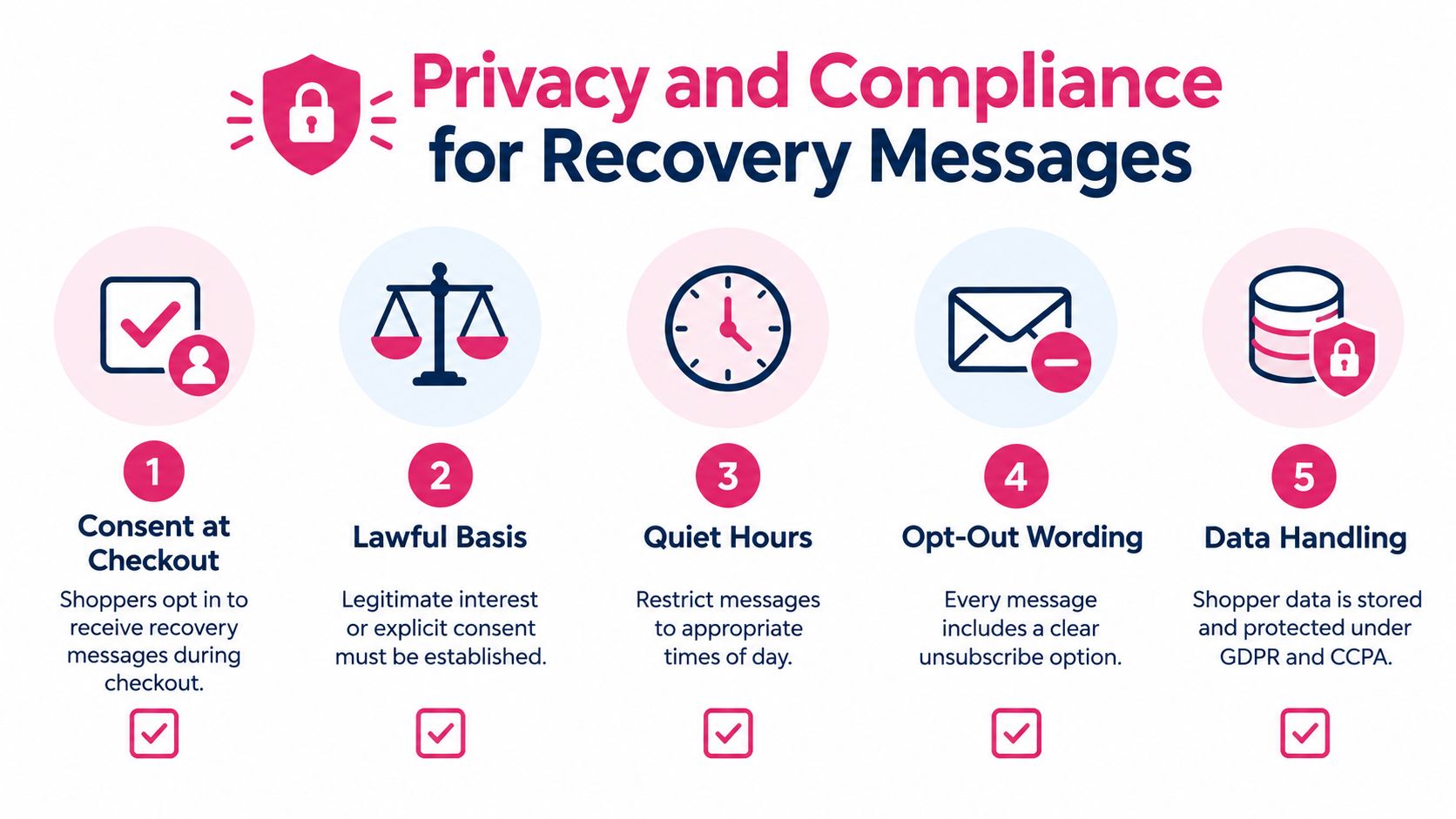
Use a clear permission and suppression checklist
- Consent: Capture the shopper’s permission for marketing messages in a clear, documented way. Don’t assume that providing a phone number for checkout authorizes promotional texts.
- Purpose: Review with counsel whether the message is promotional or transactional and what lawful basis applies. A discount offer is promotional; don’t treat it as equivalent to an order-related update.
- Timing: Respect applicable quiet-hour requirements and configure suppression for inappropriate send times.
- Opt-out: Make the unsubscribe path easy to understand and honor opt-out requests across relevant campaigns.
- Data handling: Use only the details needed to deliver the recovery message, protect them appropriately, and follow your retention and deletion practices.
Guest checkout is also part of a lower-friction, more privacy-conscious journey. As noted earlier, account requirements can deter shoppers; don’t make registration a condition for placing an order when it isn’t needed to complete the purchase.
Before launch, hand your flow to the person responsible for privacy or legal review. Confirm the consent language, message purpose, sender identification, opt-out behavior, data access, and suppression rules. CartBoss’s overview of GDPR and CCPA compliance can support that review, but it doesn’t replace advice customized to your business and markets.
Choosing the Right Recovery Approach for Your Store
Choose the response that matches the signal. A shopper who left a cart may need time or a low-pressure reminder. A shopper who started checkout may be a stronger candidate for a saved-checkout link. A repeated drop at one form field, unclear total, or payment step calls for a checkout investigation before another message.
Baymard estimates that improving checkout usability could produce a 35.26% increase in conversion for large ecommerce sites (Baymard’s checkout usability research). Treat that as a reason to investigate usability, not a forecast for your store. Your own funnel and test results should determine where the opportunity lies.
Track these measures separately for cart and checkout audiences:
- Recovered revenue per eligible session: Shows what the flow returns relative to the audience that could receive it.
- Time to purchase: Helps you understand when shoppers come back after a message.
- Discount cost: Reveals whether an offer is buying conversions you might have earned without it.
- Incremental conversion against a holdout: Distinguishes campaign-driven purchases from orders that would have happened anyway.
This week, separate cart starts from checkout starts in your reporting, verify the recovery links, and review where shoppers repeatedly leave. Launch a consent-checked, low-pressure cart reminder and a distinct checkout flow, then compare each with a holdout. Put longer-term checkout fixes on the roadmap when the evidence points to form, cost, account, or payment friction.
CartBoss provides automated SMS recovery for Shopify and WooCommerce, including timed reminders and pre-filled links that can return shoppers to their cart or checkout. If you’re ready to build stage-specific recovery messages and measure what brings shoppers back, visit CartBoss.