


Most advice about WooCommerce Abandoned Cart Pro starts with the wrong promise: install the plugin, send reminders, and watch lost revenue return. That approach treats every abandoned cart as a messaging failure. In practice, stores lose checkouts because shoppers encounter unexpected costs, complicated forms, weak trust signals, payment errors, or are not ready to buy. Recovery messages matter, but they can’t repair a checkout that keeps creating friction.
A WooCommerce store needs a decision framework, not another feature checklist. The right question is whether Abandoned Cart Pro gives your store enough recovery capability, or whether its email-first design will limit an SMS-led strategy. This guide evaluates the plugin as it works in a real store, explains where its bundled SMS module fits, and shows when a dedicated SMS recovery platform such as CartBoss deserves consideration.
Table of Contents
- Why One Plugin Won’t Fix Your Cart Abandonment Problem
- What WooCommerce Abandoned Cart Pro Does Inside Your Store
- Core Features and How They Actually Perform
- How the Bundled SMS Module Compares to a Dedicated SMS Tool
- Setting Up the Plugin the Right Way
- Real Pros and Cons for an SMS-Centric Store
- When to Stick With the Plugin, When to Go Hybrid, When to Switch
- Implementation Checklist and Measurement Plan
Why One Plugin Won’t Fix Your Cart Abandonment Problem
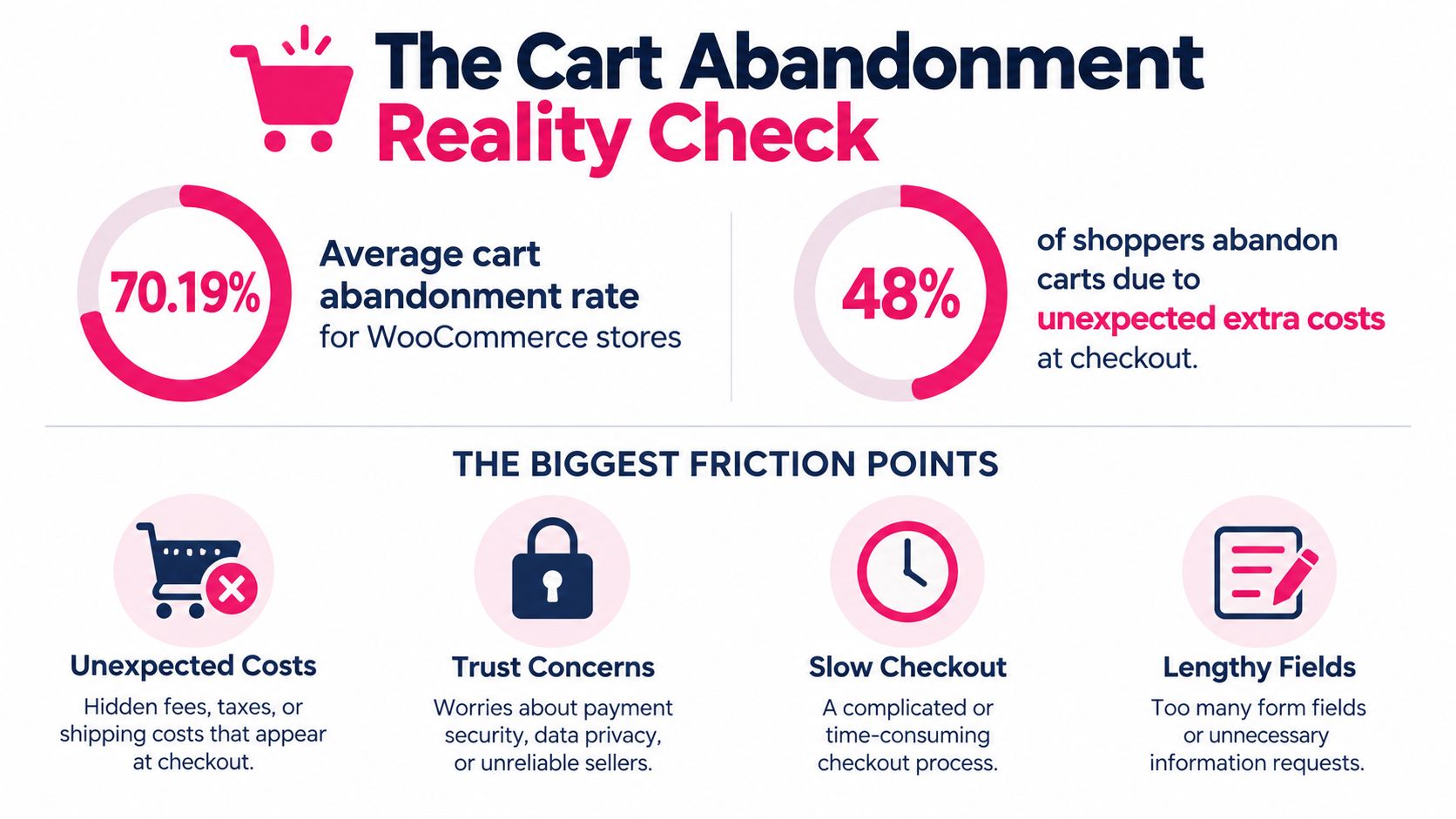
A recovery plugin cannot compensate for a checkout that creates doubt or surprise. Baymard Institute’s global benchmark is approximately 70.19% (Baymard’s checkout research), which means roughly 702 out of 1,000 carts would not become completed orders at that benchmark, while about 298 would. That figure includes browsers, comparison shoppers, and people who were not ready to buy, so it is not a promise that every abandoned cart can be recovered. It does show why checkout improvements and timely follow-up need to work together.
Cost clarity is the largest preventable issue in the cited survey. A 2024 survey summarized by Contentsquare found that 48% of respondents abandoned because shipping, taxes, or other extra costs were too high, 26% abandoned when a site required account creation, 25% cited financial trust concerns, and 17% were associated with checkout errors or crashes. Each cause requires a different response. A generic “complete your purchase” message cannot resolve an unexpected delivery charge, a forced account, or a broken payment step.
Email recovery has a ceiling
Email remains useful for longer consideration cycles, product education, and customers who prefer inbox communication. It gives you space to explain shipping, answer objections, and show product details. Its weakness is timing: the shopper must return to an inbox, recognize the sender, and act before buying intent fades.
SMS reaches the shopper in a shorter format while the abandoned session may still be relevant. Use it only with valid permission and a clear reason to send. Repeated discounts, generic links, or poor consent practices can create complaints without fixing the checkout experience.
That distinction shapes the plugin decision. Abandoned Cart Pro works well as an email-recovery layer with SMS attached. It suits stores that want native WooCommerce recovery without another system. It is a weaker fit when SMS is the primary channel, the audience spans several languages or markets, or the team needs detailed measurement of incremental SMS revenue. At that point, compare its bundled module with a dedicated SMS-first tool such as CartBoss rather than assuming one plugin covers every need.
WooCommerce’s extensibility lets merchants add email, SMS, analytics, discounts, multilingual messaging, and checkout tools around the existing commerce system. If checkout changes or custom event connections require development help, hire developers from latam can help you find WooCommerce support.
Practical rule: Fix the reason people leave, then use recovery messages to reach shoppers who still have purchase intent.
What WooCommerce Abandoned Cart Pro Does Inside Your Store
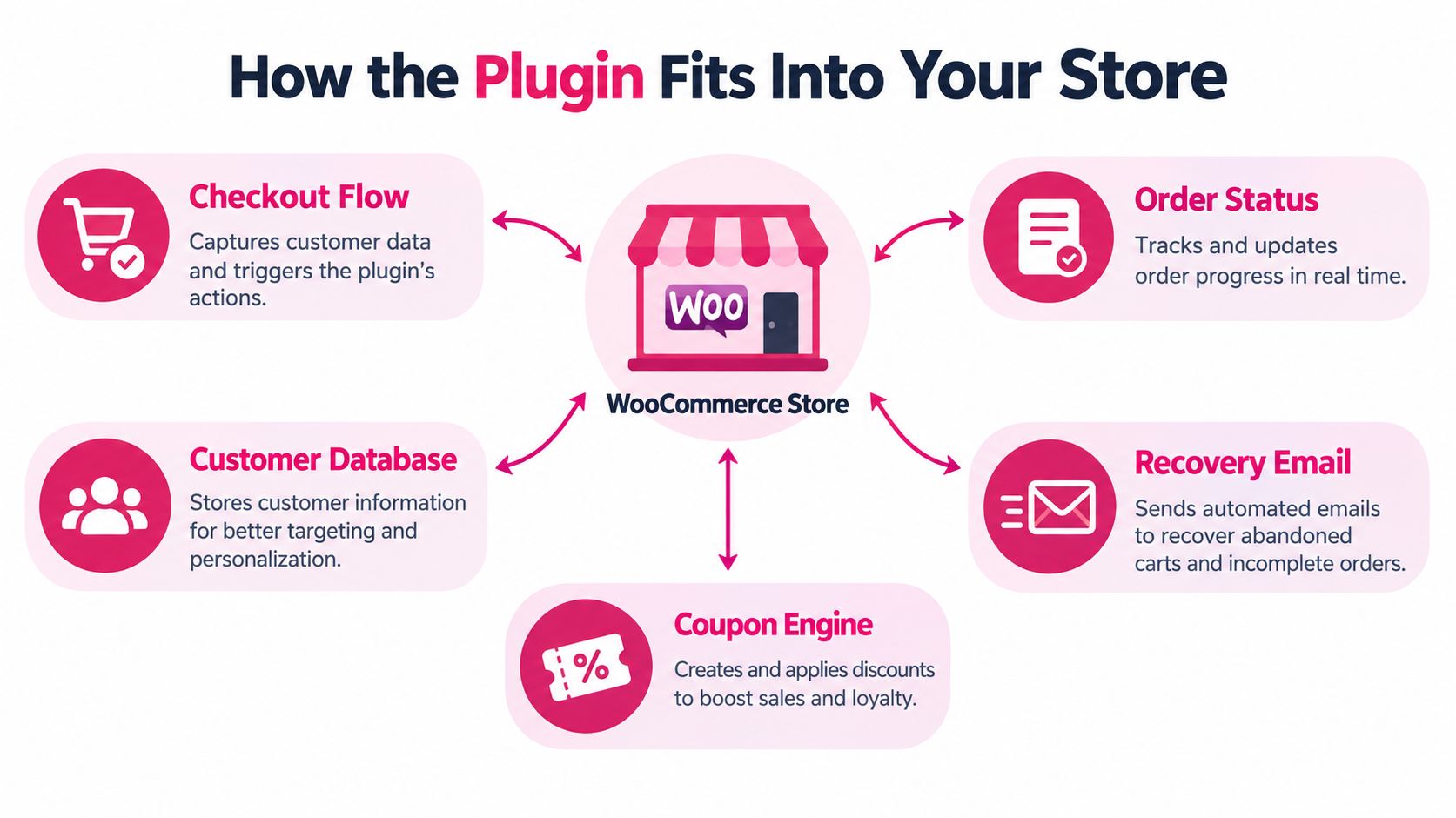
WooCommerce Abandoned Cart Pro isn’t a replacement for WooCommerce. It’s an optimization layer built around the store’s existing checkout, customer, order, and session data. That distinction matters because the plugin’s quality depends on what it can capture, how accurately it identifies an inactive cart, and whether it can return the shopper to a usable checkout session.
WooCommerce itself doesn’t define abandonment as one universal event. Its documentation lets administrators set the inactivity interval and choose eligible order statuses, including Failed. It also distinguishes records such as Abandoned, Unsubscribed, Abandoned–Pending Payment, Abandoned–Order Cancelled, Recovered, and Abandoned–Order Received. Read the WooCommerce abandoned-cart documentation before copying settings from another store.
The event flow you need to understand
A typical workflow looks like this:
- The shopper builds a cart. Product, quantity, coupon, and session details are stored by WooCommerce.
- The shopper reaches checkout. Depending on the configuration and available contact information, the recovery system can associate the session with a customer record.
- The inactivity timer runs. The cart becomes eligible only after the selected period without activity.
- The status rules filter the record. A failed payment, pending payment, abandoned cart, or completed order may follow different paths.
- The plugin sends a recovery message. Email, and potentially SMS through an add-on or integration, points the customer back toward completion.
- The order state changes. A completed order should leave the recovery queue and become a recovered record rather than receiving later reminders.
The WooCommerce abandoned-cart recovery guide is useful for understanding the broader recovery workflow, but don’t confuse a plugin’s ability to store a cart with its ability to diagnose why the shopper left.
Plugin data versus hosted messaging
A plugin operates close to your WordPress and WooCommerce installation. That can simplify access to order statuses, coupons, checkout fields, and customer history. It also means your hosting quality, theme, caching, checkout customization, and plugin conflicts can affect delivery and recovery behavior.
A hosted SMS service typically specializes in sender management, message routing, localization, suppression rules, and analytics. It may rely on the WooCommerce integration for cart data while handling communication outside WordPress. For a small store, the plugin’s familiar dashboard may be the better trade-off. For an international or SMS-heavy operation, communication-specific controls usually matter more than keeping every function in one admin panel.
Core Features and How They Actually Perform
A feature list doesn’t tell you whether the plugin will recover profitable orders. Judge each capability by the work it removes and the failure it prevents.

Email templates
The email builder is usually the strongest part of an email-first recovery plugin. It lets you create a branded message, insert cart details, include product imagery, and send the shopper back to a saved session instead of a generic homepage.
Use email to address the actual hesitation:
- Cost concern: Show the final payable amount and shipping information where your setup supports it.
- Product uncertainty: Include the product name, key benefit, and a clear route to customer support.
- Checkout interruption: Use a direct recovery link that restores the cart instead of forcing a new search.
- Low urgency: Keep the first message helpful rather than immediately discounting the order.
Verdict: Strong enough for stores that want dependable email automation and don’t need advanced channel orchestration.
Coupon generation
Automatic coupons can recover price-sensitive shoppers, but indiscriminate discounting creates a bad incentive. If the shopper left because shipping appeared late or the payment page failed, a coupon cuts margin without removing the original obstacle.
Set coupon rules around intent and economics. Consider a discount only after a shopper has shown meaningful checkout activity, and exclude products or orders where margin can’t support it. Track the discount cost separately from recovered revenue.
Verdict: Useful when controlled by segment and margin. Dangerous when every reminder contains an offer.
Customer records and segmentation
A customer database helps you separate logged-in customers, guests, previous buyers, abandoned carts, pending payments, and unsubscribed contacts. That separation is essential. A person who failed payment needs a different message from someone who only viewed a product, and an unsubscribed customer must not re-enter an SMS sequence.
Segmentation is only as good as the available event data. If the plugin doesn’t expose the checkout step, shipping selection, payment method, or consent context you need, you’ll have to add custom tracking or accept broad groups.
Verdict: Adequate for basic lifecycle rules. Test the actual fields before promising advanced personalization.
Reporting
Basic dashboards can show sent messages, clicks, recovered orders, and revenue associated with recovery. Those metrics help you find broken links and timing problems, but they can overstate the campaign’s impact if customers return without the reminder.
You need separate views for:
- completed orders per eligible abandoned cart;
- recovered revenue before and after discounts;
- message and delivery costs;
- opt-outs and complaints;
- results against a holdout group.
Verdict: Sufficient for operational monitoring. Not sufficient if SMS is a major acquisition or retention channel and you need channel-level incremental analysis.
The bundled SMS module
The SMS add-on gives an email-focused plugin a way to reach customers on mobile. That can be enough for a small, single-language store testing SMS recovery. It becomes limiting when you need automatic language detection, localized templates, branded sender identity, pre-filled checkout links, quiet-hour controls, detailed suppression rules, or granular SMS reporting.
Treat the add-on as a useful extension, not proof that the plugin has become an SMS-first platform.
Verdict: Good for a controlled pilot. Reconsider it when SMS becomes a core revenue channel rather than an extra reminder.
How the Bundled SMS Module Compares to a Dedicated SMS Tool
The practical difference isn’t whether both tools can send a text. The difference is how much of the recovery journey each tool controls, from consent through checkout completion and measurement.
| Capability | Bundled SMS Module | Dedicated SMS Recovery Tool |
|---|---|---|
| WooCommerce connection | Uses the plugin’s store, cart, order, and customer data | Connects to WooCommerce while specializing in recovery messaging |
| Message delivery | Suitable for basic reminders, subject to configuration and provider setup | Built around SMS routing, sender management, and delivery workflows |
| Language support | Often depends on manually created templates and available fields | Can support localized message libraries and language-aware workflows |
| Sender identity | May offer limited sender configuration | More likely to support branded sender options where local rules allow |
| Consent handling | Requires careful setup inside the store and plugin workflow | Can provide dedicated opt-in, suppression, and unsubscribe controls |
| Recovery links | May return shoppers to a saved cart, depending on integration | Can prioritize session-preserving and pre-filled checkout links |
| Discounts | Usually relies on WooCommerce coupon settings or plugin rules | Can automate dynamic discount creation and insertion into messages |
| Analytics | Combines recovery reporting with broader plugin activity | Focuses on SMS delivery, clicks, opt-outs, complaints, and recovery outcomes |
| Best fit | Small stores adding SMS to an existing email workflow | Stores making SMS a primary recovery channel |
A dedicated tool earns its place when it removes operational work that the bundled module leaves to your team. For example, CartBoss offers a WooCommerce plugin with automated SMS campaigns, pre-filled checkout forms, dynamic discounts, automatic language detection, localized messages, sender branding, compliance controls, and detailed reporting. Those capabilities matter when a shopper in one market needs a different message or suppression rule from a shopper in another.
Don’t select based on an advertised open-rate claim or a large revenue promise. Select based on whether the system preserves the cart, respects consent, prevents duplicate reminders, and lets you measure net recovered revenue after discounts and messaging costs.
The best recovery link is the one that removes work from the shopper, not the one that sends the most traffic back to your site.
Setting Up the Plugin the Right Way
Configuration determines whether your recovery data means anything. A wrong timeout, failed payment left in the queue, or blank recovery cart can make a working channel look ineffective.
Configure the store before writing messages
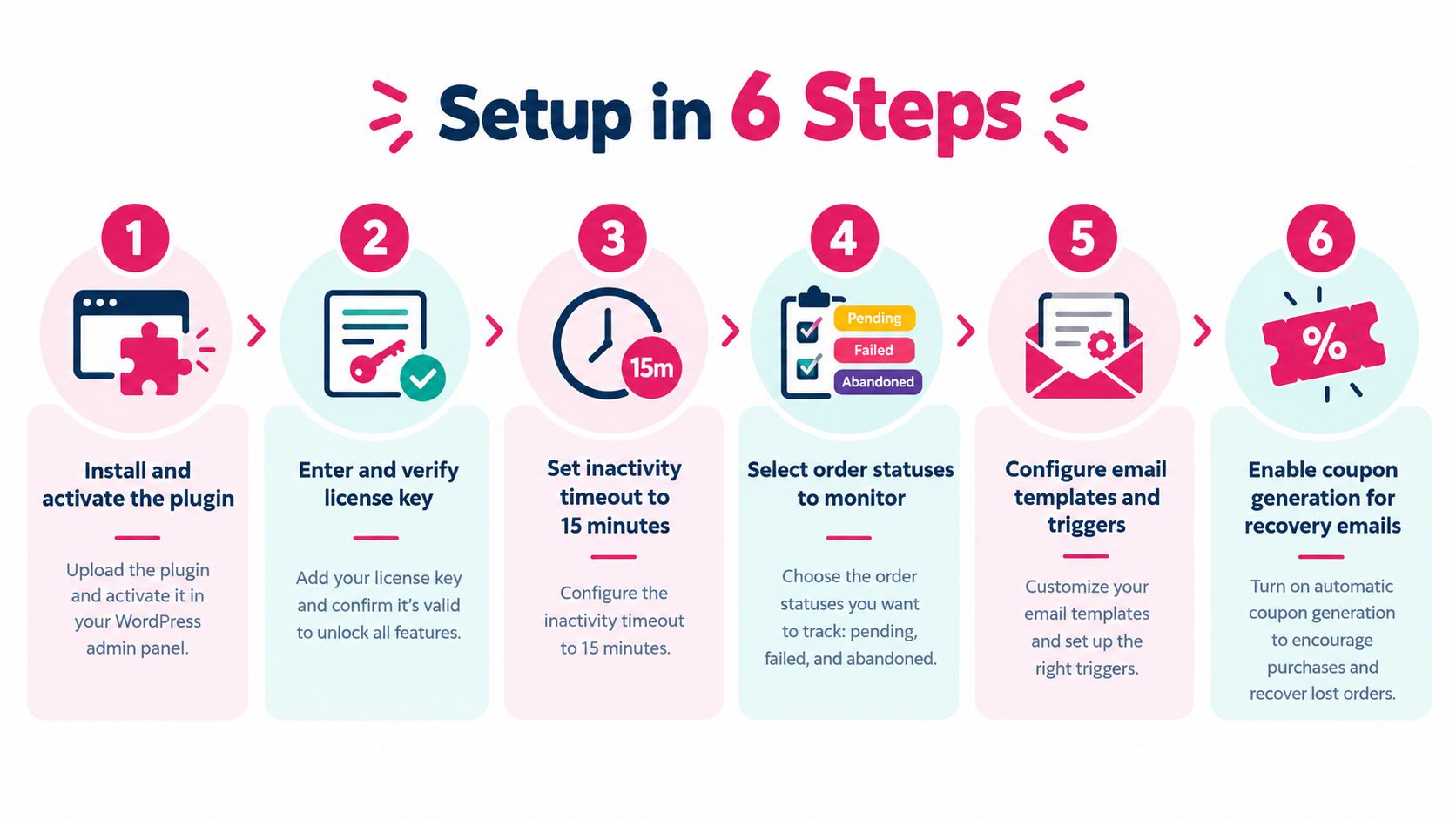
- Install and activate the plugin. Back up the store first, then check compatibility with WordPress, WooCommerce, the theme, checkout, and caching layers.
- Enter and verify the license key. Confirm that updates and support access work before creating campaigns.
- Set the inactivity timeout. Start with 15 minutes (AutomateWoo abandoned-cart documentation), a timeout supported by AutomateWoo’s documentation, then adjust only after observing your store’s buying cycle.
- Select eligible statuses. Decide whether pending, failed, abandoned, or checkout-draft records should enter recovery. Exclude completed, recovered, and unsubscribed records from future sends.
- Create the first email template. Include the store name, abandoned products, a direct recovery link, support details, and a clear explanation of any offer.
- Enable coupon generation only if the economics work. Test a reminder without a discount before attaching a coupon to every sequence.
The inactivity timeout controls when a cart becomes eligible. It does not replace the rules for manually sending a recovery email. AutomateWoo’s documentation states that manually sent recovery emails require an order at least one hour old, with Pending payment or an eligible Checkout draft status. Keep those checks separate.
Add SMS with discipline
Connect the sending number or sender identity approved by your provider. Check that the displayed brand matches the name customers recognize. Collect phone numbers with explicit consent and an optional explanation of why SMS is requested. Do not force the field without testing its effect on checkout completion. Baymard reports that 14% of users abandon when a phone number is required, and 39% of ecommerce sites fail to explain why (Baymard’s cart and checkout research).
Start with two messages:
- First reminder: “You left items in your cart. Return to your saved checkout here: [recovery link]. Reply STOP to opt out.”
- Second reminder: “Your saved cart is still available. Complete checkout here: [recovery link].”
Use approved consent language and obtain local legal review. Hold back discounts until the first reminder shows whether customers will recover without an incentive. Abandoned Cart Pro works best here as an email-recovery layer with SMS added carefully, not as a full SMS-first operating system.
Test before launch
Run each scenario manually:
- a synthetic abandoned cart;
- a failed payment;
- a guest checkout;
- a logged-in customer;
- a completed order before the next reminder;
- a confirmed SMS opt-out;
- a coupon applied and removed;
- a recovery link opened on a mobile device.
The setup passes only when cart contents, permitted customer fields, coupon state, order status, suppression behavior, and reporting records match the intended rules. If any test fails, fix the configuration before judging SMS performance.
Real Pros and Cons for an SMS-Centric Store
Abandoned Cart Pro makes sense when your store already depends on WooCommerce’s native data and you want recovery in the same administration area. You avoid introducing another operational system, keep the cart and order logic close to the checkout, and can launch with familiar email workflows before adding SMS.
That simplicity has real value. A small team doesn’t need separate dashboards for every channel, and a store with one market and a modest catalog may not need advanced localization or sender management. The plugin also gives you a practical way to test whether customers respond to timely reminders before committing to a broader SMS program.
Where the plugin earns its place
- Native context: The workflow can use WooCommerce cart, customer, coupon, and order data instead of relying on disconnected exports.
- Lower operational load: Your team can manage email recovery and basic SMS from a familiar store environment.
- Controlled discounting: WooCommerce coupon rules can support targeted offers rather than manual codes.
- Fast validation: You can launch a small campaign, monitor recovered orders, and decide whether SMS deserves more investment.
Where it becomes a bottleneck
The weaknesses appear when the store’s communication requirements outgrow the plugin’s recovery layer. Limited language detection can force manual segmentation. Weak sender branding can make messages feel less recognizable. Broad reporting can hide the difference between a customer who returned naturally and one who completed checkout because of SMS.
Consent creates another risk. Baymard reports that phone-number collection can itself contribute to abandonment, so collecting more numbers isn’t automatically a win. A larger list with weak consent can produce opt-outs and complaints, while a smaller, clearly permissioned audience may generate healthier results.
Discount dependence is equally important. If shoppers learn that abandoning a cart produces a coupon, some will delay payment intentionally. Measure the net result after coupon cost and messaging cost, not gross order value. The SMS marketing versus email marketing cost and ROI breakdown offers a useful lens for comparing channels without treating clicks as revenue.
Verdict: Use Abandoned Cart Pro as your primary layer if the store is small, single-language, and still validating recovery. Don’t make its bundled SMS module the foundation of a complex, international, compliance-sensitive program without testing the gaps first.
When to Stick With the Plugin, When to Go Hybrid, When to Switch
Choose the simplest setup that gives you reliable recovery data and acceptable customer experience.
Stick with the plugin
Stay with Abandoned Cart Pro when you’re testing recovery for the first time, your audience uses one primary language, and your team wants email plus occasional SMS without another platform. Your trigger is not a revenue promise. It’s clean execution: correct cart restoration, correct suppression, working coupons, and measurable completed orders per eligible cart.
Go hybrid
Use a hybrid setup when WooCommerce should remain the source of cart and order truth, but SMS needs stronger localization, sender controls, or analytics. Keep the plugin’s email and store-side recovery logic, then route SMS through a specialist integration. This option suits a store that has international traffic or wants better SMS measurement without migrating every recovery workflow at once.
Run the hybrid arrangement only if ownership is clear. One system must decide eligibility, one system must suppress completed orders, and both systems must share opt-out state. Otherwise, customers can receive duplicate reminders from separate queues.
Switch to dedicated SMS recovery
Move to a dedicated SMS-first tool when SMS is a major recovery channel, your audience spans multiple languages, or compliance requirements are difficult to manage manually. The signal is operational, not aspirational: your team spends too much time maintaining templates, consent records, sender settings, translations, or channel reports.
Use a holdout group to confirm incremental recovery. Compare completed orders per eligible abandoned cart and net recovered revenue after discounts and message costs. If the dedicated workflow doesn’t improve those measures without increasing opt-outs or complaints, it hasn’t earned the migration cost.
Implementation Checklist and Measurement Plan
Lock these settings before launch:
- Eligibility: Record the inactivity timeout and included order statuses.
- Consent: Make SMS opt-in clear, optional where appropriate, and easy to revoke.
- Identity: Verify the sender name or number customers will recognize.
- Recovery: Confirm that links restore cart contents and permitted checkout fields.
- Discounts: Test a no-discount sequence before adding automatic coupons.
- Suppression: Exclude recovered, completed, and unsubscribed contacts.
Run a synthetic abandonment, failed payment, guest checkout, mobile recovery, and opt-out test. Track recovery rate, incremental revenue after discounts and message costs, opt-out rate, and complaint rate. Use the marketing campaign measurement guide to keep reporting focused on outcomes rather than clicks.
Hold out a randomized group of eligible abandoned carts from reminders. Compare its completed-order rate with the messaged group. That experiment tells you whether the plugin caused additional recovery or merely received credit for shoppers who were already returning.
If your WooCommerce store needs SMS-first recovery, CartBoss provides automated abandoned-cart SMS, saved-cart recovery links, dynamic discounts, localized messaging, pre-filled checkout forms, and analytics through a WooCommerce integration. Visit CartBoss to evaluate whether its dedicated SMS workflow fits your consent, localization, and measurement requirements.