

Better checkout design could increase conversion by 35.26% for the average large ecommerce site, according to Baymard’s checkout usability research. That changes how you should approach email marketing for ecommerce: a recovery message can bring someone back, but the checkout still has to earn the order.
The strongest program connects relevant messages, reliable inbox placement, clear permission, and a checkout shoppers can finish. Sending more isn’t the starting point. Knowing which customers need which next step is.
Table of Contents
- Why Ecommerce Email Is the Store Memory
- Ecommerce Email Benchmarks Worth Tracking
- Five Automated Flows to Build First
- Campaign Examples for Welcome Cart and Repeat Orders
- Fix Inbox Placement and Consent First
- Pair Email with SMS for Recovery
- Launch One Measured Recovery Flow
Why Ecommerce Email Is the Store Memory
Email is the store’s memory. It lets your team respond to what a shopper already did instead of treating every visit as a fresh acquisition opportunity.
Say someone browses a linen shirt, chooses a size, and leaves before paying. Your next message shouldn’t introduce the whole clothing collection. It should help that shopper resume the decision they were already making.
After they buy, the message should change again. A cart reminder becomes irrelevant; delivery information, washing instructions, and a suitable complementary item become useful.
Give campaigns and flows different jobs
Campaigns are calendar sends. You choose the audience, message, and send time for a product launch, seasonal sale, or newsletter.
Flows are behavior sends. A signup, product view, abandoned cart, completed purchase, or period of inactivity determines who receives the message.
Those jobs need different measures of success:
- Campaigns: Judge whether a particular offer works for a selected audience.
- Flows: Judge whether responding to a customer action produces additional orders.
- Post-purchase communication: Judge whether customers get useful help and return when another purchase makes sense.
A store can need both without giving them equal attention. Campaigns give you control over merchandising. Flows give you a repeatable way to respond while a shopper’s interest is relevant.
Practical rule: Before buying another visit, check whether you’ve given the last interested shopper a useful next step.
Make memory useful rather than intrusive
Remembering a customer doesn’t mean mentioning everything you know about them. Use the smallest amount of information needed to make the message helpful.
For the shirt shopper, that means the right product, size, and cart destination. It doesn’t mean a subject line announcing that you tracked every page they visited.
Keep operational ownership clear, too. Someone should own the product feed, someone should check order-event synchronization, and someone should approve offers against margin. A persuasive email with stale stock information can create work for customer support rather than revenue.
Before changing subject lines, export the last 90 days of email performance as your working baseline. Split campaign revenue from automation revenue, and include delivered messages, unsubscribes, complaints, discounts, and refunds.
Keep that export unchanged. Later tests need a stable reference, not a dashboard whose attribution settings keep moving.
Ecommerce Email Benchmarks Worth Tracking
Ecommerce email benchmarks by funnel stage
The campaign figures and automation comparison below come from Omnisend’s digital marketing statistics, including a 26.6% campaign open rate, 1.22% campaign click rate, 0.07% ecommerce email conversion, 27.6% growth in click-to-conversion in 2024, and purchases from one in three automated-email clickers versus one in 18 campaign clickers.
| Measure | Benchmark | What it tells you | How to use it |
|---|---|---|---|
| Campaign open rate | 26.6% | Exposure, up 6% year over year | Treat as a noisy delivery clue, not sales proof |
| Campaign click rate | 1.22% | Who engaged with the offer | Compare flows against this, not against each other only |
| Campaign conversion | 0.07% | Purchases from scheduled sends | Don’t expect newsletters alone to carry revenue |
| Click-to-conversion change | +27.6% in 2024 | Engaged readers became more likely to buy | Improve the page after the click, not only the subject line |
| Automated vs campaign buyers | 1 in 3 automated clickers vs 1 in 18 campaign clickers | Triggered mail converts more strongly | Prioritize cart, browse, welcome, and post-purchase flows |
These are historical reference points, not guaranteed results or newly measured benchmarks for your store. Category, price, buying cycle, and attribution settings affect whether a comparison is useful.
The biggest distinction is the denominator. Purchases among people who clicked aren’t the same measure as purchases among everyone who received a message. Don’t compare those rates as though they describe the same stage.
Read the gap between attention and purchase
An open tells you little about whether the offer worked. Mailbox privacy features can register opens without a shopper actively reading, so use open rate as a diagnostic signal rather than a sales score.
Clicks are closer to intent, but they still aren’t orders. A customer might click to check delivery costs, discover an unavailable size, and leave.
When clicks look healthy but orders don’t, inspect the destination before rewriting the subject. Check whether the email promise matches the landing page, the product is available, and the checkout preserves the shopper’s selections.
The automation comparison supports prioritizing behavior-based messages. It doesn’t mean every flow deserves unlimited volume. A poorly timed browse reminder can still be less useful than a well-targeted launch campaign.
Put commercial outcomes on every report
Report these four operating numbers per send:
- Delivered messages: Your usable denominator, distinct from attempted sends.
- Unique clicks: Recipient engagement without counting repeated clicks as different people.
- Placed orders: Purchases tied to a stated attribution window.
- Revenue: Order value, with discounts and refunds visible alongside it.
Add revenue per delivered recipient so differently sized sends can be compared. Keep the definition consistent across campaigns and flows.
Use the ecommerce metrics worth tracking to connect email reporting with average order value and repeat purchasing, rather than keeping email in a separate reporting silo.
A flow beating the automated click-to-purchase reference is a candidate to protect and investigate, not automatically expand. Confirm its margin and incremental contribution first. A newsletter judged only on opens still has unfinished measurement.
Five Automated Flows to Build First
Build reliable triggers before elaborate branching. A simple flow with accurate product information and working exit rules is more useful than a complicated sequence that keeps contacting buyers.
Use this order to establish the customer lifecycle, while giving the cart flow the closest commercial scrutiny.
Build around the customer event
-
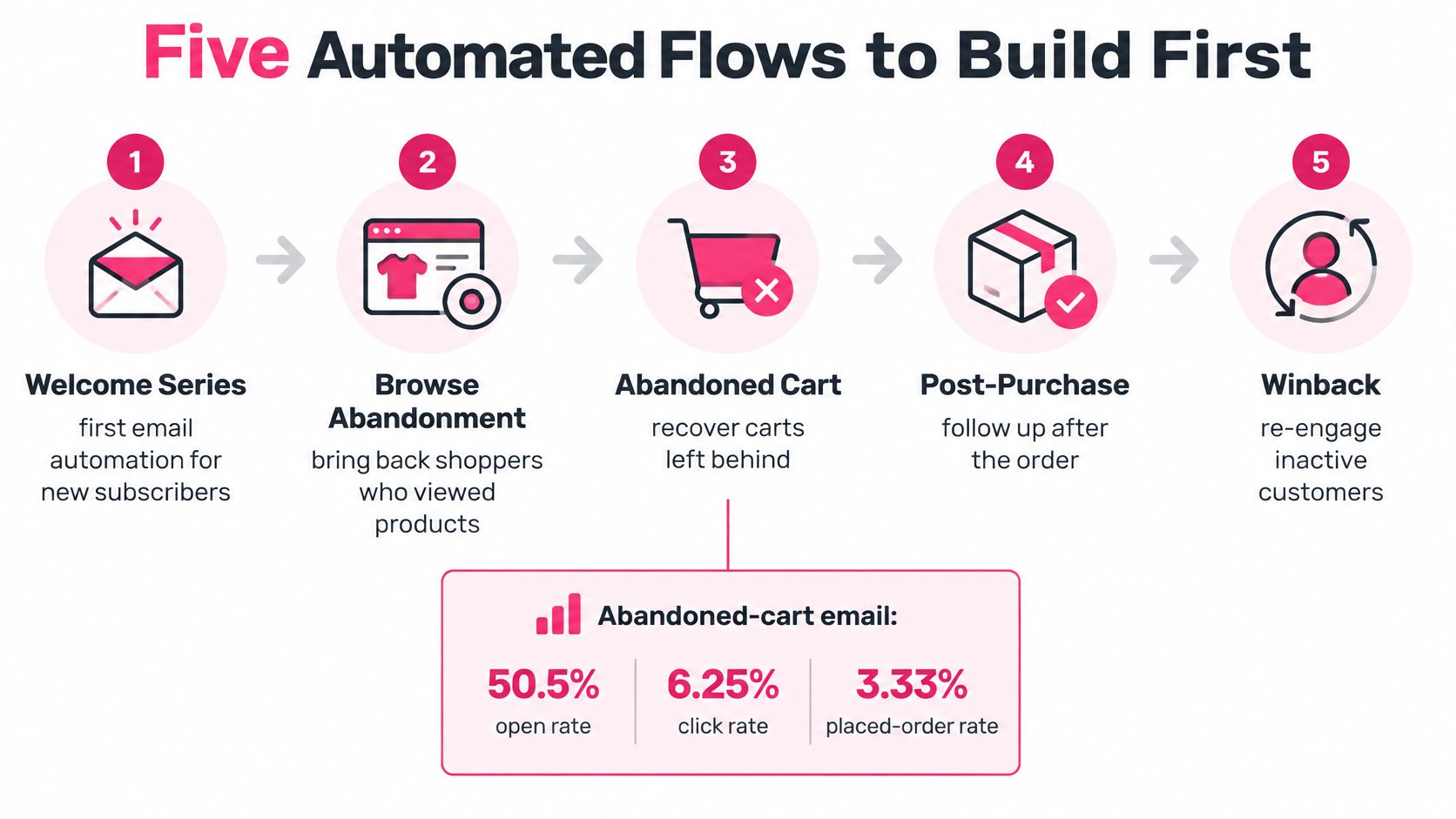
Welcome: Trigger immediately after signup. Deliver the promised benefit, explain what subscribers will receive, and set expectations about frequency. A subscriber interested in skincare advice shouldn’t immediately receive unrelated clearance offers.
-
Browse abandonment: Use a product view without an add-to-cart event. Keep the reminder about that product, not a fabricated abandoned checkout. Only enroll identifiable shoppers you’re permitted to contact.
-
Cart abandonment: Start with a reminder soon after abandonment, follow with product and checkout continuity, and reserve an incentive for a later message when margin allows. Industry benchmarks cited by Shopify put automated abandoned-cart email at 50.5% opens, 6.25% clicks, and 3.33% placed orders, with $3.65 average revenue per recipient, reaching $28.89 among the top 10% of brands. That’s a reason to build carefully, not a promise of your results.
-
Post-purchase: Stop cart messaging when the order arrives in your system. Organize confirmation, delivery information, care guidance, and later replenishment or cross-sell around actual fulfillment events.
-
Win-back: Define inactivity using the product’s buying cycle. Replenishable goods and occasional furniture purchases shouldn’t use the same gap. Run a finite sequence, then stop contacting nonresponders through that flow.
Five core flows at a glance
| Flow | Trigger | Timing | Exit rule |
|---|---|---|---|
| Welcome | Signup | Send immediately with what they get and how often | Unsubscribe or first purchase |
| Browse | Product view with no add-to-cart | Short reminder of that product only | Add to cart or purchase |
| Cart | Cart abandonment | First reminder soon after abandonment, second on the same cart, third with incentive only if margin allows | Order placed |
| Post-purchase | Order placed | Confirmation, then care and delivery, then a relevant add-on after delivery | Refund or end of sequence |
| Win-back | Defined gap with no purchase | One quiet-customer sequence, then stop | Purchase or sequence end |
Instrument the whole path
Record cart_created, checkout_started, email_captured, message_delivered, clicked, checkout_resumed, order_placed, and refunded. Use a shared customer and cart identifier so the reporting system can connect events without counting a replacement cart as a separate recovered shopper.
For planning, estimate total attributed revenue as eligible recipients multiplied by delivery rate, click rate, click-to-order rate, and average order value. Divide by the recipient denominator to calculate revenue per recipient; deduct incentives and sending costs separately when estimating contribution.
Don’t multiply by eligible recipients and call the result revenue per recipient. That produces a total.
Use marketing automation workflow examples to map branches and exits before configuring them. Give each flow a frequency limit, exclude unsubscribers, and test purchase suppression with a real test order.
Keep the checkout constraint visible
A shopper who leaves because they were distracted may only need a reminder. Someone who encounters surprise shipping charges, forced account creation, failed payment, or confusing address fields needs a repaired checkout.
Deep-link to the exact cart, preserve the variant, and keep price and availability current. A payment-stage abandoner should return to a usable payment path rather than the homepage.
Evaluate the flow against a randomly assigned holdout group that doesn’t receive recovery messages. Additional placed orders matter more than clicks back to an unresolved problem.
Campaign Examples for Welcome Cart and Repeat Orders
Write the message around the shopper’s unfinished task. The following templates give each email a specific job without turning every contact into a discount request.
Replace bracketed fields with live information. If a field is unavailable, remove the sentence rather than exposing a broken placeholder.
Welcome that delivers the signup promise
Subject: Your first look inside [Store]First line: Your [guide, early access, or product updates] starts here.
Body pattern:
You signed up for [specific benefit].
We’ll send [type of content] at [the frequency you’ve committed to].
Start with [collection or bestseller relevant to the signup].
Button: Explore [Collection]
The body’s job is to confirm that the subscription was worthwhile. Don’t bury the promised resource beneath a brand history or force a subscriber to browse unrelated categories first.
A welcome discount is optional. If the signup promised one, honor it clearly; otherwise, don’t introduce an incentive just because the template has space.
Cart reminders that preserve the decision
Subject: You left [Product] in your cart
First line: Your selected [Product] is ready to revisit.
Body pattern:
[Product name][Variant, size, or color][Current price]Return to your cart to check availability and complete checkout.
[Accurate shipping or returns detail that answers a likely hesitation.]
Button: Return to my cart
Keep the first touch factual. Don’t claim that inventory is reserved unless your store reserves it.
For the next message, retain the same products and answer a real objection. A relevant review, material detail, or explanation of returns can help, but stock claims must come from current inventory.
Only introduce a later incentive if the contribution margin supports it. State the actual terms and end time, and make sure the cart destination applies the offer correctly.
A recovery message should reduce the work of buying, not make the shopper reconstruct the cart.
Use the abandoned-cart email templates to develop alternatives around product proof and checkout reassurance. Duplicate the cart pattern before spending time on a general newsletter.
Post-purchase reassurance before another offer
Subject: Your [Product] is confirmed
First line: We’ve received your order for [Product].
Body job: Confirm what happens next, explain where delivery updates will appear, and provide a direct support route.
Button: View my order
Keep the receipt focused on the purchase. Send care information when it’s useful, and place a relevant add-on in a separate message after delivery rather than competing with confirmation details.
For example, someone buying leather boots may need care instructions before they need another pair. Recommend a compatible care product only when that recommendation fits the item and the customer’s marketing permissions.
Keep scheduled campaigns equally focused
Choose a single offer, a specific audience, and a real deadline. Past buyers of a category are a clearer audience than everyone who has ever supplied an email address.
Before publishing, use this checklist:
- One idea: Every section supports the same next action.
- Mobile readability: Short lines and a clear, tappable button.
- Specific subject: Use the product name where relevant.
- Plain-text version: Preserve meaning without the design.
- Tested destination: Open the link on a phone and complete the path.
- Visible unsubscribe: Make leaving straightforward.
Fix Inbox Placement and Consent First
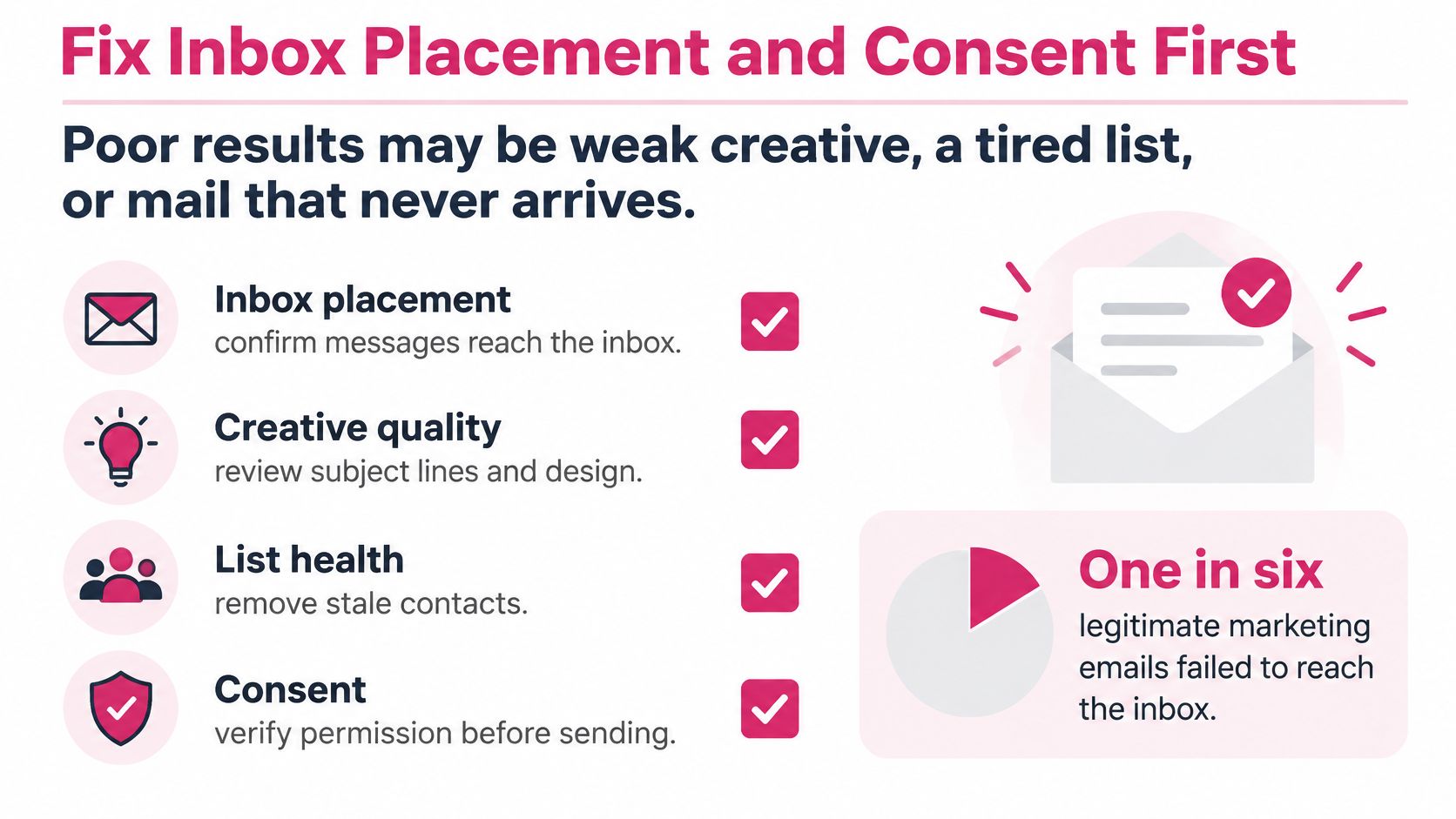
Are poor results caused by weak creative, a tired list, or mail that never arrives? Diagnose that before approving more sends.
Validity’s 2025 benchmark found that one in six legitimate marketing emails failed to reach the inbox, global spam placement nearly doubled from the first quarter to the fourth, and Microsoft inbox placement was 75.6%. Better personalization won’t help if the recipient never sees the message.
Diagnose before changing creative
-
Authentication: Confirm that SPF authorizes your sending service, DKIM signatures pass, and DMARC alignment works with your visible sending domain. Use your email platform’s authentication checks rather than guessing from whether a test email arrived.
-
Complaints and filtering: Review complaint trends, rejection messages, and placement by mailbox provider. A problem concentrated at a particular provider needs a different investigation from weak engagement everywhere.
-
List quality: Suppress invalid addresses, opted-out contacts, and recipients with sustained non-engagement. Investigate unexplained signup spikes before feeding those contacts into automation.
-
Creative and landing page: Once the delivery and audience checks pass, test the offer, message, and destination. Change a defined variable so you can interpret the result.
Separate accepted delivery from inbox placement. A receiving server accepting a message doesn’t establish that it appeared in the inbox.
Use the sender reputation guide to organize the investigation. Don’t respond to deteriorating placement by sending more aggressively to the same inactive audience.
Treat permission as a commercial control
In a 2025 survey of 985 people across the United States, Canada, Australia, India, Israel, and European countries, 47% said they would mark an email as spam if it lacked an unsubscribe option, while 43% cited excessive frequency, according to MediaPost’s survey coverage. Removing friction from opting out protects the audience that still wants your messages.
The FTC’s CAN-SPAM guidance requires a clear opt-out mechanism that remains operational for at least 30 days after sending, with requests honored within 10 business days. Automate suppression immediately rather than treating the legal deadline as your service target.
Store the consent source, date, channel, wording, and applicable market. Keep suppression records protected from list imports, and test unsubscribe links on mobile.
For a concrete signup-page reference, visit the EP Fine Jewelry newsletter signup, then assess your own form for clear subscription purpose and expectations. Don’t copy another store’s consent wording without checking your own audience and jurisdiction.
Make preferences usable
US CAN-SPAM generally operates through opt-out requirements for commercial email, but it isn’t permission to ignore other applicable rules. Many European and UK marketing situations require prior, specific consent, subject to local exceptions; don’t treat an email address or checkout phone number as universal marketing permission.
- Channel records: Separate email permission from marketing SMS permission.
- Preference center: Let customers choose relevant topics and reduce frequency.
- Contact controls: Apply local quiet hours and a shared cross-channel cap.
- Accessible content: Use meaningful alt text, logical headings, readable mobile layouts, and keyboard-operable links.
Keep promotional content separate from essential receipts and service updates. Judge cleanup through placement, complaints, and incremental revenue, not a temporary open-rate improvement after shrinking the list.
Pair Email with SMS for Recovery
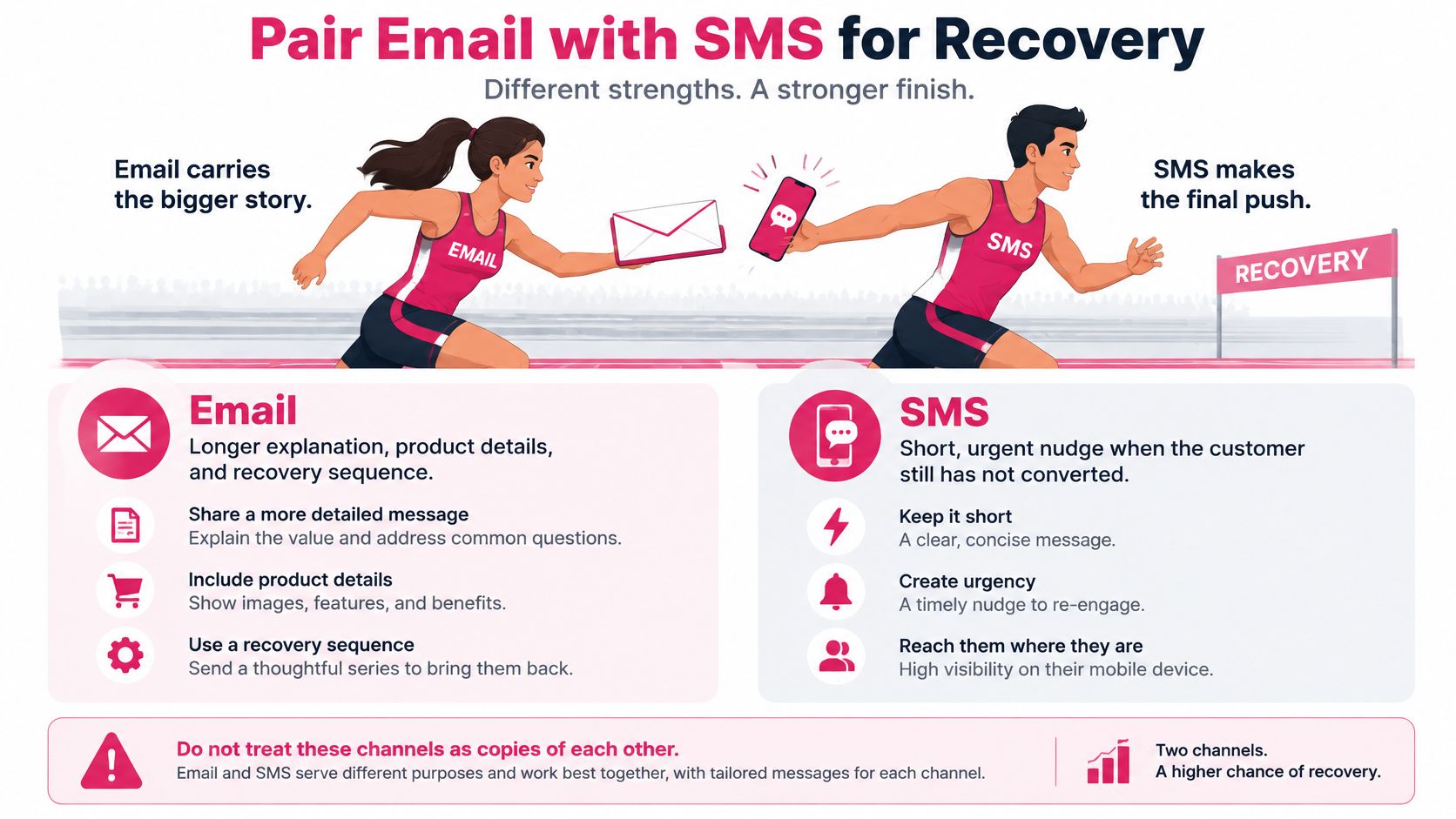
Think of email and SMS as a relay. Email carries the longer explanation; SMS provides a short handoff when a permitted recipient hasn’t taken the next step.
They shouldn’t contain duplicate sales pitches. Email can explain fit, materials, delivery, and returns. A text should make a useful action easy without compressing the whole email into a smaller screen.
Email and SMS roles by ecommerce journey
| Journey | Email role | SMS role | Consent rule |
|---|---|---|---|
| Welcome | Lead with expectations and a first product path | Optional one-line hello only | Separate marketing SMS opt-in |
| Browse abandonment | Lead with the viewed product | Skip unless email gets no action and SMS consent exists | Don’t infer SMS consent from email |
| Cart abandonment | Lead with cart deep link, then continuity, then a margin-safe incentive | One short nudge if email isn’t acted on | SMS consent recorded on its own |
| Post-purchase | Care, help, and a later relevant offer | Delivery updates only | Transactional SMS isn’t a marketing opt-in |
| Win-back | Short email sequence to a quiet customer | One message maximum, then stop | Shared frequency cap across both channels |
Define eligibility before the handoff
Use a shared contact cap so a cart reminder, scheduled campaign, and win-back message can’t all land in the same afternoon. Make the recovery journey take priority over unrelated promotions while the cart remains active.
Treat “no action” as no relevant click, resumed checkout, or order, not merely no recorded open. Check the latest purchase state immediately before sending the text.
SMS permission must exist independently. Apply quiet hours in the recipient’s local time, and defer or skip the message if it would arrive after the recovery window has become irrelevant.
A suitable text pattern is:
[Store]: Still considering [Product]? Return to your cart: [cart link]. [Required opt-out instructions]
The bracketed link belongs to the customer’s actual cart. Don’t substitute a generic collection page, and don’t add urgency unless the deadline or stock condition is genuine.
Match the return path to the abandonment stage
Baymard’s synthesis of 50 studies places average cart abandonment at 70.22%. That figure includes different shopper motivations, so don’t treat every abandoned cart as a sale a message should recover.
A browse visitor needs product context. A shopper who reached payment needs a working way to finish paying. Preserve the cart’s product and variant state, display total cost and delivery information early, and use prefilled fields only where permission and platform capabilities allow.
Segment abandonment by:
- Device: Find mobile-specific form or payment problems.
- Traffic source: Separate low-intent visitors from returning shoppers.
- Country: Check delivery availability, currencies, and payment options.
- Checkout step: Distinguish address friction from payment failure.
Use the email and SMS marketing handoff guide to map which channel owns each next action. Write the contact rules before enabling the integration.
Measure the combined journey
Compare the coordinated sequence with a holdout, not just with email clicks. Track incremental profit and complaint rates across the whole journey.
Test a no-discount reminder against an incentive version while keeping the audience and message purpose comparable. Review conversion, average order value, gross margin, and revenue per message together.
A discount can increase recovered orders while reducing contribution. Likewise, a text that wins the last click may receive credit for a purchase the customer would have completed anyway. Neither result justifies expanding the sequence without an incremental test.
Launch One Measured Recovery Flow
Use the coming week to launch a controlled recovery test, not rebuild your entire lifecycle program. Choose a clearly defined cart audience and assign a named owner to implementation, reporting, and customer-support checks.
Keep the initial scope small enough that you can inspect the customer journey yourself.
Complete the launch checklist
-
Save the baseline. Keep the campaign-versus-automation export, attribution settings, and current complaint counts together. Record the checkout and messaging changes you make so the comparison remains interpretable.
-
Verify the sending gate. Confirm authentication, functional opt-outs, suppression synchronization, and channel-specific permission before any new message is queued.
-
Remove the worst checkout snag. Walk through a purchase on a phone. Fix the clearest obstacle you find, whether that’s hidden shipping costs, unnecessary account creation, or a failed payment route.
-
Enable the cart emails. Start with a useful reminder and a continuity message. Make any later discount conditional on product margin and customer eligibility.
-
Assign a holdout. Randomize eligible abandoners before messaging begins. Decide how orders, refunds, and contribution will be counted before inspecting the result.
-
Add the SMS branch selectively. Enroll only separately consented shoppers who haven’t acted on the email, and verify that the combined schedule respects your contact cap.
Fit the SMS tool to the test
CartBoss offers SMS cart recovery for Shopify and WooCommerce stores, plus free tools including the Cart Abandonment Rate Calculator and SMS Cart Recovery ROI Calculator to estimate the opportunity before launch. Our first SMS cart reminder sends 15 minutes after a visitor leaves their cart; a second sends 3 hours after departure and includes a discount if they still haven’t ordered.
That timing needs to fit your email-first design. Don’t enable overlapping recovery schedules and assume the channels will coordinate themselves; validate the actual enrollment and sending behavior before expanding the audience.
Our reported reminder click rate is 50%+ among reminder recipients. Treat that as a click measure, not an order rate or proof of incremental profit.
Make the next decision from the result
Choose a primary commercial outcome before launch: incremental contribution from eligible abandoners. Keep complaints, opt-outs, and discount expense beside it as guardrails.
If orders increase but contribution falls, change the incentive rather than celebrating recovery revenue. If customers receive messages after purchasing, stop expansion and repair the event handling.
Launch when the sending checks and checkout path pass, then review actual customer journeys alongside the report. A measured recovery flow is useful because it gives you a defensible next decision, not because it adds more activity to the calendar.
CartBoss provides automated SMS cart recovery for Shopify and WooCommerce stores, giving consented shoppers a direct route back to their carts. Visit CartBoss to assess the recovery opportunity and add SMS as a measured follow-up to your email flow, not another duplicate blast.