



An API for sending SMS is essentially a technical bridge that connects your e-commerce store’s software directly to a mobile carrier’s network. Think of it like a universal translator, letting your systems automatically fire off crucial messages like order confirmations or abandoned cart reminders without anyone lifting a finger. This is the engine that powers the instant, personal communication we’ve all come to expect from modern brands.
Understanding the Power of an SMS API
At its heart, an API—or Application Programming Interface—is just a set of rules that lets different software programs talk to each other. When you apply this to texting, an API for sending SMS gives your online store the power to send and receive text messages programmatically. So, instead of a person typing on a phone, your store’s system makes a request to the API, and the API handles all the complicated backend work of getting that message to your customer’s phone.
This isn’t just a techy convenience; it’s a huge shift in how businesses can interact with their customers. It allows you to automate communication at scale, turning a specific customer action—like leaving a checkout—into an immediate, personalized conversation.
Why It Matters for E-Commerce
For an online store, this is a total game-changer. It pulls your communication out of the crowded, often-ignored email inbox and puts it right onto the customer’s lock screen. This direct line is priceless for time-sensitive messages.
Just think about these common e-commerce scenarios, all powered by an SMS API:
- Order Confirmations: Instantly let customers know their purchase went through successfully. No more wondering if their payment worked.
- Shipping Updates: Send real-time tracking info and cut down on those “where is my order?” support tickets.
- Abandoned Cart Recovery: Nudge a customer with a timely reminder that includes a direct link back to their pre-filled cart.
- Promotional Campaigns: Announce a flash sale or special offer with a message that you know will be read almost immediately.
An API isn’t just a piece of code. It’s the invisible connection between your store’s automated logic and a customer’s pocket, turning a trigger like an abandoned cart into a direct shot at recovering a lost sale.
This technology is at the center of a massive global industry. The application-to-person (A2P) messaging market was valued at around USD 71.7 billion and is expected to climb to USD 75.2 billion in the next year. For store owners, this means that a reliable SMS sender API isn’t just a neat tool anymore—it’s a core part of a modern sales and marketing strategy.
How Your Message Travels from Store to Phone
Ever wondered about the magic that happens when a customer abandons a cart and, moments later, a perfectly timed reminder text appears on their phone? It’s not magic, but a fast and reliable process powered by an API for sending SMS. This journey from your store to your customer’s screen is remarkably efficient.
Think of it like an automated postal service built for the digital age. Your e-commerce store is the sender, the customer is the recipient, and the SMS API is the high-tech post office that handles all the complex logistics in between. It all starts with a simple trigger.
The Initial Trigger and API Call
The whole thing kicks off the moment a specific event happens in your store. This could be anything from a customer leaving items in their cart for 30 minutes to a successful purchase that needs an order confirmation.
Once this trigger event happens, your store’s backend doesn’t manually type out a message. No way. Instead, it makes a secure, automated request—an API call—to your SMS provider. This call is just a small packet of data containing three key pieces of information:
- Who to send it to: The customer’s phone number.
- What to say: The content of the message (e.g., “You left items in your cart!”).
- Who it’s from: Your designated sender ID or phone number.
This simple diagram shows the core steps of how an API for sending SMS works, from your e-commerce store straight to the customer’s phone.
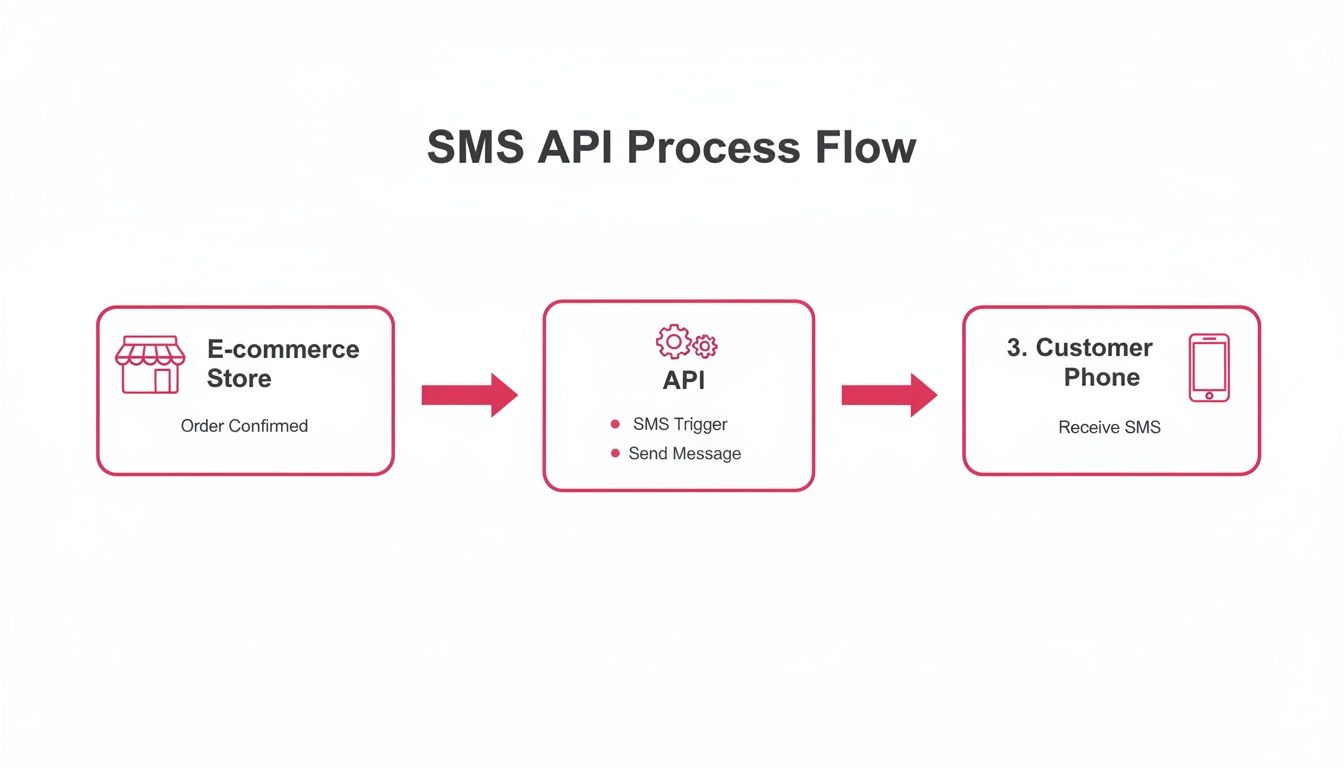
As you can see, the API is the crucial middleman, translating your store’s request into a format that mobile networks can understand and deliver in a snap.
Navigating the Carrier Networks
After getting that API call, the provider’s system validates the request and hands it off to a complex web of telecommunication partners and carrier networks. These are the same networks—like AT&T, Verizon, or Vodafone—that handle our everyday text messages.
The message is then routed through a series of gateways, making sure it reaches the right carrier for the customer’s specific phone number. While some messages travel through SMS gateways, others use different protocols. If you want to get into the weeds, you can explore the differences between email to SMS gateways and direct API connections.
The beauty of an SMS API is that it hides all this complexity. You don’t need to know anything about carrier agreements or routing protocols. You just tell the API what to send, and it makes sure your message gets delivered in seconds.
Choosing the Right SMS API Provider
Picking an API for sending SMS isn’t just a technical task—it’s a massive business decision. The right partner makes sure your messages actually hit your customers’ inboxes. The wrong one? Well, that can lead to failed deliveries during a flash sale, serious legal trouble, or a tarnished brand reputation. It’s not about who can send a text; it’s about who can do it reliably, legally, and at the scale your store needs.

To make a smart choice, you have to look past the shiny marketing claims and dig into the criteria that actually fuel e-commerce growth.
Global Deliverability and Carrier Relationships
At its core, your SMS API provider has one job: deliver your messages. This all comes down to their network of direct relationships with mobile carriers. A provider with a solid, multi-carrier network can route messages intelligently, ensuring they don’t get lost in the ether or blocked by spam filters, especially when you’re sending internationally.
Picture this: it’s Black Friday, and you hit “send” on a campaign to thousands of customers. If your provider’s infrastructure is flimsy, those texts might never arrive, leaving a huge chunk of potential buyers completely unaware of your deals. Strong deliverability means your messages get there fast and consistently, no matter how big the send.
Compliance and Localization
SMS marketing is a minefield of regulations, with strict laws like the TCPA in the U.S. and GDPR in Europe. A reputable provider will have compliance baked right into their platform. This means features like automated opt-out management and tools to respect “quiet hours,” which stop you from accidentally waking up a customer in another time zone at 3 AM.
A great API provider acts as your compliance partner, not just a message sender. They should offer features that protect your business from hefty fines and help maintain customer trust by respecting their privacy and preferences.
Localization is just as important. A provider that supports local sender IDs (like a local phone number or brand name) and understands country-specific rules will always get you much higher delivery and engagement rates.
Scalability and Rate Limits
Your e-commerce store is built to handle huge spikes in traffic, and your SMS provider needs to do the same. Two critical terms to investigate are scalability and rate limits—which is just a fancy way of saying how many messages you can send per second.
During a new product drop or a holiday flash sale, your message volume could easily jump 100x in a matter of minutes. A provider with low rate limits will create a traffic jam, delaying your time-sensitive offers and leaving customers frustrated. Always ask potential providers how they handle sudden, high-volume campaigns.
Transparent Pricing and Developer Support
SMS pricing models can be notoriously confusing. Look for a provider with a clear, pay-as-you-go structure that doesn’t hide fees or lock you into long-term contracts. The cost per message should be spelled out for every country you plan to text.
Finally, solid developer support is non-negotiable. You’re looking for clean documentation, SDKs for popular programming languages, and a technical support team that actually responds. When comparing options, you can check out things like Copycat247’s SMS API features to get a sense of what a standard offering looks like. A smooth integration will save you countless hours and headaches down the road.
To help you vet potential partners, we’ve put together a checklist of must-have features for any e-commerce store.
SMS API Provider Feature Checklist for E-Commerce
| Feature | Why It’s Critical for E-Commerce | What to Look For |
|---|---|---|
| Direct Carrier Connections | Ensures messages are delivered quickly and aren’t flagged as spam. Essential for time-sensitive flash sales and cart recovery. | Ask if they have direct-to-carrier routes versus gray routes. Look for global network coverage. |
| Compliance Tools | Protects your business from massive fines under regulations like TCPA and GDPR. | Built-in opt-out management, quiet hours enforcement, and automatic consent tracking. |
| High Rate Limits | Allows you to send thousands of messages in a short burst during peak sales events like Black Friday. | Ask for their messages-per-second (MPS) limit and if it can be increased. |
| Localization Features | Improves open and trust rates by using familiar sender IDs and respecting local regulations. | Support for local sender IDs (long codes, short codes, alphanumeric IDs) and country-specific compliance. |
| Real-Time Webhooks | Instantly tells your system which messages were delivered, failed, or replied to, enabling automated follow-ups. | Reliable webhook delivery with retry logic and detailed status updates (e.g., “delivered,” “undelivered”). |
| Transparent Pricing | Avoids surprise bills and helps you accurately calculate the ROI of your SMS campaigns. | A clear per-message price for each country with no hidden setup or monthly fees. |
| Developer-Friendly Docs & Support | Speeds up the integration process and provides a lifeline when technical issues pop up. | Comprehensive API documentation, SDKs for your tech stack, and responsive technical support. |
This checklist gives you a solid framework for evaluating different SMS APIs. It’s about finding a partner that not only sends texts but also supports your growth strategy.
Choosing the right provider is a foundational step. To see how these criteria play out in real-world tools, check out our guide to the best SMS marketing platforms for e-commerce.
Common SMS Integration Mistakes to Avoid
Getting an API for sending SMS hooked up is the easy part. The real challenge? Turning those messages into actual, measurable profit. This is where so many businesses trip up, making common but costly mistakes that absolutely tank their conversion rates and can even damage customer relationships.
Dodging these pitfalls is the key to seeing a real return on your SMS marketing. Let’s break down the biggest ones.
Sending at the Wrong Time
The most frequent error we see is sending messages at completely the wrong time. Think about it: a cart recovery text that buzzes on someone’s nightstand at 3 AM isn’t a helpful reminder. It’s an instant unsubscribe. The same goes for a flash sale alert that lands hours after the sale has already started. That’s just money down the drain. Timing is everything with SMS.
Generic Copy That Fails to Connect
Another major misstep is lazy, one-size-fits-all copy. A message like “You left items in your cart. Click here to finish your order” has zero personality and no sense of urgency. Your customers are bombarded with marketing messages all day; yours has to cut through the noise to stand a chance.
Good SMS copy feels like a one-on-one conversation. Instead of a bland, robotic alert, you can use dynamic tags to get personal and drive them to act.
The Bad Example:
“Your cart is waiting for you. Complete your purchase now.”
The Better Example:
“Hey [Customer Name]! Did you forget your [Product Name]? It’s still waiting for you. Click here to grab it before it’s gone: [Deep Link to Checkout]”
See the difference? That simple change turns a generic notification into a personal nudge that speaks directly to what the customer was looking at. Using their name and mentioning the specific item they wanted makes the message feel relevant and dramatically increases the odds they’ll come back to finish the purchase.
Ignoring Compliance and Legal Rules
This one is the most dangerous mistake of all: neglecting legal compliance. SMS marketing is tightly controlled by regulations like the TCPA in the United States and GDPR in Europe. These laws require you to get explicit consent—an “opt-in”—before you can send anyone promotional texts.
Key Takeaway: Sending marketing texts to customers who haven’t opted in isn’t just bad form; it can lead to astronomical fines. We’re talking penalties up to $1,500 per message under the TCPA. Always, always make sure you have clear consent records for every single contact.
A good API for sending SMS should have compliance tools built-in, but at the end of the day, it’s your business’s responsibility to use them correctly. This includes giving people a dead-simple way to opt out, like replying “STOP.”
Failing to Use Deep Links
Finally, a surprisingly common mistake is sending people back to your homepage instead of their pre-filled checkout. Every extra click you make a customer take creates friction and massively increases the chance they’ll just give up. If they have to go find their cart again and re-enter all their info, you’ve almost certainly lost that sale for good.
The solution is simple: deep links. These are special URLs that take the user directly back to their abandoned cart, with all their items and information already loaded and ready to go. It creates a seamless, one-click path to purchase. A powerful SMS integration should be able to generate these links automatically, making the recovery process effortless for both you and your customers.
By steering clear of these common mistakes, you can turn your SMS strategy from a simple notification tool into a powerful and consistent revenue driver.
Raw API vs Specialized E-Commerce Tools
When you need to send automated texts, you’re faced with a big choice. Do you use a raw API for sending SMS, or do you go with a specialized e-commerce tool? It’s a lot like deciding between buying a high-performance engine and buying a fully-built race car.
A raw SMS API gives you the powerful core components. It’s the engine. It lets your developers send and receive messages programmatically, which is great, but that’s pretty much where its job ends. You get the engine, but now you have to build the chassis, the steering, the fuel system, and even the driver’s seat yourself.
This means your team is on the hook for everything else. You’ll need to design and code the entire abandoned cart recovery logic from scratch, figure out how to generate and track unique discount codes, and build a system to handle global compliance and quiet hours. It’s a huge technical project that requires constant upkeep.
The Specialized Tool Advantage
Specialized tools, like CartBoss, are the complete race car. They’re built on top of a powerful SMS API but come pre-configured and optimized for one specific, high-value job: turning abandoned carts into cash.
These solutions come with pre-built, battle-tested sales logic baked right in. They already know the perfect time to send a message, what it should say, and how to create a frictionless path that leads the customer right back to their pre-filled checkout. This isn’t just about sending a text; it’s about deploying a proven revenue recovery strategy straight out of the box.
Think about what you’re actually getting:
- Raw API: A technical connection to send a text message.
- Specialized Tool: Automated workflows, proven message templates, dynamic discount generation, and detailed analytics showing you the exact ROAS.
For most e-commerce stores, the goal isn’t just to send an SMS—it’s to make a sale. A specialized tool is engineered from the ground up to do exactly that, taking all the guesswork and development headaches off your plate.
Comparing Implementation and Return on Investment
The time it takes to see any value is drastically different. Integrating a raw API can take weeks, or even months, of development time just to build the basic features a specialized tool offers from day one. With a tool like CartBoss, you can be live and recovering sales in under an hour.
That speed has a direct impact on your return. Companies now set aside, on average, 18.76% of their marketing budget for SMS, and over 64% plan to spend even more. Specialized tools deliver an immediate and measurable return, with many users reporting an average ROAS of around 4,500%. This fits perfectly with industry data showing SMS campaigns can pull in click-through rates between 21–35% for most businesses. For an e-commerce store, recovering even 10–20% of abandoned carts can translate into tens of thousands in new revenue. You can discover more about these market trends and their impact on e-commerce.
So, while a raw API offers total flexibility for custom projects, a specialized tool delivers maximum results for e-commerce. If your goal is to quickly and efficiently turn abandoned carts into profit, the choice is pretty clear. For a deeper look at this, check out our complete guide on using an API to send SMS for your business.
Why SMS Is Your Best Cart Recovery Channel
When a potential customer leaves your store with items in their cart, every second that ticks by is lost revenue. While email has its place, it just can’t compete with the raw power of SMS for immediate, high-impact cart recovery. A text message cuts straight through the noise, landing right on your customer’s lock screen.
This creates a sense of personal urgency that an email buried in a crowded inbox simply can’t match. You’re not just sending a notification; you’re starting a direct conversation at the exact moment their interest is highest.
The numbers don’t lie. SMS open rates can hit a staggering 98%, with response rates hovering around 45%. That absolutely dwarfs the performance of a typical email campaign.
Think about it this way: by 2025, nearly 5.9 billion people will be sending and receiving texts. That’s a direct line to almost three-quarters of the entire world’s population. For any cart recovery strategy, that kind of reach and engagement is a game-changer. Every automated reminder becomes a genuine opportunity to bring back a sale.
Using an API for sending SMS is more than just a technical step; it’s a direct investment in your bottom line. It’s about turning what would have been lost revenue into a consistent, automated profit stream. You can learn more about abandoned cart SMS effectiveness in our detailed guide on the topic.
Frequently Asked Questions
When you start digging into the world of SMS APIs, a few practical questions always pop up, especially for store owners who just want to see results. Let’s clear the air on some of the most common ones.
How Much Does an API for Sending SMS Cost?
Pricing can be all over the map, but most providers stick to a pay-as-you-go model. You’re usually looking at a tiny fraction of a cent for each text message you send out. Keep in mind that the cost often changes depending on where you’re sending the message—texts to some countries will cost more than others.
A raw API might look cheaper on paper at first. But what it’s missing is the built-in sales logic that actually drives conversions. Specialized tools, on the other hand, are built from the ground up to make you money, which often means a much higher return on investment, making that per-message cost incredibly effective.
Is It Complicated to Set Up an SMS API?
If you’re going with a raw api for sending sms, then yes, you’ll need a developer. They’ll have to get their hands dirty writing code to connect to the API, handle your store’s triggers (like an abandoned cart), manage secret API keys, and figure out what to do with the responses. This whole process can take anywhere from a few days to a few weeks, depending on how custom you want to get.
Contrast that with a specialized e-commerce tool like CartBoss. These usually have simple, plug-and-play integrations for platforms like Shopify or WooCommerce. Setup is often done in under an hour, and you won’t have to touch a single line of code.
The key difference is implementation. A raw API requires you to build the car from parts, while a specialized tool gives you a race-ready vehicle from the start.
What Are the Legal Requirements for Sending SMS?
This part is non-negotiable. Major regulations like the TCPA in the U.S. and GDPR in Europe are crystal clear: you absolutely must get explicit consent from customers before sending them marketing messages. You also have to give them a simple, obvious way to opt out, like replying “STOP”. Any decent provider will have features built in to help you manage this automatically.
And if you’re looking for a wider view on winning back customers while staying compliant, you might find some great ideas in these proven tactics to reduce cart abandonment.
Ready to turn abandoned carts into your biggest revenue source? CartBoss offers a powerful, plug-and-play solution that automates SMS cart recovery and boosts your sales on autopilot. Start recovering lost sales today.