


Think of an automatic SMS reply as your store’s digital receptionist. It’s a pre-written text message that gets sent out automatically whenever a specific trigger happens—like a customer texting in a keyword. It’s always on, ready to instantly acknowledge customer questions, confirm their actions, or send them info without you lifting a finger.
What Exactly Is an Automatic SMS Reply?
At its core, an automatic SMS reply is just a smart, pre-set rule: if a customer does X, your system automatically sends them message Y. This simple “if-this-then-that” logic is what makes it such a powerful tool, ensuring no customer ever feels ignored.
It’s about more than just saying, “we got your message.” It’s your chance to create an immediate, helpful, and professional first impression, any time of day or night.
The process kicks off with a trigger. This could be anything—a customer texting “SUPPORT” to your number, making a purchase on your website, or even filling out a contact form. Once that trigger is pulled, the system instantly shoots out the pre-written message you’ve already crafted.
The Core Mechanics Behind Automation
This technology is all about two things: efficiency and engagement. It works by linking your messaging platform to specific events or keywords. But its real power comes from its versatility and the immediate connection it builds with your customers.
You can use this for all sorts of things, keeping your communication consistent and timely across the board.
Key benefits include:
- Instant Acknowledgment: Customers get an immediate confirmation that you’ve received their message, which is a huge plus for their experience.
- Time Savings: Your team gets a break from answering the same questions over and over, freeing them up to handle more complex issues.
- Consistent Branding: Every automated response is perfectly on-brand, delivering the exact tone and message you want, every single time.
- Lead Capture: You can automatically engage with potential customers who text you after hours, making sure you never miss a sales opportunity.
This completely changes your SMS channel from a one-way notification tool into an interactive conversation. And considering how popular texting is, it’s an incredibly effective strategy. SMS marketing campaigns see a staggering 98% open rate and a 45% response rate—numbers that blow traditional email marketing out of the water.
To get a better handle on how this fits into a bigger plan, check out our complete guide on what is SMS marketing.
Why Your Business Needs to Automate Texting
In a world of instant gratification, making a customer wait is a risky move. An automatic SMS reply transforms that dead waiting time into a moment of positive engagement. It turns potential frustration into reassurance and starts building trust from the very first text.
It’s the difference between a customer feeling ignored versus feeling valued.

Imagine two online stores. Store A gets a text inquiry after hours and stays silent until morning. By then, the shopper has already bought from a competitor. Store B, on the other hand, uses an automated reply to instantly acknowledge the message, provide a helpful FAQ link, and promise a personal follow-up soon. That simple action keeps the lead warm and shows exceptional service.
Beyond Convenience: The Impact on Your Bottom Line
Automating your texting isn’t just a time-saver; it’s a powerful growth strategy. By providing immediate answers and acknowledgments, you seriously boost customer satisfaction and loyalty. This instant connection has a direct impact on your key business metrics.
You can expect real, tangible results:
- Reduced Customer Churn: Instant replies make customers feel heard, which means they’re far less likely to get frustrated and leave your brand for good.
- Increased Sales Opportunities: You can capture and engage leads 24/7. An after-hours inquiry gets nurtured automatically, preventing a potential sale from slipping through the cracks.
- Improved Team Efficiency: Freeing your support team from answering the same questions over and over lets them focus their energy on complex issues that actually need a human touch.
By automating routine communication, you empower your team to operate at a higher level, turning your customer service from a cost center into a revenue driver.
Before we get deep into SMS, it helps to understand where this all fits in. For a better look at the technologies that make this possible, check out the broader concept of marketing automation.
Embracing Smart Automation for Growth
Modern systems are getting smarter all the time. In fact, 81% of companies report that AI integration has improved their SMS marketing effectiveness, saving teams 4 to 6 hours weekly. Customers are getting on board, too. SMS opt-in rates are projected to hit 84% in 2025, showing that people are more willing than ever to get automated texts from brands they like.
Ultimately, setting up an automatic SMS reply system is a strategic move. It strengthens customer relationships, makes your operations smoother, and directly helps your bottom line. To see just how simple it can be, you can check out our guide on how to automate text messages.
Essential Features of a Powerful Reply System
Choosing the right platform for your automatic SMS reply strategy is a lot like picking the right tool for a job. Sure, a simple hammer works for a single nail, but if you’re building a house, you’re going to need a full toolkit. Not all SMS automation systems are built the same, so knowing what to look for is absolutely crucial.
A truly powerful system does more than just send out a basic “we got your message” reply. It becomes an active part of your marketing and customer service engine, feeling intuitive to use while offering deep functionality that can support your business as it grows.
Foundational Automation Capabilities
First things first, any system worth its salt has to handle the basics flawlessly. These are the non-negotiables, the features that form the very backbone of a successful SMS setup.
Your checklist should include:
- Keyword-Based Triggers: This is the bread and butter. It lets customers text a specific word like “INFO” or “DEALS” to get an instant, relevant response. It’s a simple but effective way to provide on-demand information and start segmenting new subscribers from the get-go.
- Scheduled Messages: You have to be able to plan ahead. Scheduling messages for future promotions, event reminders, or holiday greetings is essential. It lets you prep your marketing in advance and ensures texts go out at the perfect time, not just whenever you remember to hit send.
- Personalization Tokens: Nobody likes feeling like a number. Generic messages get ignored. Using tokens to automatically pop in a customer’s name, order number, or last purchase makes your messages feel personal and can seriously boost engagement.
These are the core functions that get you started. They let you handle common questions, run proactive campaigns, and build a real connection with your audience—all on autopilot.
Advanced Features for E-commerce Growth
Once you’ve got the basics down, the advanced features are what separate a good tool from a great one. These are the capabilities designed to actively drive revenue, make your team more efficient, and give you a clear picture of what’s actually working.
An advanced system doesn’t just send messages; it makes intelligent decisions based on customer data and behavior, turning simple replies into strategic business actions.
Look for tools, like CartBoss, that offer sophisticated features designed specifically for e-commerce success:
- Audience Segmentation: This is a game-changer. It lets you group contacts based on things like purchase history, location, or how often they engage. Sending a targeted automatic SMS reply to a specific segment—like a special offer just for your VIP customers—will always outperform a generic blast. Always.
- Platform Integration: Your SMS tool needs to talk to your other systems. It absolutely must connect seamlessly with your e-commerce platform (like Shopify or WooCommerce) and your CRM. This is what fuels powerful automations like abandoned cart reminders or post-purchase follow-ups, all driven by real-time customer data.
These advanced tools help you build a smarter, more responsive communication strategy. It’s also worth noting that modern enhancements, like including rich media (images/GIFs) in messages, have been shown to increase engagement by 20% compared to plain text. These integrations make those kinds of impactful tactics possible. You can dive deeper into these trends over at these SMS marketing statistics.
Proven SMS Automation Recipes for E-commerce
Knowing the theory behind an automatic SMS reply is great, but putting it into practice is where you’ll actually see the money roll in. For e-commerce stores, a few specific, well-timed automations can completely change the game. We’re talking about turning one-time buyers into loyal fans and pulling back revenue that would have otherwise vanished.
Think of these as proven recipes for success that you can steal and tweak for your own brand. These aren’t just random messages; they’re designed to hit customers at the most critical moments in their journey. From their first “hello” to the moment their package lands on their doorstep, automated SMS gives you a direct, personal line to build trust and get them to act.
The Welcome and First Purchase Offer
That moment a customer gives you their phone number? That’s your golden ticket. Their interest is at its absolute peak, and a quick, valuable offer can turn that curiosity into a sale right then and there.
- Trigger: New SMS subscriber opt-in.
- Goal: Convert a fresh lead into a first-time customer.
- Example Message: “Welcome to the [Your Brand] family! We’re so glad you’re here. To say thanks, here’s 15% off your first order. Use code: WELCOME15 at checkout. Happy shopping! [Link to your store]”
This simple text does so much more than just hand out a discount. It confirms their subscription, delivers instant value, and gives them a reason to start browsing immediately. It’s a low-effort, high-impact way to kick things off on the right foot.
Post-Purchase and Shipping Updates
As soon as a customer clicks “buy,” their mindset flips. Now, it’s all about their order. They’re wondering if the purchase went through and, more importantly, when their stuff will arrive. Automating these updates via SMS keeps them in the loop and dramatically cuts down on those “Where is my order?” support tickets.
- Trigger: A customer completes a purchase.
- Goal: Provide reassurance and build post-purchase confidence.
- Example Message: “Great news, [Customer Name]! Your order #[Order Number] from [Your Brand] is confirmed. We’ll text you again as soon as it ships. Track your order here: [Tracking Link]”
This kind of proactive communication is a game-changer for customer satisfaction. It shows you’re on top of things and turns that anxious waiting period into a positive brand touchpoint.
This becomes absolutely critical during the holiday rush. During Black Friday and Cyber Monday, a staggering 60% of holiday shoppers actually prefer getting deals and order updates via SMS. It just goes to show how vital these messages are when you’re dealing with a high volume of sales.
Answering Common Questions Instantly
Let’s be honest, customers tend to ask the same questions over and over again. Think returns, shipping policies, or basic product info. You can set up keyword-based auto-replies to handle these instantly, freeing up your support team for the tricky stuff.
For example, a customer could just text “RETURNS” and get your policy in seconds.
- Trigger: Customer texts a specific keyword (e.g., “RETURNS,” “SHIPPING”).
- Goal: Provide immediate answers to common questions, reducing support load.
- Example Message: “Hi! You can find our full return policy here: [Link to Returns Page]. We offer free 30-day returns on all unused items. Need more help? Just reply to this message to connect with our team.”
Putting these proven recipes into play is a solid first step in building a communication strategy that actually works. To take things to the next level, you can explore more advanced tactics in our guide to SMS campaign marketing.
How to Set Up Your First Auto-Reply in CartBoss
Alright, let’s put this into practice. Getting your first automatic SMS reply set up with CartBoss is way easier than you might think. This isn’t some complicated task for developers; it’s a simple process designed to have you up and running in just a few minutes.
You’ll be engaging customers and saving yourself time before you know it.

Think of this as your quick-start guide. We’re going to walk through the essential steps to launch a keyword-based auto-reply, which is one of the most versatile tools you can have for giving out instant info and grabbing leads.
Step 1: Connect Your E-commerce Store
First things first, you need to link CartBoss to your e-commerce platform. This is the crucial first step that lets the system tap into customer data for personalization and actually track how well your campaigns are doing.
The integration is designed to be totally painless:
- Find the CartBoss App or Plugin: If you’re on Shopify, grab CartBoss from the Shopify App Store. For all the WooCommerce folks, you’ll just install the official plugin.
- Authorize the Connection: Just follow the simple on-screen instructions to link your store to your CartBoss account. It’s usually just a couple of clicks.
Once that’s done, your store and SMS platform can talk to each other, unlocking powerful features like abandoned cart recovery and personalized post-purchase texts.
Step 2: Navigate to Automations and Choose a Trigger
With your store connected, it’s time for the fun part—building your first auto-reply. Log in to your CartBoss dashboard and find the “Automations” or “Flows” section. This is your command center for creating all sorts of automated messages.
For this example, we’ll set up a response that fires off whenever a customer texts a specific keyword.
Select the trigger “Keyword Received.” This tells the system to be on the lookout for a specific word or phrase sent to your number. This trigger is perfect for providing on-demand information, like your return policy or store hours.
You’ll then be asked to define the keyword. Let’s just use “INFO” for this walkthrough. Now, anytime a customer texts the word “INFO,” this automation will jump into action.
Step 3: Craft Your Message and Activate
This is where you write the actual text your customer gets. A great automatic reply is short, helpful, and manages expectations. The best part? You can use personalization to make the whole thing feel a lot more human.
Here’s a sample message you can tweak for your own brand:
“Hi {firstName}! Thanks for reaching out to [Your Brand]. For general info, visit our FAQ page: [Link to FAQ]. If you need help from our team, we’ll reply here within 24 hours. Text STOP to unsubscribe.”
Notice a few key things here:
- Personalization Tag: Using
{firstName}automatically pops in the customer’s name if it’s in the system. - Helpful Resource: Giving a direct link to an FAQ page can solve their problem on the spot.
- Clear Expectations: Saying you’ll reply within 24 hours prevents them from wondering when a human will get back to them.
- Compliance: You’ve got to include an opt-out option. It’s essential.
Once you’re happy with the message, just hit “Save” or “Activate.” That’s literally it! Your automatic SMS reply is now live and working for you 24/7. If you want to dive deeper into different messaging strategies, check out our guide on creating an effective automatic text message response.
Best Practices For SMS Auto-Replies
An effective automatic SMS reply isn’t just a piece of tech—it’s a direct reflection of your brand and how much you value your customers. Getting it right is the difference between a genuinely helpful interaction and an annoying, robotic intrusion. The real magic happens when you blend smart automation with a personal, human touch, making every message feel respectful and valuable.
Crafting the perfect auto-reply boils down to a few core principles. Think of these as your guardrails to ensure every message you send is effective, compliant, and actually helps build a stronger relationship with your customers.
This simple graphic breaks down the basic flow of an automatic reply.
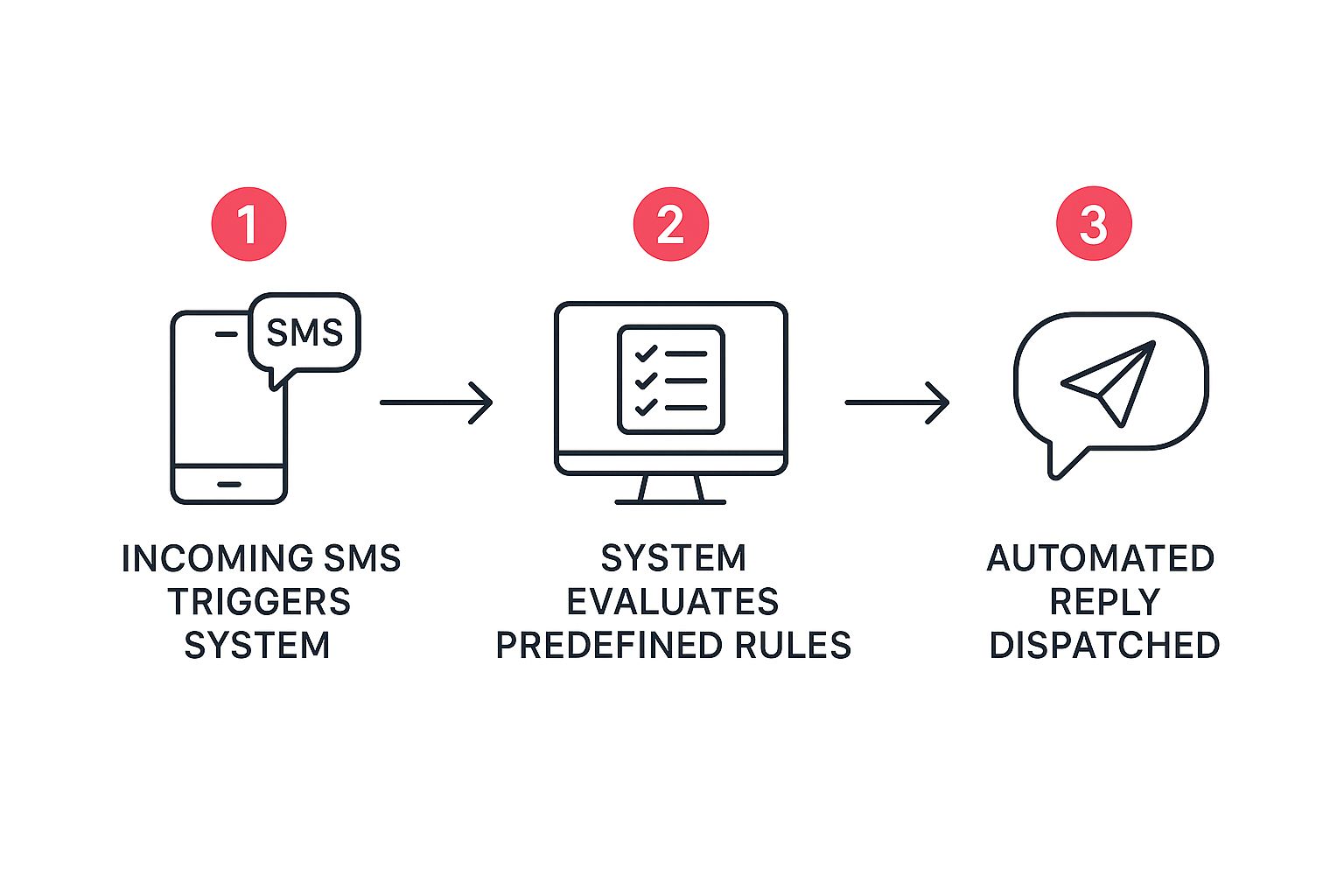
As you can see, an incoming text from a customer kicks off a process where the system checks the rules you’ve set and instantly fires back the right pre-written response.
Keep It Concise And Clear
Let’s be honest, nobody wants to read a novel in a text message. SMS is all about being short and to the point. Your auto-reply should instantly acknowledge the customer’s message and give them the essential info without any fluff.
Anything long or rambling is just going to get ignored. Stick to what the customer needs to know right now. A simple confirmation, an estimated response time, or a helpful link is usually all it takes to provide value and let them know they’ve been heard.
Set Realistic Expectations
One of the most critical jobs of an auto-reply is to manage customer expectations. If someone needs help from a real person, your automated message has to be upfront about when they can expect that human touch. This one simple step prevents a ton of frustration and shows you respect their time.
A message like, “Thanks for getting in touch! Our team will get back to you within 24 business hours,” is infinitely better than radio silence. It provides a clear timeline and assures the customer they aren’t shouting into the void.
This is especially true for things like order updates and appointment reminders. In fact, a whopping 85% of consumers prefer getting these updates via text instead of calls or emails. It just goes to show how much people appreciate clear, timely info delivered straight to their phone.
Always Prioritize Compliance
Compliance isn’t just a suggestion; it’s the foundation of any trustworthy SMS strategy. Regulations like the TCPA in the US and GDPR in Europe are there to protect consumers from spam, and ignoring them can lead to massive fines and seriously damage your brand’s reputation.
Your compliance checklist needs to include these non-negotiables:
- Explicit Consent: Only send automated texts to people who have clearly opted in. No exceptions.
- Clear Opt-Out: Every single message must have a simple way to unsubscribe, like “Reply STOP to opt-out.”
- Identify Your Business: Never make them guess who’s texting them. Always state your brand name clearly.
Good vs. Bad Automatic SMS Reply Examples
Seeing these principles in action is the best way to understand them. The difference between a good and a bad auto-reply can be subtle, but it has a huge impact on the customer experience.
Here’s a quick comparison of what to do—and what not to do—in a few common scenarios.
| Scenario | Ineffective Reply (What to Avoid) | Effective Reply (Best Practice) |
|---|---|---|
| After-Hours Support | “We are closed.” | “Hi from [Brand]! Our team is offline for the day, but we’ll be back at 9 AM ET. We’ll reply to your message first thing in the morning! Reply STOP to unsubscribe.” |
| Keyword Trigger (“SALE”) | “Here is the link: example.com/sale” | “Hey there! You’ve unlocked our VIP sale access. Shop all deals at [Link] before they’re gone! Thanks for being part of the [Brand] family. Reply STOP to opt-out.” |
| Order Confirmation | “Order confirmed.” | “Your [Brand] order #12345 is confirmed! We’re getting it ready now. We’ll text you again once it ships. Track its progress here: [Link]. Txt STOP to end.” |
| Missed Call | “You called us. How can we help?” | “Sorry we missed your call from [Phone Number]! This is the team at [Brand]. If you need assistance, just reply to this text, and we’ll get back to you shortly. Txt STOP to end.” |
Notice how the effective examples are clear, set expectations, identify the brand, and provide an opt-out. They feel helpful, not robotic.
Building your strategy around these core ideas ensures your automated messages become a tool for strengthening customer loyalty, not driving people away. For a much deeper dive, check out our complete guide on SMS marketing best practices.
Got Questions About Automatic SMS? We’ve Got Answers.
As you get ready to put your own automatic SMS reply strategy into action, a few last-minute questions probably come to mind. Don’t worry, that’s normal. Here are some quick, straightforward answers to the things most business owners want to know before they jump in.
Think of this as your final checklist to make sure you can move forward with total confidence.
Are Automatic SMS Replies Actually Legal for My Business?
Yes, they absolutely are—as long as you play by the rules. The biggest one in the US is the TCPA (Telephone Consumer Protection Act). It simply requires you to get clear permission, or an “opt-in,” from customers before you send them any automated texts.
On top of that, every single message has to give them an easy way out, like texting “STOP.” Following these rules isn’t just about avoiding big fines; it’s fundamental to building trust with your customers.
Can I Actually Personalize These Automated Texts?
You sure can, and you absolutely should. Good SMS platforms are built for this. They use simple placeholders, often called personalization tokens, that automatically pull in customer details like their name or order number.
A little personalization goes a long way. A text that reads, “Hi Sarah, your order #54321 has shipped!” feels a world away from a generic, robotic update. It makes the customer feel like you’re talking directly to them.
This one small step makes your customer feel seen and valued, which does wonders for strengthening their connection to your brand and keeping them engaged.
What If a Customer’s Reply Is Too Complicated for an Auto-Reply?
That’s a great question, and the strategy here is all about managing expectations. Your first automated message can acknowledge their question and give them a clear timeframe for when a real person will get back to them (e.g., “Thanks for your message! Our team will get back to you within 24 hours.”).
This is where a professional SMS platform like CartBoss really shines. It gives you a unified inbox where your support team can see all incoming messages. Whenever an automatic SMS reply isn’t enough, a team member can easily jump into the conversation and take over manually, ensuring no customer ever gets left hanging.
Ready to turn those abandoned carts into your biggest source of revenue? CartBoss makes it dead simple to set up powerful, automated SMS campaigns that win back lost sales on autopilot. Start recovering revenue today.