

86% of surveyed consumers had opted in to business text messages, according to EZ Texting’s 2025 Consumer Texting Behavior Report, based on 1,074 respondents surveyed in November 2024. That’s evidence that shoppers accept business texts, not permission for your store to text everyone who starts checkout.
A useful email SMS service connects store events, channel permissions, and purchase status. Judge it by how many eligible shoppers become profitable orders, not how many phone numbers it collects. Give email and SMS different jobs, and make stopping a sequence as reliable as starting one.
Table of Contents
- What an Email SMS Service Actually Does
- How Email and SMS Share One Customer Event
- Cart Revenue Gains and the Risks
- GDPR and CCPA Before the First Text
- How to Connect Shopify or WooCommerce
- Cart and Post-Purchase Message Examples
- Choose a Provider and Send the First Test
What an Email SMS Service Actually Does
Email and SMS jobs for a store
| Channel | 2025 benchmark | Best store job | Main risk |
|---|---|---|---|
| SMS marketing | 98% open rate, EZ Texting | Cart link, shipping ping, one-line offer | Messages without valid consent |
| Business text speed | 83.2% read within 30 minutes, Text Request | First reminder while the product is remembered | Repeating the same pitch |
| Consumer demand | 72% want texts from businesses, Text Request | Useful weekly or order updates | Promo volume people did not expect |
| Existing permission | 86% have opted in to business texts, EZ Texting | A list you can actually message | Treating a cart event as opt-in |
| Use your store’s delivered-to-order baseline | Totals, delivery, policies, longer win-back | Slow click if it’s the only nudge | |
| Email plus SMS | Each channel does a different job | Fast text plus a reopenable email | Double-messaging after purchase or opt-out |
An email SMS service sends email and text from shared customer events. Instead of operating separate campaigns that don’t know someone already purchased, the store uses one purchase state to decide which message can go next.
In practice, that can mean a combined platform or connected specialist tools. The important distinction isn’t the number of dashboards. It’s whether both channels receive the same order status, permission changes, and suppression instructions.
In 2025, EZ Texting’s Consumer Texting Behavior Report reported a 98% open rate for SMS marketing messages. That’s an attention metric, not proof of recovered revenue. It doesn’t tell you whether the recipient needed a reminder, clicked, purchased, or would have returned without it.
Give each channel a separate job
SMS works best when the next action is simple: restore a cart, check shipment progress, or view a concise offer. Email gives the shopper somewhere to reopen shipping information, compare order details, or read a return policy.
The Text Request 2025 report announcement says 72% of surveyed consumers wanted texts from businesses and other organizations. That preference supports useful communication, not an unlimited promotional schedule.
Use this division when drafting a recovery sequence:
- SMS carries the action. Name the product and provide the shortest useful path back to checkout.
- Email answers the objection. Explain delivery, total cost, payment choices, or product details.
- The next message earns its place. Send it only when it adds something the shopper hasn’t already received.
A platform that sends identical copy through both channels has connected its sending tools, but it hasn’t coordinated the customer experience. Check whether its workflow can branch on purchase status and channel permission before comparing templates.
How Email and SMS Share One Customer Event
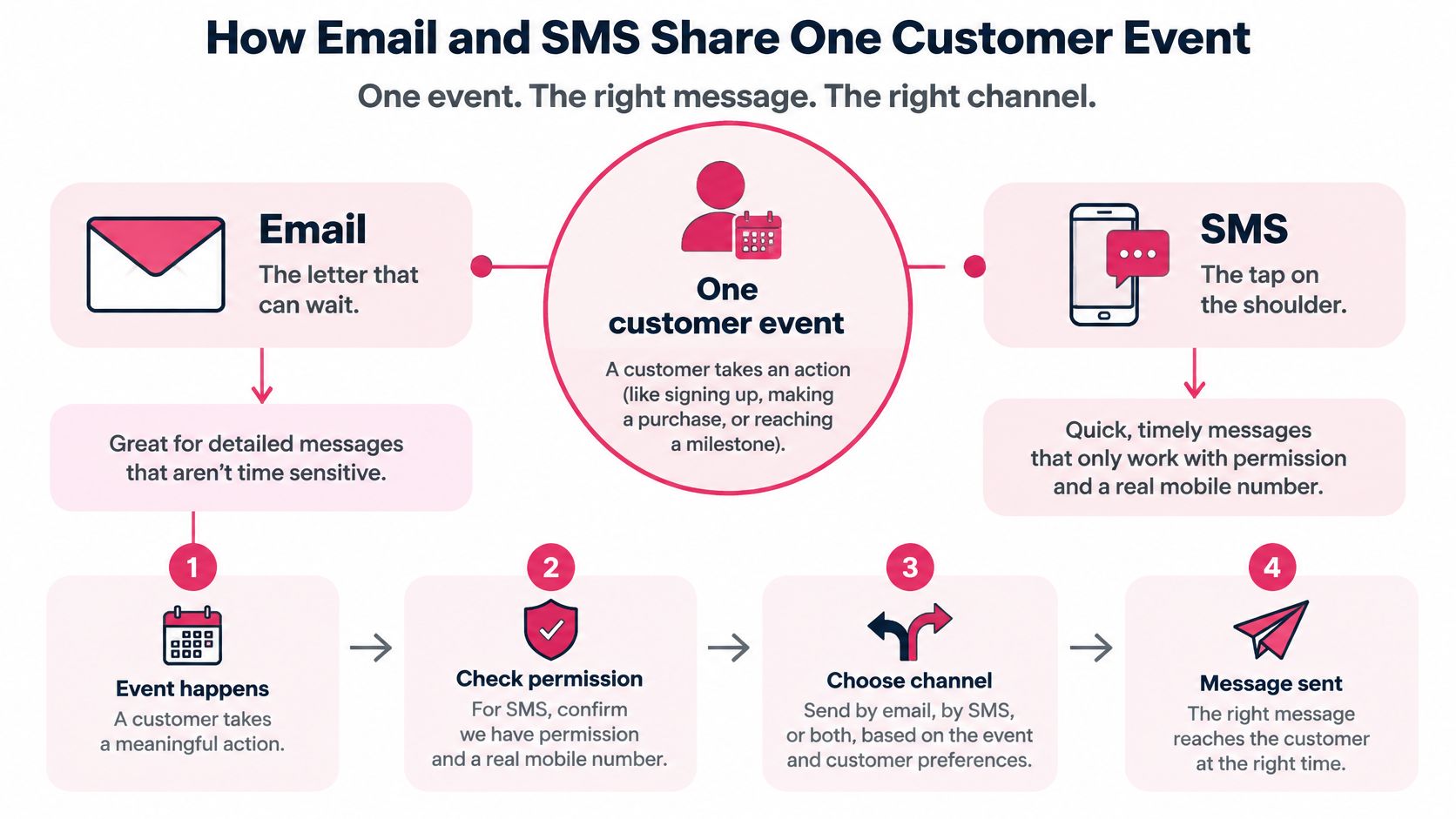
Say a shopper adds a jacket to the cart, enters contact details, and leaves before payment. Email is the letter that can wait on the kitchen table. SMS is the tap on the shoulder, useful only when the shopper permitted it and the number reaches the right person.
Speed explains why that distinction matters. In Text Request’s 2025 State of Business Texting Report, based on 520 professionals in the United States and Canada, 83.2% of surveyed business-texting recipients said they read texts within 30 minutes.
Follow the event through the store
- Collect contact details separately. The shopper provides an email address and, if appropriate, a phone number. Neither field alone establishes marketing permission.
- Store channel-specific permission records. Keep order-update permission distinct from promotional messaging.
- Receive the cart or checkout event. Include a customer identifier, cart identifier, products, and a restorable checkout destination.
- Wait before sending. A shopper using a slow payment method shouldn’t receive a recovery message while still checking out.
- Check SMS eligibility. Confirm permission, mobile-number validity, local sending availability, and suppression status before releasing the text.
- Send email only if the purchase is still incomplete and the email adds useful information, such as delivery details.
- Cancel queued recovery messages when a paid order arrives. Process STOP and unsubscribe events immediately, applying their scope across the connected marketing systems.
The awkward cases deserve explicit handling. A typed number might be a landline, a shared family phone, or a recycled number belonging to someone else. A country code doesn’t establish the shopper’s preferred language, checkout currency, tax treatment, or applicable privacy rules.
Make suppression a customer-level control
Don’t build a separate opt-out list inside every campaign. Maintain a shared suppression record that each workflow checks immediately before sending, including messages already waiting in a queue.
Treat an explicit request to stop marketing as a suppression event across recovery campaigns, rather than allowing another automation to restart the conversation. Keep necessary order communications separate from marketing, with rules appropriate to each channel.
Use the customer journey automation guide to map those branches. Before comparing software, list the events your store produces, the permissions each channel requires, and the events that must stop a sequence.
Cart Revenue Gains and the Risks
Why carts are abandoned and what a message can answer
The following abandonment reasons come from Baymard figures cited by Shopify in Klaviyo’s online shopping report.
| Reason | Share | What the follow-up should answer |
|---|---|---|
| Extra costs such as shipping, tax, or fees | 40% | The real total and what’s included |
| Delivery feels slow | 20% | The delivery estimate or shipping option |
| Does not trust the site with card data | 19% | How to pay and where to get help |
| Forced to create an account | 18% | A guest checkout link back to the saved cart |
| Checkout too long or complicated | 17% | A short link that restores the cart |
The same report describes an average U.S. checkout with 23 form elements, while a usable checkout can work with roughly 12–14. That gives the store an on-site improvement target before it pays to remind more shoppers.
A reminder can clarify a shipping charge. It can’t make an unexpectedly expensive order feel affordable without changing the offer. Likewise, a shortened link won’t solve a checkout that still forces account creation.
Fix the objection before increasing sends
Start with checkout changes that benefit every visitor. Show the total early, enable guest checkout, display realistic delivery estimates, and remove fields the business doesn’t need to fulfill an order.
Then make follow-up messages answer the remaining questions. If shipping uncertainty drives hesitation, use email to explain the available service and arrival estimate. If the shopper needs help choosing a size, offer a support route rather than automatically discounting the product.
For a broader checkout review, Grumspot’s Shopify cart recovery strategies provide a useful companion to message-flow planning. Improve the destination and the reminder together.
Revenue rule: Don’t pay to send more shoppers back to the same avoidable checkout problem.
Report the reachable funnel
Maximizing send volume can reduce profit when it creates complaints, blocks, unnecessary discounts, or regulatory exposure. Report the actual path instead:
- Eligible carts: Abandonments that meet the flow’s event and customer rules.
- Consented contacts: Customers with usable permission for the selected channel.
- Delivered messages and clicks: Separate successful delivery from engagement.
- Completed orders: Purchases associated with the flow, checked against an untreated comparison where practical.
- Opt-outs and complaints: Warning signals that shouldn’t disappear inside a revenue chart.
Use a consistent attribution window so changing a reporting setting doesn’t look like improved performance. Where possible, hold back a comparable group to distinguish reminder-driven purchases from shoppers who would have returned anyway.
Your weekly scorecard should end with net recovered revenue after discounts and SMS cost. Keep contribution margin alongside it, because recovering a low-margin order with an expensive incentive isn’t automatically a good result.
GDPR and CCPA Before the First Text
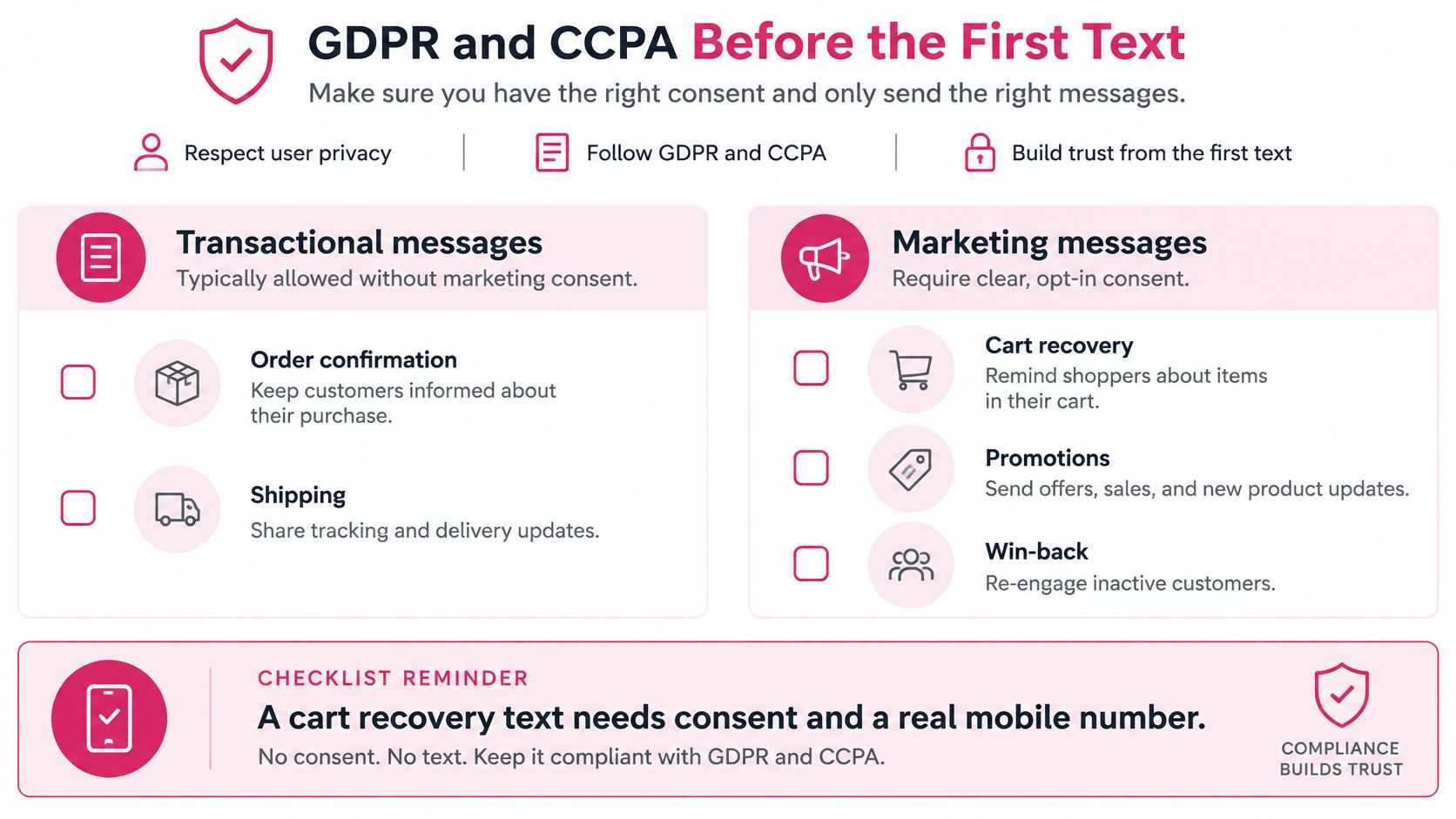
Transactional messages include order confirmations and shipping updates. Marketing messages include cart recovery, promotions, and win-back offers. Don’t put a promotional cart reminder into the transactional category merely because checkout produced the phone number.
For our service, users must obtain consent from every end user they wish to message before sending an SMS. A number collected for delivery coordination isn’t a free marketing list.
Turn permission into a send condition
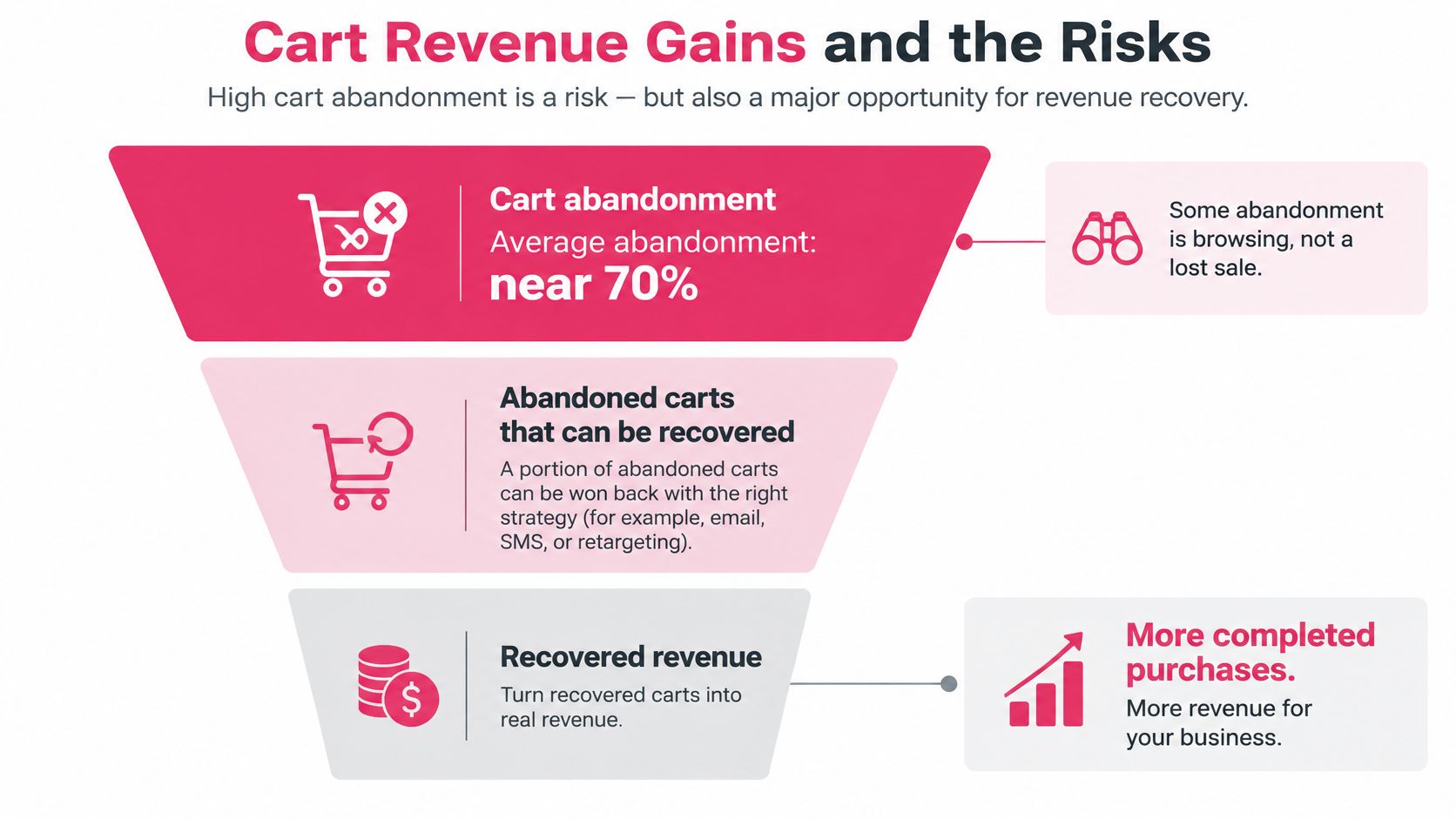
Baymard’s checkout research puts average cart abandonment at approximately 70%. That pool is not a consented audience, and some shoppers are browsing rather than ready to buy.
Record permission in a form your developer can retrieve, not just a checkbox that disappears after checkout:
- Timestamp and origin: When permission was given and the page URL where it happened.
- Exact wording: The disclosure the shopper saw, including its version.
- Channel scope: Whether the choice covered email, SMS, or both.
- Withdrawal history: When the customer opted out and which systems received the update.
For GDPR, document a lawful basis for each processing purpose, limit use to that purpose, and make withdrawing consent as easy as giving it. Know which processors receive phone numbers and whether international transfers occur. Electronic marketing requirements also need market-specific review, rather than a generic GDPR badge.
Under CCPA, California residents can request information about personal data held about them, request deletion subject to applicable exceptions, and opt out of sale or sharing where applicable. Build a process that locates records across the store, messaging tools, and connected processors.
Give the developer a launch checklist
Use the GDPR and CCPA compliance guide as an implementation reference, then have qualified counsel review the markets you serve. Software features support compliance, but they don’t decide whether your collection wording or campaign is lawful.
- Separate purposes: Keep promotional permission apart from essential order communications.
- Enforce quiet hours: Require automatic do-not-disturb handling rather than relying on a campaign manager’s calendar.
- Test withdrawal: STOP, unsubscribe, and shared suppression must work on the first attempt.
- Handle uncertain identity: Suppress disputed numbers and don’t assume the current recipient is the original subscriber.
- Confirm localization: Use explicit customer and checkout preferences, not a country-code guess.
- Assign ownership: Name the person responsible for access, deletion, retention, and suppression failures.
Launch only when the team can demonstrate those controls with test records.
How to Connect Shopify or WooCommerce
We offer SMS cart recovery for Shopify and WooCommerce, with automated post-purchase and win-back SMS flows billed per message. Your store’s email tool can continue sending receipts and longer customer communications.
The connection needs more than a successful installation screen. Use the e-commerce platform integration guide alongside an event log so you can confirm what the store sends.
Build and verify the connection
- Install the Shopify app or WooCommerce plugin. Confirm that cart, checkout, and order events arrive. Inspect their payloads instead of assuming an active integration receives every event.
- Map email, phone, country code, customer identity, and cart identity. Normalize phone numbers and reject non-mobile destinations from SMS recovery.
- Add a separate marketing choice. Guest checkout should collect necessary order information without forcing an account or treating a phone field as consent.
- Configure the reminder delay. Our first SMS cart reminder goes out 15 minutes after a visitor leaves their cart. Test the event definition so a customer still completing payment isn’t incorrectly classified as gone.
- Pass useful cart details. Include the product name, current price, and a link that restores the cart. Don’t send the shopper to the homepage to rebuild the order.
- Make the paid-order event cancel every remaining recovery email and SMS. Deduplicate repeat carts from the same customer so a fresh session doesn’t create overlapping sequences.
- Write opt-outs back. Send STOP and email unsubscribe changes to the relevant shared records, including any connected marketing tools.
Test the cases that ordinary demos miss
Headless storefronts may need explicit event instrumentation. A cart update in the browser isn’t enough if the recovery service never receives it.
Multi-currency stores should pass checkout currency with the amount. Draft orders need their own eligibility decision, and asynchronous payment methods need a clear distinction between pending and paid.
Agencies should keep store identities, credentials, permissions, and reporting separate. Connecting several sites shouldn’t allow one store’s order event to cancel another store’s flow or attach the wrong brand to a message.
- Abandoned-cart test: Confirm the correct product, language, currency, restored checkout, and suppression checks.
- Purchase test: Complete payment while a reminder is queued and verify cancellation.
- Opt-out test: Withdraw permission before the scheduled send and inspect the queue afterward.
Place a test order and create a test abandonment before enabling any live discount. If the underlying events are wrong, better copy will only make the error more visible.
Cart and Post-Purchase Message Examples
Say a shopper leaves a jacket in the cart after choosing a size. Keep the recovery sequence focused on completing that purchase, then switch to fulfillment communication once payment succeeds.
The following copy uses bracketed fields rather than invented checkout URLs. Replace them with actual store values and identify the sender clearly.
Flow A for cart recovery
At 15 minutes, send the permitted cart reminder:
[Store]: Your [jacket name] is still in your cart. Continue checkout: [saved checkout link]. Reply STOP to opt out.
For a sample test schedule, send an email about four hours later if the order remains unpaid. Use the message to state the current shipping cost and delivery estimate, rather than repeating the text.
A next-day SMS is optional. Only test it when the customer remains eligible and the margin supports an incentive. State a genuine expiration condition, apply the offer correctly, and don’t invent scarcity.
The abandoned-cart examples guide can help with message structure. Keep the checkout destination and opt-out instruction intact when adapting the copy.
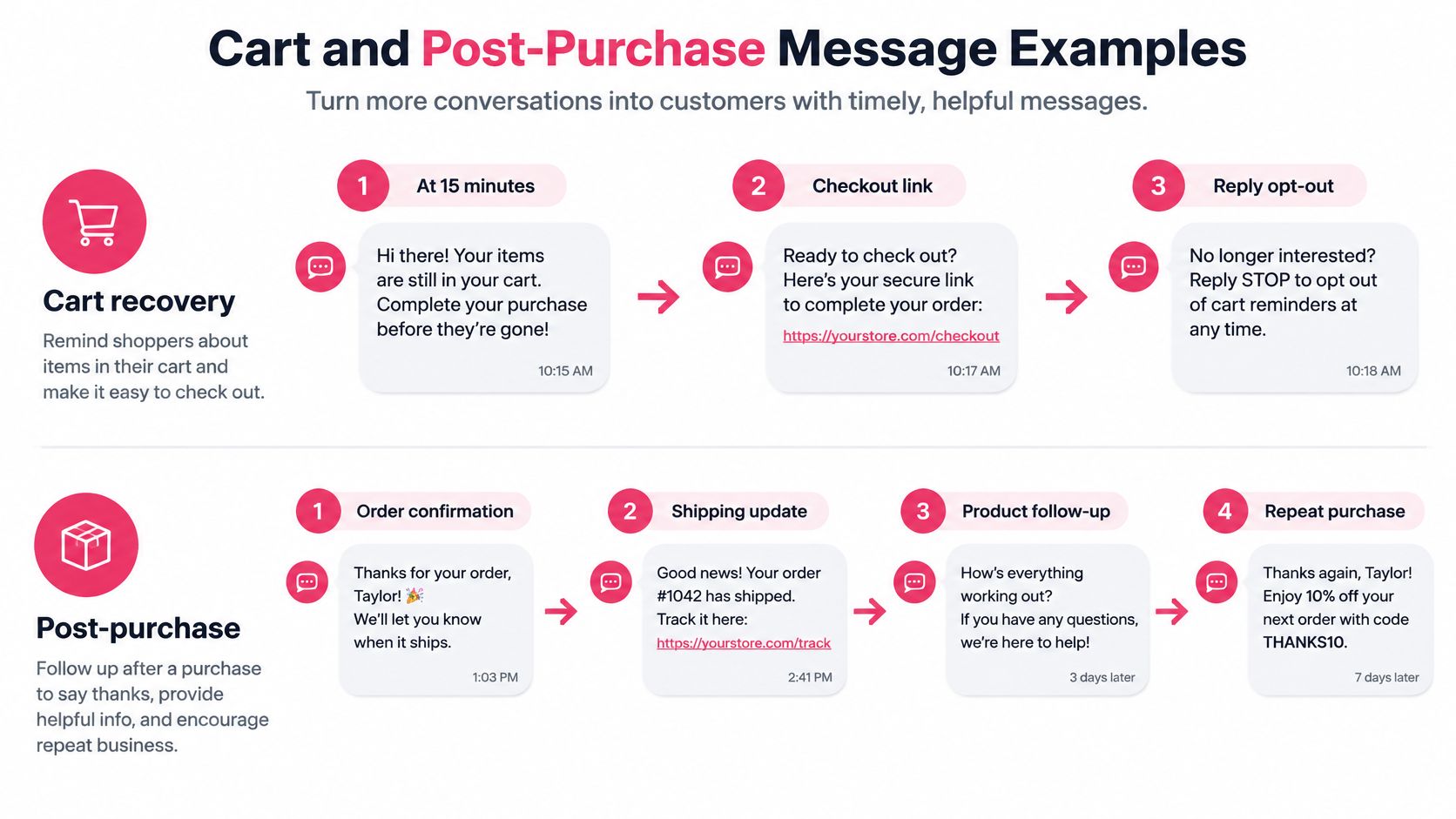
Flow B after purchase
Send the receipt by email when payment completes. Send a shipment text when the parcel ships, using the permissions and rules appropriate to that communication.
[Store]: Your order has shipped. Track your parcel: [tracking link]. Your receipt and order details are in your email.
After delivery, use email for a review request where permitted. Reserve win-back texts for consented past buyers after a suitable quiet period based on the product’s purchase cycle. Don’t stack a promotional recovery message onto someone who just paid.
Test the sequence, not just the wording
Klaviyo reports that 65% of surveyed consumers had purchased something sooner because of a brand text, and identifies 2.1% or higher as a great campaign SMS/MMS conversion rate. Triggered cart shoppers aren’t broadcast recipients, so use your store’s own baseline when judging recovery.
Compare a single reminder against a sequence with an additional reminder. Keep audience eligibility and reporting windows consistent.
- Commercial results: Recovered orders, revenue per 1,000 eligible abandonments, and net recovered revenue.
- Costs: Message charges, discount cost, and the margin left after fulfillment.
- Customer response: Unsubscribe rate and complaints, segmented by country and new versus returning buyer.
Our free tools include an SMS Character Counter & Segment Calculator, a Cart Abandonment Rate Calculator, and an SMS Cart Recovery ROI Calculator. Use them to check message length, establish the abandonment baseline, and model whether the extra reminder pays for itself.
Choose a Provider and Send the First Test
Provider checks before you send
| Check | What to verify | A pass looks like |
|---|---|---|
| Consent | Opt-in stored before marketing SMS | Separate checkbox, timestamp, and wording |
| Quiet hours | Local send window | Automatic do-not-disturb, not a manual calendar |
| Store connection | Shopify or WooCommerce events | Cart starts the flow and a paid order stops it |
| Price | Per message versus a subscription | Cost per recovered order can be modeled |
| Stop rules | Opt-out and repeat carts | STOP and purchase suppress every later message |
Choose channel coverage before comparing prices. A combined provider may suit a team that needs email design, broadcast scheduling, and SMS in one workspace. Connected specialist tools can suit a store whose email setup already works, provided they share events and suppression reliably.
Also inspect country coverage, sender requirements, processor arrangements, and reporting. An attractive sending rate won’t help if the tool can’t show net recovered revenue or support your destination markets. The marketing automation tools comparison provides context for that shortlist.
Where CartBoss fits
We’re an SMS cart recovery tool, not a full email inbox platform. Keep receipts in your existing email tool if it already handles them properly. A team needing a full email designer and broadcast calendar in the same product should evaluate a broader suite.
A developer seeking a raw messaging API and planning to build consent, event processing, and recovery logic independently has a different requirement from a store seeking automated recovery.
Our pricing is pay as you go, with no subscriptions and no hidden fees. One SMS to the United States costs 0.025 €, and the first cart we recover for a store is free. Model costs in the currency you pay, including the number of billable messages in the finished sequence.
We report a 99% open rate for our SMS reminders. Treat vendor-reported open rates as supporting context, not the buying decision.
Keep the first test deliberately small
Measure current abandonment, enable a single consented cart reminder, and leave discounts off while establishing the baseline. Compare recovered revenue with message cost, then inspect the orders and opt-outs behind the totals.
Calculate cost per recovered order by dividing messaging spend by recovered orders. Use a holdout group where practical before deciding the automation caused every attributed purchase.
CartBoss offers automated SMS cart recovery for Shopify and WooCommerce that can work alongside your existing email tool. Visit CartBoss to connect your store, verify consent and stop rules, and start with a focused recovery test before adding discounts or extra messages.