


The most common Shopify cart advice is already out of date: create a checkout, store its identifier, and build recovery logic around that object. That pattern is precisely what modern Shopify integrations are moving away from. The safer approach is to treat the cart as the buyer session, keep checkout as the final handoff, and design recovery workflows around versioned cart data rather than assumptions inherited from older REST tutorials.
That distinction matters for more than headless storefronts. A theme, mobile app, abandoned-cart tool, and flash-sale workflow can all fail when they use the wrong API, mishandle a cart token, or assume that a completed cart can later be queried like an order. The Shopify shopping cart API is now an architectural decision, not just a list of endpoints.
Table of Contents
- The Shift to Cart-First Architecture
- Categorizing Shopify Cart Integration Methods
- Core GraphQL Mutations and Payload Structures
- Querying Abandoned Checkouts for Recovery Campaigns
- Connecting Cart State to SMS Recovery Workflows
- Managing Cart State Fragility and Version Drift
- Executing the Migration from Legacy Checkout APIs
- Quick Reference for Endpoints and Access Scopes
The Shift to Cart-First Architecture
Shopify’s modern Storefront Cart API was formally introduced with the 2021-10 API release. Shopify designed the new cart model for performance, reliability, and scale, while removing the previous dependency between cart creation and checkout throttling. Cart requests follow the throttling behavior of other storefront requests instead of being tied to checkout limits, a meaningful change for high-traffic stores and flash-sale events. Shopify describes the Storefront API redesign as a move toward a more capable commerce primitive, not a cosmetic endpoint change.
The cart now holds the state a buyer creates before payment. That includes merchandise lines, estimated costs, applied discounts, gift cards, and delivery options. A custom storefront can therefore preserve buying intent without immediately creating a checkout object. A recovery workflow can work from cart state while the buyer is still browsing, changing quantities, or selecting delivery context.
Practical rule: Keep the cart as the persistent buyer-session object. Treat checkout as the destination, not the database for every preceding interaction.
This separation also changes how technical marketers should evaluate old implementation guides. Legacy checkout-centered flows can appear to work in a test environment while remaining exposed to throttling assumptions, missing cart fields, or sunset APIs. Shopify deprecated the REST Admin and Storefront Checkout APIs in 2024-04, and scheduled them for complete sunset in 2025-04, directing developers toward the Storefront Cart API or Checkout Kit for native mobile apps. The migration timeline is documented in Shopify’s Cart API migration documentation.
A mobile-first strategy also depends on reliable state handoff. A buyer might add an item in a mobile web view, leave the session, and return through an SMS link or an app. If the recovery system only understands a checkout object created through a legacy flow, the handoff can break before the customer reaches payment. Teams planning that kind of journey can also review this mobile-first commerce strategy for broader experience considerations.
The result is straightforward. For custom storefronts, the GraphQL Cart API is the foundation. Older REST checkout patterns aren’t a safer fallback, and they shouldn’t remain embedded in recovery tooling just because they were implemented first.
Categorizing Shopify Cart Integration Methods
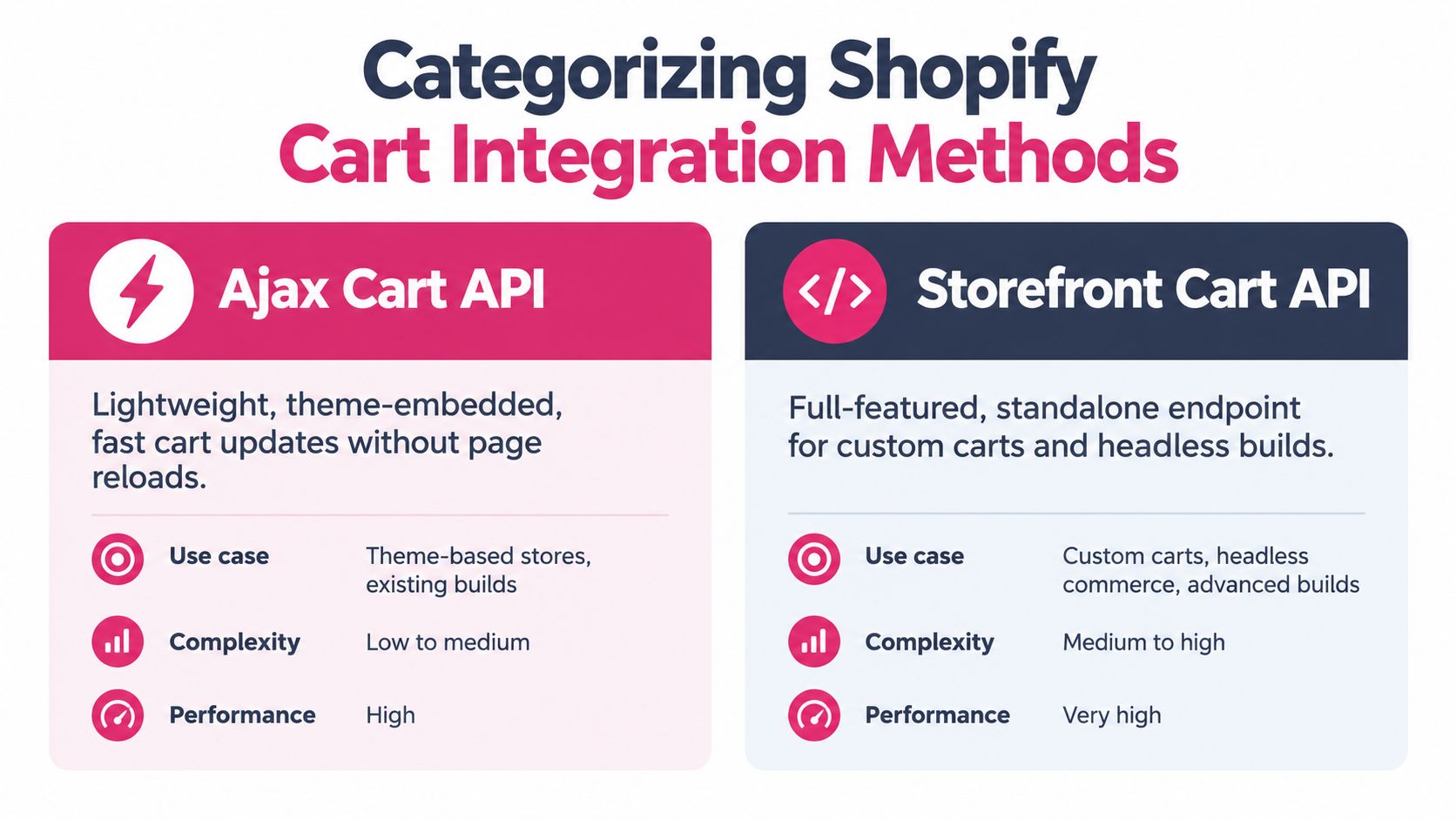
There are two practical integration paths, and they solve different problems. The Ajax Cart API belongs inside a Shopify-hosted theme. The Storefront Cart API is the appropriate foundation for headless storefronts, custom applications, and cross-channel experiences.
Ajax Cart API for hosted themes
Ajax is lightweight because Shopify hosts the storefront and supplies the session context. It doesn’t require a Storefront access token or client ID, and it exposes REST-like paths such as /{locale}/cart.js, /{locale}/cart/add.js, and /{locale}/cart/clear. Theme JavaScript can read the cart, add or update line items, clear it, add notes and attributes, and request shipping estimates without a full page refresh.
That makes Ajax a sensible choice for a conventional Shopify theme where the main requirement is responsive cart interaction. It can also support storefront instrumentation that records what a shopper added before a recovery workflow begins.
Its boundary is firm. Ajax cannot run on a custom storefront, and it can’t read customer or order data. It isn’t a backend automation layer, a cross-channel cart store, or a replacement for the Admin API. Trying to use it for a mobile app or server-side cart reconstruction usually creates an architecture that depends on browser state it doesn’t control.
Storefront Cart API for custom builds
The Storefront Cart API is GraphQL-only and uses a single POST endpoint with a Storefront access token. It supports cart creation, retrieval, updates, line mutations, and checkout redirection. A headless frontend can use the same commerce interface across a web application, mobile experience, or other custom client.
| Decision point | Ajax Cart API | Storefront Cart API |
|---|---|---|
| Best fit | Shopify-hosted themes | Headless storefronts and custom apps |
| Authentication | No access token or client ID | Storefront access token |
| Interface | REST-like theme endpoints | GraphQL |
| Customer and order data | Not available | Buyer-session cart operations |
| Cross-channel reconstruction | Weak fit | Stronger fit |
| Checkout handoff | Theme cart flow | Cart checkout URL |
Before choosing, document where the cart will live, which system needs customer context, and whether a recovery service must reconstruct the session outside the original browser. Developers comparing the wider Shopify API surface can use this master Shopify API integration guide as a complementary reference.
A theme-only store shouldn’t adopt GraphQL just because it sounds more modern. Conversely, a headless team shouldn’t force Ajax into an application it wasn’t designed to serve. The right choice follows the storefront architecture, not the endpoint’s familiarity. For teams modifying the final purchase experience, review the constraints described in this guide to Shopify checkout page customization.
Core GraphQL Mutations and Payload Structures
A reliable cart implementation starts with four mutations:
cartCreatecreates the buyer-session cart and can include initial merchandise lines, buyer identity, discount codes, and other supported input.cartLinesAddappends merchandise to an existing cart.cartLinesUpdatechanges quantities or supported line-level values.cartLinesRemoveremoves selected lines.
The implementation shouldn’t treat these mutations as isolated calls. Each response should update the application’s canonical cart state, including the returned cart identifier, line data, costs, discounts, gift cards, delivery options, and checkout URL when available. Shopify documents these operations in its Storefront Cart management reference.
Create and persist the cart safely
A simplified creation request conceptually looks like this:
mutation CartCreate($input: CartInput) {
  cartCreate(input: $input) {
    cart {
      id
      checkoutUrl
      lines(first: 20) {
        nodes {
          id
          quantity
        }
      }
      cost {
        subtotalAmount {
          amount
          currencyCode
        }
      }
    }
    userErrors {
      field
      message
    }
  }
}
The exact selection set should reflect the fields your storefront and recovery workflow need. Don’t request only a line count and then attempt to rebuild pricing later. The cart object is where the API returns the session’s current commercial context.
The cart ID is sensitive state. Shopify specifies that it must be handled as a complete token-plus-secret value in the form <token>?key=<secret>. Store and retrieve that full value consistently. Splitting the token from its secret, stripping the query component, or normalizing it as if it were an ordinary public identifier can make later reads and recovery links fail.
Mutate lines without losing context
For cartLinesAdd, send the merchandise identifier and quantity in the line input. For cartLinesUpdate, send the existing cart line ID with the revised quantity. For cartLinesRemove, send the line IDs to remove. After every mutation, process userErrors and replace the local cart snapshot with the response returned by Shopify.
A useful application pattern is:
- Read the current cart ID from secure client-side persistence.
- Call the relevant mutation.
- Reject the update if Shopify returns a user error.
- Persist the returned cart ID exactly as provided.
- Refresh costs, discounts, delivery options, and checkout URL.
- Emit an internal cart-state event for analytics or recovery logic.
Don’t calculate final prices in the browser and pass those values to an SMS tool as if they were authoritative. Promotional codes, delivery estimates, inventory, and buyer context can change. The recovery link should lead back to a current cart or checkout state that Shopify can validate.
Teams working with Storefront access credentials should also separate public storefront authentication from server-side secrets. This Shopify API key guide is useful when documenting which credentials belong in the client and which must remain protected on the server.
Querying Abandoned Checkouts for Recovery Campaigns
Cart state and abandoned checkout data aren’t interchangeable. The Storefront Cart API manages the buyer session, while abandoned checkout records are queried through the Admin API for eligible recovery workflows.
Shopify considers a checkout abandoned when the customer has provided contact information but hasn’t completed the purchase. The record can contain customer details, line items, pricing information, timestamps, and a recovery URL, which gives a marketing system the context needed to build a re-engagement message. Shopify’s abandoned checkout resource describes the record and its recovery URL.
Configure permissions before building automation
The application needs the read_orders access scope and the manage_abandoned_checkouts permission to access abandoned checkout data. On Shopify POS, the user also needs the retail permission to view abandoned checkouts. These aren’t optional configuration details. If the app requests the wrong scope, the recovery job can appear healthy while returning incomplete data or no eligible records.
A practical permission checklist looks like this:
- Access scope: Request
read_ordersduring app authorization. - Permission: Confirm
manage_abandoned_checkoutsis granted. - POS access: Add the required retail permission when POS users need visibility.
- Record handling: Store the recovery URL and the associated customer and line-item context only as long as the campaign requires.
- Failure monitoring: Alert when the query returns an authorization error, a schema error, or an unexpected empty response.
The recovery URL deserves special treatment. It should be passed through the messaging workflow without being replaced by a generic homepage or a manually assembled product URL. A buyer who receives a reminder should return to a path that preserves the purchase context represented by the abandoned checkout.
Separate commerce retrieval from campaign decisions
The Admin query should retrieve the record. A campaign service should decide whether the shopper is eligible, whether consent exists, what message to send, and whether the link still represents a valid purchase opportunity. That separation prevents API code from becoming a collection of marketing rules that are difficult to test.
For an operational walkthrough of locating abandoned carts in Shopify, teams can use this abandoned cart recovery guide. Keep the data contract explicit: customer contact, line items, price context, timestamp, recovery URL, consent status, and campaign state should each have a defined field and failure behavior.
Connecting Cart State to SMS Recovery Workflows
A recovery message is only as useful as the cart state behind it. The integration must connect a known shopper, a valid contact permission, the relevant line items, and a checkout path that doesn’t discard the buyer’s context.
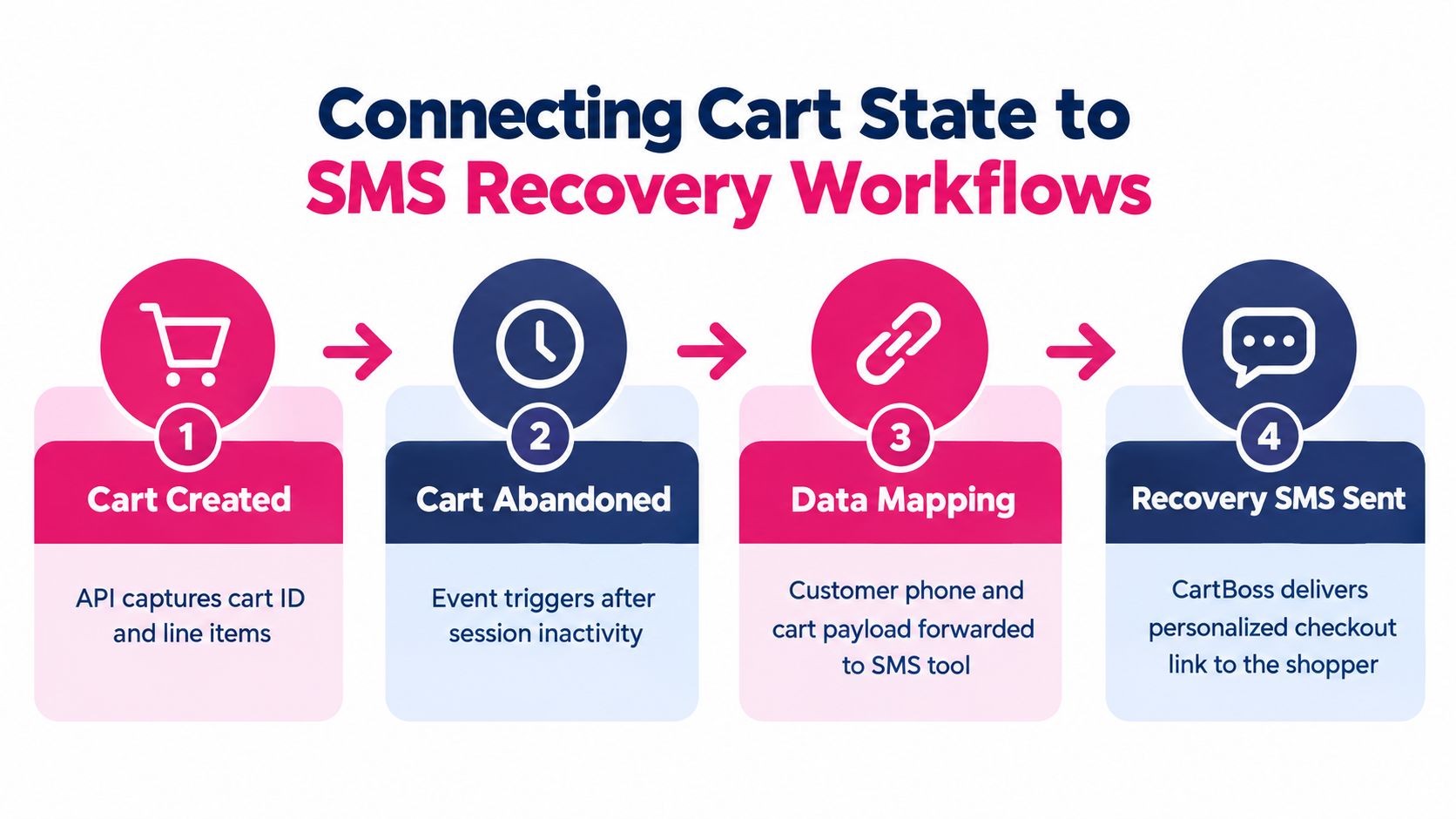
A complete payload should carry the cart or checkout reference, product and variant identifiers, quantities, current displayed pricing, currency, customer phone number, language preference where available, consent status, and a recovery URL. The messaging layer can use that information to create a reminder that names the relevant purchase without inventing availability or price.
Build the workflow around state transitions
Use explicit events rather than a timer that assumes every cart is still valid:
- Cart created or updated: Record the cart reference and line-state event.
- Contact captured: Associate the phone number with the session only after the appropriate consent flow.
- Abandonment detected: Confirm that the buyer hasn’t completed the purchase and that the recovery record remains eligible.
- Message queued: Render the message from current cart context and attach the recovery URL.
- Purchase or opt-out received: Stop subsequent messages and update campaign state.
Dynamic discounts need the same discipline. A discount should be applied through a supported Shopify mechanism or a validated campaign rule. The SMS payload shouldn’t claim that a discount exists merely because a marketing system intended to offer one. Likewise, a pre-filled checkout should be generated from reliable customer context, not from unchecked browser fields.
Compliance comes before delivery: Send an SMS only when the shopper has provided the required prior consent, and make the opt-out action clear.
In major markets, explicit prior consent is the practical baseline. Messages should include a clear opt-out such as STOP. For EU and UK recipients, the opt-in must be freely given, specific, informed, and unambiguous under GDPR and ePrivacy requirements, as outlined in this SMS abandoned-cart compliance playbook.
The recovery tool should also respect do-not-disturb status, suppress messages after purchase, and preserve an audit trail of consent and unsubscribe events. Technical teams often focus on retrieving the cart and under-specify these controls. That creates a campaign that can technically send messages but can’t prove why a recipient was contacted.
For implementation ideas around sending SMS from API-driven events, see this guide to using an API to send SMS.
The following video provides an additional visual explanation of SMS recovery workflows:
Managing Cart State Fragility and Version Drift
An integration can pass every launch test and still fail later because Shopify changes the shape or behavior of cart data. Recent release notes document changes involving discount query paths, a view_key option for line updates and removals, and a cart token format change affecting both Ajax and Storefront GraphQL cart APIs. The relevant cart token format changelog is a reminder that cart identifiers aren’t permanent implementation details.
The dangerous failures are often silent. A parser may accept an older token shape but generate a recovery link that no longer resolves. A GraphQL selection set may continue returning data while omitting a newly important discount field. A mutation may succeed, but the local application may retain stale costs because it only updates the line quantity.
Design for change
Use a versioned adapter between Shopify and the rest of the application. The adapter should normalize cart IDs, map line and discount fields, and expose a stable internal contract to analytics and recovery services. When Shopify changes its schema or token behavior, the adapter becomes the controlled migration point instead of forcing every downstream system to change at once.
Defensive practices include:
- Pin API versions: Don’t let production drift to a new version without a review and regression run.
- Validate identifiers: Test the full cart token-plus-secret value, including its secret component.
- Handle user errors: Treat GraphQL
userErrorsas first-class failures, not optional debug output. - Store raw responses selectively: Preserve enough response context to diagnose a mismatch without retaining unnecessary personal data.
- Monitor cart-to-checkout handoff: Test the exact recovery path, not only cart creation.
- Test discount behavior: Verify codes, automatic discounts, and changed query paths after version upgrades.
Monitor business symptoms, not only API status
A successful HTTP response doesn’t prove that recovery works. Track whether cart creation is followed by a valid checkout URL, whether recovery links resolve, whether line items match the triggering event, and whether completed purchases suppress later messages. A rise in empty recovery payloads can reveal a schema or permission issue before a developer sees an exception.
The integration contract should fail loudly when cart identity, line data, or checkout redirection changes. Silent fallback is how abandoned-cart campaigns keep sending broken links.
Executing the Migration from Legacy Checkout APIs
The legacy migration is not a refactor you can postpone indefinitely. Shopify states that deprecated Checkout APIs shut down on April 1, 2025, and directs developers to the Storefront Cart API. The April 2025 Shopify release notes also clarify an important expectation gap: the Storefront Cart API is GraphQL-only, and completed carts can’t be queried for order information in the same way teams may remember from checkout-centric workflows.
1. Inventory the old assumptions
Search the codebase, server jobs, mobile clients, and recovery integrations for legacy checkout mutations, checkout IDs, REST checkout paths, and logic that expects a completed checkout object to contain order information. Include documentation and campaign templates. A migration fails when one background worker continues using the old contract after the storefront has moved.
2. Map objects, not just endpoints
Replace checkout creation with cartCreate. Map checkout line operations to cartLinesAdd, cartLinesUpdate, and cartLinesRemove. Replace checkout URL handling with the cart’s checkout URL, and identify which fields now come from the cart object.
Don’t perform a mechanical name substitution. The data model has changed, and the cart is now the persistent session object. Recovery services that need order confirmation must use an appropriate post-purchase or Admin-side process rather than querying a completed cart as if it were an order record.
3. Update authentication and storage
The Storefront Cart API requires a Storefront access token. Review every client and server call, remove credentials that belonged to the retired flow, and ensure the complete cart ID is stored and retrieved without stripping its secret component.
4. Test the journeys customers actually use
Run tests for product addition, quantity changes, removal, discount application, gift cards, delivery options, checkout redirection, mobile handoff, and abandoned-cart recovery. Include invalid merchandise, expired state, duplicate events, and interrupted network requests.
5. Deploy with observability
Release the adapter and storefront changes together where possible. Monitor GraphQL user errors, failed redirects, missing cart fields, authorization failures, and recovery-link resolution. Keep a rollback plan for the application layer, but don’t roll back to a retired Shopify API as a permanent solution.
The migration is complete only when the customer can move from product discovery to cart, from cart to checkout, and from an interrupted session to a valid recovery path without relying on a legacy checkout object.
Quick Reference for Endpoints and Access Scopes
Use this table as a working reference while reviewing an integration. The Storefront Cart API is the primary path for custom storefront cart management. Ajax remains useful inside Shopify-hosted themes, while abandoned checkout retrieval belongs to the Admin API and requires separate permissions.
Shopify Cart API Quick Lookup
| Operation | API / Endpoint | Required Scope / Token |
|---|---|---|
| Create a cart | Storefront GraphQL cartCreate |
Storefront access token |
| Retrieve a cart | Storefront GraphQL cart query | Storefront access token |
| Add cart lines | Storefront GraphQL cartLinesAdd |
Storefront access token |
| Update cart lines | Storefront GraphQL cartLinesUpdate |
Storefront access token |
| Remove cart lines | Storefront GraphQL cartLinesRemove |
Storefront access token |
| Redirect to checkout | Checkout URL returned by the Storefront cart | Storefront access token for cart operations |
| Read a theme cart | /{locale}/cart.js |
Shopify-hosted theme context, no access token or client ID |
| Add a theme line item | /{locale}/cart/add.js |
Shopify-hosted theme context |
| Clear a theme cart | /{locale}/cart/clear |
Shopify-hosted theme context |
| Estimate shipping in a theme | Ajax shipping-rate endpoints | Shopify-hosted theme context |
| Query abandoned checkouts | Admin REST or Admin GraphQL resources | read_orders scope and manage_abandoned_checkouts permission |
| View abandoned checkouts in POS | Admin abandoned checkout access | Required permissions plus retail permission on Shopify POS |
Version checkpoints
Shopify documents the Storefront Cart API as available in 2022-10 and higher, with metafield support in 2023-04 and higher. The migration timeline then shows the API becoming more central: Shopify shipped the Cart API Migration Guide in 2024-04, gift-card support and carrier-calculated shipping rates in 2024-07, @defer support and authenticated buyer identity carried through to checkout in 2024-07, and native Apple Pay and Google Pay support for mobile apps in 2025-01. These milestones are listed in Shopify’s cart migration roadmap.
Keep the version requirements in a tested compatibility matrix:
- Storefront Cart API: GraphQL-only, with a Storefront access token.
- Metafields: Supported through the Storefront Cart API in version 2023-04 and higher.
- Theme cart interactions: Ajax endpoints, limited to Shopify-hosted themes.
- Abandoned checkout access: Admin API permissions, separate from Storefront token access.
- Cart identity: Preserve the complete
<token>?key=<secret>value. - Legacy checkout: Don’t build new dependencies on the deprecated Checkout APIs.
A good reference sheet also records the owner for each integration. The storefront team owns cart mutations, the platform team owns API-version upgrades, and the marketing operations team owns consent, suppression, and message content. Without those boundaries, version drift becomes everyone’s problem and nobody’s scheduled work.
Before every Shopify API upgrade, run a short release checklist:
- Compare the current cart schema with the target version.
- Review Shopify cart changelog entries for token, discount, and mutation changes.
- Test Ajax and Storefront paths separately if the business uses both.
- Confirm abandoned checkout permissions still work.
- Create a cart, mutate lines, apply campaign logic, and redirect to checkout.
- Verify that a completed purchase stops recovery messaging.
- Inspect logs for user errors and malformed cart identifiers.
- Release only after the recovery link has been tested on the channels that send it.
A stable Shopify shopping cart API integration isn’t defined by whether cartCreate works once. It’s defined by whether cart identity survives persistence, whether version changes are caught before launch, and whether the buyer reaches a valid checkout from every recovery channel.
A CartBoss integration connects Shopify cart and checkout signals to automated SMS recovery workflows, with features such as personalized reminders, recovery links, dynamic discount handling, and pre-filled checkout experiences. Visit CartBoss to connect your cart-state strategy with an automated recovery process and reduce the manual work involved in re-engaging shoppers.